Play-games-plugin-for-unity: [SOLVED] Can't authenticate users, sign in fails
I can't figure it out. I have a feeling that something is happening on services end, but then there's also some weird behavior on my end. Like it works when I just built new apk, it allows me to log in with any of my two users on my phone, but once the apk goes live on Google Play it doesn't allow me to log in anymore. Maybe it's just a coincidence though. Sometimes it just starts working randomly while no changes were made, but even if it starts working for me it doesn't for other devices/users. It shows that green Google Play Games rectangle, then shows a panel where I choose a user, then that green circle rotates on screen while trying to log in, then it just disappears and nothing happens and that user bubble on top of screen never shows up, so user authentication never happens in the end. I'm losing my mind. What might be the issue?
Build
GooglePlayGamesPlugin-0.9.39a.unitypackage
Games
_com.axodendritic.fortytwosecs
com.axodendritic.pooliorigins_
Android log
1. 06-23 12:11:47.948 9265 9666 W GamesServiceBroker: Client connected with SDK 8487000, Services 11055436, and Games 39080036
- 06-23 12:11:47.950 1036 1790 I AccountManagerService: getTypesVisibleToCaller: isPermitted? true
- 06-23 12:11:47.961 1036 1060 I AccountManagerService: getTypesVisibleToCaller: isPermitted? true
4. 06-23 12:11:47.968 9265 9666 W GamesServiceBroker: Client connected with SDK 8487000, Services 11055436, and Games 39080036 - 06-23 12:11:47.968 1036 1899 I AccountManagerService: getTypesVisibleToCaller: isPermitted? true
- 06-23 12:11:47.970 1036 1790 I AccountManagerService: getTypesVisibleToCaller: isPermitted? true
- 06-23 12:11:47.985 462 1092 E APEExtractor: getAPEInfo not ape 5003
8. 06-23 12:11:47.986 9265 9666 W GamesServiceBroker: Client connected with SDK 8487000, Services 11055436, and Games 39080036
9. 06-23 12:11:47.986 19677 19677 V GamesNativeSDK: Play Games callback indicates connection failure.
10. 06-23 12:11:47.988 19677 21392 I GamesNativeSDK: UI interaction required to connect to Google Play. - 06-23 12:11:47.990 19677 21412 E libEGL : validate_display:255 error 3008 (EGL_BAD_DISPLAY)
- 06-23 12:11:47.997 462 1092 I MediaExtractor: Autodetected media content as 'video/mp4' with confidence 0.40
- 06-23 12:11:48.003 462 1092 I MPEG4Extractor: sample_size:16
- 06-23 12:11:48.009 19677 21417 I System.out: [CDS]rx timeout:1
- 06-23 12:11:48.009 19677 21417 I System.out: [CDS]rx timeout:1
- 06-23 12:11:48.028 19677 21417 I System.out: [CDS]rx timeout:0
- 06-23 12:11:48.028 19677 21417 I System.out: [CDS]rx timeout:0
- 06-23 12:11:48.028 19677 21417 I System.out: [CDS]rx timeout:0
- 06-23 12:11:48.028 19677 21417 I System.out: [CDS]rx timeout:0
- 06-23 12:11:48.028 19677 21417 I System.out: [OkHttp] sendRequest>>
- 06-23 12:11:48.028 19677 21417 I System.out: [OkHttp] sendRequest<<
- 06-23 12:11:48.036 19677 19677 I Unity : Interstitial loaded
- 06-23 12:11:48.036 19677 19677 I Unity :
- 06-23 12:11:48.036 19677 19677 I Unity : (Filename: ./artifacts/generated/common/runtime/DebugBindings.gen.cpp Line: 51)
- 06-23 12:11:48.036 19677 19677 I Unity :
26. 06-23 12:11:48.037 19677 21392 I GamesNativeSDK: Auth operation started: SIGN IN
27. 06-23 12:11:48.037 19677 21392 I GamesNativeSDK: Connecting to Google Play... - 06-23 12:11:48.040 19677 21299 I System.out: [CDS][DNS] getAllByNameImpl netId = 0
- 06-23 12:11:48.040 19677 21299 D libc-netbsd: [getaddrinfo]: mtk netid=0; mark=0
- 06-23 12:11:48.040 19677 21299 D libc-netbsd: getaddrinfo( app_uid:10306
- 06-23 12:11:48.040 19677 21299 D libc-netbsd: getaddrinfo() uid prop:
- 06-23 12:11:48.041 19677 21299 D libc-netbsd: getaddrinfo() getuid():10306
- 06-23 12:11:48.041 19677 21299 D libc-netbsd: [getaddrinfo]: mtk ai_addrlen=0; ai_canonname=(null); ai_flags=4; ai_family=0
- 06-23 12:11:48.041 19677 21299 D libc-netbsd: [getaddrinfo]: mtk netid=0; mark=0
- 06-23 12:11:48.041 19677 21299 D libc-netbsd: getaddrinfo( app_uid:10306
- 06-23 12:11:48.041 19677 21299 D libc-netbsd: getaddrinfo() uid prop:
- 06-23 12:11:48.041 19677 21299 D libc-netbsd: getaddrinfo() getuid():10306
- 06-23 12:11:48.041 19677 21299 D libc-netbsd: [getaddrinfo]: mtk ai_addrlen=0; ai_canonname=(null); ai_flags=1024; ai_family=0
- 06-23 12:11:48.042 459 21420 D libc-netbsd: [getaddrinfo]: mtk netid=1008; mark=1008
- 06-23 12:11:48.042 459 21420 D libc-netbsd: getaddrinfo( app_uid:0
- 06-23 12:11:48.042 459 21420 D libc-netbsd: [getaddrinfo]: mtk ai_addrlen=0; ai_canonname=(null); ai_flags=1024; ai_family=0
- 06-23 12:11:48.042 459 21420 D libc-netbsd: getaddrinfo: get result from proxy gai_error = 11
- 06-23 12:11:48.043 459 21420 D libc-netbsd: default dns: query_ipv6=0, query_ipv4=1
- 06-23 12:11:48.043 459 21420 D libc-netbsd: res_queryN class = 1, type = 1
- 06-23 12:11:48.043 459 21420 D libc-netbsd: res_queryN succeed
46. 06-23 12:11:48.045 19677 21237 I Unity : [Play Games Plugin DLL] 06/23/17 12:11:48 +03:00 DEBUG: Starting Auth Transition. Op: SIGN_IN status: ERROR_NOT_AUTHORIZED - 06-23 12:11:48.045 19677 21237 I Unity :
- 06-23 12:11:48.045 19677 21237 I Unity : (Filename: ./artifacts/generated/common/runtime/DebugBindings.gen.cpp Line: 51)
- 06-23 12:11:48.045 19677 21237 I Unity :
50. 06-23 12:11:48.046 19677 21237 I Unity : [Play Games Plugin DLL] 06/23/17 12:11:48 +03:00 DEBUG: Invoking callbacks, AuthState changed from silentPending to Unauthenticated. - 06-23 12:11:48.046 19677 21237 I Unity :
- 06-23 12:11:48.046 19677 21237 I Unity : (Filename: ./artifacts/generated/common/runtime/DebugBindings.gen.cpp Line: 51)
- 06-23 12:11:48.046 19677 21237 I Unity :
- 06-23 12:11:48.046 19677 21299 D libc-netbsd: getaddrinfo: get result from proxy gai_error = 0
55. 06-23 12:11:48.046 19677 21237 I Unity : [Play Games Plugin DLL] 06/23/17 12:11:48 +03:00 DEBUG: there are pending auth callbacks - starting AuthUI - 06-23 12:11:48.046 19677 21237 I Unity :
- 06-23 12:11:48.046 19677 21237 I Unity : (Filename: ./artifacts/generated/common/runtime/DebugBindings.gen.cpp Line: 51)
- 06-23 12:11:48.046 19677 21237 I Unity :
- 06-23 12:11:48.046 19677 21299 I System.out: [CDS]rx timeout:20000
- 06-23 12:11:48.051 19677 21299 D libc-netbsd: [getaddrinfo]: mtk netid=0; mark=0
- 06-23 12:11:48.051 19677 21299 D libc-netbsd: getaddrinfo( app_uid:10306
- 06-23 12:11:48.051 19677 21299 D libc-netbsd: getaddrinfo() uid prop:
- 06-23 12:11:48.051 19677 21299 D libc-netbsd: getaddrinfo() getuid():10306
- 06-23 12:11:48.051 19677 21299 D libc-netbsd: [getaddrinfo]: mtk ai_addrlen=0; ai_canonname=(null); ai_flags=4; ai_family=0
- 06-23 12:11:48.057 19677 21299 I System.out: gba_cipher_suite:TLS_ECDHE_RSA_WITH_AES_128_GCM_SHA256
- 06-23 12:11:48.059 19677 21299 I System.out: [CDS]rx timeout:20000
- 06-23 12:11:48.060 19677 21299 I System.out: [CDS]rx timeout:20000
- 06-23 12:11:48.060 19677 21299 I System.out: [OkHttp] sendRequest>>
- 06-23 12:11:48.060 19677 21299 I System.out: [OkHttp] sendRequest<<
- 06-23 12:11:48.063 1036 2131 I AccountManagerService: getTypesVisibleToCaller: isPermitted? true
- 06-23 12:11:48.065 322 322 I SurfaceFlinger: [Built-in Screen (type:0)] fps:12.974063,dur:1002.00,max:658.24,min:8.79
72. 06-23 12:11:48.068 9265 9277 W GamesServiceBroker: Client connected with SDK 11011000, Services 11055436, and Games 39080036 - 06-23 12:11:48.072 19677 21412 W AudioCapabilities: Unsupported mime audio/mpeg-L2
- 06-23 12:11:48.073 9265 9276 I art : Background sticky concurrent mark sweep GC freed 15191(1152KB) AllocSpace objects, 9(252KB) LOS objects, 7% free, 19MB/20MB, paused 17.418ms total 76.525ms
- 06-23 12:11:48.076 19677 21412 W AudioCapabilities: Unsupported mime audio/x-adpcm-ms
- 06-23 12:11:48.076 322 356 I BufferQueueProducer: SurfaceView queueBuffer: fps=13.78 dur=1016.12 max=660.40 min=10.89
- 06-23 12:11:48.079 19677 21412 W AudioCapabilities: Unsupported mime audio/x-adpcm-dvi-ima
- 06-23 12:11:48.087 1036 1901 I AccountManagerService: getTypesVisibleToCaller: isPermitted? true
- 06-23 12:11:48.088 9265 21418 W Ads : App does not have the required permissions to get location
- 06-23 12:11:48.097 9265 2232 W Herrevad: [2193] rvb.a: On wifi, but couldn't get security type
- 06-23 12:11:48.100 1036 1791 I AccountManagerService: getTypesVisibleToCaller: isPermitted? true
- 06-23 12:11:48.100 19677 21412 W AudioCapabilities: Unsupported mime audio/ape
83. 06-23 12:11:48.100 9265 9667 W GamesServiceBroker: Client connected with SDK 8487000, Services 11055436, and Games 39080036 - 06-23 12:11:48.102 1036 1938 I AccountManagerService: getTypesVisibleToCaller: isPermitted? true
- 06-23 12:11:48.104 1036 1448 I AccountManagerService: getTypesVisibleToCaller: isPermitted? true
- 06-23 12:11:48.108 19677 21412 W AudioCapabilities: Unsupported mime audio/x-adpcm-ms
87. 06-23 12:11:48.112 9265 9666 W GamesServiceBroker: Client connected with SDK 8487000, Services 11055436, and Games 39080036 - 06-23 12:11:48.112 19677 21412 W AudioCapabilities: Unsupported mime audio/x-adpcm-dvi-ima
89. 06-23 12:11:48.121 19677 19677 V GamesNativeSDK: Play Games callback indicates connection failure.
90. 06-23 12:11:48.121 19677 21392 I GamesNativeSDK: UI interaction required to connect to Google Play.
91. 06-23 12:11:48.121 19677 21392 I GamesNativeSDK: Resolving connection.
 tyomklz
All 37 comments
Basically what happens is: Unity's apk works fine, but once it's Google Play one, Google Play Games stops working.
tyomklz
on 23 Jun 2017
I just checked the app of mine I have installed from Google Play yesterday, sign in wasn't working, it does now. What's going on? Can anyone from Google confirm it's services issues or plugin issues? Currently I've tried to downgrade to previous plugin build version and uploaded that apk to Google Play.
tyomklz
on 23 Jun 2017
I just had a rough idea, could it have something to do with Google Play App Signing somehow?
tyomklz
on 23 Jun 2017
Previous build 0.9.39 does it as well.
tyomklz
on 23 Jun 2017
I also have this enabled: https://developers.google.com/games/services/android/antipiracy
If that somehow may be the cause, then it works backwards, because non Google Play apk can log in, but Google Play one can't.
Just blind guessing.
tyomklz
on 23 Jun 2017
0.9.38a same issue. It's probably Google Play related other than the plugin itself. Hands down.
tyomklz
on 23 Jun 2017
I can indeed again confirm that Unity apk works fine, Google Play apk doesn't.
tyomklz
on 23 Jun 2017
Same problem.
Anyone Please give a link to download GooglePlayGamesPlugin-0.9.38.unitypackage and GooglePlayGamesPlugin-0.9.36.unitypackage ,i can not find
 RocksteadyDog
on 23 Jun 2017
RocksteadyDog
on 23 Jun 2017
Look history for: https://github.com/playgameservices/play-games-plugin-for-unity/commits/master/current-build (Committing automated building of packages commits)
Also: https://github.com/playgameservices/play-games-plugin-for-unity/tree/master/old-builds
tyomklz
on 23 Jun 2017
Same problem. I've been working on this for days with no solution.
 Shrykar
on 24 Jun 2017
Shrykar
on 24 Jun 2017
Well, hopefully some guys from Google will solve it soon enough.
I can't start promoting my games while this thing isn't working, boo :(
tyomklz
on 24 Jun 2017
Have you had luck with any version? I had this up and running a few months ago but now this strange error others are getting.
Shrykar
on 24 Jun 2017
Nope, i tested with - GooglePlayGamesPlugin-0.9.39a, -0.9.39, -0.9.38a, -0.9.38, -0.9.37
RocksteadyDog
on 24 Jun 2017
Yeah, it looks like it's not plugin's fault at all, it's either Google Play apk setup conflict with Google Play Games services or services are bugged on their end. No freaking idea as well, tried everything I could, spent days trying to figure it out, no idea.
tyomklz
on 24 Jun 2017
Okay guys, here's the solution to the whole thing if your case is the same as mine. As I mentioned before I'm using Google Play App Signing feature of Google Play Console for my apps. If you do as well, then you need to go to https://console.developers.google.com/ and then choose API manager from menu there, and go to credentials of your app (if your app isn't there yet you should add it using the search there). When you're in credentials of your app just replace SHA-1 certificate line with the one that shown in your App signing (it's in Release management menu of Google Play Console). There you'll see app signing certificate info, you need that SHA-1 line from there, then you just replace the one you have in credentials with that one, by default in credentials you have the one from your keystore you generate with Unity (it's also shown in the bottom, where it says Upload certificate in your Google Play Console page). Once you save new credentials you'll be able to sign in in the game right away. I hope it'll help you, guys. Cheers!
tyomklz
on 25 Jun 2017
Thanks! It helped me
Cheers!
2017-06-25 10:03 GMT+08:00 Artyom notifications@github.com:
Okay guys, here's the solution to the whole thing if your case is the same
as mine. As I mentioned before I'm using Google Play App Signing feature of
Google Play Console for my apps. If you do as well, then you need to go to
https://console.developers.google.com/ and then choose API manager from
menu there, and go to credentials of your app (if your app isn't there yet
you should add it using the search there). When you're in credentials of
your app just replace SHA-1 certificate line with the one that shown in
your App signing (it's in Release management menu of Google Play Console).
There you'll see app signing certificate info, you need that SHA-1 line
from there, then you just replace the one you have in credentials with that
one, by default in credentials you have the one from your keystore you
generate with Unity (it's also shown in the bottom, where it says Upload
certificate in your Google Play Console page). Once you save new
credentials you'll be able to sign in in the game right away. I hope it'll
help you, guys. Cheers!—
You are receiving this because you commented.
Reply to this email directly, view it on GitHub
https://github.com/playgameservices/play-games-plugin-for-unity/issues/1800#issuecomment-310877125,
or mute the thread
https://github.com/notifications/unsubscribe-auth/AcSajZ6HF7ULLishXz6Is9ldRKwwQZrvks5sHb_ugaJpZM4ODVM5
.
RocksteadyDog
on 25 Jun 2017
@tyomklz
In my case
default setting capture
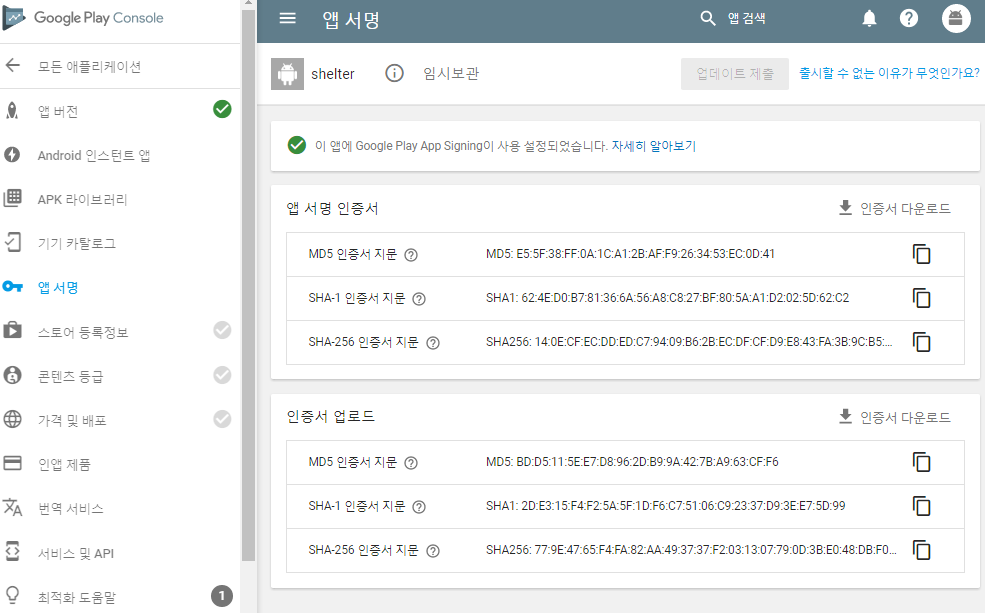

You says default sha1 in credential is upload certificate sha1 (2D:E3:15:F4:F2:5A...) and replace with app certificate sha1 (62:4E:D0:B7:8E...)
But in my case
default sha1 in credential is equal to app certificate sha1
Is it right for my understanding your solution?
thanks for your reading
 leehotae
on 1 Jul 2017
leehotae
on 1 Jul 2017
I replaced (62: 4E: D0: B7: 8E ...) on (2D: E3: 15: F4: F2: 5A ...),
And the problem was solved
2017-07-01 19:25 GMT+08:00 leehotae notifications@github.com:
@tyomklz https://github.com/tyomklz
In my case
default setting capture
[image: capture1]
https://user-images.githubusercontent.com/21328168/27761647-49a52446-5e9b-11e7-9d77-175a902f7b7c.PNG
[image: capture2]
https://user-images.githubusercontent.com/21328168/27761650-53478534-5e9b-11e7-86a2-018e8bdf8716.PNGYou says default sha1 in credential is upload certificate sha1
(2D:E3:15:F4:F2:5A...) and replace with app certificate sha1
(62:4E:D0:B7:8E...)But in my case
default sha1 in credential is equal to app certificate sha1Is it right for my understanding your solution?
thanks for your reading
—
You are receiving this because you commented.
Reply to this email directly, view it on GitHub
https://github.com/playgameservices/play-games-plugin-for-unity/issues/1800#issuecomment-312426672,
or mute the thread
https://github.com/notifications/unsubscribe-auth/AcSajeAD9x4uC6e6t0PggvjkJA8-5GaTks5sJiymgaJpZM4ODVM5
.
RocksteadyDog
on 1 Jul 2017
@RocksteadyDog
thank you
it works fine too
leehotae
on 2 Jul 2017
In my case, all are setted correctly. but Authentication still fails with 0.9.39a.
I've checked SHA1 from Keystore, and signed APK with that keystore, and console.developers.google.com
I see SHA1 is same for 3 places.
but I can't login to google play.
I am using Google play service version is 10.2.0
Please help me.
 NonaKovaleva
on 2 Jul 2017
NonaKovaleva
on 2 Jul 2017
I've got exactly the same problem. SHA1 is RIGHT. The same everywhere. And still I can't connect to Google Play Games.
Things I can add on this case:
- When I build directly to my phone, from Unity building, the login to Google Play Games always Works.
- When I download the game from the store (Closed Beta version, with a tester account), then I can see that the login always FAILS. I see the popup to connect to Google Play Games, then, nothing. And i'm not connected.
Please Help!
 GuillaumZ
on 19 Jul 2017
GuillaumZ
on 19 Jul 2017
I am having the same problem. When I linked my app It had App signing SHA1 in API manager by default. Then the app was trying to sign in but failing every time. I replaced Upload Certificate with App Signing Certificate, now even signing in screen doesn't pop up.
One more question, are you guys using API key feature from API manager(the option above OAuth 2.0 client ID)?
 ki4chan
on 2 Aug 2017
ki4chan
on 2 Aug 2017
I have the same problem as @GuillaumZ. I have all the SHA-1 setup properly but still it does not allow signing in. SIGN_IN status: ERROR_NOT_AUTHORIZED
 miyurusagarage
on 20 Aug 2017
miyurusagarage
on 20 Aug 2017
I resolved this by using the 'Upload Certificate' SHA-1 in the API Console Credentials. However, on production, you will have to use the proper 'App Signing' SHA-1.
miyurusagarage
on 20 Aug 2017
what about achievement and leaderboard feature? Are they too working fine? Because I have tried this method too but the score wasn't updating on the leaderboard.
If those things are not working fine try this, It is explained here in detail. https://github.com/playgameservices/play-games-plugin-for-unity/issues/1834#issuecomment-321785101
ki4chan
on 20 Aug 2017
The leaderboard is also working fine. My scores got updated and displayed properly on the leaderboard.
miyurusagarage
on 20 Aug 2017
Nice! The solution @leehotae is the best for me.
Copy the sha1 from upload sha1 in play.google console and paste in inside credentials in developer.console.
Thank you
 mrpacogp
on 26 Oct 2017
mrpacogp
on 26 Oct 2017
Listen carefully. Copy SHA-1 from "Upload certificate", not "App signing certificate". it worked for me after struggling all day long.
 MTaimurAzhar
on 8 Dec 2017
MTaimurAzhar
on 8 Dec 2017
Unity 2017.3.0f3
play-games-plugin 0.9.42
works :D
 clucle
on 11 Jan 2018
clucle
on 11 Jan 2018
Hi, I had authorization problems and I try the sha 1 option, but in my case it was just that I was using an alpha verification list but it wasn't autorized in Play Services configuration. So, I could authorize it in Tests Section for the app on the Google Play Console.
 juliocrm
on 30 Jan 2018
juliocrm
on 30 Jan 2018
I have make Keystore by Unity and Upload in "APP SIGNING PRIVATE KEY"
in App signing, Now I dont know how to "UPLOAD PUBLIC KEY CERTIFICATE"
Please help me guys
 REHAN065
on 1 Feb 2018
REHAN065
on 1 Feb 2018
Here's video unity google play game plugin
clucle
on 7 Feb 2018
I've tried both App signing certificate and Upload certificate SHA-1 in credentials. None seem to work.
 ThanhWilliamLe
on 10 Apr 2018
ThanhWilliamLe
on 10 Apr 2018
I was very confused about the Upload Certificate vs App Signing Certificate, according to this article your APK is signed with your Upload Key, but its distributed with the App Signing Key.
That means that if you manually install your APK into your device (through ADB or Google Drive for example) It will be signed with the Upload Certificate
In the other hand, if you install it through Play Store it will be signed with the App Signing Certificate
Solution
Edit your Google APIs linked app OAuth credentials to one of the following:
- Upload certificate: Manual distributing (ADB, Unity Build and Run, Cloud storage, etc)
- App Signing Certificate: Distributing your APK through Play Console and download via Play Store (Internal | Alpha | Beta | Production )
Tests details
I had 2 devices, My Phone with the APK downloaded from playstore and a Tablet with the APK installed via ADB (Unity Build and Run). Both had same version of the APK!
Google APIs Credentials was setup to use Upload Certificate
Authentication was working fine on my Tablet but not on my Phone
I edited my Google APIs Credentials to use App Signing Certificate
It now works fine on my Phone but not on my tablet.
It all makes sense in the world now!
To make sure I uninstalled the game from my Tablet and reinstalled from Play Store, and now it works on both devices!
I danced for some minutes. (Very important step of the process)
Hope this helps someone. :-)
I wonder why documentation won't say anything about this stuff and have us look around for hours!
 sebastianteres
on 14 Apr 2018
sebastianteres
on 14 Apr 2018
I had this issue for a long time and found out Unity wasn't signing the app as expected. Make sure to check the SHA1 of your APK and compare it to the one in your API Credentials.
Here is how to see the SHA1 of your APK - https://stackoverflow.com/questions/11331469/how-do-i-find-out-which-keystore-was-used-to-sign-an-app
(I added my incorrect SHA1 to API Credentials and it works for now - testing is a lot easier now!)
 glitchersgames
on 22 May 2018
glitchersgames
on 22 May 2018
Well, a year late but, I also had this problem, I added a new OAuth (android) with the upload SHA-1 and also in the firebase project and it's working. Thanks.
 SolidS28
on 26 Jun 2019
SolidS28
on 26 Jun 2019
Taken from Cross Platform Native Plugins
But, the info here is very general and works with any plugins.
Why sign in fails?
For Google Play Services to sign in successfully, you need to make sure the apk from where you are logging in should be allowed to make requests to google servers.
How to make the APK authorized to make requests to google servers?
Each apk built with a keystore has a SHA fingerprint. You need to make sure the SHA fingerprint is added in the google cloud.
You can fetch it with keytool command (check here on how to get SHA for each environment )
How many SHA fingerprints I need to add for successful authentication?
One per each environment. In total 3 environments (dev, release and production)
- Development build uses android default debug keystore.
Release build uses the keystore you set in publishing settings of player settings
Google play store build which uses google play signing.
If you want all the above builds to authenticate successfully, add all 3 fingerprints. Else only the required environment.
How to get each environment's SHA?
Debug ( keytool -list -v -keystore "PATH_TO_DEBUG_KEYSTORE" -alias androiddebugkey -storepass android -keypass android)
Release (Get from Google play console -> Your App -> Setup -> App signing -> Upload key certificate )
Apk/AAb downloaded from Google play store (Get from Google play console -> Your App -> Setup -> App signing -> App signing key certificate )
Where to add these SHA fingerprints?
Google Play Console. Check here for details on how to add a SHA fingerprint.
 manwithsteelnerves
on 12 Dec 2020
manwithsteelnerves
on 12 Dec 2020
Related issues
 Only4Gamers
·
4Comments
Only4Gamers
·
4Comments
 easycg
·
3Comments
easycg
·
3Comments
 temresen
·
4Comments
temresen
·
4Comments
 YogendraChauhan
·
4Comments
YogendraChauhan
·
4Comments
 RafikTSG
·
4Comments
RafikTSG
·
4Comments
Most helpful comment
Okay guys, here's the solution to the whole thing if your case is the same as mine. As I mentioned before I'm using Google Play App Signing feature of Google Play Console for my apps. If you do as well, then you need to go to https://console.developers.google.com/ and then choose API manager from menu there, and go to credentials of your app (if your app isn't there yet you should add it using the search there). When you're in credentials of your app just replace SHA-1 certificate line with the one that shown in your App signing (it's in Release management menu of Google Play Console). There you'll see app signing certificate info, you need that SHA-1 line from there, then you just replace the one you have in credentials with that one, by default in credentials you have the one from your keystore you generate with Unity (it's also shown in the bottom, where it says Upload certificate in your Google Play Console page). Once you save new credentials you'll be able to sign in in the game right away. I hope it'll help you, guys. Cheers!