Play-games-plugin-for-unity: Can't login when apk is downloaded from google play store
Hello everybody,
I have a rather strange problem and I have been removing and putting code for 5 days and I do not deal with the solution. Is that something strange since when I install the apk directly from the memory of the phone does the login without any problem, I register in the console activity etc, but when I upload that same apk to google play store, and you download the Game from there, the login does not work anymore, every time I press the button it does like an attempt, it stays thinking but in the end it does nothing.
Here very basic code of what I am doing:
A script called "GooglePlayConection" to activate the services:
using GooglePlayGames;
using GooglePlayGames.BasicApi;
using System.Collections;
using System.Collections.Generic;
using UnityEngine;
using UnityEngine.SocialPlatforms;

public class GooglePlayConection : MonoBehaviour {
    void Start () {
        PlayGamesPlatform.Activate();
        if (!PlayGamesPlatform.Instance.localUser.authenticated)
        {
            PlayGamesPlatform.Instance.Authenticate((bool success) => {
                if (success)
                {
                    /// Signed in! Hooray!
                }
                else
                {
                    /// Not signed in. We'll want to show a sign in button
                }
            }, true);   ///  That "true" does the login in silence!
        }
        else
        {
            //Debug.Log("We're already signed in");
        }
    }
}
Another one when I press a button for achievements and calls the ShowMedals function:
 public void ShowMedals()
    {
        if (Social.localUser.authenticated)
        {
            Social.Active.ShowAchievementsUI();
        }
        else
        {
            Social.localUser.Authenticate((bool success) => {});
        }
    }
And finally in a gameController script where when the game time is finished run his game things that all works perfectly and then the following to send the score and unlock achievements:
            if (Social.localUser.authenticated)
            {
        Social.ReportScore(sumScore.score, "CgkIk4rB19gdEAIAAA", (bool success) => { });

                if (sumScore.score >= 300)
                {
                    Social.ReportProgress("CgkIk4rB19gdEAIAAA", 100.0, (bool success) => { });
                }
                if (sumScore.score >= 450)
                {
                    Social.ReportProgress("CgkIk4rB19gdEAIAAA", 100.0, (bool success) => { });
                }
                if (sumScore.score >= 600)
                {
                    Social.ReportProgress("CgkIk4rB19gdEAIAAA", 100.0, (bool success) => { });
                }
                if (sumScore.score >= 750)
                {
                    Social.ReportProgress("CgkIk4rB19gdEAIAAA", 100.0, (bool success) => { });
                }
            }
Am I doing something unusual in the code that does not work in the google play store?
 kesada7
All 17 comments
The most common problem is that when you upload to the play store you are signing it with a different keystore which does not have an associated linked application to your game.
Can you share a log of authentication failing?
 claywilkinson
on 8 Jun 2017
claywilkinson
on 8 Jun 2017
Hi claywilkinson thanks for the help!
I am not sure what you mean to signing it with a different keystore since I use always the same to sign it at unity since I generated the keystore for this proyect and I used comand keytool -exportcert -keystore path-to-debug-or-production-keystore -list -v to get SHA-1 code and paquet name to put it on the developer console and associate the aplication game.
Here are the logs when authentication failing, one with unity filter. I am pretty noob reading and understanding logs so hope you can help me.
With unity filtrer:
06-08 20:41:58.045: E/Unity(11418): Unable to find AudioPluginOculusSpatializer
06-08 20:41:58.205: D/Unity(11418): GL_OES_EGL_image GL_ARB_texture_non_power_of_two GL_OES_blend_func_separate GL_OES_blend_equation_separate GL_OES_blend_subtract GL_OES_byte_coordinates GL_OES_compressed_paletted_texture GL_OES_point_size_array GL_OES_point_sprite GL_OES_single_precision GL_OES_stencil_wrap GL_OES_texture_env_crossbar GL_OES_texture_mirrored_repeat GL_OES_element_index_uint GL_OES_texture_cube_map GL_OES_draw_texture GL_OES_framebuffer_object GL_OES_fbo_render_mipmap GL_OES_rgb8_rgba8 GL_OES_stencil1 GL_OES_stencil4 GL_OES_stencil8 GL_OES_depth_texture GL_OES_packed_depth_stencil GL_EXT_texture_format_BGRA8888 GL_APPLE_texture_format_BGRA8888 GL_EXT_blend_minmax GL_OES_standard_derivatives GL_OES_texture_float GL_OES_texture_float_linear GL_OES_texture_half_float GL_OES_texture_npot GL_OES_texture_half_float_linear GL_OES_compressed_ETC1_RGB8_texture
06-08 20:42:04.625: D/GamesUnitySDK(11418): Performing Android initialization of the GPG SDK
06-08 20:42:04.645: I/Unity(11418): Building GPG services, implicitly attempts silent auth
06-08 20:42:04.645: I/Unity(11418):
06-08 20:42:04.645: I/Unity(11418): (Filename: ./artifacts/generated/common/runtime/DebugBindings.gen.cpp Line: 51)
06-08 20:42:04.675: W/Unity(11418): !!! [Play Games Plugin DLL] 06/08/17 20:42:04 +02:00 WARNING: Creating new PlayGamesPlatform
06-08 20:42:04.675: W/Unity(11418):
06-08 20:42:04.675: W/Unity(11418): (Filename: ./artifacts/generated/common/runtime/DebugBindings.gen.cpp Line: 51)
Without filter:
06-08 20:48:23.815: W/Auth(9667): [GetToken] GetToken failed with status code: UNREGISTERED_ON_API_CONSOLE
06-08 20:48:23.815: E/TokenRequestor(9848): You have wrong OAuth2 related configurations, please check. Detailed error: UNREGISTERED_ON_API_CONSOLE
06-08 20:48:23.825: D/dalvikvm(9420): GC_FOR_ALLOC freed 1277K, 20% free 6681K/8336K, paused 6ms, total 6ms
06-08 20:48:23.825: I/GamesNativeSDK(11418): UI interaction required to connect to Google Play.
06-08 20:48:23.825: W/GamesServiceBroker(9848): Client connected with SDK 8487000, Services 11055070, and Games 39080070
06-08 20:48:23.825: W/GamesServiceBroker(9848): Client connected with SDK 8487000, Services 11055070, and Games 39080070
06-08 20:48:23.945: W/audio_hw_primary(9099): out_write() limiting sleep time 66597 to 46439
06-08 20:48:23.995: W/audio_hw_primary(9099): out_write() limiting sleep time 53718 to 46439
06-08 20:48:24.835: W/GamesServiceBroker(9848): Client connected with SDK 10260000, Services 11055070, and Games 39080070
06-08 20:48:24.835: W/GamesServiceBroker(9848): Client connected with SDK 8487000, Services 11055070, and Games 39080070
06-08 20:48:24.835: W/GamesServiceBroker(9848): Client connected with SDK 8487000, Services 11055070, and Games 39080070
06-08 20:48:24.845: D/dalvikvm(9420): GC_FOR_ALLOC freed 1384K, 20% free 6681K/8336K, paused 7ms, total 7ms
06-08 20:48:24.845: W/GamesServiceBroker(9848): Client connected with SDK 8487000, Services 11055070, and Games 39080070
06-08 20:48:24.855: W/GamesServiceBroker(9848): Client connected with SDK 8487000, Services 11055070, and Games 39080070
06-08 20:48:24.865: D/dalvikvm(9848): GC_FOR_ALLOC freed 2420K, 24% free 8039K/10492K, paused 10ms, total 10ms
06-08 20:48:24.865: E/DataBuffer(9848): Internal data leak within a DataBuffer object detected!  Be sure to explicitly call release() on all DataBuffer extending objects when you are done with them. (internal object: com.google.android.gms.common.data.DataHolder@4ead5844)
06-08 20:48:24.875: W/GamesServiceBroker(9848): Client connected with SDK 8487000, Services 11055070, and Games 39080070
06-08 20:48:24.875: W/GamesServiceBroker(9848): Client connected with SDK 8487000, Services 11055070, and Games 39080070
06-08 20:48:25.055: W/Auth(9667): [GetToken] GetToken failed with status code: UNREGISTERED_ON_API_CONSOLE
06-08 20:48:25.055: E/TokenRequestor(9848): You have wrong OAuth2 related configurations, please check. Detailed error: UNREGISTERED_ON_API_CONSOLE
06-08 20:48:25.055: I/GamesNativeSDK(11418): UI interaction required to connect to Google Play.
06-08 20:48:25.055: W/GamesServiceBroker(9848): Client connected with SDK 8487000, Services 11055070, and Games 39080070
06-08 20:48:25.055: W/GamesServiceBroker(9848): Client connected with SDK 8487000, Services 11055070, and Games 39080070
06-08 20:48:25.075: D/dalvikvm(9420): GC_FOR_ALLOC freed 1316K, 20% free 6680K/8336K, paused 8ms, total 8ms
06-08 20:48:26.055: W/GamesServiceBroker(9848): Client connected with SDK 10260000, Services 11055070, and Games 39080070
06-08 20:48:26.065: W/GamesServiceBroker(9848): Client connected with SDK 8487000, Services 11055070, and Games 39080070
06-08 20:48:26.065: W/GamesServiceBroker(9848): Client connected with SDK 8487000, Services 11055070, and Games 39080070
06-08 20:48:26.075: W/GamesServiceBroker(9848): Client connected with SDK 8487000, Services 11055070, and Games 39080070
06-08 20:48:26.075: W/GamesServiceBroker(9848): Client connected with SDK 8487000, Services 11055070, and Games 39080070
06-08 20:48:26.075: W/GamesServiceBroker(9848): Client connected with SDK 8487000, Services 11055070, and Games 39080070
06-08 20:48:26.085: D/dalvikvm(9420): GC_FOR_ALLOC freed 1331K, 21% free 6667K/8336K, paused 6ms, total 6ms
06-08 20:48:26.085: W/GamesServiceBroker(9848): Client connected with SDK 8487000, Services 11055070, and Games 39080070
06-08 20:48:26.245: W/Auth(9667): [GetToken] GetToken failed with status code: UNREGISTERED_ON_API_CONSOLE
06-08 20:48:26.245: E/TokenRequestor(9848): You have wrong OAuth2 related configurations, please check. Detailed error: UNREGISTERED_ON_API_CONSOLE
06-08 20:48:26.245: I/GamesNativeSDK(11418): UI interaction required to connect to Google Play.
06-08 20:48:26.245: W/GamesServiceBroker(9848): Client connected with SDK 8487000, Services 11055070, and Games 39080070
06-08 20:48:26.245: W/GamesServiceBroker(9848): Client connected with SDK 8487000, Services 11055070, and Games 39080070
06-08 20:48:27.245: W/GamesServiceBroker(9848): Client connected with SDK 10260000, Services 11055070, and Games 39080070
06-08 20:48:27.255: D/dalvikvm(9420): GC_FOR_ALLOC freed 1331K, 20% free 6669K/8336K, paused 6ms, total 6ms
06-08 20:48:27.265: W/GamesServiceBroker(9848): Client connected with SDK 8487000, Services 11055070, and Games 39080070
06-08 20:48:27.265: W/GamesServiceBroker(9848): Client connected with SDK 8487000, Services 11055070, and Games 39080070
06-08 20:48:27.265: W/GamesServiceBroker(9848): Client connected with SDK 8487000, Services 11055070, and Games 39080070
06-08 20:48:27.275: W/GamesServiceBroker(9848): Client connected with SDK 8487000, Services 11055070, and Games 39080070
06-08 20:48:27.275: W/GamesServiceBroker(9848): Client connected with SDK 8487000, Services 11055070, and Games 39080070
06-08 20:48:27.275: W/GamesServiceBroker(9848): Client connected with SDK 8487000, Services 11055070, and Games 39080070
06-08 20:48:27.445: W/Auth(9667): [GetToken] GetToken failed with status code: UNREGISTERED_ON_API_CONSOLE
06-08 20:48:27.445: E/TokenRequestor(9848): You have wrong OAuth2 related configurations, please check. Detailed error: UNREGISTERED_ON_API_CONSOLE
06-08 20:48:27.445: W/GamesServiceBroker(9848): Client connected with SDK 8487000, Services 11055070, and Games 39080070
06-08 20:48:27.455: I/GamesNativeSDK(11418): UI interaction required to connect to Google Play.
06-08 20:48:27.455: D/dalvikvm(9420): GC_FOR_ALLOC freed 1296K, 20% free 6671K/8336K, paused 7ms, total 7ms
06-08 20:48:27.455: W/GamesServiceBroker(9848): Client connected with SDK 8487000, Services 11055070, and Games 39080070
06-08 20:48:32.455: D/dalvikvm(11418): threadid=14: thread exiting, not yet detached (count=0)
06-08 20:48:37.985: D/dalvikvm(11418): GC_CONCURRENT freed 726K, 20% free 3106K/3880K, paused 0ms+1ms, total 2ms
This line: 06-08 20:48:23.815: W/Auth(9667): [GetToken] GetToken failed with status code: UNREGISTERED_ON_API_CONSOLE definitely points to a configuration problem between the apk and the Play console.
You can confirm the fingerprint of your APK by running
keytool -list -printcert -jarfile <apkfile.apk>
The package name in the AndroidManifest.xml needs to match the console too. You can get this by running
${ANDROID_HOME}/build-tools/25.0.3/aapt dump badging <apkfile.apk> | grep package
Then go to the Play Console and then Game Services section.
From there select your game. On the Game Details page, scroll to the bottom where it says "API Console project" Click the link to the console project.
On the console project page, click on the key icon (Credentials) on the left menu.
There should be an Android icon next to one of the apps. Click it. This will list all the credentials associated with your app. In the list there needs to be an Android type project. Click it. This will show you the details of the client. The package name and SHA1 need to match exactly what you read from the apk.
If they don't match, either edit the existing client (which might break working clients). or go back to the credentials page and create a new Android client with the correct information.
claywilkinson
on 8 Jun 2017
Hi, if you use app Application signing that not default in google play console.You have to change sha1 code in google apis page.You can find new sha1 code in Application signing certificate in google play console page.
 mckiyak42
on 9 Jun 2017
mckiyak42
on 9 Jun 2017
@claywilkinson Yeah it definitely points to a configuration problem, i don´t think is the code because if you install the apk directly from the memory works perfect so...
But still struggling :( I double checked that the fingerprint and package name of my apk matches with the credentials in the google play service console, and they actually match, here a screenshot.

@mckiyak42 Sorry mate but I don't understand what do you exactly mean, can you try to explain it again please?
kesada7
on 9 Jun 2017
Just to confirm, the apk in the screenshot is the one you downloaded from the Play store?
The other thing to confirm is that this app in the API console is linked to the game in the Play console.
I believe @mckiyak42 is referring to a new feature in the Play Console called App Signing. This program makes managing your release keys easier.
claywilkinson
on 9 Jun 2017
@kesada7 - I just installed your app from the play store (it's nice!) It is version 1.0.12. The SHA1 for the play store version starts with 4A:C3:EF:94:3C:76:76:BF:A5:18:2A:C3 which does not match your screen shot. It looks like you have multiple keystores (which you should).
claywilkinson
on 9 Jun 2017
@claywilkinson
- No, it was not the apk from the Play Store, it was the apk before I uploaded it to Play Store, so I was going to download the apk direct from there to double chek it again but there are 2 option so now I am confuse.
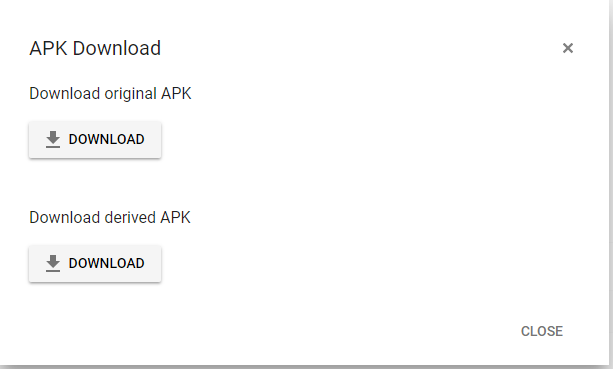
I check both and the original apk match the SHA1 but the derived apk doesn't. I guess this is usual right?
Yes it is linked, and the strange thing about this is I have enable "anti-piracy" wich says "Prevents users who have not installed your game via Google Play from accessing Google Play game servies." But then the opposite happens, if you install the game out of the Google Play Store the services works, but if you do it from the Play Store it doesn't... is like come on T.T

I find something on the log that I didn't put yesterday, means something?

kesada7
on 9 Jun 2017

@kesada7 hi kesada.look at picture, my panel is Turkish, sorry for this.In blue write "Uygulama İmzalama" ,i guess in English, it is "app signing" there are 2 sha1 key. If you want to work play services which has been build from your computer.You should change sha1 key in google apis page.
I solved my problem this problem so.If you didnt use app signing in play console, this solution is not for you.
mckiyak42
on 9 Jun 2017
I want to bring something new, I've been experimenting with the two apk that I've downloaded from the google console, the ones I taught you in the image above. And this is what I have noticed:
When I install the original apk everything works and this is the login:
06-09 18:48:08.873: D/Home.AppLaunchReceiver(3719): APP LAUNCH com.google.android.play.games
06-09 18:48:08.873: W/GamesServiceBroker(4760): Client connected with SDK 8487000, Services 11055070, and Games 39080070
06-09 18:48:08.873: I/AdScreen(3719): Starting AppClickUtil for com.google.android.play.games
06-09 18:48:08.883: W/GamesServiceBroker(4760): Client connected with SDK 8487000, Services 11055070, and Games 39080070
06-09 18:48:08.883: I/ActivityManager(1745): Displayed com.google.android.play.games/com.google.android.gms.games.ui.client.achievements.ClientAchievementListActivity: +357ms (total +396ms)
06-09 18:48:08.913: W/GamesServiceBroker(4760): Client connected with SDK 8487000, Services 11055070, and Games 39080070
06-09 18:48:08.933: W/GamesServiceBroker(4760): Client connected with SDK 8487000, Services 11055070, and Games 39080070
06-09 18:48:08.943: D/dalvikvm(1745): GC_FOR_ALLOC freed 1702K, 22% free 7358K/9432K, paused 7ms, total 7ms
06-09 18:48:08.953: W/GamesServiceBroker(4760): Client connected with SDK 8487000, Services 11055070, and Games 39080070
06-09 18:48:08.973: D/dalvikvm(5005): GC_FOR_ALLOC freed 787K, 14% free 5160K/5980K, paused 4ms, total 4ms
06-09 18:48:09.053: E/Volley(4760): [304] BasicNetwork.performRequest: Unexpected response code 401 for https://www.googleapis.com/games/v1/applications/played
06-09 18:48:09.063: W/GameAgent(4760): Volley error when reporting played
06-09 18:48:09.063: W/GameAgent(4760): com.android.volley.AuthFailureError
06-09 18:48:09.063: W/GameAgent(4760):  at com.android.volley.toolbox.BasicNetwork.performRequest(:com.google.android.gms:32)
06-09 18:48:09.063: W/GameAgent(4760):  at iwo.performRequest(:com.google.android.gms:3)
06-09 18:48:09.063: W/GameAgent(4760):  at com.android.volley.NetworkDispatcher.run(:com.google.android.gms:11)
06-09 18:48:09.233: D/WindowManager(1745): topDisplayedActivityInfo, appToken: Token{4e8fdd9c ActivityRecord{4e9f4118 u0 com.google.android.play.games/com.google.android.gms.games.ui.client.achievements.ClientAchievementListActivity t7}}
06-09 18:48:09.233: D/WindowManager(1745): topDisplayedActivityInfo, appToken: Token{4e6dce9c ActivityRecord{4ea587a4 u0 com.castlestudio.freefallolive/com.google.games.bridge.NativeBridgeActivity t7}}
06-09 18:48:09.273: W/GamesServiceBroker(4760): Client connected with SDK 8487000, Services 11055070, and Games 39080070
06-09 18:48:13.423: D/dalvikvm(4829): threadid=16: thread exiting, not yet detached (count=0)
But when I install the derived apk happens exactly the same as when I installed the apk from the google play store, the services do not work and the log is similar to the one from yesterday.
06-09 18:52:19.483: W/GamesServiceBroker(4760): Client connected with SDK 11010000, Services 11055070, and Games 39080070
06-09 18:52:19.483: W/GamesServiceBroker(4760): Client connected with SDK 8487000, Services 11055070, and Games 39080070
06-09 18:52:19.483: W/GamesServiceBroker(4760): Client connected with SDK 8487000, Services 11055070, and Games 39080070
06-09 18:52:19.483: W/GamesServiceBroker(4760): Client connected with SDK 8487000, Services 11055070, and Games 39080070
06-09 18:52:19.483: V/AccountUtils(4760): 0 accounts found with uca feature
06-09 18:52:19.493: W/GamesServiceBroker(4760): Client connected with SDK 8487000, Services 11055070, and Games 39080070
06-09 18:52:19.503: W/GamesServiceBroker(4760): Client connected with SDK 8487000, Services 11055070, and Games 39080070
06-09 18:52:19.503: W/GamesServiceBroker(4760): Client connected with SDK 8487000, Services 11055070, and Games 39080070
06-09 18:52:19.683: W/Auth(2076): [GetToken] GetToken failed with status code: UNREGISTERED_ON_API_CONSOLE
06-09 18:52:19.683: E/TokenRequestor(4760): You have wrong OAuth2 related configurations, please check. Detailed error: UNREGISTERED_ON_API_CONSOLE
06-09 18:52:19.683: W/GamesServiceBroker(4760): Client connected with SDK 8487000, Services 11055070, and Games 39080070
06-09 18:52:19.683: V/GamesNativeSDK(5436): Play Games callback indicates connection failure.
06-09 18:52:19.683: I/GamesNativeSDK(5436): UI interaction required to connect to Google Play.
06-09 18:52:19.683: D/dalvikvm(1745): GC_FOR_ALLOC freed 1690K, 24% free 7262K/9432K, paused 7ms, total 7ms
Is there any possibility that what is happening is that when you download the apk from the Play Store you download the derived version and not the original?
kesada7
on 9 Jun 2017
omg.. ok I think I solved it, but I am so confused now, maybe there is something about the documentation I forgot to read? I explain myself:
If I put in the console credentials the SHA-1 code from the derivate apk and no the one from my apk everything works. If this should be so then I'm sorry, I should have missed that part in the documentation because of my level of English (not my first language).
So every time you upload an apk to the Play Store you have to download the derivative version from there and extract his SHA1 code is that correct?
kesada7
on 9 Jun 2017
Yes there is nothing about this in documentation.No ,you should do it just once.you can do it when you publish game.Maybe i am wrong about this problem but this solution is working for me
mckiyak42
on 9 Jun 2017
@mckiyak42 Hello! I just saw your post over mine and this is the solution! I had already solved it on my own. But the way you show it is easier and faster since you do not have to download the apk and get the code by command line.
I can not believe that I have not seen any of this in the documentation and in none of the tutorials I have followed on the internet to implement google play services. Thanks a lot for your help!
And thanks too to you @claywilkinson for taking time to help me, is the first game I made and I learned so much with it. Thanks thanks thanks guys!
kesada7
on 9 Jun 2017
How did you solve the problem?
mckiyak42
on 9 Jun 2017
@mckiyak42 I explained it on my comment above, I put in the console credentials the SHA-1 code from the derivative apk and no the one from my apk
kesada7
on 9 Jun 2017
I figured it out with kesada7's help, even though she/he gave a ridiculously brief solution. Here is a step by step instruction guide to do what kesada7 suggested.
IT DOES FIX THE PROBLEM, TESTED AND SOLVED:
https://forum.unity3d.com/threads/google-play-services-not-working.485322/
 InventorDerek
on 6 Sep 2017
InventorDerek
on 6 Sep 2017
I can't found Google play services option on apps & notification settings on my android Nougat phone. How can i enable it?
 BestusefulTips
on 24 Jun 2019
BestusefulTips
on 24 Jun 2019
Related issues
 bibbis
·
4Comments
bibbis
·
4Comments
 Only4Gamers
·
4Comments
Only4Gamers
·
4Comments
 SQuirkster
·
3Comments
SQuirkster
·
3Comments
 parkJeongOck
·
4Comments
parkJeongOck
·
4Comments
 cataHHH
·
4Comments
cataHHH
·
4Comments
Most helpful comment
This line:
06-08 20:48:23.815: W/Auth(9667): [GetToken] GetToken failed with status code: UNREGISTERED_ON_API_CONSOLEdefinitely points to a configuration problem between the apk and the Play console.You can confirm the fingerprint of your APK by running
keytool -list -printcert -jarfile <apkfile.apk>The package name in the AndroidManifest.xml needs to match the console too. You can get this by running
${ANDROID_HOME}/build-tools/25.0.3/aapt dump badging <apkfile.apk> | grep packageThen go to the Play Console and then Game Services section.
From there select your game. On the Game Details page, scroll to the bottom where it says "API Console project" Click the link to the console project.
On the console project page, click on the key icon (Credentials) on the left menu.
There should be an Android icon next to one of the apps. Click it. This will list all the credentials associated with your app. In the list there needs to be an Android type project. Click it. This will show you the details of the client. The package name and SHA1 need to match exactly what you read from the apk.
If they don't match, either edit the existing client (which might break working clients). or go back to the credentials page and create a new Android client with the correct information.