Platformio-vscode-ide: PlatformIO extension in VS Code does not load after opening a folder (i.default.isFileSync is not a function)
Since today, the PlatformIO extension in VS Code stops working as soon as I open a folder or a workspace. Opening the Console in the Developer Tools of VS Code, I see the following messages:
[Extension Host] activating extension
console.ts:137 [Extension Host] starting language server
console.ts:137 [Extension Host] (node:19568) [DEP0005] DeprecationWarning: Buffer() is deprecated due to security and usability issues. Please use the Buffer.alloc(), Buffer.allocUnsafe(), or Buffer.from() methods instead.
t.log @ console.ts:137
console.ts:137 [Extension Host] rejected promise not handled within 1 second: TypeError: i.default.isFileSync is not a function
t.log @ console.ts:137
console.ts:137 [Extension Host] stack trace: TypeError: i.default.isFileSync is not a function  at Object.t.isPIOProject (c:\Users\Stefan\.vscode\extensions\platformio.platformio-ide-1.9.1\node_modules\platformio-node-helpers\dist\index.js:1:4689) at map.filter.e (c:\Users\Stefan\.vscode\extensions\platformio.platformio-ide-1.9.1\dist\extension.js:1:13675)  at Array.filter (<anonymous>)   at c (c:\Users\Stefan\.vscode\extensions\platformio.platformio-ide-1.9.1\dist\extension.js:1:13658) at Object.t.getActivePIOProjectDir (c:\Users\Stefan\.vscode\extensions\platformio.platformio-ide-1.9.1\dist\extension.js:1:12547)   at Object.activate (c:\Users\Stefan\.vscode\extensions\platformio.platformio-ide-1.9.1\dist\extension.js:1:2810)    at t.activate (c:\Users\Stefan\.vscode\extensions\platformio.platformio-ide-1.9.1\dist\extension.js:1:1684) at Function._callActivateOptional (c:\Users\Stefan\AppData\Local\Programs\Microsoft VS Code\resources\app\out\vs\workbench\services\extensions\node\extensionHostProcess.js:667:613)    at Function._callActivate (c:\Users\Stefan\AppData\Local\Programs\Microsoft VS Code\resources\app\out\vs\workbench\services\extensions\node\extensionHostProcess.js:667:264)    at Promise.all.then.n (c:\Users\Stefan\AppData\Local\Programs\Microsoft VS Code\resources\app\out\vs\workbench\services\extensions\node\extensionHostProcess.js:666:404)
t.log @ console.ts:137
mainThreadExtensionService.ts:65 [[object Object]]i.default.isFileSync is not a function
$onExtensionRuntimeError @ mainThreadExtensionService.ts:65
mainThreadExtensionService.ts:66 TypeError: i.default.isFileSync is not a function
    at Object.t.isPIOProject (c:\Users\Stefan\.vscode\extensions\platformio.platformio-ide-1.9.1\node_modules\platformio-node-helpers\dist\index.js:1:4689)
    at map.filter.e (c:\Users\Stefan\.vscode\extensions\platformio.platformio-ide-1.9.1\dist\extension.js:1:13675)
    at Array.filter (<anonymous>)
    at c (c:\Users\Stefan\.vscode\extensions\platformio.platformio-ide-1.9.1\dist\extension.js:1:13658)
    at Object.t.getActivePIOProjectDir (c:\Users\Stefan\.vscode\extensions\platformio.platformio-ide-1.9.1\dist\extension.js:1:12547)
    at Object.activate (c:\Users\Stefan\.vscode\extensions\platformio.platformio-ide-1.9.1\dist\extension.js:1:2810)
    at t.activate (c:\Users\Stefan\.vscode\extensions\platformio.platformio-ide-1.9.1\dist\extension.js:1:1684)
    at Function._callActivateOptional (c:\Users\Stefan\AppData\Local\Programs\Microsoft VS Code\resources\app\out\vs\workbench\services\extensions\node\extensionHostProcess.js:667:613)
    at Function._callActivate (c:\Users\Stefan\AppData\Local\Programs\Microsoft VS Code\resources\app\out\vs\workbench\services\extensions\node\extensionHostProcess.js:667:264)
    at Promise.all.then.n (c:\Users\Stefan\AppData\Local\Programs\Microsoft VS Code\resources\app\out\vs\workbench\services\extensions\node\extensionHostProcess.js:666:404)
I already tried the following steps to solve the problem:
- Uninstalled VS Code with %LocalAppData%\Programs\Microsoft VS Code\unins000.exe
- Removed %AppData%\Code
- Removed %Homepath%\.vscode
- Removed %Homepath%\.platformio
- Did a fresh install of latest VS Code (VSCodeUserSetup-x64-1.39.2.exe)
- Within VS Code, did a fresh install of the PlatformIO IDE extension
- Restarted VS Code
The reproducible result is: First, the PlatformIO extension loads normally. but as soon as I create a new Project from extension's Home view or open any folder / load any workspace, the extension disappears and does not load anymore with the above output in the VS Code console. When I choose File -> Close folder, the extension loads normally again.
VS Code version 1.39.2
PlatformIO IDE extension version 1.9.1
PlatformIO Home 2.3.3
PlatformIO Core 4.0.3
 skleeschulte
All 25 comments
yeah, I get the same thing.
 lovettchris
on 20 Oct 2019
lovettchris
on 20 Oct 2019
I just opened up #1210 with the same issue.
I tried downgrading, but no change.
EDIT Also tried upgrading to the dev version, and it still fails.
 XBrav
on 20 Oct 2019
XBrav
on 20 Oct 2019
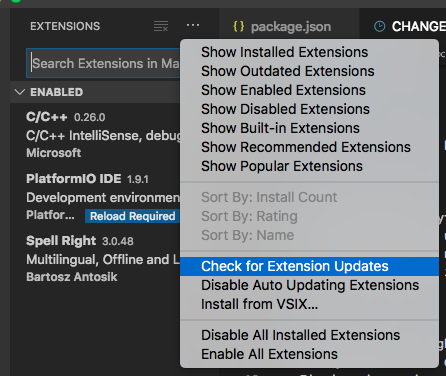
Workaround: Downgrade to PlatformIO IDE extension version 1.9.0: In the extension manager, click the gear symbol next to PlatformIO IDE and choose Install Another Version...:

skleeschulte
on 20 Oct 2019
Workaround (not fully working, see below): Downgrade to PlatformIO IDE extension version 1.9.0: In the extension manager, click the gear symbol next to PlatformIO IDE and choose Install Another Version...:
UPDATE: This way I get the extension to load again, but now existing projects are not recognized as PIO projects, only new ones...
This workaround works. Afterwards, if I open projects as folders, it appears fine and compiles as expected. Thanks!
XBrav
on 20 Oct 2019
Yeah, just realized it doesn't work if I use "Open folder" with my Projects folder (where I have subfolders for all my projects). When using "Add folder to workspace..." to add all subfolders in my Projects folder it works as expected.
skleeschulte
on 20 Oct 2019
Yikes must have just missed this one. Pulled all my extensions this morning and reloaded all fresh. Including PlatformIO and Python. Then after a fresh copy of Marlin was loaded, I took my time and found every reference to updates and ran them, and performed Intelisense one more time. After this weird random errors I had never seen, regarding files I don't use, all gone.
Hope I don't get this bug next time I load it. At least for now my printer is running correctly.
64Win7Pro. Intel i5-650. 8GB. 4TB.
 rflulling
on 20 Oct 2019
rflulling
on 20 Oct 2019
same issue here 4.0.3 was installed without my permission and now I try since 5h to make it work.
=> I even try now the portable version and have the same issue
I can't understand that an update is done without my permission. I wanted to change 1 line of code, a work of 2 min and end up in a desaster because the environment is not working.
=> I tried ll steps above and do not see the buttons to compile (yes it is a platformio project and yes it still works on my 2 other computers)
mainThreadExtensionService.ts:65 [[object Object]]i.default.isFileSync is not a function mainThreadExtensionService.ts:66 TypeError: i.default.isFileSync is not a function at Object.t.isPIOProject (c:\Users\IBM_ADMIN.vscode\extensions\platformio.platformio-ide-1.9.1\node_modules\platformio-node-helpers\dist\index.js:1:4689) at map.filter.e (c:\Users\IBM_ADMIN.vscode\extensions\platformio.platformio-ide-1.9.1\dist\extension.js:1:13675) at Array.filter (
WHILE YOU FIX THIS... can you please remove the automatic upadte to the latest version? I have portable versions for for certain projects, which I want just to have in case.... when I need to change 1 line of code.
=> It can not be that a software decides itself to update to the version it wants! Are we back to the darkest days of Windows?
 lobocobra
on 20 Oct 2019
lobocobra
on 20 Oct 2019
Since today, the PlatformIO extension in VS Code stops working as soon as I open a folder or a workspace. Opening the Console in the Developer Tools of VS Code, I see the following messages:
[Extension Host] activating extension
console.ts:137 [Extension Host] starting language server
console.ts:137 [Extension Host] (node:19568) [DEP0005] DeprecationWarning: Buffer() is deprecated due to security and usability issues. Please use the Buffer.alloc(), Buffer.allocUnsafe(), or Buffer.from() methods instead.
t.log @ console.ts:137
console.ts:137 [Extension Host] rejected promise not handled within 1 second: TypeError: i.default.isFileSync is not a function
t.log @ console.ts:137
console.ts:137 [Extension Host] stack trace: TypeError: i.default.isFileSync is not a function    at Object.t.isPIOProject (c:\Users\Stefan\.vscode\extensions\platformio.platformio-ide-1.9.1\node_modules\platformio-node-helpers\dist\index.js:1:4689) at map.filter.e (c:\Users\Stefan\.vscode\extensions\platformio.platformio-ide-1.9.1\dist\extension.js:1:13675)  at Array.filter (<anonymous>)   at c (c:\Users\Stefan\.vscode\extensions\platformio.platformio-ide-1.9.1\dist\extension.js:1:13658) at Object.t.getActivePIOProjectDir (c:\Users\Stefan\.vscode\extensions\platformio.platformio-ide-1.9.1\dist\extension.js:1:12547)   at Object.activate (c:\Users\Stefan\.vscode\extensions\platformio.platformio-ide-1.9.1\dist\extension.js:1:2810)    at t.activate (c:\Users\Stefan\.vscode\extensions\platformio.platformio-ide-1.9.1\dist\extension.js:1:1684) at Function._callActivateOptional (c:\Users\Stefan\AppData\Local\Programs\Microsoft VS Code\resources\app\out\vs\workbench\services\extensions\node\extensionHostProcess.js:667:613)    at Function._callActivate (c:\Users\Stefan\AppData\Local\Programs\Microsoft VS Code\resources\app\out\vs\workbench\services\extensions\node\extensionHostProcess.js:667:264)    at Promise.all.then.n (c:\Users\Stefan\AppData\Local\Programs\Microsoft VS Code\resources\app\out\vs\workbench\services\extensions\node\extensionHostProcess.js:666:404)
t.log @ console.ts:137
mainThreadExtensionService.ts:65 [[object Object]]i.default.isFileSync is not a function
$onExtensionRuntimeError @ mainThreadExtensionService.ts:65
mainThreadExtensionService.ts:66 TypeError: i.default.isFileSync is not a function
  at Object.t.isPIOProject (c:\Users\Stefan\.vscode\extensions\platformio.platformio-ide-1.9.1\node_modules\platformio-node-helpers\dist\index.js:1:4689)
  at map.filter.e (c:\Users\Stefan\.vscode\extensions\platformio.platformio-ide-1.9.1\dist\extension.js:1:13675)
  at Array.filter (<anonymous>)
  at c (c:\Users\Stefan\.vscode\extensions\platformio.platformio-ide-1.9.1\dist\extension.js:1:13658)
  at Object.t.getActivePIOProjectDir (c:\Users\Stefan\.vscode\extensions\platformio.platformio-ide-1.9.1\dist\extension.js:1:12547)
  at Object.activate (c:\Users\Stefan\.vscode\extensions\platformio.platformio-ide-1.9.1\dist\extension.js:1:2810)
  at t.activate (c:\Users\Stefan\.vscode\extensions\platformio.platformio-ide-1.9.1\dist\extension.js:1:1684)
  at Function._callActivateOptional (c:\Users\Stefan\AppData\Local\Programs\Microsoft VS Code\resources\app\out\vs\workbench\services\extensions\node\extensionHostProcess.js:667:613)
  at Function._callActivate (c:\Users\Stefan\AppData\Local\Programs\Microsoft VS Code\resources\app\out\vs\workbench\services\extensions\node\extensionHostProcess.js:667:264)
  at Promise.all.then.n (c:\Users\Stefan\AppData\Local\Programs\Microsoft VS Code\resources\app\out\vs\workbench\services\extensions\node\extensionHostProcess.js:666:404)
I already tried the following steps to solve the problem:
* Uninstalled VS Code with %LocalAppData%\Programs\Microsoft VS Code\unins000.exe

* Removed %AppData%\Code

* Removed %Homepath%\.vscode

* Removed %Homepath%\.platformio

* Did a fresh install of latest VS Code (VSCodeUserSetup-x64-1.39.2.exe)

* Within VS Code, did a fresh install of the PlatformIO IDE extension

* Restarted VS Code
The reproducible result is: First, the PlatformIO extension loads normally. but as soon as I create a new Project from extension's Home view or open any folder / load any workspace, the extension disappears and does not load anymore with the above output in the VS Code console. When I choose File -> Close folder, the extension loads normally again.
VS Code version 1.39.2
PlatformIO IDE extension version 1.9.1
PlatformIO Home 2.3.3
PlatformIO Core 4.0.3
And once all this is fixed, we should ask ourselves, "is it possible to add to the uninstall function a button to delete all those folders automatically?
=> It would help! Many thanks
lobocobra
on 20 Oct 2019
Sorry for the issue, 1.9.2 is out! Please update
 ivankravets
on 20 Oct 2019
ivankravets
on 20 Oct 2019
WHILE YOU FIX THIS... can you please remove the automatic update to the latest version?
@lobocobra That's a VSCode issue... if you want to call it that. By defaykt t automatically updates all extensions (in this case it would have been to 1.9.1 since that's the versions that seemed to have a bug, and was mentioned in your log). When the PlatformIO extension updates, it also updates the PlatformIO core version so that they're in sync. If you don't want VSCode to update extensions... you'll need to turn off the Auto Update feature of the Extension Viewlet.
 pfeerick
on 20 Oct 2019
pfeerick
on 20 Oct 2019
Update to 1.9.2 worked for me, thanks for your help.
 ghost
on 20 Oct 2019
ghost
on 20 Oct 2019
Just got moved to the 1.9.2 version. Looked like everything was going fine until this popped up:
Error: Could not create PIO Core Virtual Environment. Please create it manually -> http://bit.ly/pio-core-virtualenv
Error: Virtualenv Create: Traceback (most recent call last):
File "C:\Users\NotMyName.platformio.cache\tmp-4168KYmbhjJTEJO6\virtualenv-16.7.5\virtualenv.py", line 2632, in
main()
File "C:\Users\NotMyName.platformio.cache\tmp-4168KYmbhjJTEJO6\virtualenv-16.7.5\virtualenv.py", line 870, in main
symlink=options.symlink,
File "C:\Users\NotMyName.platformio.cache\tmp-4168KYmbhjJTEJO6\virtualenv-16.7.5\virtualenv.py", line 1156, in create_environment
install_python(home_dir, lib_dir, inc_dir, bin_dir, site_packages=site_packages, clear=clear, symlink=symlink)
File "C:\Users\NotMyName.platformio.cache\tmp-4168KYmbhjJTEJO6\virtualenv-16.7.5\virtualenv.py", line 1526, in install_python
shutil.copyfile(executable, py_executable)
File "C:\Users\NotMyName.platformio\python37\lib\shutil.py", line 121, in copyfile
with open(dst, 'wb') as fdst:
PermissionError: [Errno 13] Permission denied: 'C:\Users\NotMyName\.platformio\penv\Scripts\python.exe'
Using base prefix 'C:\Users\NotMyName\.platformio\python37'
New python executable in C:\Users\NotMyName.platformio\penv\Scripts\python.exe
at t.value (c:\Users\NotMyName.vscode\extensions\platformio.platformio-ide-1.9.2\node_modules\platformio-node-helpers\dist\index.js:1:32251)
 hunterw89
on 20 Oct 2019
hunterw89
on 20 Oct 2019
@hunterw89 do you have antivirus tools in system?
ivankravets
on 20 Oct 2019
@ivankravets You're thinking this could be virus-related?
hunterw89
on 20 Oct 2019
It seems that I understand the problem now. Could you try to close VSCode, open system task manager and kill all python.exe processes. Start VSCode
Does it work now?
ivankravets
on 20 Oct 2019
Status update: PIO IDE still installing.
hunterw89
on 20 Oct 2019
VSCode > Help > Toggle Developer Tools > Console
Do you see any errors?
ivankravets
on 20 Oct 2019
workbench.desktop.main.js:sourcemap:243 [Extension Host] activating extension
workbench.desktop.main.js:sourcemap:243 [Extension Host] starting language server
workbench.desktop.main.js:sourcemap:243 [Extension Host] (node:7576) [DEP0005] DeprecationWarning: Buffer() is deprecated due to security and usability issues. Please use the Buffer.alloc(), Buffer.allocUnsafe(), or Buffer.from() methods instead.
t.log @ workbench.desktop.main.js:sourcemap:243
workbench.desktop.main.js:sourcemap:243 [Extension Host] Git installation not found.
t.log @ workbench.desktop.main.js:sourcemap:243
workbench.desktop.main.js:sourcemap:243 [Extension Host] runCommand platformio Array(1) Object
workbench.desktop.main.js:sourcemap:243 [Extension Host] Starting express server on port: 52694
workbench.desktop.main.js:sourcemap:243 [Extension Host] using c:/Users/NotMyName/.vscode/extensions/vsciot-vscode.vscode-arduino-0.2.27/vendor/node-usb-native/lib/native/usb-native_win32_4.2.5_x64.node
workbench.desktop.main.js:sourcemap:243 [Extension Host] Error: No pyvenv.cfg file
at c:\Users\NotMyName.vscode\extensions\platformio.platformio-ide-1.9.2\node_modules\platformio-node-helpers\dist\index.js:1:7465 at ChildProcess.h (c:\Users\NotMyName.vscode\extensions\platformio.platformio-ide-1.9.2\node_modules\platformio-node-helpers\dist\index.js:1:6292) at ChildProcess.emit (events.js:182:13) at ChildProcess.cp.emit (c:\Users\NotMyName.vscode\extensions\platformio.platformio-ide-1.9.2\node_modules\platformio-node-helpers\node_modules\cross-spawn\lib\enoent.js:34:29) at maybeClose (internal/child_process.js:962:16) at Socket.stream.socket.on (internal/child_process.js:381:11) at Socket.emit (events.js:182:13) at Pipe._handle.close (net.js:606:12)
t.log @ workbench.desktop.main.js:sourcemap:243
workbench.desktop.main.js:sourcemap:243 [Extension Host] runCommand conda Array(1) Object
workbench.desktop.main.js:sourcemap:243 [Extension Host] runCommand C:\Users\NotMyName.platformio\python37python.exe Array(2) Object
workbench.desktop.main.js:sourcemap:243 [Extension Host] runCommand C:\Users\NotMyName.platformio\python37python.exe Array(3) Object
workbench.desktop.main.js:sourcemap:3551 [[object Object]]Cannot read property 'settings' of null
$onExtensionRuntimeError @ workbench.desktop.main.js:sourcemap:3551
workbench.desktop.main.js:sourcemap:3551 TypeError: Cannot read property 'settings' of null
at SerialMonitor.initialize (c:\Users\NotMyName.vscode\extensions\vsciot-vscode.vscode-arduino-0.2.27\out\src\serialmonitor\serialMonitor.js:42:69)
at SerialMonitor.dc.onDidChange (c:\Users\NotMyName.vscode\extensions\vsciot-vscode.vscode-arduino-0.2.27\out\src\serialmonitor\serialMonitor.js:26:26)
at l.fire (c:\Users\NotMyName\AppData\Local\Programs\Microsoft VS Code\resources\app\out\vs\workbench\services\extensions\node\extensionHostProcess.js:50:519)
at vscode.workspace.findFiles.then (c:\Users\NotMyName.vscode\extensions\vsciot-vscode.vscode-arduino-0.2.27\out\src\deviceContext.js:76:39)
$onExtensionRuntimeError @ workbench.desktop.main.js:sourcemap:3551
workbench.desktop.main.js:sourcemap:243 [Extension Host] rejected promise not handled within 1 second: TypeError: Cannot read property 'map' of undefined
t.log @ workbench.desktop.main.js:sourcemap:243
workbench.desktop.main.js:sourcemap:243 [Extension Host] stack trace: TypeError: Cannot read property 'map' of undefined at ArduinoApp.tryToUpdateIncludePaths (c:\Users\NotMyName.vscode\extensions\vsciot-vscode.vscode-arduino-0.2.27\out\src\arduino\arduino.js:299:63) at c:\Users\NotMyName.vscode\extensions\vsciot-vscode.vscode-arduino-0.2.27\out\src\extension.js:289:53 at Generator.next (
t.log @ workbench.desktop.main.js:sourcemap:243
workbench.desktop.main.js:sourcemap:3551 [[object Object]]Cannot read property 'map' of undefined
$onExtensionRuntimeError @ workbench.desktop.main.js:sourcemap:3551
workbench.desktop.main.js:sourcemap:3551 TypeError: Cannot read property 'map' of undefined
at ArduinoApp.tryToUpdateIncludePaths (c:\Users\NotMyName.vscode\extensions\vsciot-vscode.vscode-arduino-0.2.27\out\src\arduino\arduino.js:299:63)
at c:\Users\NotMyName.vscode\extensions\vsciot-vscode.vscode-arduino-0.2.27\out\src\extension.js:289:53
at Generator.next (
at fulfilled (c:\Users\NotMyName.vscode\extensions\vsciot-vscode.vscode-arduino-0.2.27\out\src\extension.js:6:58)
$onExtensionRuntimeError @ workbench.desktop.main.js:sourcemap:3551
workbench.desktop.main.js:sourcemap:243 [Extension Host] runCommand C:\Users\NotMyName.platformio\penv\Scriptspython.exe Array(2) Object
workbench.desktop.main.js:sourcemap:243 [Extension Host] runCommand C:\Users\NotMyName.platformio\penv\Scriptspython.exe Array(1) Object
workbench.desktop.main.js:sourcemap:243 [Extension Host] runCommand C:\Users\NotMyName.platformio\penv\Scriptspython.exe Array(5) Object
workbench.desktop.main.js:sourcemap:243 [Extension Host] runCommand platformio Array(6) Object
hunterw89
on 20 Oct 2019
Cannot read property 'map' of undefined
at ArduinoApp.tryToUpdateIncludePaths (c:\Users\NotMyName.vscode\extensions\vsciot-vscode.vscode-arduino-0.2.27\
Please remove arduino extension, it's conflict with PlatformIO extension. Also, try to restart machine. It will kill active python processes.
ivankravets
on 20 Oct 2019
Extension removed, processes killed.
hunterw89
on 20 Oct 2019
Does it work now?
ivankravets
on 20 Oct 2019
Nothing's jumping out at me and screaming "CRITICAL ERROR RUN AND HIDE" so I'm thinking that's a good thing.
hunterw89
on 20 Oct 2019
PIO IDE 192 is installed.
hunterw89
on 20 Oct 2019
Sorry, I don't understand. Does it work now?
ivankravets
on 20 Oct 2019
It seems to work, yes.
hunterw89
on 20 Oct 2019
Related issues
 EnviousD
·
6Comments
EnviousD
·
6Comments
 heumann-a
·
7Comments
heumann-a
·
7Comments
 jenokizm
·
3Comments
jenokizm
·
3Comments
 Zukatomo
·
7Comments
XBrav
·
7Comments
Zukatomo
·
7Comments
XBrav
·
7Comments
Most helpful comment
Workaround: Downgrade to PlatformIO IDE extension version 1.9.0: In the extension manager, click the gear symbol next to PlatformIO IDE and choose Install Another Version...: