Platformio-vscode-ide: PlatformIO commands not found
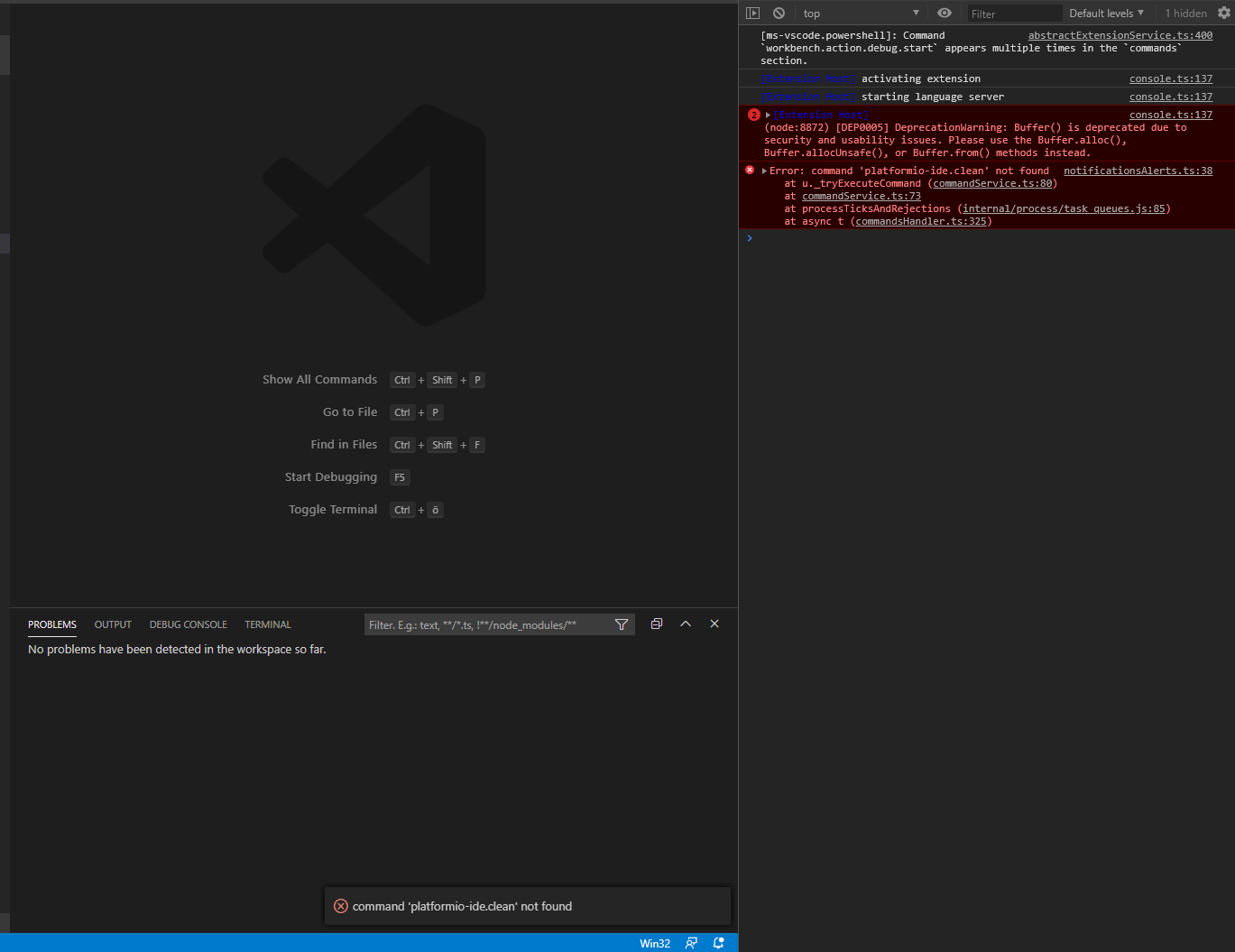
I have already searched all open and closed Issues but every solution didnt work for me on my Windows 10 Laptop.
I uninstalled VSCode, deleted all Folders in %username%, reinstalled newest VSCode and PlatformIO and still getting the same Error as seen in the picture above. Doenst Matter which command i try everyone has this errormessage.
My VSCode Version:
Version: 1.43.1 (user setup)
Commit: fe22a9645b44368865c0ba92e2fb881ff1afce94
Date: 2020-03-18T07:01:20.184Z
Electron: 7.1.11
Chrome: 78.0.3904.130
Node.js: 12.8.1
V8: 7.8.279.23-electron.0
OS: Windows_NT x64 10.0.18362
//Update: tried to install on Worklaptop. Same issues
 heumann-a
All 7 comments
Hi Alexander,
Sorry, I've missed this issue :(
Could you try our new portable installer? We have not released it with IDE yet: https://docs.platformio.org/en/latest/core/installation.html#local-download-mac-linux-windows
So, please download this file https://raw.githubusercontent.com/platformio/platformio-core-installer/master/get-platformio.py and save under
get-platformio.py.Open system
cmd.exeterminal and typepython get-platformio.py --verbose.
Do you see any errors? Please provide an output.
 ivankravets
on 20 Mar 2020
ivankravets
on 20 Mar 2020
Installer version: 0.1.0
Platform: Windows-10-10.0.18362-SP0
Python version: 3.7.5 (tags/v3.7.5:5c02a39a0b, Oct 15 2019, 00:11:34) [MSC v.1916 64 bit (AMD64)]
Python path: C:\Users\Alex-NB\AppData\Local\Programs\Python\Python37\python.exe
Creating a virtual environment at C:\Users\Alex-NB\.platformio\penv
DEBUG: Current environment PATH C:\Program Files\Python38\Scripts\;C:\Program Files\Python38\;C:\Program Files (x86)\Python38-32\Scripts\;C:\Program Files (x86)\Python38-32\;C:\ProgramData\DockerDesktop\version-bin;C:\Program Files\Docker\Docker\Resources\bin;C:\Program Files (x86)\Intel\Intel(R) Management Engine Components\iCLS\;C:\Program Files\Intel\Intel(R) Management Engine Components\iCLS\;C:\Program Files (x86)\Microsoft Visual Studio\Shared\Python36_64\Scripts\;C:\Program Files (x86)\Microsoft Visual Studio\Shared\Python36_64\;C:\Program Files (x86)\Common Files\Oracle\Java\javapath;C:\Program Files (x86)\NVIDIA
Corporation\PhysX\Common;C:\ProgramData\Oracle\Java\javapath;C:\WINDOWS\system32;C:\WINDOWS;C:\WINDOWS\System32\Wbem;C:\WINDOWS\System32\WindowsPowerShell\v1.0\;C:\Program Files\Microsoft SQL Server\130\Tools\Binn\;C:\Program Files\Microsoft SQL Server\110\Tools\Binn\;C:\Program Files\dotnet\;C:\WINDOWS\System32\OpenSSH\;C:\Program Files (x86)\Intel\Intel(R) Management Engine Components\DAL;C:\Program Files\Intel\Intel(R) Management Engine Components\DAL;C:\Program Files (x86)\Intel\Intel(R) Management Engine Components\IPT;C:\Program Files\Intel\Intel(R) Management Engine Components\IPT;C:\Program Files\Intel\WiFi\bin\;C:\Program Files\Common Files\Intel\WirelessCommon\;C:\Program Files\Git\cmd;C:\Program Files\MiKTeX 2.9\miktex\bin\x64\;C:\Program Files\Dart\dart-sdk\bin;C:\Program Files\nodejs\;C:\ProgramData\chocolatey\bin;C:\Program Files\PuTTY\;;C:\Program Files\Microsoft VS Code\bin;C:\Users\Alex-NB\AppData\Local\Programs\Python\Python37\Scripts\;C:\Users\Alex-NB\AppData\Local\Programs\Python\Python37\;C:\Users\Alex-NB\AppData\Local\Microsoft\WindowsApps;C:\Program Files\Intel\WiFi\bin\;C:\Program Files\Common Files\Intel\WirelessCommon\;C:\Users\Alex-NB\AppData\Local\Microsoft\WindowsApps;C:\Users\Alex-NB\AppData\Roaming\npm;C:\Users\Alex-NB.dotnet\tools
DEBUG: Checking a Python candidate C:\Users\Alex-NB\AppData\Local\Programs\Python\Python37\python.exe
DEBUG: The Python 3.7.5 (C:\Users\Alex-NB\AppData\Local\Programs\Python\Python37\python.exe) interpreter is compatible.
DEBUG: Using C:\Users\Alex-NB\AppData\Local\Programs\Python\Python37\python.exe Python for virtual environment.
DEBUG: Creating virtual environment: C:\Users\Alex-NB\AppData\Local\Programs\Python\Python37\python.exe -m venv C:\Users\Alex-NB.platformio\penv
Updating Python package manager (PIP) in a virtual environment
DEBUG: Creating pip.conf file in C:\Users\Alex-NB.platformio\penv
DEBUG: Downloading 'get-pip.py' installer...
DEBUG: Installing pip
PIP has been successfully updated!
Virtual environment has been successfully created!
Installing PlatformIO Core
Collecting platformio
Downloading platformio-4.3.1.tar.gz (169 kB)
|████████████████████████████████| 169 kB 2.2 MB/s
Collecting bottle<0.13
Using cached bottle-0.12.18-py3-none-any.whl (89 kB)
Collecting click!=7.1,!=7.1.1,<8,>=5
Downloading Click-7.0-py2.py3-none-any.whl (81 kB)
|████████████████████████████████| 81 kB 1.7 MB/s
Collecting colorama
Using cached colorama-0.4.3-py2.py3-none-any.whl (15 kB)
Collecting pyserial!=3.3,<4,>=3
Using cached pyserial-3.4-py2.py3-none-any.whl (193 kB)
Collecting requests<3,>=2.4.0
Using cached requests-2.23.0-py2.py3-none-any.whl (58 kB)
Collecting semantic_version<3,>=2.8.1
Using cached semantic_version-2.8.4-py2.py3-none-any.whl (15 kB)
Collecting tabulate<1,>=0.8.3
Using cached tabulate-0.8.6.tar.gz (45 kB)
Collecting pyelftools<1,>=0.25
Using cached pyelftools-0.26-py2.py3-none-any.whl (136 kB)
Collecting marshmallow>=2
Using cached marshmallow-3.5.1-py2.py3-none-any.whl (45 kB)
Collecting certifi>=2017.4.17
Using cached certifi-2019.11.28-py2.py3-none-any.whl (156 kB)
Collecting urllib3!=1.25.0,!=1.25.1,<1.26,>=1.21.1
Using cached urllib3-1.25.8-py2.py3-none-any.whl (125 kB)
Collecting chardet<4,>=3.0.2
Using cached chardet-3.0.4-py2.py3-none-any.whl (133 kB)
Collecting idna<3,>=2.5
Using cached idna-2.9-py2.py3-none-any.whl (58 kB)
Building wheels for collected packages: platformio, tabulate
Building wheel for platformio (setup.py) ... done
Created wheel for platformio: filename=platformio-4.3.1-py3-none-any.whl size=255458 sha256=71c8a6132b2eb7405d76d1f5a834aa7eb5365b9fbd93c9b8f72fd4e1306a01c6
Stored in directory: c:\users\alex-nb\appdata\local\pip\cache\wheels\57\75\02\7d8071bb42e1deac2ffe60a8f1b4b5fc97ac6975bd31ef575b
Building wheel for tabulate (setup.py) ... done
Created wheel for tabulate: filename=tabulate-0.8.6-py3-none-any.whl size=23274 sha256=d508439bb360a1bad3543afd13964d0c579313f7d24ad393c0a27ad8b010f98d
Stored in directory: c:\users\alex-nb\appdata\local\pip\cache\wheels\09\b6\7e\08b4ee715a1239453e89a59081f0ac369a9036f232e013ecd8
Successfully built platformio tabulate
Installing collected packages: bottle, click, colorama, pyserial, certifi, urllib3, chardet, idna, requests, semantic-version, tabulate, pyelftools, marshmallow, platformio
Successfully installed bottle-0.12.18 certifi-2019.11.28 chardet-3.0.4 click-7.0 colorama-0.4.3 idna-2.9 marshmallow-3.5.1 platformio-4.3.1 pyelftools-0.26 pyserial-3.4 requests-2.23.0 semantic-version-2.8.4 tabulate-0.8.6 urllib3-1.25.8
PlatformIO Core has been successfully installed into an isolated environment C:\Users\Alex-NB\.platformio\penv!
The full path to platformio.exe is C:\Users\Alex-NB\.platformio\penv\Scripts\platformio.exe
If you need an access to platformio.exe from other applications, please install Shell Commands
(add PlatformIO Core binary directory C:\Users\Alex-NB\.platformio\penv\Scripts to the system environment PATH variable):
See https://docs.platformio.org/page/installation.html#install-shell-commands
```
This is the output of the installation script. It worked fine
heumann-a
on 21 Mar 2020
Great! We are going to integrate a new installer into VSCode next week.
Does VSCode work now?
ivankravets
on 21 Mar 2020
Unfortunately not...
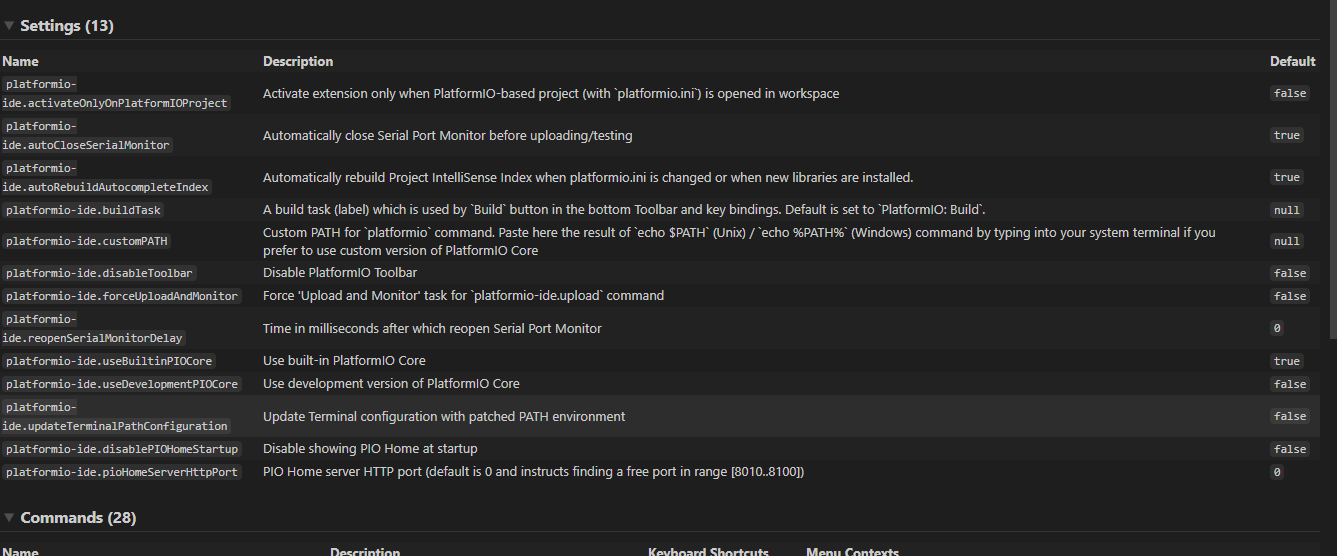
These are my Settings of IDE. are these correct?
heumann-a
on 21 Mar 2020
Your settings are correct. Do you see Home icon on the bottom of toolbar?
ivankravets
on 21 Mar 2020
Ah i need to do a little workaround but it worked now
you need to set "platformio-ide.activateOnlyOnPlatformIOProject" to false to see it everytime
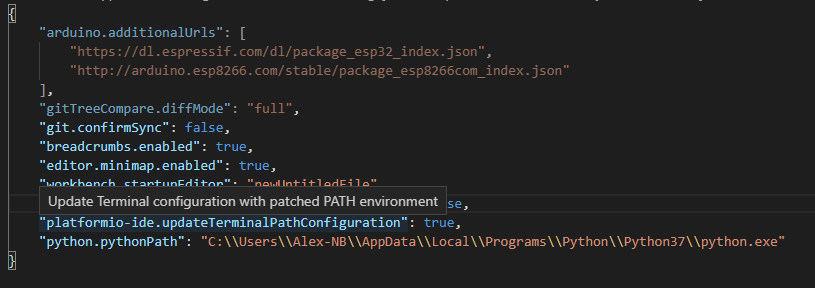
Thank you very much!!
heumann-a
on 21 Mar 2020
Ahhhh! Not I understand. Another option was to open the PlatformIO Project.
We would be thankful if you update your review here: https://marketplace.visualstudio.com/items?itemName=platformio.platformio-ide&ssr=false#review-details
We are an open-source project and the whole of our work is free. These places like Microsoft Marketplace help us to find new users. Thanks!
ivankravets
on 21 Mar 2020
Related issues
 jenokizm
·
3Comments
jenokizm
·
3Comments
 chenjingyuanku
·
8Comments
chenjingyuanku
·
8Comments
 XBrav
·
7Comments
XBrav
·
7Comments
 Rotzbua
·
3Comments
Rotzbua
·
3Comments
 tovine
·
4Comments
tovine
·
4Comments