Platformio-vscode-ide: Clicking "Open" does not open the project
Problem: When clicking Open in PIO Home, the following message is displayed and the project cannot be opened.
Project has been successfully configured and is located by this path: C:\Users\***\Documents\PlatformIO\Projects\test_ptoj
You can open it with your favourite IDE or process with platformio run command.
Following the similar Issues ( platformio-atom-ide - Clicking "Open" does not open the project #1453 ) procedure, I executed the following command:
pio home
When the same operation was performed from the opened browser screen, the following error was displayed.
> pio home

  ___I_
 /\-_--\   PlatformIO Home
|[]| [] |  http://127.0.0.1:8008
|__|____|_______________________

Open PIO Home in your browser by this URL => http://127.0.0.1:8008
PIO Home has been started. Press Ctrl+C to shutdown.
Error: {'message': 'PIO Home IDE agent is not started', 'code': 4005}
Environment:
- Windows 10 Home 1903
- VSCode 1.37.1
platformio --versionPlatformIO, version 4.0.1rc1- Platform IDE 1.8.2
- contrib-piohome @ 2.2.0
 drmus0715
All 13 comments
I have this too. Can't open project.
 ivan0kurnia
on 21 Aug 2019
ivan0kurnia
on 21 Aug 2019
Same problem.
Using GNU/Linux Debian Stretch 9
Atom 1.40.1 x64
PlatformIO 2.2.0 Core 4.0.2
Python 2.7.13 and 3.5.3
I posted on older issue
 MarioJose
on 24 Aug 2019
MarioJose
on 24 Aug 2019
I have already upgraded latest version.
Environment:
VSCode 1.37.1
platformio --version PlatformIO, version 4.0.1rc1
Platform IDE 1.8.2
contrib-piohome @ 2.2.0
drmus0715
on 24 Aug 2019
This problem seems to affect the creation of new projects as well. The project is created but not opened, i.e. it is not added to the workspace.
The workaround is to open it manually with File / Add Folder to Workspace.... The projects are located at Documents / PlatformIO/ Projects.
 manuelbl
on 24 Aug 2019
manuelbl
on 24 Aug 2019
I've also noticed this recent change in behaviour when creating a new projects. PlatformIO 4.0.2 and VSCode 1.37.1 on Linux, also Windows. I tried running pio home standalone and get the same error as the OP (Error: {'message': 'PIO Home IDE agent is not started', 'code': 4005}).
 pfeerick
on 25 Aug 2019
pfeerick
on 25 Aug 2019
I was thinking I am an idiot for not being able to figure this out. I also have this problem. Tried both Atom and VSCode, both didn't work.
 torsoreaper
on 25 Aug 2019
torsoreaper
on 25 Aug 2019
Same problem here. Opening Project not working.
PIO IDE 1.8.2
vscode 1.37.1
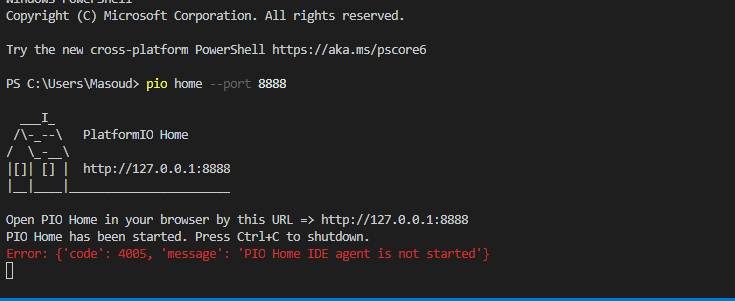
 arbabseyfola
on 25 Aug 2019
arbabseyfola
on 25 Aug 2019
Yes, you can't open a project in VSCode when running PIO Home separately from CLI. This is OK.
PIO extension loads PIO Home Server in the background and connects to it when you start VSCode. Later, when you open PIO Home UI from VScode, it connects to the same "background" server and can communicate with a VSCode client which listens for IDE commands.
I've just tested this issue and can't reproduce.
Can you reproduce this issue after these steps?
1) Open PIO IDE Terminal and type pio upgrade command
2) Close VSCode
3) Kill all Python processes via system task manager
4) Start VSCode.
Does it work now?
 ivankravets
on 25 Aug 2019
ivankravets
on 25 Aug 2019
Update: Sorry, this our bug, we forgot to release a new version of PIO Home frontend. I'll come with updates soon...
ivankravets
on 25 Aug 2019
So, new PIO Home 2.3.1 is out!
- An improved library Installation wizard
- Automatic saving of installed library to
lib_deps - Fixed issue with project opening
- Other bug-fixes
Please open PIO IDE Terminal and run pio update command. Restart VSCode.
Another option is to use PlatformIO (left side bar) > Quick Access > Upates > Update all.
ivankravets
on 25 Aug 2019
I'm having the same problem on macos.
_Project has been successfully configured and is located by this path: /Volumes/GoogleDrive/My Drive/.../project-v2.3.3.
You can open it with your favourite IDE or process with platformio run command._
I've tried:
uninstalling vscode
uninstalling platformio (using: sudo pip uninstall Platformio)
reinstalled vscode (latest version)
reinstalled platformio
rebooted
- same issue.
$ pio --version
PlatformIO, version 4.0.2

$ python --version
Python 3.7.3

$ pio home
  ___I_
 /\-_--\   PlatformIO Home
/  \_-__\
|[]| [] |  http://127.0.0.1:8008
|__|____|_______________________
Open PIO Home in your browser by this URL => http://127.0.0.1:8008
PIO Home has been started. Press Ctrl+C to shutdown.
 craigdetter
on 27 Aug 2019
craigdetter
on 27 Aug 2019
Now appears to be fixed. Needed to do File / Add Folder to Workspace...
--- That selection seemed to invoke more installation steps
This seems to have corrected it.
craigdetter
on 27 Aug 2019
Have you run a pio update? contrib-piohome 2.3.1 fixed this problem for me, and is now 2.3.2 and still working fine.
pfeerick
on 28 Aug 2019
Related issues
 tovine
·
4Comments
tovine
·
4Comments
 heumann-a
·
7Comments
heumann-a
·
7Comments
 Rotzbua
·
3Comments
Rotzbua
·
3Comments
 rkruetli
·
6Comments
rkruetli
·
6Comments
 leobel96
·
7Comments
leobel96
·
7Comments
Most helpful comment
Update: Sorry, this our bug, we forgot to release a new version of PIO Home frontend. I'll come with updates soon...