Platformio-vscode-ide: Can't type project name in PIO Home
Solution
This is a known VSCode issue https://github.com/microsoft/vscode/issues/76863. It was fixed in VSCode 1.40.2. Please update VSCode.
can't type project name on my mac vscode, but i can use web interface type project name
 morestart
All 15 comments
Sorry... can you elaborate further? Do you mean you can't enter a name for a new project in PIO Home when it's in a VSCode tab, but you can when you pop it out to a web browser?
 pfeerick
on 13 Jul 2019
pfeerick
on 13 Jul 2019
Sorry... can you elaborate further? Do you mean you can't enter a name for a new project in PIO Home when it's in a VSCode tab, but you can when you pop it out to a web browser?
yeah, i don't know why, i can't copy demo code from pio home that use vscode, but i use chrome open the pio home, it works...
morestart
on 13 Jul 2019
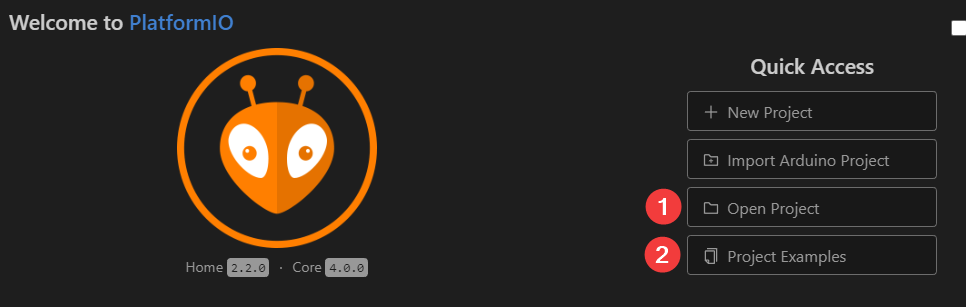
When you say copy demo code - do you mean open project (1) or project examples (2) ?
pfeerick
on 13 Jul 2019
no, it is libraries demo code
morestart
on 13 Jul 2019
I can confirm this issue.
OSX: v10.14.3
VSCode: v1.36.1
PIO: Home 2.2.0 Core 4.0.0
Occasionally when creating a "New Project" I have had the text entry boxes (this includes the search drop down menus as well) lock; no cursor appears and no text can be entered. The project can then not be created due to missing text such as a project name.
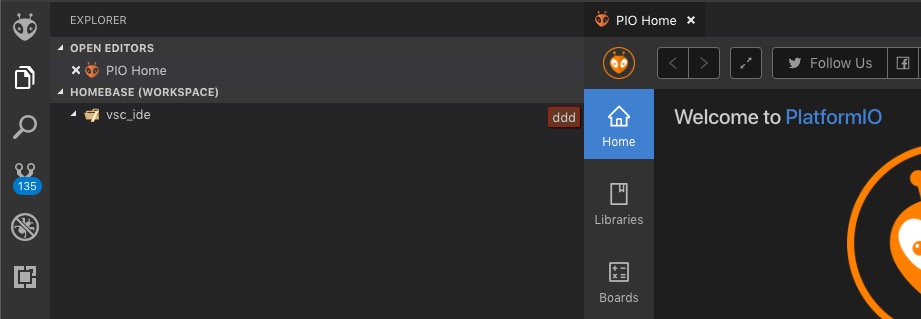
I have noticed typed text does sometime appear in a red box elsewhere on the screen (I have no idea what this other text box is for). See the attached image for a screenshot of this extra dislocated text next to the PIO Home button.
 demosthien
on 18 Jul 2019
demosthien
on 18 Jul 2019
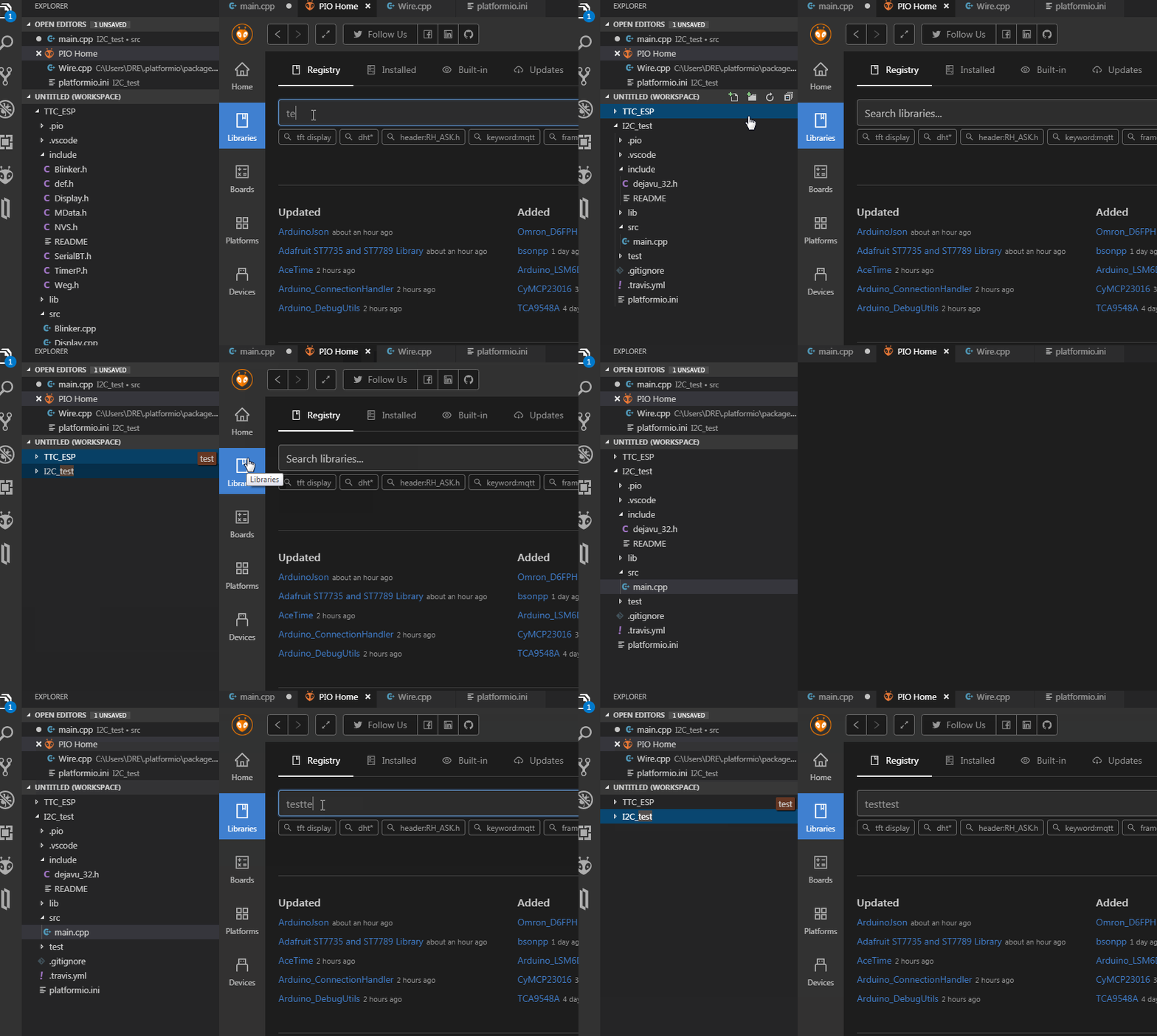
I've been able to to get this to occur multiple times now, and seems more likely to occur if it's the first time PIO Home has opened in a VSCode session... closing the PIO Home tab and reopening it seems to 'cure' it. Nothing has shown up in the the vscode debug logs so far... and it's erratic ... Eureka! I think I just found the repeatable way to trigger it...
1) Open PIO Home
2) click on some other element of VSCode - ie. sidebar icon, expand a collasped folder / project task
3) try to enter any text input into PIO Home - search project, search library, create new project... it won't have keyboard input focus :(
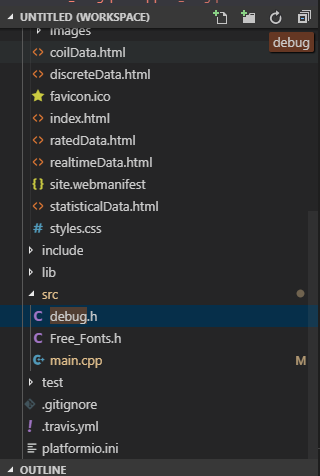
btw, the red box is to do with being able to find files in your workspace... if you have a file in one of the folders called 'debug' and you click on the file browser and just start typing 'debug' it will get highlighted for you you, and scrolled into view... the animation in the vscode release notes about improved keyboard navigation might make more sense than my explanation...
pfeerick
on 18 Jul 2019
Can confirm this problem. I tried to convince my boss to use PlatformIO over Ardunio IDE. While I tried to show him the benefits of PIO this bug occured multiple times. Real show stopper.
 Erich11
on 23 Jul 2019
Erich11
on 23 Jul 2019
Another way to get it to work again is to click on the pio home tab, and bash the tab key on your keyboard several times until you see the buttons at the top of the pio page lighting up... then it seems it has keyboard focus again.
pfeerick
on 23 Jul 2019
This is a VSCode a bug https://github.com/microsoft/vscode/issues/76863
The workaround is to double-click on PIO Home tab.
 ivankravets
on 23 Jul 2019
ivankravets
on 23 Jul 2019
Just tried it with the 1.37.0 insider build on W10 x64 as well as W7 x64. The issue persists.
Double-clicking on the PIO Home Tab works as mentioned.
Erich11
on 23 Jul 2019
The workaround appears to be working on the released v1.36.1 (on Windows 10, at least)... double clicking the PIO Home tab is returning keyboard focus to PIO Home... thanks for the find! :) Insiders 1.37 build 07-23 still needs the workaround as the bug is still present.
pfeerick
on 24 Jul 2019
Let's wait for the fix on https://github.com/microsoft/vscode/issues/76863
ivankravets
on 24 Jul 2019
Brilliant, thanks Ivan for your time in updating this, I dont know how you have time to do all these responses.
Work around on Windows10 and MAC OSX works for me.
 Galaxy-Man
on 7 Aug 2019
Galaxy-Man
on 7 Aug 2019
The issue has been fixed in https://github.com/microsoft/vscode/issues/76863
Please update VSCode to 1.40.2 or above.
ivankravets
on 26 Nov 2019
Funny you would mention that... I only just restarted VSCode to apply 1.40.2... didn't notice they'd bumped it to the October recovery build. Nice to see the back of this one! :)
pfeerick
on 26 Nov 2019
Related issues
 rkruetli
·
6Comments
rkruetli
·
6Comments
 heumann-a
·
7Comments
heumann-a
·
7Comments
 Rotzbua
·
3Comments
Rotzbua
·
3Comments
 LaBus3
·
7Comments
LaBus3
·
7Comments
 jenokizm
·
3Comments
jenokizm
·
3Comments
Most helpful comment
Can confirm this problem. I tried to convince my boss to use PlatformIO over Ardunio IDE. While I tried to show him the benefits of PIO this bug occured multiple times. Real show stopper.