Platformio-atom-ide-terminal: Uncaught Error: channel closed
events.js:160
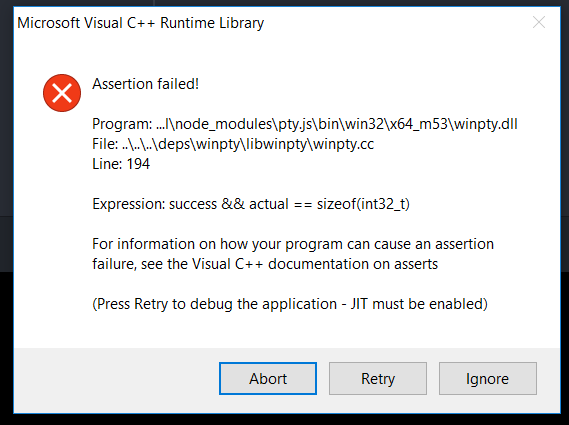
Doesn't let me you use terminal on Atom. What should I do? Anyone faced this problem before?
 aldaaga
All 43 comments
I got this problem today
 AlfieDarko
on 26 Aug 2017
AlfieDarko
on 26 Aug 2017
anyone any suggestion how to work this out?
aldaaga
on 26 Aug 2017
+1
 EswarJ
on 28 Aug 2017
EswarJ
on 28 Aug 2017
Same with me. I'm new to this so any help is appreciated.
 mrhBU67
on 28 Aug 2017
mrhBU67
on 28 Aug 2017
same. How can i fix this.
 Sanil14
on 31 Aug 2017
Sanil14
on 31 Aug 2017
I've also had the same error happen. Running Windows 10 x64. have tried in the 32 bit version of Atom and still the same problem persists.
I've also tried swapping default shell's from cmd to powershell and back to no avail.
Have installed/reinstalled C++ libraries, build tools etc and can't get around it at present.
Very interested in finding a fix for this.
 hellbenthorse
on 3 Sep 2017
hellbenthorse
on 3 Sep 2017
Same with me. I'm new to this so any help is appreciated.
 Lalit12289
on 4 Sep 2017
Lalit12289
on 4 Sep 2017
Same
 GeorgeBurac
on 7 Sep 2017
GeorgeBurac
on 7 Sep 2017
Having the same issue. Really new to atom, so not sure what to do.
Thanks
 asadkamal
on 9 Sep 2017
asadkamal
on 9 Sep 2017
Seeing the same issue with Windows10 and Atom.
 npabbisetty
on 9 Sep 2017
npabbisetty
on 9 Sep 2017
Update: I still get the error sometimes when opening a terminal in atom. However I've noticed ignoring the error the first couple of times and then when opening a new terminal if i begin typing in the terminal as soon as it initializes it will work. All future terminal instances in that atom session will also function without issue.
I don't have a fool proof way of replicating this at present as it seems to be random but random seldom is. I don't possess the technical knowledge presently to pin point it.
hellbenthorse
on 9 Sep 2017
This issue come up again and again every time PlatformIO is updated.
 thbui
on 12 Sep 2017
thbui
on 12 Sep 2017
Having same problem in windows 10
 RayTimlin
on 14 Sep 2017
RayTimlin
on 14 Sep 2017
also having the same issue, is there a fix found for this issue
 naziasc
on 16 Sep 2017
naziasc
on 16 Sep 2017
Same 👎
 EdgarDelaRosa
on 19 Sep 2017
EdgarDelaRosa
on 19 Sep 2017
same here
 ShivaShankarPuvvada
on 21 Sep 2017
ShivaShankarPuvvada
on 21 Sep 2017
same here
 Freekdirkx
on 21 Sep 2017
Freekdirkx
on 21 Sep 2017
Same issue, someone managed to solve it?
 MichFe
on 24 Sep 2017
MichFe
on 24 Sep 2017
Resolved on my windows 10 box. Appears to be an issue with node-gyp building some native extensions for pty.js. Its a bit of a faff to fix, but here it is anyway:
- Open up cmd.exe as admin
- npm install --global --production windows-build-tools
- Uninstall platformio-ide-terminal
- Reboot PC
- Reinstall platformio-ide-terminal
- cd ~/.atom/packages/platformio-ide-terminal/node_modules/pty.js
- node scripts\install.js
You should see in the terminal the native extensions being build correctly, it prints a lot of junk out to the console but you're looking for:
 Generating code
  Finished generating code
  pty.vcxproj -> C:\Users\<userid>\.atom\packages\platformio-ide-terminal\node_modules\pty.js\build\Release\\pty.node
  pty.vcxproj -> C:\Users\<userid>\.atom\packages\platformio-ide-terminal\node_modules\pty.js\build\Release\pty.pdb (Full PDB)
After that just restart atom and you're all set with a working terminal!
 concon121
on 25 Sep 2017
concon121
on 25 Sep 2017
Should be "npm install --global --production windows-build-tools" , right?
 erkobg
on 26 Sep 2017
erkobg
on 26 Sep 2017
Yeah sorry I was half asleep when I wrote that, edited and updated my comment for future readers. Cheers!
concon121
on 27 Sep 2017
@concon121 Thanks your wisdom mate, fixed it right up. Cheers!
hellbenthorse
on 27 Sep 2017
Here is what worked for me:
Settings - Install Packages - Search for platformio-ide-terminal
Since the package is already installed, select 'Uninstall'.
Close Atom - Reopen Atom
Back to Install Packages and re-install platformio-ide-terminal
Hope it works to you as well. I am using Windows 7 (64-bit) system.
 kmohan10
on 27 Sep 2017
kmohan10
on 27 Sep 2017
Unfortunately for me any of these instructions don't work.
Windows 10 (64) ...
Any other ideas?
erkobg
on 7 Oct 2017
@erkobg do you get a stack trace or anything printed out to the developer console that could help us debug the issue?
concon121
on 7 Oct 2017
In the Dev Console I see:
events.js:106 A dynamic link library (DLL) initialization routine failed.
\\?\C:\Users\MY_USER\.atom\packages\platformio-ide-terminal\node_modules\pty.js\build\Release\pty.node
(anonymous) @ <embedded>:72772
(anonymous) @ <embedded>:72849
module.exports.Emitter.simpleDispatch @ <embedded>:64068
module.exports.Emitter.emit @ <embedded>:64184
(anonymous) @ <embedded>:72801
emitTwo @ events.js:106
emit @ events.js:191
process.nextTick @ internal/child_process.js:752
_combinedTickCallback @ internal/process/next_tick.js:67
_tickCallback @ internal/process/next_tick.js:98
events.js:106 Objectcode: "ENOENT"errno: -4058path: "C:\Users\MY_USER\.atom\packages\platformio-ide-terminal\node_modules\pty.js\bin\win32\x64_m53\pty.node.bak"syscall: "lstat"__proto__: Object
(anonymous) @ <embedded>:72775
(anonymous) @ <embedded>:72849
module.exports.Emitter.simpleDispatch @ <embedded>:64068
module.exports.Emitter.emit @ <embedded>:64184
(anonymous) @ <embedded>:72801
emitTwo @ events.js:106
emit @ events.js:191
process.nextTick @ internal/child_process.js:752
_combinedTickCallback @ internal/process/next_tick.js:67
_tickCallback @ internal/process/next_tick.js:98
erkobg
on 7 Oct 2017
@concon121 Of your 7 step solution, after step 5, I still get the same error in the terminal and I'm not able to run the 6th and 7th step in it (doesn't allow to enter any text). Kindly help. Mine is a Windows 10 (64).
 surajgampa
on 18 Oct 2017
surajgampa
on 18 Oct 2017
Got this error when on W10 1703, upgrading to 1709 seems to have fixed it.
 h3rmanj
on 19 Oct 2017
h3rmanj
on 19 Oct 2017
I've got the same error, can anyone help please...
Error: channel closed
at ChildProcess.target.send (internal/child_process.js:548:16)
 abhirathod07
on 20 Oct 2017
abhirathod07
on 20 Oct 2017
Same. Bump.
 lffg
on 3 Nov 2017
lffg
on 3 Nov 2017
same.
 antonapua
on 10 Nov 2017
antonapua
on 10 Nov 2017
me too W10 64
 1985michel
on 17 Nov 2017
1985michel
on 17 Nov 2017
Hello,
Windows 10 64 here.
after checking the referenced issue https://github.com/jeremyramin/terminal-plus/issues/280
I was able to fix the issue by doing following :
- Closed PlatformIO
- Open CMD
- Navigate to
C:\Users\USERNAME\.atom\packages\platformio-ide-terminal(eg. CDC:\Users\USERNAME\.atom\packages\platformio-ide-terminal) - type npm install and wait to complete
- type apm rebuild and wait to complete
- Start PlatformIO
- Try any Serial Monitor or "Upgrade platforms, packages and libraries"
( it can give the same error first time, ignore and start Serial Monitor or "Upgrade platforms, packages and libraries" again, second time)
Hope this helps.
erkobg
on 22 Nov 2017
Same issue here..
 collins73
on 24 Nov 2017
collins73
on 24 Nov 2017
for windows
run atom as administrator
close atom
then run atom normally not as an administrator
 ElecTreeFrying
on 1 Dec 2017
ElecTreeFrying
on 1 Dec 2017
Did anyone manage to run it properly? I tried but wasn't able to run it on Atom. I use Windows 10.
I tried the npm install (...) but my prompt didn't reconize it
 daev3
on 13 Dec 2017
daev3
on 13 Dec 2017
@Barenco I was able to do what @erkobg did and it worked. You have to install node.js first.
[https://nodejs.org/en/]
After that, try the steps again.
 edivaldodelgado
on 18 Dec 2017
edivaldodelgado
on 18 Dec 2017
Well, testing from a long time so far ... issue tends to come over and over again.... it is really annoying ... I used to ignore it somehow so far but in long term it would be better if they fix the issue from the root...
erkobg
on 18 Dec 2017
@erkobg that's true. In fact, I had some troubles with conda virtual environments after, then I decide to use cmd itself, in another windows.
edivaldodelgado
on 18 Dec 2017
@edivaldodelgado indeed it work! Thank you guys!
daev3
on 7 Jan 2018
I have a "Uncaught Error: channel closed"
event.js.160
my OS is win 10
 Rayongice
on 30 Jan 2018
Rayongice
on 30 Jan 2018
also having this error, have followed all the various instructions in this thread but to no avail. does anyone have any other ideas?
 buttrs2013
on 21 Mar 2018
buttrs2013
on 21 Mar 2018
Please retest again with platformio-atom-ide-terminal 2.9.0 is using node-pty-prebuilt instead unmaintained and outdated pty.js
 the-j0k3r
on 7 Feb 2019
the-j0k3r
on 7 Feb 2019
Related issues
 conradolucas
·
5Comments
conradolucas
·
5Comments
 fusion809
·
3Comments
fusion809
·
3Comments
 v3ss0n
·
4Comments
v3ss0n
·
4Comments
 JoanaRFerreira
·
4Comments
JoanaRFerreira
·
4Comments
 alexmylonas
·
3Comments
alexmylonas
·
3Comments
Most helpful comment
for windows
run atom as administrator
close atom
then run atom normally not as an administrator