Planner: My Inbox is gone after system reinstall
Describe the bug
My inbox tasks continually disappear.
To Reproduce
Steps to reproduce the behaviour:
- Start Planner for the first time (create DB), fill it out, fill Inbox and backup the DB file;
- Copy backup to another machine and start Planner there;
- Change DB location in settings to your backup;
- See Inbox is gone, everything else remain;
- Try to fill Inbox again;
- Try to open it a couple of times, after reboot for example;
- See it's gone again.
Expected behaviour
I'm clearly not expecting to lose all my inbox tasks.
Desktop:
- OS: Linux Mint 20 Cinnamon
- Version: v2.4.6 (Flathub)
Additional context
I was backing up my Planner DB, just like KeePassXC and preparing for system reinstall. After installing fresh system, installing Planner and changing DB path to my home directory with backup I saw that all my Inbox tasks are gone (a lot of them). I started to fill it again but after some time I saw that it's gone again.
 antimech
All 3 comments
I've found something interesting. When I launched search (Ctrl + F) I was searching for some of my tasks and surprisingly I saw one of my tasks that was gone, I clicked on it and entered Inbox with all my tasks that was gone but the Inbox is not visible on my side panel. I mean it's visible but that Inbox is empty, so it looks like there are two Inbox now.
Or Planner consider this Inbox as a invisible project:
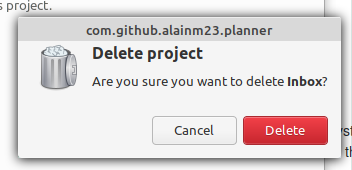
I've moved all my task to the "real" Inbox and removed the "fake" Inbox project, it fixed my problem temporarily.
antimech
on 30 Jul 2020
Maybe related to https://github.com/alainm23/planner/issues/432
 jounathaen
on 4 Aug 2020
jounathaen
on 4 Aug 2020
I can confirm the bug, I'm developing a better way to be able to create a backup.
 alainm23
on 13 Aug 2020
alainm23
on 13 Aug 2020
Related issues
 joe733
·
7Comments
joe733
·
7Comments
 Philip-Scott
·
4Comments
Philip-Scott
·
4Comments
 roymckenzie
·
3Comments
roymckenzie
·
3Comments
 zedtux
·
4Comments
zedtux
·
4Comments
 zkmrgirish
·
5Comments
zkmrgirish
·
5Comments
Most helpful comment
I can confirm the bug, I'm developing a better way to be able to create a backup.