Planner: Reconsider the choice of Ctrl + Tab as a keyboard shortcut
Describe the bug
Ctrl + Tab is very commonly used to navigate tabs in browsers. It's _very_ inconvenient that Planner steals this keyboard shortcut for itself (this is made worse by #420).
A better choice IMHO may be Super + T (for "to do") or similar.
To Reproduce
Steps to reproduce the behavior:
- Open your browser of choice
- Press Ctrl+Tab
- Planner's "Quick Add" pops up.
Expected behavior
The browser should jump to the next tab instead.
Screenshots
If applicable, add screenshots to help explain your problem.
Desktop (please complete the following information):
- OS or DE: elementary OS Hera 5.1
- Version: 2.4.2
Additional context
N/A
 jmc-88
All 16 comments
I should mention this is the reason why I uninstalled Planner -- it made my web browser unusable.
I hope to install it again once this is fixed.
 12people
on 26 Jun 2020
12people
on 26 Jun 2020
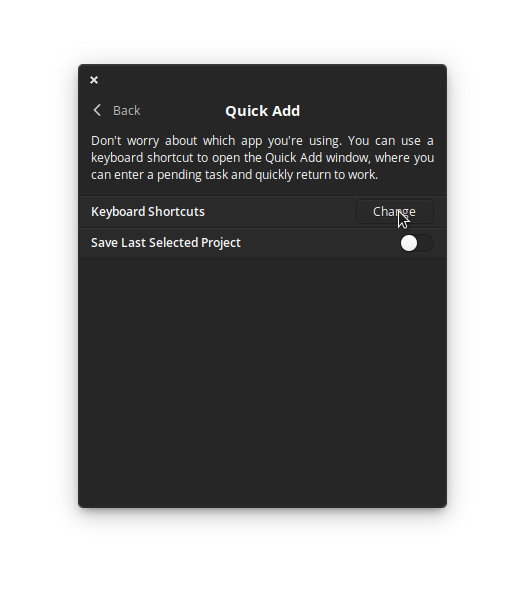
Thanks for commenting, I will consider it. By the way the keyboard shortcut to use Quick Add can be changed from the Preferences in Planner. Go to Preferences > Quick Add
 alainm23
on 27 Jun 2020
alainm23
on 27 Jun 2020
If this is a problem I would like to know what should be the default keyboard shortcut for Quick Add?
alainm23
on 27 Jun 2020
Thanks for commenting, I will consider it. By the way the keyboard shortcut to use Quick Add can be changed from the Preferences in Planner. Go to Preferences > Quick Add
Yes, though #420 suggests that doesn't actually work (I haven't tested this myself so can't confirm).
If this is a problem I would like to know what should be the default keyboard shortcut for Quick Add?
In my initial report I suggested Super+T, though I realize now that would clash even with my own keyboard shortcuts... (I set it up for opening Terminal)
In the end I don't think there's the One True Shortcut™ that works flawlessly for every user. Maybe a good compromise is to ask the user upon first start whether they want to set up such a shortcut to whatever they think is appropriate.
jmc-88
on 27 Jun 2020
Thanks for commenting, I will consider it. By the way the keyboard shortcut to use Quick Add can be changed from the Preferences in Planner. Go to Preferences > Quick Add
Oh, awesome!
Could you add this option to Preferences > Keyboard shortcuts as well? That's where I looked for it and, since all entries were read-only, thought they were impossible to change.
12people
on 28 Jun 2020
If this is a problem I would like to know what should be the default keyboard shortcut for Quick Add?
Shortcuts using Ctrl or Shift + Ctrl tend to be used inside applications (as per the GNOME HIG ), so they shouldn't be used for a global "Quick add" shortcut.
The shortcut also shouldn't be any standard system shortcut (a subset of those here: elementaryOS, GNOME, KDE).
As for what it SHOULD be, I'd recommend looking at what competing apps use. Notably, Todoist uses Ctrl + Alt + A on Windows, so I'd recommend using that here.
12people
on 28 Jun 2020
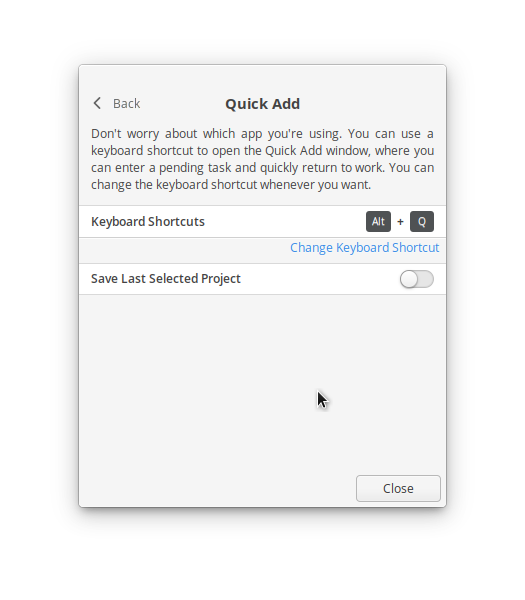
I've added a button to make the feature easier to discover.
alainm23
on 28 Jun 2020
I've added a button to make the feature easier to discover.
Great!
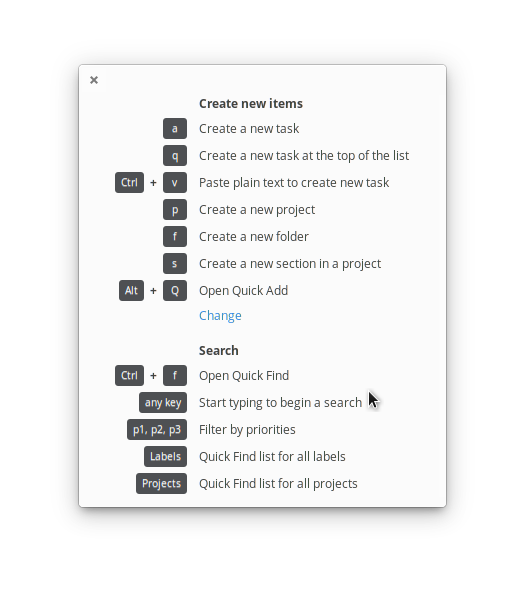
Could you add it to the Keyboard Shortcuts settings screen as well? That's the only place where I initially looked. It didn't even occur to me that one could change the shortcut from somewhere else.
12people
on 28 Jun 2020
@12people Sure
alainm23
on 28 Jun 2020
Awesome, thanks! :)
12people
on 29 Jun 2020
Just fyi: alt+q and alt+shift+q are used in some windows managers like i3 by default. E.g. to close a window or session.
 lightonflux
on 30 Jun 2020
lightonflux
on 30 Jun 2020
Can we make this optional, or an enable/disable option? I don't want to select a shortcut for feature I wouldn't use that could potentially break some other application.
 quentincaffeino
on 1 Jul 2020
quentincaffeino
on 1 Jul 2020
hi, i'm using planner on mint cinnamon 20.00. the kbd shortcut doesnt work. even if i try a custom set of keyboard. only me ?
 westdam
on 3 Jul 2020
westdam
on 3 Jul 2020
Hey there! :) I need a slightly different thing regarding Quick Add - to completely disable this feature.
Specifically - when I remove the shortcut, and I remove it from system shortcuts as well, on the next login I get a notification the CTRL+TAB shortcut has been installed for me... Which is quite annoying. Would it be possible to do something about it? :)
Thanks!
 deekej
on 14 Jul 2020
deekej
on 14 Jul 2020
I stumbled over this as i noticed that my ctrl+tab is not working anymore.
IMHO planner should not set any shortcuts on its own. This is a highly user driven setting and therefor should not contain a default and rather ask a user for his personal choice.
There are combinations that are to be considered as defacto standard. And that planner overwrites a strongly used default like ctrl+tab should be avoided at all.
Every user has another setup. As mentioned above, if you run i3 you would forcefully overwrite a highly customized setting which leads to a lot of digging around and finding the origin of this issue. This could simply solved by not setting any shortcut as default.
Please, make it optional...
 T8xi
on 14 Jul 2020
T8xi
on 14 Jul 2020
Edit: The reason this is so disturbing is the global type of this setting. The shortcut does not introduce itself and one is wondering why the ctrl+tab shortcut is not working anymore.

Sure you can delete the global setting and change the shortcut in planner to something different, but you will disturb everyone who is using this shortcut on a regular basis.
Personally I first thought there seems to be a bug with Arch / Gnome do to its rolling release and it took me quite some time to find out that planner is the source of "evil".
The global introduction of this shortcut will be unnoticed by most users and will cause more pain. So besides the poor choice of the shortcut keys (which should be changed aswell) this should really be disabled / optional as default.
(P.S not everybody is using flatpak as its main source. But at this point I don't know if this is an AUR package or planner issue)
T8xi
on 14 Jul 2020
Related issues
 Philip-Scott
·
4Comments
Philip-Scott
·
4Comments
 brcmesquita
·
6Comments
brcmesquita
·
6Comments
 rahayon
·
4Comments
rahayon
·
4Comments
 roymckenzie
·
3Comments
roymckenzie
·
3Comments
 marbetschar
·
4Comments
marbetschar
·
4Comments
Most helpful comment
Thanks for commenting, I will consider it. By the way the keyboard shortcut to use Quick Add can be changed from the Preferences in Planner. Go to Preferences > Quick Add
