Planner: There should be a possibility to export/import my database
For backup purposes.
Perhaps the approach of KeepassXC is exciting to mention here. I have always two files: user.kdbx & user.old.kdbx. As soon as a change is made to the database, a backup from before the change remains. Maybe this is also helpful if a backup file suddenly stops working.
Maybe a solution can be thought together with https://github.com/alainm23/planner/issues/105?
 4jNsY6fCVqZv
All 23 comments
I was about to open a ticket for the same request.
Appreciate it if export/import features are prioritised. As new users, people will have to put a lot of faith and time into this application without having the ability to easily restore/backup the data. This could be a deal breaker for a lot of people.
Mucho gracias para esta aplicación :slightly_smiling_face:
 unsungNovelty
on 23 Feb 2020
unsungNovelty
on 23 Feb 2020
If you could choose where your data ist stored, would that help taking a backup? Just having another file with almost the same content on the same filesystem is not really a backup.
But if you could store your data where all other files are stored that have a real backup. That would help much more. Right?
 romixch
on 19 Apr 2020
romixch
on 19 Apr 2020
Of course, It would be a great feature.
 alainm23
on 19 Apr 2020
alainm23
on 19 Apr 2020
@romixch
Just having another file with almost the same content on the same filesystem is not really a backup.
With this example I want to address a different quality. KeePassXC gives you the possibility to create a second file with each save, in case the first file becomes somehow corrupt and then can't be restored.
But if you could store your data where all other files are stored that have a real backup. That would help much more. Right?
Yeah, right! And e.g. in case of a system migration I would like to be able to select the location from where I want to restore my Planner data/backup. This would then describe the reverse process of a backup scenario.
4jNsY6fCVqZv
on 19 Apr 2020
Nice. I would like to contribute this feature. In fact I already started. I would put it to the general section of the preferences dialog:
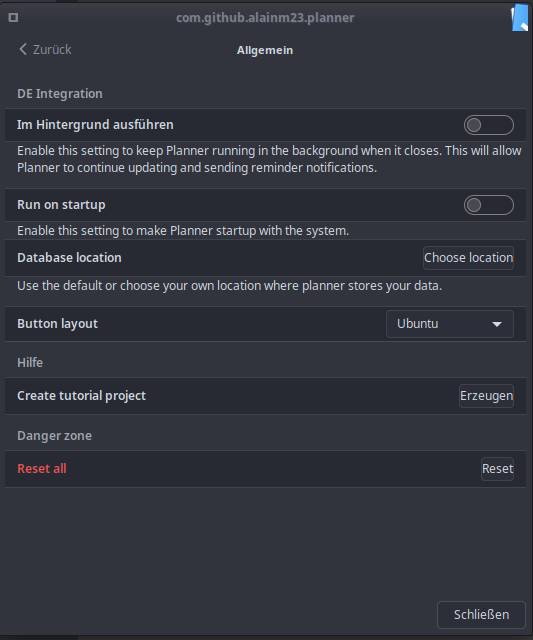
Your thoughts @alainm23 @4jNsY6fCVqZv ?
romixch
on 19 Apr 2020
@romixch Thank you very much for your help. First I would recommend you to install these dependencies so that Planner works correctly elementary-theme elementary.icons
To do this work it is only necessary to change the path where Planner can find the Database file.
https://github.com/alainm23/planner/blob/master/src/Services/Database.vala#L80
Remember to display an confirmation alert to make this change and copy the current database to the selected directory and and reopen the database so that Planner can save the data in the new directory correctly.
https://github.com/alainm23/planner/blob/master/src/Services/Database.vala#L87
alainm23
on 20 Apr 2020
Looks like we are on the same page. Going to implement it. 👌
romixch
on 20 Apr 2020
@romixch What exactly do you want to implement?
Export, import and the backup file?
4jNsY6fCVqZv
on 20 Apr 2020
I would implement an ability to choose where to store your data. Now the file is just placed somewhere in your home directory. But it is not easy to find out where.
With that feature you can:
- See where your data is stored.
- Select a different location where your backup is kicking in.
- Restore that file, when your computer crashed, got lost or burned up.
I personally will store the file in ~/Nextcloud/organize/planner.db. Because I know that all in the folder Nextcloud is going to be backed up.
romixch
on 20 Apr 2020
Restore that file, when your computer crashed, got lost or burned up.
What would a user interface look like to make this possible?
I personally will store the file in ~/Nextcloud/organize/planner.db. Because I know that all in the folder Nextcloud is going to be backed up.
What do you do if the file somehow gets corrupted and you can't restore it from your Nextcloud?
4jNsY6fCVqZv
on 20 Apr 2020
Restaure ese archivo, cuando su computadora se bloqueó, se perdió o se quemó.
Remember to validate if a database file exists in the selected folder, if this happens, ask the user if he wants to restore or copy and replace the existing database file.
What do you do if the file somehow gets corrupted and you can't restore it from your Nextcloud?
You can validate the database file from here.
https://github.com/alainm23/planner/blob/master/src/Services/Database.vala#L91
alainm23
on 20 Apr 2020
Where is the database file now?
I know, I can't import now, but I want to save it offline. I don't want to use todoist for privancy reasons.
 mateHD
on 20 Apr 2020
mateHD
on 20 Apr 2020
@mateHD
AppCenter:
/home/<user>/.local/share/com.github.alainm23.planner
Flatpak:
/home/<user>/.var/app/com.github.alainm23.planner/data/com.github.alainm23.planner
alainm23
on 20 Apr 2020
@4jNsY6fCVqZv
Restore that file, when your computer crashed, got lost or burned up.
What would a user interface look like to make this possible?
I guess that depends on your backup tool.
What do you do if the file somehow gets corrupted and you can't restore it from your Nextcloud?
That would mean that I did not have a good backup strategy. Which I should have independently of Planner.
I understand that a .old.db file may help in some cases. But it does not replace a backup strategy. In order to have such a strategy, you have to know where your data is located at least. It is even easier when you can configure it yourself.
My problem with creating this .old.db file is the time when to create it. Planner saves data all the time. There is no such trigger as saving that happens after major changes. So the old.db file would look pretty much the same as the original file.
romixch
on 20 Apr 2020
@mateHD
AppCenter:
/home/<user>/.local/share/com.github.alainm23.planner
Flatpak:
/home/<user>/.var/app/com.github.alainm23.planner/data/com.github.alainm23.planner
Wish I've knew this before. I tried to search and couldn't find it. Two days ago I somehow corrupted all my data while trying to fix a font issue in my Planner Flatpak. It is going to be super painful to rewrite all the tasks because I also don't use Todoist for privacy reasons.
Am just glad that some options are going to be available. Hope this get shipped soon so that my situation doesn't repeat. THanks for the getting the conversation going! :slightly_smiling_face:
unsungNovelty
on 21 Apr 2020
@alainm23
On my fork, I have now incorporated the database settings. The path is stored in the settings and it can be changed and switched back to the default path.
Now I would like to let all UI elements reload their content. But this seems to be quite a change. So I would like to discuss this with you before I make changes that you don't agree with.
I would like to introduce a signal on the service Database that is fired when the database is connected. The elements have then to load their data from the database and display it. This will be the case when the app starts up and when the user changes the database location.
This would not be that much of a change and may even lead to a cleaner design.
Alternatively, I could also try to restart the app. Or I just close it and ask the user to start it again.
What do you think about that?
romixch
on 24 Apr 2020
@romixch
I guess that depends on your backup tool.
I am talking about the future Planner UI, which allows me to re-import a previously exported database. By the way, I still don't feel that the choice of location is an export in the sense that I wanted it to be in this issue. I rather imagined some kind of button or dialog.
I understand that a .old.db file may help in some cases. But it does not replace a backup strategy.
This is intended as a supplementary feature. Not as a replacement for a backup strategy. I suspect that many less tech-savvy people do not use backup strategies.
The idea with the second file would be to have a fallback if no backup strategy is used.
My problem with creating this .old.db file is the time when to create it. Planner saves data all the time. There is no such trigger as saving that happens after major changes. So the old.db file would look pretty much the same as the original file.
What about defined time intervals? So save the database every x minutes.
4jNsY6fCVqZv
on 25 Apr 2020
This are all good points you just made. All of those are technically not that difficult to implement. And I'd be happy to contribute.
For my personal use the location is of best value.
For the import and the location change I need an answer from Alain before I can proceed.
romixch
on 25 Apr 2020
@romixch Thank you very much for working at Planner. There are a few issues that I would like to discuss before going further with this feature.
- I understand the idea of selecting a new location to store the database file and be able to restore it. However, what if the user has projects synced with Todoist?
I would like to introduce a signal on the service Database that is fired when the database is connected. The elements have then to load their data from the database and display it. This will be the case when the app starts up and when the user changes the database location.
I like the idea to implementing a global signal to restore everything.
This is intended as a supplementary feature. Not as a replacement for a backup strategy. I suspect that many less tech-savvy people do not use backup strategies.
The idea with the second file would be to have a fallback if no backup strategy is used.
@4jNsY6fCVqZv Right, this will be a complementary feature, export and import is still in the plans in the future.
alainm23
on 25 Apr 2020
@alainm23
Oh. I did not think of todoist yet. I did not have a closer look at the code now. Would it be sufficient to just call the sync() method?
So maybe I first work on the global signal to restore everything. This needs to be done before we can do import or relocation of the database.
romixch
on 25 Apr 2020
@romixch Thanks for your positive feedback!
@alainm23 Thank you that import and export will be part of your future considerations!
When I read your thoughts, I wonder if it would be better to open a new issue for this. Spontaneous impulse: "Support custom database location".
4jNsY6fCVqZv
on 25 Apr 2020
When I read your thoughts, I wonder if it would be better to open a new issue for this. Spontaneous impulse: "Support custom database location".
Sound reasonable to me.
romixch
on 27 Apr 2020
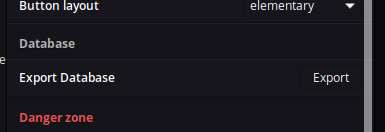
Export
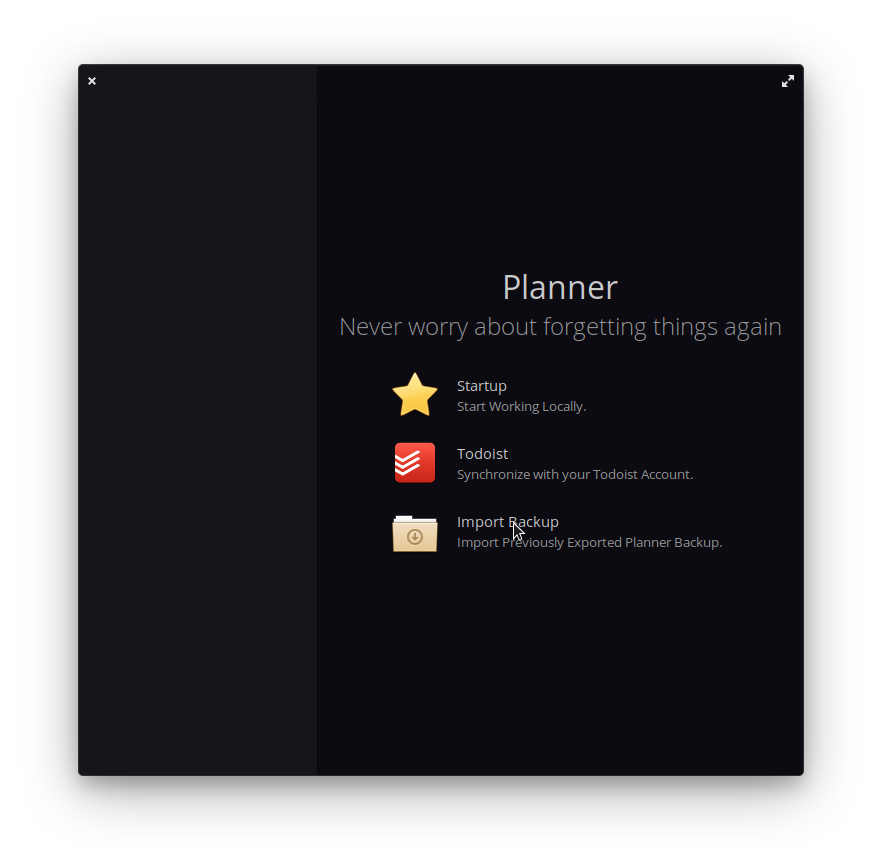
Import
alainm23
on 14 Sep 2020
Related issues
 ie900
·
5Comments
ie900
·
5Comments
 antimech
·
3Comments
antimech
·
3Comments
 Philip-Scott
·
4Comments
Philip-Scott
·
4Comments
 williamd1k0
·
7Comments
williamd1k0
·
7Comments
 zkmrgirish
·
5Comments
zkmrgirish
·
5Comments
Most helpful comment
Wish I've knew this before. I tried to search and couldn't find it. Two days ago I somehow corrupted all my data while trying to fix a font issue in my Planner Flatpak. It is going to be super painful to rewrite all the tasks because I also don't use Todoist for privacy reasons.
Am just glad that some options are going to be available. Hope this get shipped soon so that my situation doesn't repeat. THanks for the getting the conversation going! :slightly_smiling_face: