Pkp-lib: Section policies are not displayed anywhere
 asmecher
All 35 comments
Hi there,
would you mind if I solve this issue and provide a PR?
Imho the task would be to add some code according to your comment in the forums
... it’s worth displaying this in the submission process and possibly the About areas
So lonG
 ViRuSTriNiTy
on 3 Sep 2018
ViRuSTriNiTy
on 3 Sep 2018
Yes, please do -- I'd be happy to review both the interface (where you put the data) and the code aspects if you have a proposal.
asmecher
on 6 Sep 2018
(Assigning to @defstat for when a pull request is available for review)
asmecher
on 11 Sep 2018
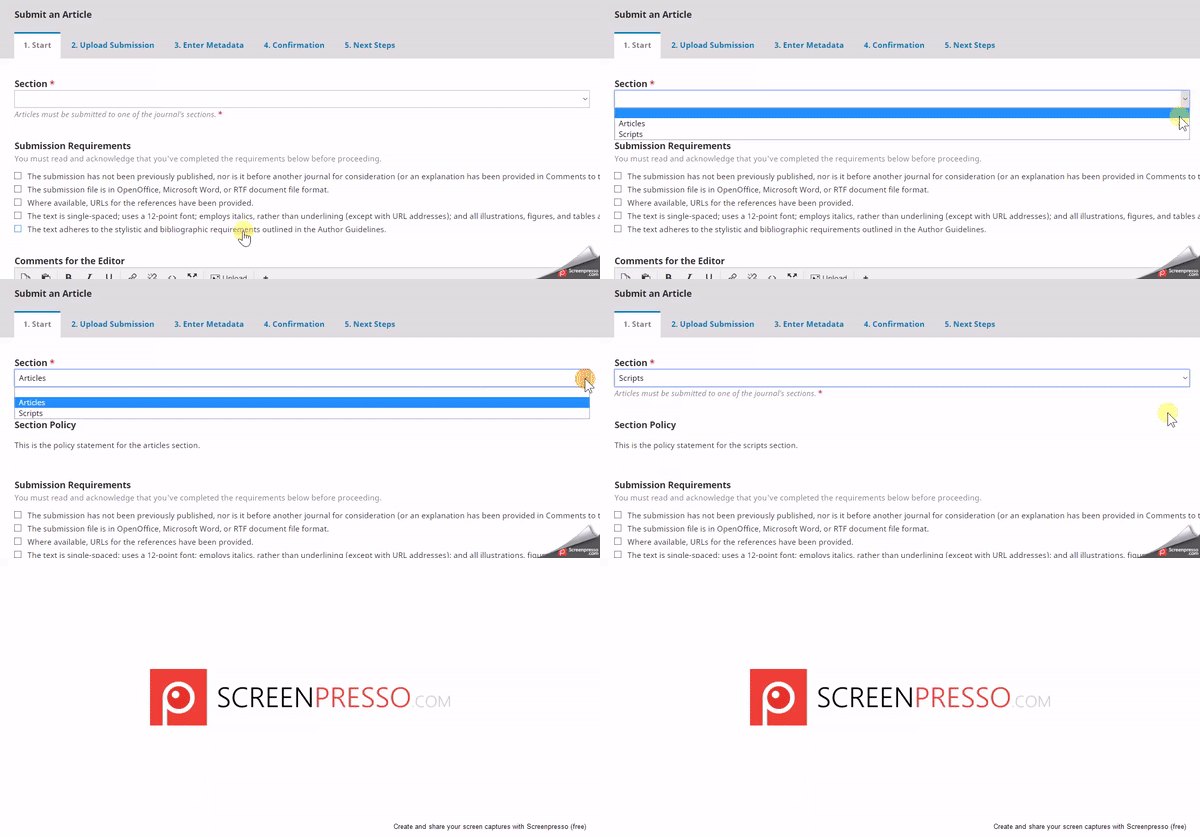
Finished implementing the section policies.
Submission process step 1
Added a dynamic update of the section policy based on the section policy selection.
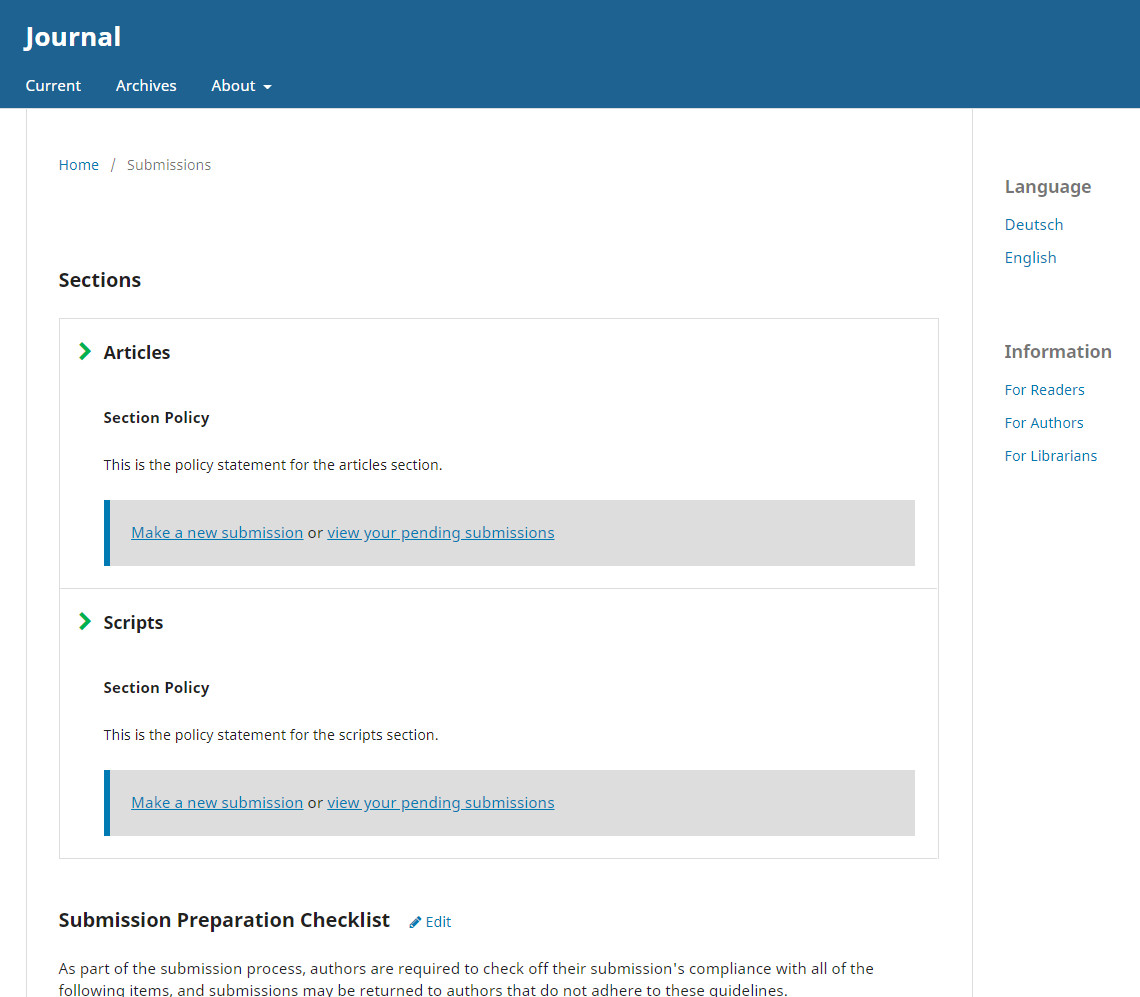
Submissions page
Added a list of sections whereas each section shows its policy and the related make a submission / view submissions / login / register links
What do you say?
ViRuSTriNiTy
on 27 Sep 2018
Looks good to me, @ViRuSTriNiTy! @stranack, any objections?
asmecher
on 2 Oct 2018
@asmecher @stranack Finished my work. Please let me know when something is unclear / not correct.
ViRuSTriNiTy
on 11 Oct 2018
Thanks, @ViRuSTriNiTy, that's good work. I've added a review to each PR.
asmecher
on 12 Oct 2018
Hi @ViRuSTriNiTy, this looks really great! Thanks for all the hard work. I have raised a couple of PRs that you can merge to your branch:
https://github.com/ViRuSTriNiTy/pkp-lib/pull/1
https://github.com/ViRuSTriNiTy/ojs/pull/1
These changes do the following:
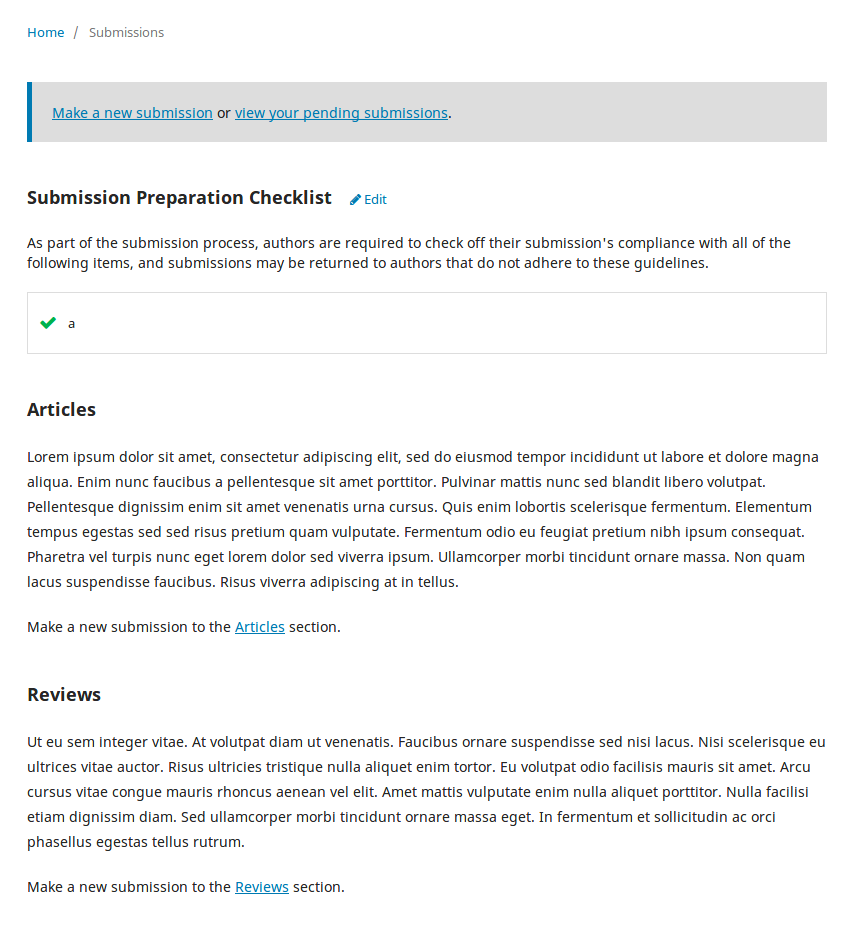
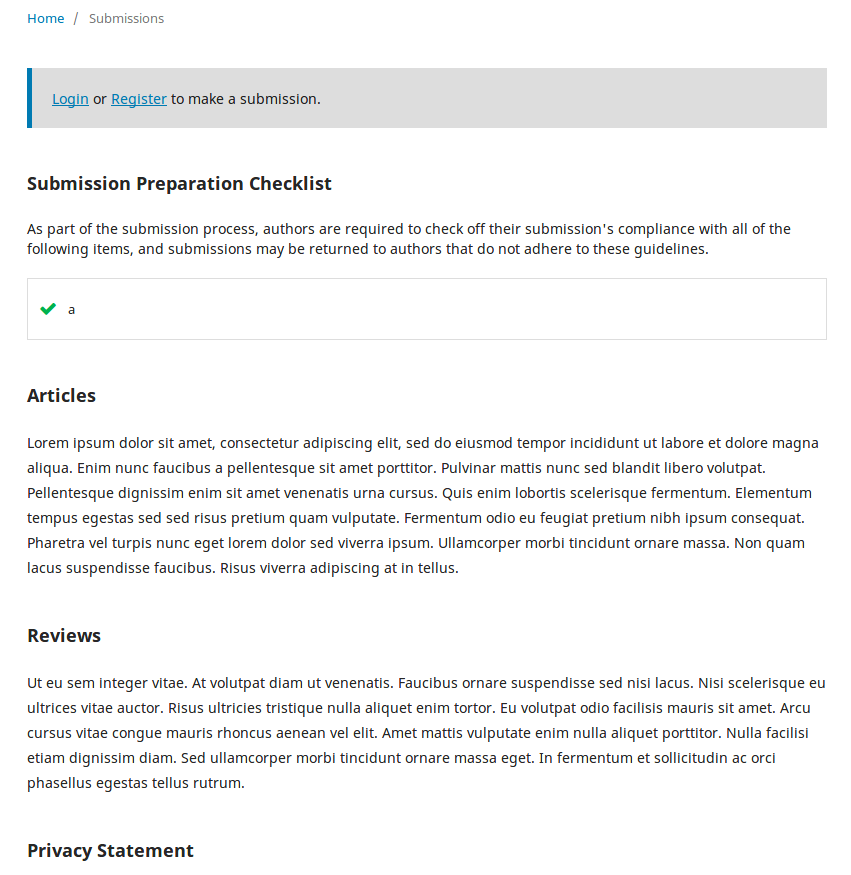
I've rearranged how we display the section policies on the reader-facing submissions page. We want to keep the call-to-action at the very top of the page. I've also moved the policies down a little bit in the order of content, and provided separate, smaller links to the section-specific submission URL. (See screenshots below.)
I've made a few adjustments to how we're fetching the data in
AboutHandler. These will reduce the number of db calls we make pulling the section information now. No big deal, but since this is a reader-facing page it's good to keep them as light as possible.I've created a JS handler for displaying the section policy when it is selected during submission. There's a lot of boilerplate here, but it's the best we can do for now until we convert this over to the new forms structure.
Hope that's all ok. Feel free to raise any questions you might have! :+1:
And here are screenshots of the submissions page now. Logged in:
And logged out:
 NateWr
on 12 Oct 2018
NateWr
on 12 Oct 2018
Hi @NateWr,
thanks for helping me out here. I found 2 issues in you commits after merging:
The newly introduced JS-Handler is needed in review process too
https://github.com/ViRuSTriNiTy/pkp-lib/pull/1/files#r225006516Section without policy is not displayed
https://github.com/ViRuSTriNiTy/pkp-lib/pull/1/files#r225006618
Please answer my comments. Thanks.
ViRuSTriNiTy
on 14 Oct 2018
Replied, thanks! :+1:
NateWr
on 15 Oct 2018
All reviews resolved. Please let me know if something is missing.
ViRuSTriNiTy
on 22 Oct 2018
@NateWr I've added a new review regarding the editor restriction handling, please have a look:
https://github.com/ViRuSTriNiTy/pkp-lib/pull/1#pullrequestreview-167603416
ViRuSTriNiTy
on 23 Oct 2018
Thanks! Please open a new PR whenever you're ready.
NateWr
on 24 Oct 2018
@NateWr Review resolved, see commit above. No open points now, again, please let me know if something is missing.
ViRuSTriNiTy
on 25 Oct 2018
Thanks @ViRuSTriNiTy! Sorry for the delay on our end. So, we just need to get the tests passing on your PR. In order to get the tests running properly, you need to create what we call a submodule commit.
This is a commit in OJS that adds the lib/pkp submodule (and any other submodules that have been changed -- none in your case). The commit has a special syntax, which tells our travis testing scripts to look for the right pkp-lib pull request to use when running the tests.
Usually it will look like this from the command line:
cd <your-ojs-directory>
git add lib/pkp
git commit -m "Submodule update ##ViRuSTriNiTy/issue-2638##
git push
That should get the tests kicked off properly. After a minute or so, you should see the Travis test showing as in-progress in your OJS PR:
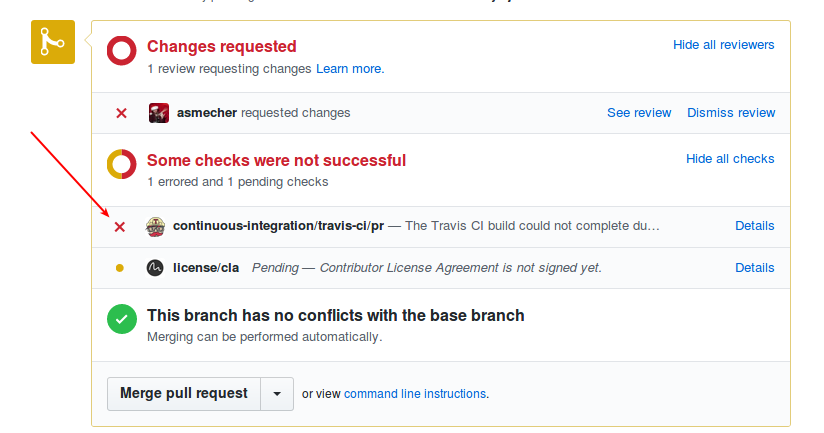
The tests may flag up issues. Let me know when it has completed and if you need any help interpreting any error messages. :+1:
(Lastly, sometimes it is necessary to rebase your lib/pkp submodule against the latest master. Otherwise it will create a merge conflict and the tests won't run.)
NateWr
on 30 Oct 2018
@NateWr I have executed the commands but the commit failed as there were no change. So I formatted some lines to get a commit going and after I pushed the changes and the Travis thing was triggered it shows the following results: https://travis-ci.org/pkp/ojs/builds/460432368?utm_source=github_status&utm_medium=notification
I have to say that currently I don't really understand what is going on here G
ViRuSTriNiTy
on 27 Nov 2018
@ViRuSTriNiTy can you share links to your PRs here? I'll take a look and see if I can spot what's going on.
NateWr
on 28 Nov 2018
@NateWr The PRs are automagically linked to this issue at the top, see paragraph "This was referenced on 11 Oct ..."
The PR affected by yesterdays commit this one:
https://github.com/pkp/ojs/pull/2132
Does this help?
ViRuSTriNiTy
on 28 Nov 2018
I have a hard time finding them in all the noise, so I like to post them in a comment.
PRs:
https://github.com/pkp/ojs/pull/2132
https://github.com/pkp/pkp-lib/pull/4135
NateWr
on 29 Nov 2018
Ok, it looks like the submodule was never added in the final commit. You probably just need to make sure that you have the issue-2638 in pkp-lib while you're working in ojs. That way you can commit the changes in the submodule.
So here's what I'd recommend you do:
cd <your-ojs-directory>
git checkout issue-2638
git reset HEAD~1
git checkout .
cd lib/pkp
git checkout issue-2638
cd ../..
git status
The status should now show you something like this:
On branch issue-2638
Your branch is up-to-date with 'origin/issue-2638'.
Changes not staged for commit:
  (use "git add/rm <file>..." to update what will be committed)
  (use "git checkout -- <file>..." to discard changes in working directory)
  (commit or discard the untracked or modified content in submodules)

  modified:   lib/pkp (new commits)
That tells you that the lib/pkp submodule has new commits in it. So you want to then add the submodule when you make the specially formatted commit message:
git add lib/pkp
git commit -m "Submodule update ##ViRuSTriNiTy/issue-2638##"
git push --force
That ensures the submodule will be updated when the pull request is merged, and helps the tests locate the correct code to check out in lib/pkp when running the tests.
If you still get test failures, let me know and I'll try to run the tests locally and see if I can spot what's going wrong.
NateWr
on 29 Nov 2018
@NateWr Thanks for the detailed response but it just won't work. Now after pushing the "submodule update" the PR shows "Conflicting files: lib/pkp".
After thinking all this through, can you confirm that all we are trying to do is to update the origin
of the submodule lib/pkp to my fork? After running a couple of commands the .gitmodules file looks like this
[submodule "lib/pkp"]
    path = lib/pkp
    url = https://github.com/ViRuSTriNiTy/pkp-lib.git
    branch = issue-2638
but i hesitate to commit this, i'm not sure this is right.
ViRuSTriNiTy
on 29 Nov 2018
but i hesitate to commit this, i'm not sure this is right.
Yeah, that will change the project structure for everyone, which we don't want to do.
Now after pushing the "submodule update" the PR shows "Conflicting files: lib/pkp".
That sounds like you're on the right track. If there have been commits to master in pkp-lib or ojs, that aren't part of your push, then there will be conflicting files. That means you'll need to rebase before you push, which is common. Here's how I usually do that:
cd <your-ojs-directory>
cd lib/pkp
git remote -v
When I do this, I'll see my own repository as the origin and PKP's repository as the upstream:
nate@nate-laptop:~/Projects/pkp/ojs/lib/pkp$ git remote -v
origin  [email protected]:NateWr/pkp-lib.git (fetch)
origin  [email protected]:NateWr/pkp-lib.git (push)
upstream    [email protected]:pkp/pkp-lib.git (fetch)
upstream    [email protected]:pkp/pkp-lib.git (push)
If you have different names for _your own_ repository and PKP's, replace origin and upstream as needed in the commands below:
git checkout master
git pull upstream master
git push
git checkout issue-2638
git rebase -i upstream/master
This will take you to view of all of your commits. Usually, you will just hit CTRL+X to save as-is. If you're lucky, it will rebase without any merge conflicts. If there is a merge conflict, you'll need to fix it in the file, then git add the conflicted file, and then git rebase --continue to continue rebasing.
When the rebase is done, there should be a message saying "rebase successful" or "rebase complete". You can then force push to update your branch:
git push --force
Now we go back to the ojs repository, rebase and redo the submodule commit:
cd ../..
git checkout master
git pull upstream master
git push
git checkout issue-2638
git reset HEAD~1
git rebase -i upstream/master
You might run into merge conflicts again here, and will need to resolve them as above. Once the rebase is complete, continue below:
git add lib/pkp
git commit -m "Submodule update ##ViRuSTriNiTy/issue-2638##"
git push --force
If all of that goes well, it should resolve the merge conflicts and the tests should kick off. :crossed_fingers:
If you run into an error at any step of the process, come back here and post. This is always a struggle the first time you do it, because our project is spread across submodules like this. But eventually it will become second nature, I promise! :laughing:
NateWr
on 3 Dec 2018
(ps - if things go wrong at any time during rebase, you can do git rebase --abort to get out of the rebase cycle. until you force push, your files are safe on your github repository, and you can always do git branch -D issue-2638, git fetch origin, and git checkout issue-2638 to make your local copy match the files on your github branch)
NateWr
on 3 Dec 2018
@NateWr What the ... :astonished: ... this is so freakin complicated. But after restarting from scratch with a new OJS repo clone the x-th time, then pointing the pkp-lib to my own fork as already pointed out in https://github.com/pkp/pkp-lib/issues/2638#issuecomment-442985327 and then runing the commands from your instructions above 💥 ... it works, Travis CI triggered and it indicates :heavy_check_mark:
Thank you for your patience on this one. :ok_hand:
Can we finish this issue now?
ViRuSTriNiTy
on 3 Dec 2018
:tada: Merged! Thanks for pushing through on this one.
Next time, when you're preparing a PR, let's hop on a call and see if we can clarify the process. It is indeed complicated!
NateWr
on 4 Dec 2018
@ViRuSTriNiTy, thanks, and also for sticking with this through the git submodule stuff -- it's a bit of a bear and I wish there was a better way of doing it. We're not aware of one!
asmecher
on 4 Dec 2018
So, the section policies are now exposed on the front-end? Is there an option to disable it? I'm not sure that all publishers want to share this information, it's quite possible that some of them use it only for internal purposes.
 Vitaliy-1
on 17 Jan 2019
Vitaliy-1
on 17 Jan 2019
No option to disable it, other than to remove the section policy or to edit the submissions template.
NateWr
on 18 Jan 2019
@Vitaliy-1, the section policy isn't really used anywhere else -- if it's not meant for public display it shouldn't be entered. (This was also the case in OJS 2.x.)
asmecher
on 18 Jan 2019
Hi everyone. There appears to be a small regression with this. If submission policies are entered, they are displayed one after the other on the submission metadata review form in the editor dashboard and do not rotate in and out like they do on the front end, when an author chooses one from the dropdown.
The effect is that if a journal has many sections with many policies, the metadata form gets very long.
 jnugent
on 11 Jun 2019
jnugent
on 11 Jun 2019
Hi @jnugent, I can't reproduce the regression. I also don't really know what you mean by "submission metadata review form in the editor dashboard". Would you please provide a screenshot?
ViRuSTriNiTy
on 11 Jun 2019
Hi @ViRuSTriNiTy - sure, see attached. I should be clear that the front author end works great. This just shows up on the submission metadata modal in the workflow.
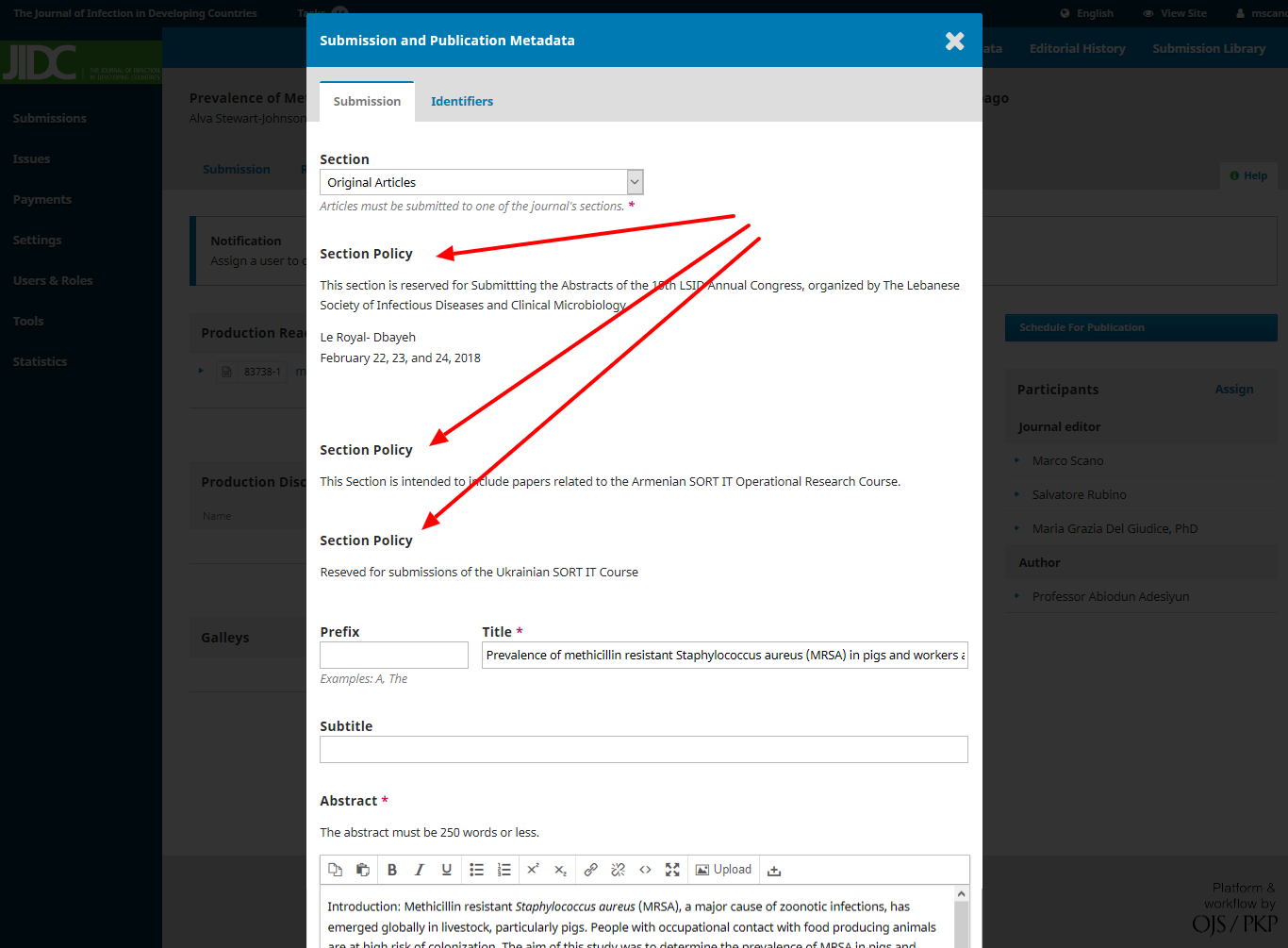
jnugent
on 11 Jun 2019
@jnugent Ok, this is a merge issue as my suggestion to introduce the section policies in this dialog was denied here but has been merged anyway: https://github.com/ViRuSTriNiTy/pkp-lib/pull/1#pullrequestreview-164512304, see discussion about js/pages/submission/SubmissionStep1FormHandler.js.
Solution either:
The commit https://github.com/pkp/ojs/commit/4a2cb1b5aa50e43209df8cc158a37594633594ad#diff-f98c757eddbd327bbbc55bf62e391aa0 needs to be reverted
or:
@NateWr reconsiders its decision and we add the javascript handler needed to handle the section policy toggle. Btw: I have this change integrated in my OJS instance, that's why I couldn't reproduce the regression, I had to investigate what changes were involved.
ViRuSTriNiTy
on 11 Jun 2019
Thanks everyone! My preferred solution is to not show the section policies in this form. I've reopened this and attached to the 3.1.2-2 milestone.
NateWr
on 17 Jun 2019
Reverted https://github.com/pkp/ojs/commit/4a2cb1b5aa50e43209df8cc158a37594633594ad#diff-f98c757eddbd327bbbc55bf62e391aa0 per @NateWr's suggestion.
asmecher
on 1 Oct 2019
Related issues
 bozana
·
6Comments
asmecher
·
3Comments
bozana
·
6Comments
asmecher
·
3Comments
 mhvezina
·
7Comments
NateWr
·
5Comments
mhvezina
·
7Comments
NateWr
·
5Comments
 jmacgreg
·
5Comments
jmacgreg
·
5Comments