Pixelfed: Problem: "Add photo to collection" doesn't work reliably
When I want to add photos to a collection, the workflow is rather unintuitive and unfortunately IMHO buggy.
To add a photo to a collection I have to first post it as a public post and then go to My Profile, Collections, Add Photo. (It would be simpler to have a dropdown or sth in the post dialog where I can add this picture(s) to a collection straight away.)
But that popup seems to fail on me 90% of the time. It lists recent posts, but clicking on one doesn't result in its URL being added. I have been able to reproduce this with Firefox 68.2 on Linux, iOS 13.2.2 on iphone.
I click on a recent post and nothing happens.
 jwildeboer
All 5 comments
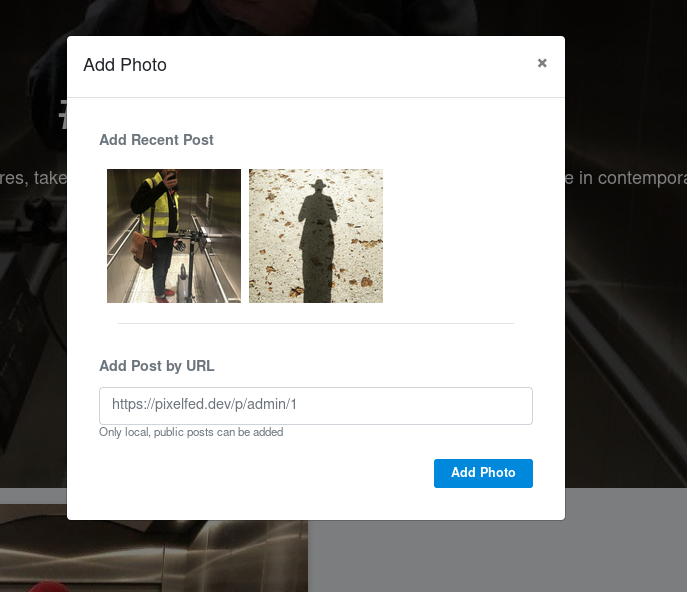
No matter how often I click on any of the recent posts, the URL field does not get updated. Firefox 68.2 on Linux. Same wihen trying on my iPhone (iOS 13.2.2)
jwildeboer
on 18 Nov 2019
The compose UI is currently being redesigned to allow adding to a collection immediately before submitting a new post. It will be added to the reworked "advanced settings" flow.
 trwnh
on 18 Nov 2019
trwnh
on 18 Nov 2019
It seems additionally there is an issue with the "add photo" dialog which seems to have lost its events in a recent refactor, perhaps... that would be why clicking the thumbnail seems to do nothing. Because it actually does do nothing. Whoops!
trwnh
on 18 Nov 2019
Thank you! Yes, that solves my problem. Additional thought: Auto-add to collections based on hashtags? IF a collection has a hashtag as name, THEN add posts with that hashtag to that collection.
Or even simpler - automagically create collections based on hashtags, but not as public collections. So that the user can a) find related posts and b) decide to make a hashtag public as collection should he/she/they so desire.
But that does start to feel a lot more like tags and not like collections, I guess.
jwildeboer
on 18 Nov 2019
Fixed, I think? EDIT: Yep.
trwnh
on 26 Jan 2020
Related issues
 svalo
·
3Comments
svalo
·
3Comments
 snarfed
·
4Comments
snarfed
·
4Comments
 davidpgil
·
3Comments
davidpgil
·
3Comments
 Sarkasper
·
5Comments
Sarkasper
·
5Comments
 ansuz
·
6Comments
ansuz
·
6Comments
Most helpful comment
The compose UI is currently being redesigned to allow adding to a collection immediately before submitting a new post. It will be added to the reworked "advanced settings" flow.