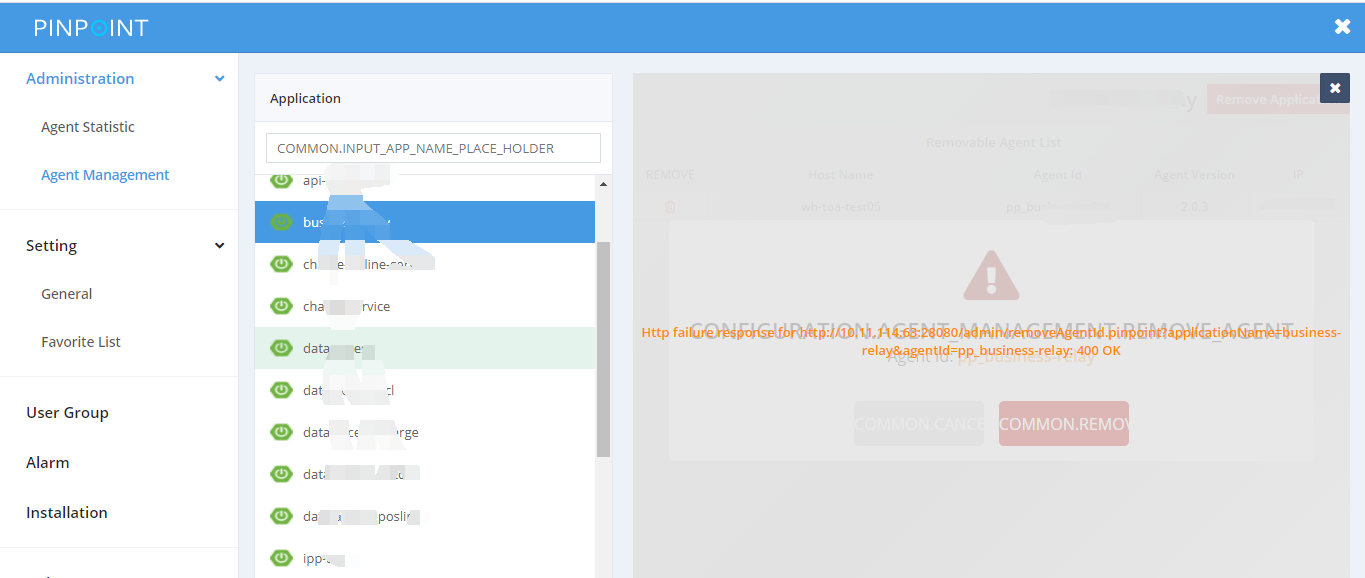
pinpoint 2.0.3 : Agent management can not remove application!!! can any tell me why?thanks
 caicha
All 13 comments
caicha
on 17 Aug 2020
From the network request/response, error response was found "Missing password". From the UI part, no place to provide password. So i thought the function need some UI update to allow user to provide password.
 yjqg6666
on 17 Aug 2020
yjqg6666
on 17 Aug 2020
You can get the GET request URL from DevTools and append &password=REPLACE_WITH_YOUR_PASSWORD to the request url.
yjqg6666
on 17 Aug 2020
it works. And how can I set the username and password for my pinpoint-web. thanks!
You can get the GET request URL from DevTools and append &password=REPLACE_WITH_YOUR_PASSWORD to the request url.
caicha
on 18 Aug 2020
admin.password=admin
yjqg6666
on 18 Aug 2020
In released versions, it's in a different file https://github.com/naver/pinpoint/blob/v2.0.4/web/src/main/resources/pinpoint-web.properties#L27 .
yjqg6666
on 18 Aug 2020
admin.password=admin
The application was successfully deleted by including the password in the URL. Now my inpoint-web does not require login authentication, I want to set up an authentication interface for pinpoint web. What should I do? Thanks!
caicha
on 18 Aug 2020
@caicha It seems to be missing an interface for entering the password in the page. Planning on adding it. Thanks for the report :)
@yjqg6666 Thanks for your help
 binDongKim
on 18 Aug 2020
binDongKim
on 18 Aug 2020
@caicha It seems to be missing an interface for entering the password in the page. Planning on adding it. Thanks for the report :)
@yjqg6666 Thanks for your help
OK! Thank you very much!
caicha
on 18 Aug 2020
@caicha
Unfortunately, for now, Pinpoint does not support authentication.
Dongbin is gonna make what Dongbin said.
thanks :)
 koo-taejin
on 18 Aug 2020
koo-taejin
on 18 Aug 2020
@caicha
Unfortunately, for now, Pinpoint does not support authentication.
Dongbin is gonna make what Dongbin said.thanks :)
hope to support it as soon as possible. Pinpoint is a good product!thanks!
caicha
on 18 Aug 2020
@binDongKim thanks and waiting for the update. Application/agent deletion from the UI is a useful feature. I used to delete them by directly call url, it would be so much better through UI.
yjqg6666
on 18 Aug 2020
Resolved by https://github.com/naver/pinpoint/pull/7140
binDongKim
on 25 Aug 2020
Related issues
 xulongju
·
3Comments
xulongju
·
3Comments
 ing-arriola
·
5Comments
ing-arriola
·
5Comments
 chuanyi-fang
·
3Comments
ing-arriola
·
3Comments
chuanyi-fang
·
3Comments
ing-arriola
·
3Comments
 CHENTIANHAO123
·
4Comments
CHENTIANHAO123
·
4Comments
Most helpful comment
You can get the GET request URL from DevTools and append &password=REPLACE_WITH_YOUR_PASSWORD to the request url.