Pillow: Bug in rendering Indic fonts
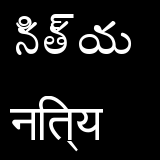
ImageFont, ImageDraw do not render complex scripts with ligatures correctly. (On Ubuntu 14.04, Python 3.4.0)
This is how it looks in editor gedit:

This is how Pillow does it.

#!/usr/bin/env python3
#-*- coding:utf8 -*-

from PIL import Image, ImageFont, ImageDraw

im = Image.new("RGB",(160, 160))
draw = ImageDraw.Draw(im)

font_telugu = ImageFont.truetype("/usr/share/fonts/truetype/ttf-indic-fonts-core/Pothana2000.ttf",50)
text_telugu = "నిత్య"

font_hindi = ImageFont.truetype("/usr/share/fonts/truetype/ttf-indic-fonts-core/gargi.ttf",50)
text_hindi = "नित्य"

draw.text((10, 10), text_telugu, font=font_telugu)
draw.text((10, 90), text_hindi, font=font_hindi)

im.show()
 rakeshvar
All 16 comments
From a quick run through google, it appears that freetype doesn't support the necessary features to correctly combine glyphs into ligatures for complicated fonts/scripts. There are libraries such as harfbuzz [http://www.freedesktop.org/wiki/Software/HarfBuzz/] that build on freetype (+other dependencies) to render those scripts properly.
 wiredfool
on 28 Jan 2015
wiredfool
on 28 Jan 2015
I have both freetype and harfbuzz up to date on my system.
rakeshvar
on 7 Feb 2015
I'm going to guess that we have zero harfbuzz integration at present.
 aclark4life
on 26 Mar 2015
aclark4life
on 26 Mar 2015
Closing, we'd require harfbuzz for this. We'd welcome pull requests for the integration.
wiredfool
on 30 Dec 2015
This should be fixed in 4.2.0 with the merge of #2576
wiredfool
on 1 Jul 2017
Thanks, @ChillarAnand can you please test this?
rakeshvar
on 1 Jul 2017
@wiredfool Thanks for the patch. This doesn't seem to fix yet.
pip show pillow
Name: Pillow
Version: 4.2.0
Summary: Python Imaging Library (Fork)
Home-page: https://python-pillow.org
Author: Alex Clark (Fork Author)
Author-email: [email protected]
License: Standard PIL License
Location: /home/chillar/.virtualenvs/py35/lib/python3.5/site-packages
Requires: olefile
Generated image
 ChillarAnand
on 1 Jul 2017
ChillarAnand
on 1 Jul 2017
Can you check if raqm is in the features list?
from PIL import features
print (features.check('raqm'))
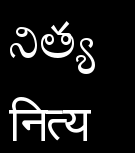
@rakeshvar @wiredfool Its working. Here is the rendered image.
ChillarAnand
on 3 Jul 2017
@ChillarAnand How did you get it to work? My features.check('raqm') is showing False.
rakeshvar
on 3 Jul 2017
Here is the script I have used to install it. I guess there is some issue with Pothana fonts itself. Its working with Vani and other fonts.
ChillarAnand
on 3 Jul 2017
@ChillarAnand,
I have the same problem for Bangla language like this
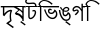
How can I solve this
 menon92
on 17 Jan 2019
menon92
on 17 Jan 2019
@menon92 Can you try with any other fonts?
ChillarAnand
on 20 Jan 2019
@ChillarAnand
I have got the solution https://github.com/python-pillow/Pillow/issues/3593
menon92
on 20 Jan 2019
The following worked for me on Ubuntu 18.04 with Python3.6.7:
sudo pip3 install Pillow-> installs5.4.1sudo apt-get install libfreetype6-dev libharfbuzz-dev libfribidi-dev gtk-doc-tools- Install
libraqmas described here (usingconfigure,make,make install) sudo ldconfigThis step was needed!- Run the following test script: (Make sure the fonts are installed
sudo apt install fonts-indic)
from PIL import Image, ImageFont, ImageDraw

im = Image.new("RGB",(160, 160))
draw = ImageDraw.Draw(im)

font_telugu = ImageFont.truetype("/usr/share/fonts/truetype/fonts-telu-extra/Pothana2000.ttf",50)
text_telugu = "నిత్య"

font_hindi = ImageFont.truetype("/usr/share/fonts/truetype/Gargi/Gargi.ttf",50)
text_hindi = "नित्य"

draw.text((10, 10), text_telugu, font=font_telugu)
draw.text((10, 90), text_hindi, font=font_hindi)
im.show()
Ubuntu 18.04 has libraqm0, so you should be able to install it and skip building Raqm manually.
 khaledhosny
on 21 Jan 2019
khaledhosny
on 21 Jan 2019
Related issues
 etc0de
·
4Comments
etc0de
·
4Comments
 readyready15728
·
4Comments
readyready15728
·
4Comments
 naaaargle
·
3Comments
naaaargle
·
3Comments
 FlowerCode
·
4Comments
FlowerCode
·
4Comments
 HansHirse
·
3Comments
HansHirse
·
3Comments
Most helpful comment
The following worked for me on Ubuntu 18.04 with Python3.6.7:
sudo pip3 install Pillow-> installs5.4.1sudo apt-get install libfreetype6-dev libharfbuzz-dev libfribidi-dev gtk-doc-toolslibraqmas described here (usingconfigure,make,make install)sudo ldconfigThis step was needed!sudo apt install fonts-indic)