Pillow: Can't treat an RGB image as an RGB image
What did you do?
Tried to set RGB pixels on an RGB image
What did you expect to happen?
Those pixels being set
What actually happened?
Integer demanded instead of (RGB) tuple, specifically:
Traceback (most recent call last):
  File "render.py", line 29, in <module>
    pixels[i, j] = (i, j, ImageColor.getrgb(colors[rows[i][j]]))
TypeError: an integer is required (got type tuple)
What are your OS, Python and Pillow versions?
- OS: Ubuntu 16.04
- Python: 3.5.2
- Pillow: 5.3.0 (installed via pip3)
Please include code that reproduces the issue and whenever possible, an image that demonstrates the issue. Please upload images to GitHub, not to third-party file hosting sites. If necessary, add the image to a zip or tar archive.
The best reproductions are self-contained scripts with minimal dependencies. If you are using a framework such as plone, Django, or buildout, try to replicate the issue just using Pillow.
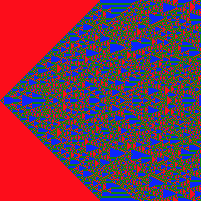
(Me adding to the template: the context is me trying to render a totalistic elementary cellular automaton, if it matters at all.)
from PIL import Image, ImageColor

# Stolen from Stack Overflow
def base_n(num, b, numerals='0123456789abcdefghijklmnopqrstuvwxyz'):
    return ((num == 0) and numerals[0]) or (base_n(num // b, b, numerals).lstrip(numerals[0]) + numerals[num % b])

code = 2040
rule = tuple(reversed([int(c) for c in base_n(code, 3)]))
colors = ['red', 'green', 'blue']
width = 201

img = Image.new('RGB', (width, width))
pixels = img.load()
initial_row = [0] * (width // 2) + [2] + [0] * (width // 2)
rows = [initial_row]

for _ in range(width - 1):
    new_row = []

    for i in range(width):
        neighbor_sum = rows[-1][i - 1] + rows[-1][i] + rows[-1][(i + 1) % width]
        new_row.append(rule[neighbor_sum])

    rows.append(new_row)

for i in range(width):
    for j in range(width):
        pixels[i, j] = (i, j, ImageColor.getrgb(colors[rows[i][j]]))
 readyready15728
All 4 comments
In short, you're trying to do this:
#  pixels[i, j] = (i, j, ImageColor.getrgb(colors[rows[i][j]]))

pixels[i, j] = (0, 0, (255, 0, 0))
When you probably want to do this:
pixels[i, j] = (255, 0, 0)
Try this:
28c28
<         pixels[i, j] = (i, j, ImageColor.getrgb(colors[rows[i][j]]))
---
>         pixels[i, j] = ImageColor.getrgb(colors[rows[i][j]])
Produces this:
The docs for PixelAccess gives this example:
The following script loads an image, accesses one pixel from it, then changes it.
from PIL import Image
im = Image.open('hopper.jpg')
px = im.load()
print (px[4,4])
px[4,4] = (0,0,0)
print (px[4,4])
Results in the following:
(23, 24, 68)
(0, 0, 0)
 hugovk
on 1 Nov 2018
hugovk
on 1 Nov 2018
So this is what confused me when I was looking through the source code:
    def __setitem__(self, xy, color):
        """
        Modifies the pixel at x,y. The color is given as a single
        numerical value for single band images, and a tuple for
        multi-band images

        :param xy: The pixel coordinate, given as (x, y). See
           :ref:`coordinate-system`.
        :param color: The pixel value.
        """
        if self.readonly:
            raise ValueError('Attempt to putpixel a read only image')
        (x, y) = self.check_xy(xy)
        return self.set_pixel(x, y, color)

    def __getitem__(self, xy):
        """
        Returns the pixel at x,y. The pixel is returned as a single
        value for single band images or a tuple for multiple band
        images

        :param xy: The pixel coordinate, given as (x, y). See
          :ref:`coordinate-system`.
        :returns: a pixel value for single band images, a tuple of
          pixel values for multiband images.
        """

        (x, y) = self.check_xy(xy)
        return self.get_pixel(x, y)

    putpixel = __setitem__
    getpixel = __getitem__
It seems like there's something about the Python language itself I don't understand? I don't see why the method should appear to have the signature I was using yet, as you have clearly demonstrated, it does not.
readyready15728
on 20 Nov 2018
__setitem__ is special:
Magic Method | When it gets invoked (example) | Explanation
-- | -- | --
__getitem__(self, key) | self[key] | Accessing an item using an index
__setitem__(self, key, val) | self[key] = val | Assigning to an item using an index
https://rszalski.github.io/magicmethods/#appendix1
When you invoke:
pixels[i, j] = (255, 0, 0)
pixels[key] = val
It calls something like:
pixels.__setitem__([i, j], (255, 0, 0))
pixels.__setitem__(key, val)
I like to know about all the little details of what is my favorite language overall. I was familiar with magic methods before but I was interpreting the idea wrong in this case. Do you have a copy of Fluent Python? It's really good.
readyready15728
on 20 Nov 2018
Related issues
 indirectlylit
·
4Comments
indirectlylit
·
4Comments
 anonymous530
·
3Comments
anonymous530
·
3Comments
 nomarek
·
3Comments
nomarek
·
3Comments
 thinrhino
·
3Comments
thinrhino
·
3Comments
 etc0de
·
4Comments
etc0de
·
4Comments