Pillow: No preview of .ico file on Windows 10
What did you do and what did you expect to happen?
I ran this code and tried to preview the .ico file created in Windows folder explorer, Windows Photo Viewer and Windows Photo:
from PIL import Image
img = Image.new('RGB', (50, 50), color = (130, 173, 242))
img.save('pillow.ico')
What actually happened?
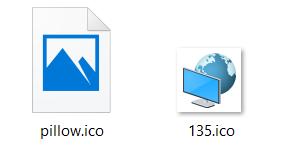
Although I can preview others .ico files on my computer, I can't preview the .ico created by Pillow (the file on the left is an .ico created by pillow, the one on the right is "genuine" ico)
Windows folder explorer
Windows Photo Viewer

Windows Photo
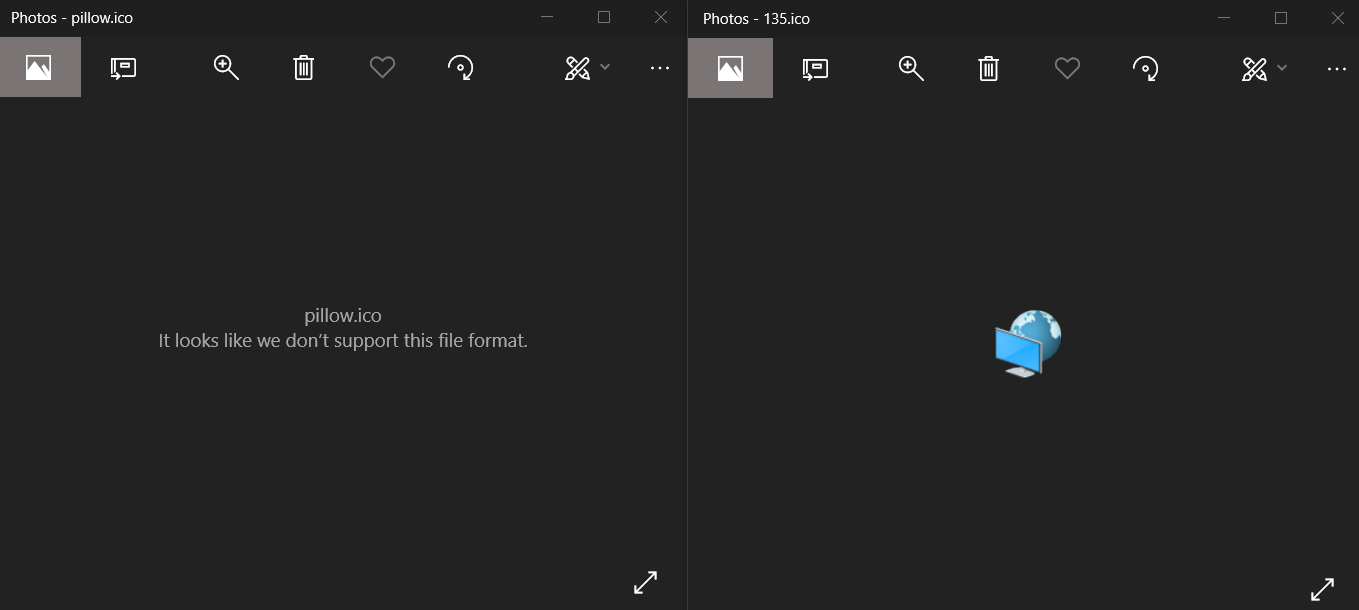
It was tested on 2 computers (same OS, Python and Pillow versions)
I can preview the .ico if I drag them in chrome. I can also preview them if I load them as an icon for a systray app.
What are your OS, Python and Pillow versions?
- OS: Windows 10
- Python: 3.6
- Pillow: 5.1.0
 MagTun
All 11 comments
Could you upload an ICO file that previews correctly, and the Pillow generated one that doesn't?
 radarhere
on 10 May 2019
radarhere
on 10 May 2019
Here is a link to the .ico.
pillow.ico is the one that isn't working, 190.ico is the one that is working (it comes from Windows shell32.dll)
I can see the preview of the ico in google drive but I am still unable to see them in Windows folder explorer, Windows Photo Viewer, Windows Photo.
MagTun
on 10 May 2019
Thanks. Looking at the two files, pillow.ico has the sizes (16, 16), (24, 24), (32, 32) and (48, 48), while 190.ico just has (40, 40).
My guess is that the problem you are seeing is due to the lack of 40x40 size in the Pillow image. I have generated two images, one with an additional (40, 40), and one without. Could you test and report back if 'pillow_without40x40.ico' fails and 'pillow_with40x40.ico' previews correctly?
If I'm right, then your immediate workaround for this problem is just specifying this as a size when saving.
from PIL import Image
original = Image.new('RGB', (50, 50), color = (130, 173, 242))
original.save('pillow.ico')
reloaded = Image.open('pillow.ico')
print(reloaded.info['sizes']) # The default {(16, 16), (24, 24), (48, 48), (32, 32)}
original.save('pillow.ico', sizes=[(40, 40)])
reloaded = Image.open('pillow.ico')
print(reloaded.info['sizes']) # {(40, 40)}
I downloaded your images and I can't preview any of them. I also tried your code, the image are created, the printed size are correct but I still can't preview them.
When I create .ico with several size in 1 file on this website, I don't have any problem previewing the file. So I think the problem comes from somewhere else.
MagTun
on 11 May 2019
Using your original code, I can see a preview in Windows Explorer, but not in Windows Photo Viewer.
Using mode RGBA I can't reproduce this (the icon is always visible):
from PIL import Image
original = Image.new('RGBA', (50, 50), color = (130, 173, 242))
original.save('pillow.ico')
 nulano
on 2 Jul 2019
nulano
on 2 Jul 2019
Yes this is working! Why does changing the color mode fix this?
MagTun
on 5 Jul 2019
Windows has very specific requirements on ICO files, one of them being the
RGBA color mode.
On Fri, Jul 5, 2019, 14:35 MagTun notifications@github.com wrote:
Yes this is working! Why does changing the color mode fix this?
—
You are receiving this because you commented.
Reply to this email directly, view it on GitHub
https://github.com/python-pillow/Pillow/issues/3773?email_source=notifications&email_token=AA5EQ3TG5LEVUJVDDNVQ2QTP545XXA5CNFSM4HD5AE6KYY3PNVWWK3TUL52HS4DFVREXG43VMVBW63LNMVXHJKTDN5WW2ZLOORPWSZGODZJNGDQ#issuecomment-508744462,
or mute the thread
https://github.com/notifications/unsubscribe-auth/AA5EQ3RKQKDGTMOXWV773MTP545XXANCNFSM4HD5AE6A
.
nulano
on 5 Jul 2019
Would it be possible for Pillow to automatically convert ICO file to RGBA? (or at least to add a comment in the console when we uses RGB with ICO so that we know it's better to use RGBA)
MagTun
on 7 Jul 2019
I wasn't home when you asked earlier, so here's a quote from Microsoft Docs (scroll almost to the end, under step 5 of subheading Icon Development):
Icon (.ico format) files must contain the 4- and 8-bit versions, as well as the 24-bit + alpha.
This to me suggests that RGB is a perfectly valid mode for image frames, but Windows will ignore it and look for a different frame.
Pillow currently doesn't support saving a single ICO file with multiple different image modes. Perhaps it would be a good idea to add automatic conversion to RGBA.
nulano
on 8 Jul 2019
The Microsoft document you linked to talks about creating icons for Windows applications, but this isn't the only application of the ICO format - there are also favicons. If there are users happily creating ICO files for favicons, I don't think their result needs to be changed - is a good alternative for a note to be made in the Pillow documentation instead?
radarhere
on 8 Jul 2019
I just tried this in Internet Explorer 11 and Microsoft Edge and both just show an error box for RGB, but render correctly with RGBA.
Whether or not automatic mode conversion is added, I think there should definitely be a note in the docs; it should also mention that the current Pillow implementation saves ICOs internally as PNGs, not DIBs (support was only added in Windows Vista).
nulano
on 8 Jul 2019
Related issues
 amithnikhade
·
4Comments
amithnikhade
·
4Comments
 FlowerCode
·
4Comments
FlowerCode
·
4Comments
 Larivact
·
4Comments
Larivact
·
4Comments
 vytisb
·
4Comments
vytisb
·
4Comments
 anonymous530
·
3Comments
anonymous530
·
3Comments
Most helpful comment
Using your original code, I can see a preview in Windows Explorer, but not in Windows Photo Viewer.
Using mode
RGBAI can't reproduce this (the icon is always visible):