Pillow: Unable to draw a char from font hzcdp01m.ttf
What did you do?
1. Create a script file char.py for drawing.
#!/usr/bin/env python3
"""Draw a text image from a font
"""
import sys
import os
import argparse
from PIL import Image, ImageDraw, ImageFont

def color_hex_to_tuple(color):
    """Convert hex string RRGGBBAA to (R, G, B, A)
    """
    return (int(color[0:2], 16), int(color[2:4], 16), int(color[4:6], 16), int(color[6:8], 16))

def draw_text(text, font, size=40, fgcolor='000000FF', bgcolor='FFFFFF00', output='text.png'):
    if not output:
        return
    if type(size) == str:
        size = int(size)
    if type(fgcolor) == str:
        fgcolor = color_hex_to_tuple(fgcolor)
    if type(bgcolor) == str:
        bgcolor = color_hex_to_tuple(bgcolor)

    img = Image.new('RGBA', (size, size), bgcolor)
    draw = ImageDraw.Draw(img)
    fnt = ImageFont.truetype(font, size)
    dx, dy = fnt.getoffset(text)
    draw.text((-dx, -dy), text, font=fnt, fill=fgcolor)
    img.save(output)

def main():
    root = os.path.dirname(__file__)

    parser = argparse.ArgumentParser(
        formatter_class=argparse.RawDescriptionHelpFormatter,
        description=__doc__,
        )
    parser.add_argument('text',
        help="""The text to draw.""")
    parser.add_argument('font',
        help="""The font used to draw the text.""")
    parser.add_argument('--size', default=40,
        help="""Image size in pixels. Default: %(default)s""")
    parser.add_argument('--fgcolor', default='000000FF',
        help="""Foreground color in hex RRGGBBAA. Default: %(default)s""")
    parser.add_argument('--bgcolor', default='FFFFFF00',
        help="""Background color in hex RRGGBBAA. Default: %(default)s""")
    parser.add_argument('--output', default=os.path.join(root, 'text.png'),
        help="""Output file path. Default: %(default)s""")
    args = vars(parser.parse_args())
    draw_text(**args)

if __name__ == "__main__":
    main()
2. Obtain the font hzcdp01m.ttf file (which is extracted from 漢字構形資料庫 v2.7 and released under CC-BY-SA 2.5 TW) and put it in the same directory.
3. Draw the text image:
# http://char.ndap.org.tw/Search/char_SQL.aspx?char=FA53&type=1
char.py "" hzcdp01m.ttf
What did you expect to happen?
A text image look like this should be drawn: 
What actually happened?
The output image is a bad square image: 
What versions of Pillow and Python are you using?
PIL.PILLOW_VERSION = 5.2.0
Tested on Windows 7, SP1 and Linux Ubuntu 16.
 danny0838
All 15 comments
This is not actually a complete example, as your script takes a text argument from the command line that isn't mentioned here. Could you provide that?
 radarhere
on 1 Apr 2019
radarhere
on 1 Apr 2019
You mean the step 3 above? It's a unicode PUA character, whose code point is E013 (you can confirm this using any program, as well as the URL provided).
danny0838
on 1 Apr 2019
Trying to inspect the font with https://fontdrop.info, I get 'No valid cmap sub-tables found.' in the console.
Trying to install the font on macOS 10.14, I get the following screenshot -
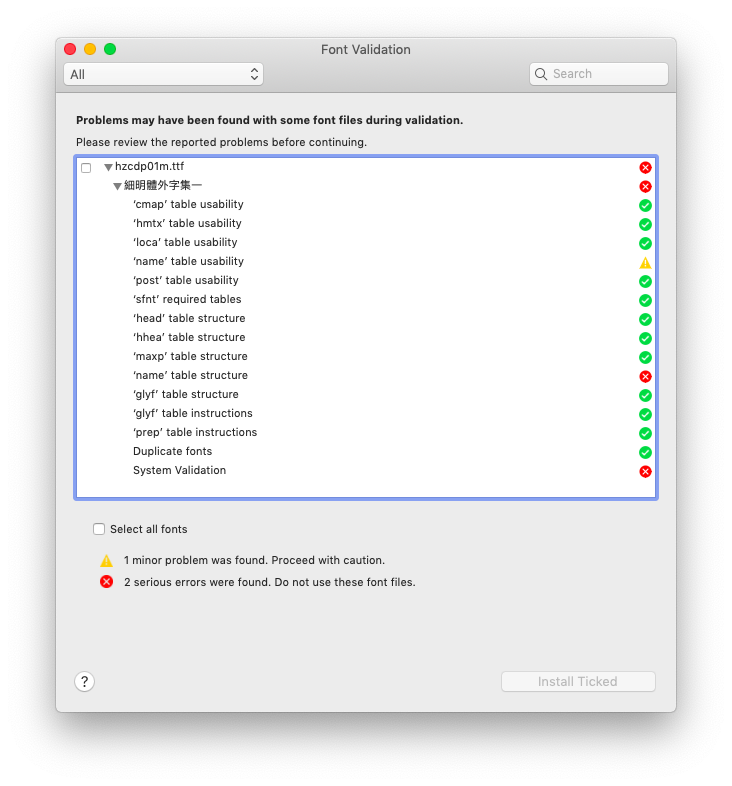
So I might conclude that this is a problem with the font, rather than with Pillow.
radarhere
on 15 Jun 2019
I'm not an expert about fonts. But the font shows normally on Windows and related applications. Could you be more clear about what's missing in the font file and how to get it work on other platforms?
danny0838
on 15 Jun 2019
I don't know that I have any more useful information to give regarding the problem. As far as a solution goes, I ran the font through https://onlinefontconverter.com/, and found that I was then able to use Pillow to show characters that I couldn't before. So for example, the following shows a square from the original font, and a proper character from the converted font -
from PIL import Image, ImageDraw, ImageFont
for path in ["hzcdp01m", "hzcdp01m_after_conversion"]:
    im = Image.new('RGBA', (40, 40))
    draw = ImageDraw.Draw(im)
    fnt = ImageFont.truetype(path+".ttf", 40)
    text = "\u9E9E"
    dx, dy = fnt.getoffset(text)
    draw.text((-dx, -dy), text, font=fnt, fill="#f00")
    im.save(path+".png")
Unfortunately, what we need is the chars in the PUA area, and the "" (U+E013) still cannot be drawn normally using the font converted by https://onlinefontconverter.com.
danny0838
on 16 Jun 2019
I found the ttx tool from https://github.com/fonttools/fonttools, which converts fonts into an XML format and back. Doing so, and adjusting the XML a bit in the middle, I came out with this font, that lets me draw the character.
from PIL import Image, ImageFont, ImageDraw

im = Image.new('RGBA', (40, 40))
draw = ImageDraw.Draw(im)
fnt = ImageFont.truetype("hzcdp01m_adjusted.ttf", 40)
text = "\ufa53"
dx, dy = fnt.getoffset(text)
draw.text((-dx, -dy), text, font=fnt, fill="#f00")
im.save("out.png")
Any thoughts on my last comment? The original font has problems, so I don't think this is something for Pillow to address, and hopefully you now have a version of the font that will fix your particular situation, so if that works, then this is resolved.
radarhere
on 29 Jun 2019
One issue for the tool in your last comment is that the char is at Unicode code point E013 rather than FA53, which is probably the Big5 code point. I have not yet confirmed whether more issues exist.
The original font may have an issue, but I haven't get an answer about where the issue specifically is and whether it's a exploit of the spec, and if it's not, maybe Pillow can implement some change to get it shown correctly, as Windows and MS Office have done.
danny0838
on 29 Jun 2019
Trying to convert the font from TTF to TTX and back again, I get -
IndexError: ('list index out of range', 'dict', 'NoncontextualMorph', 'MortSubtable[0]', 'MortChain[0]')
Removing the MorphSubtable from the TTX, I find that I can then convert it to TTF.
Now, as I mentioned earlier, https://fontdrop.info/ reports that there are 'No valid cmap sub-tables found'. So there is a line in the TTX -
<cmap_format_4 platformID="3" platEncID="4" language="0">
Looking up Platform ID 3 and Encoding ID 4 in https://docs.microsoft.com/en-us/typography/opentype/otspec170/cmap, I see that it is Big5 - looking at https://www.freetype.org/freetype2/docs/reference/ft2-base_interface.html, I see that Big5 is 'an encoding system for Traditional Chinese as used in Taiwan and Hong Kong'. Looking at the JS of https://fontdrop.info/, I think for Platform ID 3, it only wants Encoding ID 0 (Symbol), 1 (Unicode BMP) or 10 (Unicode UCS-4).
I find that if I change platEncID to 1 (Unicode BMP), I can generate the character in Pillow from fa53, as seen in my last comment, and https://fontdrop.info/ no longer reports an error.
So perhaps https://fontdrop.info/ just doesn't support other encodings. However, in the Microsoft link, it states that 'Microsoft strongly recommends using a BMP Unicode 'cmap' for all fonts.' which this font does not.
All of which leads me to the realisation that this works.
from PIL import Image, ImageFont, ImageDraw

im = Image.new('RGBA', (40, 40))
draw = ImageDraw.Draw(im)
fnt = ImageFont.truetype("hzcdp01m.ttf", 40, encoding="big5")
text = "\ufa53"
dx, dy = fnt.getoffset(text)
draw.text((-dx, -dy), text, font=fnt, fill="#f00")
im.save("out.png")
So Pillow can work with the original font, just by specifying the encoding.
Your original post mentions FA53, not E013. So can I ask, what leads you to conclusion that E013 is correct?
radarhere
on 13 Jul 2019
Thank you for the detailed investigation. I've confirmed that ImageFont.truetype with encoding="big5" and text = "\ufa53" does work.
I did think of possibility of the encoding issue, but the current documentation explains the encoding parameter of ImageFont.truetype like this:
encoding – Which font encoding to use (default is Unicode). Common encodings are “unic” (Unicode), “symb” (Microsoft Symbol), “ADOB” (Adobe Standard), “ADBE” (Adobe Expert), and “armn” (Apple Roman). See the FreeType documentation for more information.
The documentation doesn't mention that the encoding can be used for the most widely used local encoding systems such as ISO-8859-1 for Europe languages, JIS for Japanese, Big5 for Taiwan and Hong Kong, and GB2312 for China. And that's why I didn't get the idea that I can use Big5 encoding like this.
Additionally, even if encoding="big5" is specified for ImageFont.truetype, I'd think that "中文" ("\u4E2D\u6587") rather than the gibberish "꒤ꓥ" ("\uA4A4\uA4E5", which are the Big5 codes for "中文" respectively) is the right string parameter for draw.text and Pillow will take care of the encoding conversion internally. I think that the documentation can be more explicit about this if it takes the text parameter merely as a series of code points rather than the corresponding Unicode chars, or provide an demo for drawing a text using a non-Unicode encoding system.
danny0838
on 14 Jul 2019
The Freetype documentation that it mentions is https://www.freetype.org/freetype2/docs/reference/ft2-base_interface.html#ft_encoding - I've created PR #3969 to include list more values in Pillow.
As for using Big5 codes instead of unicode values, I've come up with the following to convert them.
from PIL import Image, ImageFont, ImageDraw

im = Image.new('RGBA', (100, 40))
draw = ImageDraw.Draw(im)
fnt = ImageFont.truetype("hzcdp01m.ttf", 40, encoding="big5")

# I think there must be a simpler way of doing this, but this is what I have
# This changes "\u4E2D\u6587" to "\uA4A4\uA4E5"
text = "\u4E2D\u6587"
text = "".join([chr(y[0]*16**2+y[1]) for y in [text.encode('big5')[i*2:i*2+2] for i in range(len(text))]])

dx, dy = fnt.getoffset(text)
draw.text((-dx, -dy), text, font=fnt, fill="#f00")
im.save("out.png")
Hopefully is helpful to you at this moment. Now, we could incorporate this into Pillow, but we value backwards compatibility - so rather it being automatic, do you have a suggestion for how we could change the API to use this?
radarhere
on 15 Jul 2019
text = "".join([chr(y[0]*16**2+y[1]) for y in [text.encode('big5')[i*2:i*2+2] for i in range(len(text))]])
This is error-prone since a char in ASCII range won't be converted and still be single-byte after the whole text is "converted" into big5, so it errors for a string like "1人".
A working (and more pythonic) way I've come up is something like:
from functools import reduce
text = ''.join(chr(reduce(lambda a, i: a << 8 | i, c.encode("big5"), 0)) for c in text)
Unfortunately, the algorithm is probably not generalizable. For instance, GB2312 encoding seems to be FT_ENCODING_PRC according to the ft2 documentation, and we'd get an error using the same algorithm as text.encode("prc") is not supported when the user provides encoding="prc". As there's also a downward compatibility issue, I'd suggest explaining the behavior in the documentation rather than changing the current API. If an improvement to the API is still preferred, I'd recommend making it support taking an interable of integer char codes in addition to a Python string, so that the user can run something like draw.text((-dx, -dy), (0xA4A4, 0xA4E5), font=fnt, fill="#f00") (and reduce the join and chr in the above), which seems more rationale, but not necessarily more performant, depending on how the underlying is implemented.
As for the documentation about encoding: I currently don't know the rule how the value of encoding is translated into the FT constant (like FT_ENCODING_UNICODE). The rule can be provided if there is one, or maybe an exhaustive enumeration of available values of encoding is needed.
Thanks again for taking care about this issue. :)
danny0838
on 15 Jul 2019
Okay. I've updated #3969 to also include the following -
This specifies the character set to use. It does not alter the encoding of any text provided in subsequent operations.
The list of encodings that I've added includes all possible values, based on https://www.freetype.org/freetype2/docs/reference/ft2-base_interface.html#ft_encoding, with the exception of FT_ENCODING_NONE, an unused value and deprecated alias values.
I've said that the PR resolves this issue, so if you could review it, that would be good.
radarhere
on 16 Jul 2019
This specifies the character set to use. It does not alter the encoding of any text provided in subsequent operations.
I still wonder if a non-font-expert user can understand the implication. It would be better to provide a demo like this:
For example, to draw the character "一" (which is 0x4E00 in Unicode and 0xA440 in Big5) with a font using encoding="big5", the user has to provide text="\uA440" or "ꑀ" (rather than "\u4E00" or "一") for PIL.ImageDraw.ImageDraw.text .
danny0838
on 16 Jul 2019
Related issues
 amithnikhade
·
4Comments
amithnikhade
·
4Comments
 indirectlylit
·
4Comments
indirectlylit
·
4Comments
 anonymous530
·
3Comments
anonymous530
·
3Comments
 vytisb
·
4Comments
vytisb
·
4Comments
 damianmoore
·
4Comments
damianmoore
·
4Comments