Pillow: some specific image can be opened by browser,but cannot opened by [email protected]
What did you do?
I am using python3,I installed the [email protected] works fine at the beginning.But someday,when i look in my logs,i finded it deal with some images badly.Here is some of my code.
I have tested that all my images can be opened by a chrome browser.
from PIL import Image
from io import BytesIO
import requests
stream = requests.get(img_url)
img = Image.open(BytesIO(stream.content))
print(img.size)
What did you expect to happen?
Image can open all image files.
What actually happened?
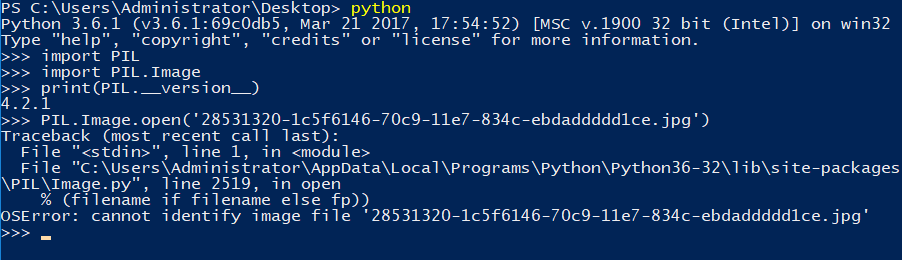
some file raise this Error "cannot not identify image file Please include code that reproduces the issue and whenever possible, an image that demonstrates the issue. Please upload images to GitHub, not to third-party file hosting sites. If necessary, add the image to a zip or tar archive. The best reproductions are self-contained scripts with minimal dependencies. If you are using a framework such as plone, Django, or buildout, try to replicate the issue just using Pillow. What versions of Pillow and Python are you using?
code goes here
 gwl002
All 12 comments
can you paste the image?
 cprogrammer1994
on 24 Jul 2017
cprogrammer1994
on 24 Jul 2017
@cprogrammer1994

gwl002
on 24 Jul 2017
cprogrammer1994
on 24 Jul 2017
You cannot open this image with Photoshop. It is likely the image is not valid.
cprogrammer1994
on 24 Jul 2017
@cprogrammer1994 But the browser can open it correctly.Now I solved it by change the pillow version to 3.1.0.
gwl002
on 25 Jul 2017
git bisect says 07a96209597c5e8dfe785c757d7051ce67a980fb is the first bad commit:
commit 07a96209597c5e8dfe785c757d7051ce67a980fb
Author: Hugo
Date:   Tue Mar 14 11:49:10 2017 +0200

    If DPI isn't in JPEG header, fetch from EXIF

:040000 040000 391c8f192170883a508880f4b39be3eb3aecb29b 3aa7b78dd462a731025d6f9f7688eda92e4cdcbf M  PIL
bisect run success
Looks like it's falling over getting the EXIF in x_resolution = self._getexif()[0x011A], and that bit should be made more robust.
 hugovk
on 25 Jul 2017
hugovk
on 25 Jul 2017
With Tests/images/exif_gps.jpg, self.info['exif'] is:
ExifMM*
���(��1PIL�����
��i��%nMakeXXX-XXX�����(#�3�����)�
=�
���2E�3 e����������2099:09:29 10:10:10����LensMake��������1999:99:99 99:99:99
And self._getexif() is:
{42035: u'LensMake', 258: (24, 24, 24), 36867: u'2099:09:29 10:10:10', 37380: (2147483647, -2147483648), 34853: {0: '\x00\x00\x00\x01', 2: (4294967295, 1), 5: '\x01', 30: 65535, 29: u'1999:99:99 99:99:99'}, 296: 65535, 34665: 185, 41994: 65535, 514: 4294967295, 271: u'Make', 272: u'XXX-XXX', 305: u'PIL', 42034: ((1, 1), (1, 1), (1, 1), (1, 1)), 34867: 4294967295, 34856: '\xaa\xaa\xaa\xaa\xaa\xaa', 282: (4294967295, 1), 50715: ((1, 1), (1, 1), (1, 1)), 33434: (4294967295, 1)}
With this issue's image, self.info['exif'] is just:
And self._getexif() raises a SyntaxError: not a TIFF file (header '' not valid) (from https://github.com/python-pillow/Pillow/blob/1f19c023e1b285d5a43f0658b0cbc61b0af0de45/PIL/TiffImagePlugin.py#L435).
A try/except should do it.
hugovk
on 25 Jul 2017
@hugovk why treat it as a tiffimage?I don't care what type of file it is,I just need the size info of it.
gwl002
on 25 Jul 2017
See #2632.
 wiredfool
on 25 Jul 2017
wiredfool
on 25 Jul 2017
@gwl002 EXIF data is formatted as a TIFF file.
wiredfool
on 25 Jul 2017
Confirmed #2632 also fixes this, and merged it.
>>> from PIL import Image
>>> im = Image.open("2642.jpg")
>>> im
<PIL.JpegImagePlugin.JpegImageFile image mode=RGB size=800x230 at 0x104517690>
>>> im.size
(800, 230)
@hugovk Thanks a lot.
gwl002
on 25 Jul 2017
Related issues
 mmalenta
·
3Comments
mmalenta
·
3Comments
 hxzhao527
·
4Comments
hxzhao527
·
4Comments
 HansHirse
·
3Comments
HansHirse
·
3Comments
 Larivact
·
4Comments
Larivact
·
4Comments
 naaaargle
·
3Comments
naaaargle
·
3Comments