Picongpu: Building a cluster
@ax3l and the team,
Hello,
We would have a budget of about 30 kEuro for building a small cluster in order to run PIConGPU and possibly the new code WarpX. Could you advice us where to start from, please?
My questions are:
- What would be the right balance between the number of CPU cores and the number of GPU cores?
- Is there any model of Nvidia GPU card that you recommend for the budget?
- Shall we be able to easily extend the cluster with identical CPUs and GPUs in the future, depending on the budget available?
Many thanks,
Cristian
 cbontoiu
All 9 comments
Hello @cbontoiu .
I do not really know about WarpX, and honestly afraid that the good configurations for these two codes may be very different, so my opinion below is just for PIConGPU.
For PIConGPU we obtain great performance on NVIDIA V100 GPUs installed at our local cluster, as well as some large supercomputers. Older P100 GPUs are also very good performance-wise. However, both rather costly. So then I guess it's more of a multi-GPU workstation than a cluster. When using PIConGPU on a GPU-based cluster or workstation, the CPU performance should not make much difference. It is however important to have RAM size of at least a few times of your combined GPU memory size.
 sbastrakov
on 29 Jul 2020
sbastrakov
on 29 Jul 2020
Also, if going for GPUs, I would strongly advise picking the version of the selected model with the max GPU memory size available. PIConGPU is easily capable of fully utilizing a GPU and so combined GPU memory size of the cluster/workstation is a limiting factor of how large your simulations can be, particularly if you have not many GPUs.
sbastrakov
on 29 Jul 2020
@sbastrakov Could tell me more about your V100 cards? There are a few versions on the market and I guess we should focus on those tuned for computations rather than for video rendering.

cbontoiu
on 29 Jul 2020
Yes, you need compute versions, however Tesla V100s or P100s should already be that, as opposed to Quadro product line.
Sorry, my knowledge on this workstation configuration side is limited. Perhaps it would be reasonable to look at full servers / workstations being sold, that already have some combination of CPUs, GPUs, appropriate cooling, etc.
sbastrakov
on 30 Jul 2020
@sbastrakov Could tell me more about your V100 cards? There are a few versions on the market and I guess we should focus on those tuned for computations rather than for video rendering.
If you buy a workstation you need a active cooled GPU e.g.: NVIDIA GV100
If you are buying a server node you need the V100 whihc is than cooled by the fans of the node.
Take care there are V100 with 16GiB GPU memory and 32GiB memory. I suggest you to buy the version with 32GiB memory. If you use PIConGPU the biggest issue with GPUs is the small memory per GPU. So more GPU memory is always better^^.
The host node should have ~2.5 - 3x more main memory than all GPU's in the node together. We have 380GiB main memory for 4xV100(each 32GiB)
I expect you compile PIConGPU on the node to, so you should by a CPU with a high clock rate. To compile PIConGPU the CPU cklock is more important than the number of cores per CPU.
 psychocoderHPC
on 31 Jul 2020
psychocoderHPC
on 31 Jul 2020
I will agree with @sbastrakov regarding the workstation config.
From memory: acquisition of a 4-node CPU-only extension of a small department cluster at a university required ca. 13k € in spring 2019. That system contained 2x Broadwell E5-2640v4 CPUS and 125 GB DDR-4 RAM with 10GB ethernet as network connection.
At the same time I remember a colleague acquiring a single server with 2 V100. if memory serves with PCI-E connection rather than NVlink. That set the group back around 20k (or more, I don't clearly remember).
Given your budget a server configuration may turn out to be one node with ~4 V100 and a workstation configuration could be better.
 Anton-Le
on 13 Aug 2020
Anton-Le
on 13 Aug 2020
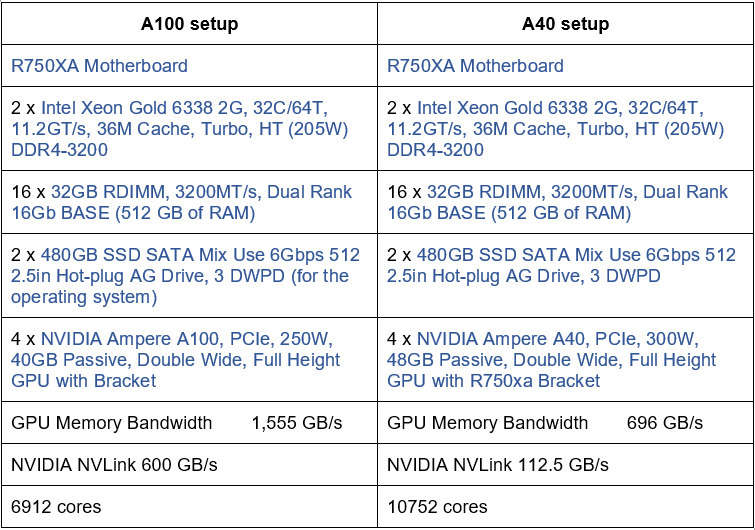
Hello, as a continuation to this thread we received two quotes for building a small cluster as shown in the image below. Could anyone reassure me that we are doing the correct balance between CPU, GPU and RAM? The difference between the A100 setup (more expensive) and the A40 setup is about £15000 so we would preferably choose the A40 version. Any help would be appreciated. Thank you.
cbontoiu
on 20 May 2021
If you buy a workstation you need a active cooled GPU e.g.: NVIDIA GV100
Now that the thread has resurfaced I must add that the above statement is incorrect. In a workstation configuration cards without active colling components _can_ be used. This will require, however, active fans mounted directly outside the chassis to suck the hot air away.
In my old university a group had 4 K80s in such a workstation, which was working quite well. Admittedly, though, we had to move it to the server room, since having that turbine in an office makes it essentially unusable.
Anton-Le
on 20 May 2021
Hello, as a continuation to this thread we received two quotes for building a small cluster as shown in the image below. Could anyone reassure me that we are doing the correct balance between CPU, GPU and RAM? The difference between the A100 setup (more expensive) and the A40 setup is about £15000 so we would preferably choose the A40 version. Any help would be appreciated. Thank you.
IMO the offer 2 on the right side looks good. You will have less bandwidth because the main memory of the GPU is slower.
From the practical viewpoint, it looks okisch to select the offer with A40.
Keep in mind that we never tested A40 therefore I can not say anything about the performance, I can only check the specs and estimate how PIConGPU would perform.
512GiB main memory is fine and a good ratio between the overall GPU main memory and the host memory.
The HDD is very small if you not have a fast external storage system you should think about larger SSD's and run both maybe as RAID0 to be able to use the aggregated size but with the risk to lose all data if one SSD breaks.
The CPU is okisch but less cores with higher frequency will speed up compiling. Since this is a GPU system there is no strong requirement to have a very high number of cores. I suggest asking for a CPU with 24/48HT Cores and 3GHz+ basis clock rate.
If you think about buying a second node with the same configuration later you should take care that you have space to add one or two Infiniband cards. Infiniband cards should be connected each to a CPU socket or if possible into NVLink.
psychocoderHPC
on 20 May 2021
Related issues
 ax3l
·
3Comments
sbastrakov
·
3Comments
ax3l
·
3Comments
sbastrakov
·
3Comments
 berceanu
·
4Comments
berceanu
·
4Comments
ax3l
·
4Comments
berceanu
·
4Comments
berceanu
·
4Comments
ax3l
·
4Comments
Most helpful comment
IMO the offer 2 on the right side looks good. You will have less bandwidth because the main memory of the GPU is slower.
From the practical viewpoint, it looks okisch to select the offer with A40.
Keep in mind that we never tested A40 therefore I can not say anything about the performance, I can only check the specs and estimate how PIConGPU would perform.
512GiB main memory is fine and a good ratio between the overall GPU main memory and the host memory.
The HDD is very small if you not have a fast external storage system you should think about larger SSD's and run both maybe as RAID0 to be able to use the aggregated size but with the risk to lose all data if one SSD breaks.
The CPU is okisch but less cores with higher frequency will speed up compiling. Since this is a GPU system there is no strong requirement to have a very high number of cores. I suggest asking for a CPU with 24/48HT Cores and 3GHz+ basis clock rate.
If you think about buying a second node with the same configuration later you should take care that you have space to add one or two Infiniband cards. Infiniband cards should be connected each to a CPU socket or if possible into NVLink.