Picongpu: How to install the PIConGPU code by sources files in Tianhe2 supercomputer center?
Hi, I'm a newer for the PIConGPU code, I want to install the code in my Tianhe2 supercomputer center from the source code. I have tried to install the code by using the PIConGPU Documentation guide manual, but it failed. I can't find the configure file in the source code, so I can't install it and make it, can anyone can help me? Thank you !
-bash: ./configure: No such file or directory
 QJohn2017
All 35 comments
Hi @QJohn2017 , thanks for willing to try PIConGPU and submitting an issue! Sorry about the problem, we will help.
Could you please clarify, are you following this paragraph of the instructions? Otherwise, please put the relevant link here.
Generally, in terms of configuring and building PIConGPU is not like a typical software that one only builds once and then runs with various inputs. Instead, each simulation requires a separate build of PIConGPU and we provide tools for that. Please find the description of the basic workflow of building and using the code here.
 sbastrakov
on 4 Dec 2018
sbastrakov
on 4 Dec 2018
Dear @QJohn2017,
just to add to the information on getting PIConGPU set up on Tianhe2.
We usually do the following: when you log into a supercomputer, source a script that loads provided modules and set some environment variables to enable tools and paths for your current workflow (running PIConGPU). Here is how this picongpu.profile script looks for other systems already: https://picongpu.readthedocs.io/en/0.4.2/install/profile.html
Does Tianhe2 have some software modules we can use? Can you link us a public user guide for the system?
Here are our requirements you can share with your system user support: https://picongpu.readthedocs.io/en/0.4.2/install/dependencies.html
Please feel free to add more details if you need any help getting started. We are glad to assist you. If it helps, you can also try to apply for user accounts for us so we can interact with system support directly during the setup phase.
 ax3l
on 4 Dec 2018
ax3l
on 4 Dec 2018
Hi, @sbastrakov , Yes, I followed the guide that you pointed out to install the code. But the installation description is not clear to me. The PIC codes I have used, like the EPOCH, just compiled the code to create an executable file and modify the input file. So, i want to installation successful firstly, can you help me? Thank you !
QJohn2017
on 4 Dec 2018
Hi @ax3l , sorry I have only the Chinese user guide of the Tianhe2 supercomputer center, but have no English user guide. The attachment file is the software modules in Tianhe2 supercomputer center. Can it do some help for the code installation?
module.xlsx
QJohn2017
on 4 Dec 2018
Thanks! The modules are plenty but a bit old, including the compiler sets.
Do you think you can forward your system support this page so they can install recent modules for you? Ideally based on a GCC 7.3 for good KNC support.
ax3l
on 4 Dec 2018
@ax3l , Can I install the modules by myself or use the current modules to install the code directly?
QJohn2017
on 4 Dec 2018
You can't install system-wide modules, which would make sense in case you are not the only user of PIConGPU on that system. But instead, you can just install from source if nobody can provide them for you: https://picongpu.readthedocs.io/en/0.4.2/install/dependencies.html
ax3l
on 4 Dec 2018
@ax3l , there are many modules need to be updated for this code installation. This may seem tedious, can you tell me which modules must to be updated? I just want to update the modules that must to be updated
QJohn2017
on 4 Dec 2018
If you like, you can automate the process by using the spack package manager which will do all of that for you.
Please install and load with
spack install picongpu backend=omp2b %[email protected]
spack load picongpu backend=omp2b %[email protected]
for KNC on Tianhe2.
The list is all we list here, because on a HPC system, you want a consistent software stack build with one compiler (and the compilers on the system you linked are very old and so are the modules that were build with it).
ax3l
on 4 Dec 2018
OK, I will try it tomorrow, thank you ! @ax3l
QJohn2017
on 4 Dec 2018
You are welcome, please feel free to report detailed error outputs in case you get stuck somewhere or need more info.
ax3l
on 4 Dec 2018
Hi @ax3l , When I used the spack package manager to install the code but had many problems, they are listed in the following pictures:

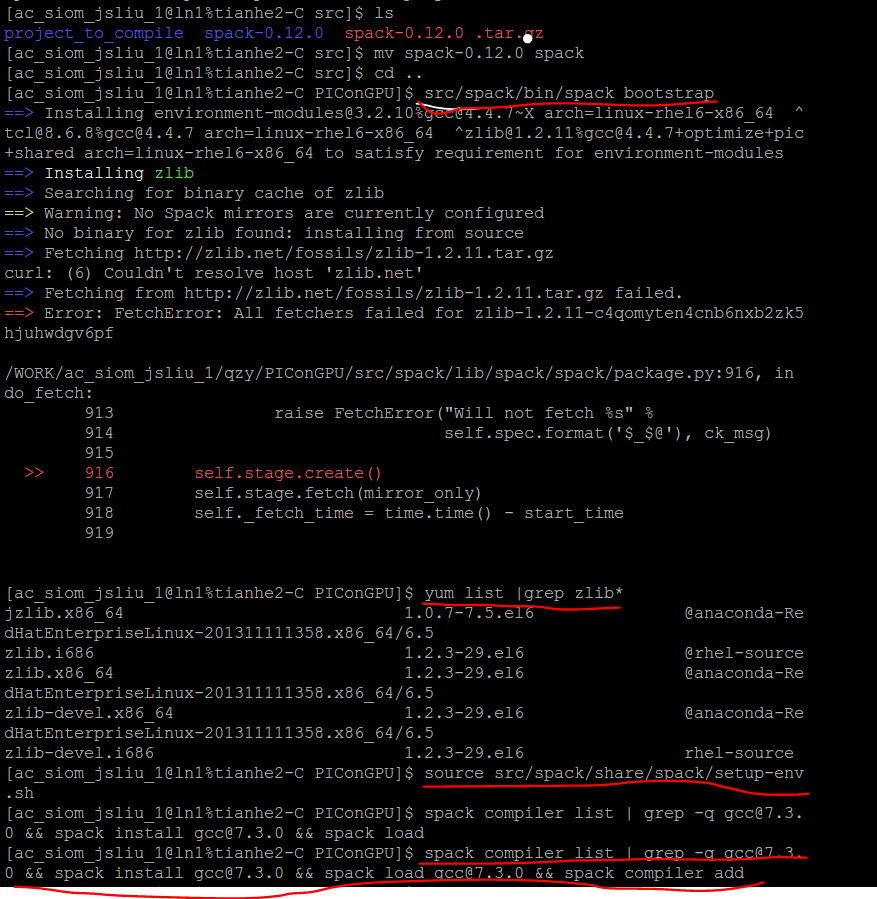
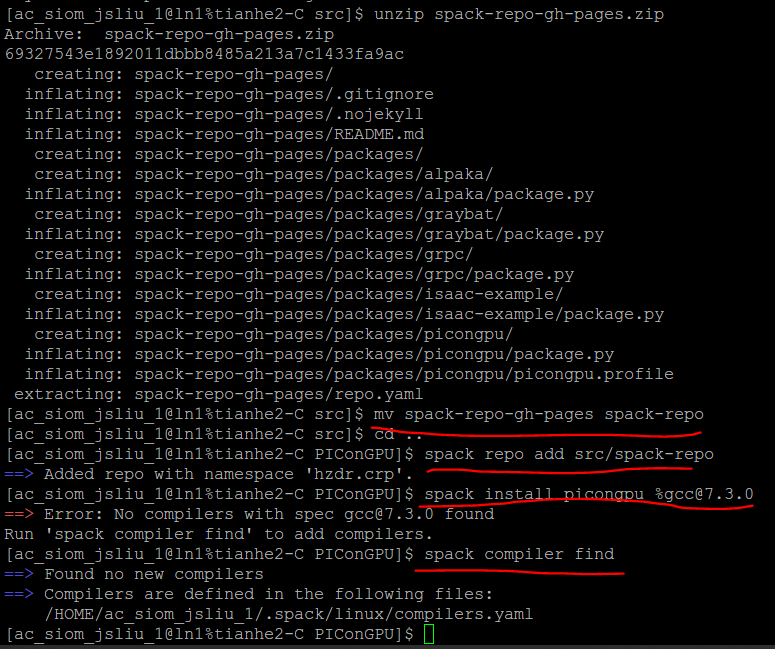
When the git clone command doesn't work, I downloaded the spack manually from the github and so as to the spack-repo .
QJohn2017
on 5 Dec 2018
Dear @QJohn2017, it looks your system is not able to access the internet.
Is there a way we can directly interact with user support and/or get an official account on the system, as collaborators of you, for setup? That would allow us to prepare and test required open source software (dependencies & templates) which will make the whole process significantly faster.
ax3l
on 5 Dec 2018
@ax3l , sorry, I think it's a little difficult for me. I just a user of this system and the administrator will not allow me to provide an official account. If so, is there really no way to continue the installation?
QJohn2017
on 5 Dec 2018
@QJohn2017 We really want to assist and help you getting started, but we need to make this efficient, because we are doing this in parallel to our research activities.
If this is your first time using PIConGPU, maybe start using it on a local machine. There you should have full control over your software stack. You can use spack on a local machine, or manually compile from source as linked above, or just use one of our docker containers.
We would like to assist you getting PIConGPU also on your clusters, but for that to be efficient it would be useful if you ask your boss / group lead to provide us with official accounts on the system. Because instructing you via tickets how to debug the quirks of a system we don't know is highly time consuming for us. Without official support from the system admin side it will be a long process we are only be able to carry out with experienced users.
Of course, you can also just try to continue on Tianhe2 on your own by downloading all dependencies to your local computer, transfer them, e.g. via SCP, and compile on Tianhe2 as documented. Nevertheless, I highly recommend you to reach out to your system support since you don't seem to have experience with installing Linux/Unix software.
ax3l
on 6 Dec 2018
@ax3l , Thank you very much ! But when I installed the code in my own local machine, there also were many problems, just as follows

QJohn2017
on 7 Dec 2018
Is there some anti-virus software or proxy running?
What does
git config --global -l | grep -i proxy
env | grep -i proxy
output for you?
ax3l
on 8 Dec 2018
@ax3l , the output of the commands are as follows:
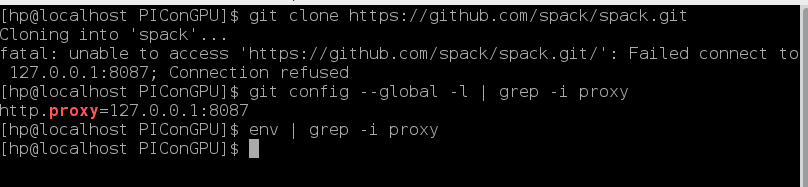
QJohn2017
on 8 Dec 2018
Hi, @ax3l @sbastrakov , I want to install the PIConGPU code on Tianhe2 again. Now, the internet in the supercomputing center can access by the command source /WORK/app/toolshs/setproxy.sh 12.10.133.132 3128 . So, i want to install the picongpu code again by the spack.
firstly, when I use the git command below, some errors occurred:
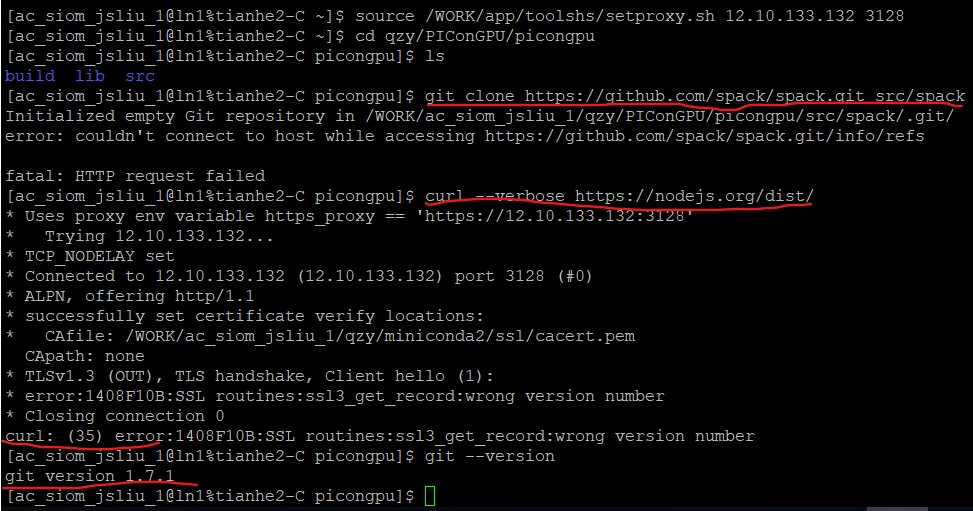
Then, I downloaded the spack manually and unzip it , then i input the command src/spack/bin/spack bootstrap, some errors again occurred:
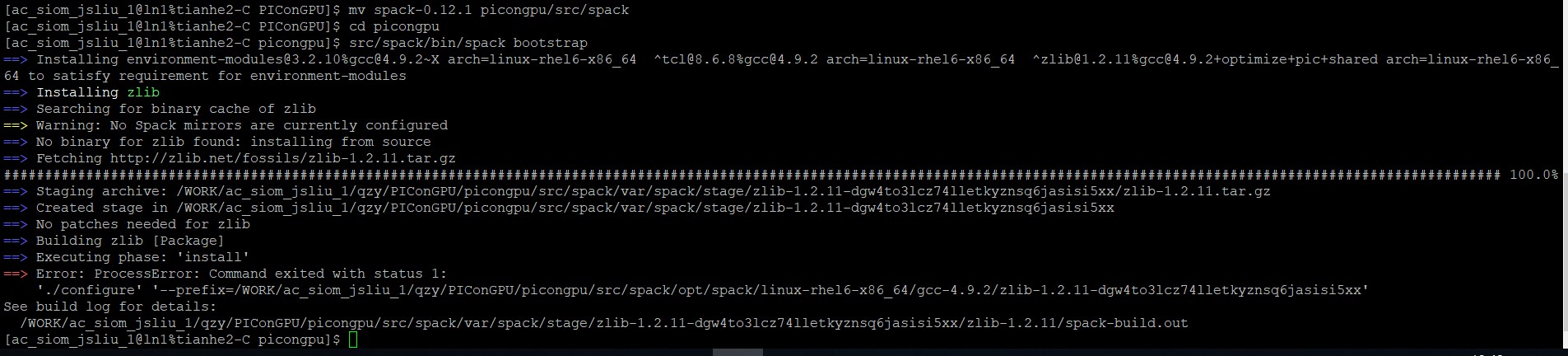
can you help me to resolve it ? thank you !
QJohn2017
on 31 May 2019
Hi @QJohn2017 ,
could you please (as a first test) try to use an ssh connection instead of a https connection as your fest marked command?
git clone https://github.com/spack/spack.git src/spack
Does this work?
(If you have not jet set a ssh key for github, please follow the instructions here.)
 PrometheusPi
on 7 Jun 2019
PrometheusPi
on 7 Jun 2019
Hi, @PrometheusPi
When I type the following commands:
[ac_siom_jsliu_1@ln0%tianhe2-C picongpu]$ git clone https://github.com/spack/spack.git src/spack
Initialized empty Git repository in /WORK/ac_siom_jsliu_1/qzy/PIConGPU/picongpu/src/spack/.git/
error: Failed to connect to 127.0.0.1 port 1080: Connection refused while accessing https://github.com/spack/spack.git/info/refs
fatal: HTTP request failed
[ac_siom_jsliu_1@ln0%tianhe2-C picongpu]$ ls -al ~/.ssh
total 56
drwx------ 2 ac_siom_jsliu_1 ac_siom_jsliu 4096 May 20 2017 .
drwx------ 36 ac_siom_jsliu_1 ac_siom_jsliu_1 20480 Jun 7 19:36 ..
-rw------- 1 ac_siom_jsliu_1 ac_siom_jsliu 401 Oct 12 2015 authorized_keys
-rw------- 1 ac_siom_jsliu_1 ac_siom_jsliu 1675 Oct 12 2015 id_rsa
-rw------- 1 ac_siom_jsliu_1 ac_siom_jsliu 401 Oct 12 2015 id_rsa.pub
-rw-r--r-- 1 ac_siom_jsliu_1 ac_siom_jsliu 19780 May 22 15:04 known_hosts
[ac_siom_jsliu_1@ln0%tianhe2-C picongpu]$ ssh-add ~/.ssh/id_rsa
Could not open a connection to your authentication agent.
[ac_siom_jsliu_1@ln0%tianhe2-C picongpu]$ ssh-add ~/.ssh/id_rsa.pub
Could not open a connection to your authentication agent.
[ac_siom_jsliu_1@ln0%tianhe2-C picongpu]$
Can I dowanload the spack manually and unzip it ?
QJohn2017
on 7 Jun 2019
In principle you could - but you will need git clone multiple times again - thus not solving this issue will slow you down for nearly every other dependency.
Again, this looks like a https proxy is running. Could you please return the output of the following terminal commands:
git config --global -l | grep https_proxy
and
env | grep -i proxy
@QJohn2017 What did you try to do with the ssh-add calls?
PrometheusPi
on 7 Jun 2019
@PrometheusPi , the out put is
[ac_siom_jsliu_1@ln0%tianhe2-C picongpu]$ git config --global -l | grep https_proxy
[ac_siom_jsliu_1@ln0%tianhe2-C picongpu]$ env | grep -i proxy
http_proxy=http://12.10.133.132:3128
ftp_proxy=ftp://12.10.133.132:3128
https_proxy=https://12.10.133.132:3128
LAST_CMD= 3392 2019-06-08 00-11-21 git config --global -l | grep https_proxy
[ac_siom_jsliu_1@ln0%tianhe2-C picongpu]$
By ssh-add option, i want to add the SSH key to the ssh-agent
QJohn2017
on 7 Jun 2019
@QJohn2017 do you have any kind of technical support on site? Your problem is caused by internal internet access / proxy settings in connection with TLSv1.3, which might not work well with the kind of package inspection that is likely occurring at your access point.
We can only help very limited from here.
That said, please try setting
https_proxy=https://12.10.133.132:3128
to
https_proxy=http://12.10.133.132:3128
which might help.
Also, you do not need to add SSH keys for https://github.com/... links (only for [email protected]:... links).
ax3l
on 10 Jun 2019
Sorry, I have asked the technichal support of the administrators, they telled me to downloaded the source manually and uploaded it to the supercomputing center.
QJohn2017
on 11 Jun 2019
Did you try changing the proxy settings as I wrote in the last comment? Did that help?
ax3l
on 11 Jun 2019
I tried what you said above, but failed:
[ac_siom_jsliu_1@ln3%tianhe2-C picongpu]$ export https_proxy=http://12.10.133.132:3128
[ac_siom_jsliu_1@ln3%tianhe2-C picongpu]$ git clone https://github.com/spack/spack.git src/spack
Initialized empty Git repository in /WORK/ac_siom_jsliu_1/qzy/PIConGPU/picongpu/src/spack/.git/
error: couldn't connect to host while accessing https://github.com/spack/spack.git/info/refs
fatal: HTTP request failed
[ac_siom_jsliu_1@ln3%tianhe2-C picongpu]$
So, I think there is no way to use the git command from github, is it ?
QJohn2017
on 11 Jun 2019
Yes, it looks like you will not be able to use git with the proxy settings enforced.
PrometheusPi
on 14 Jun 2019
Google told me to set git http and https proxies like this:
git config --global http.proxy http://12.10.133.132:3128
git config --global http.sslVerify false
@ax3l , when I do what you said above, it returned:
[ac_siom_jsliu_1@ln1%tianhe2-C ~]$ source /WORK/app/toolshs/setproxy.sh 12.10.133.132 3128
[ac_siom_jsliu_1@ln1%tianhe2-C ~]$ cd qzy/PIConGPU/picongpu
[ac_siom_jsliu_1@ln1%tianhe2-C picongpu]$ ls
build lib src
[ac_siom_jsliu_1@ln1%tianhe2-C picongpu]$ git config --global http.proxy http://12.10.133.132:3128
[ac_siom_jsliu_1@ln1%tianhe2-C picongpu]$ git config --global http.sslVerify false
[ac_siom_jsliu_1@ln1%tianhe2-C picongpu]$ git clone https://github.com/spack/spack.git src/spack
Initialized empty Git repository in /WORK/ac_siom_jsliu_1/qzy/PIConGPU/picongpu/src/spack/.git/
error: while accessing https://github.com/spack/spack.git/info/refs
fatal: HTTP request failed
Maybe you can ask your colleague here?
https://github.com/spack/spack/issues/12355
Seams all users on that system have the same issue with internet access.
ax3l
on 9 Aug 2019
Hi, I am not sure if the issues had been resolved. Just to share my experience for installing picongpu on ARIS Greece. Installing via spack may face some problem sometime even if we can connect to the internet. A faster way is to ask the system administrator to install the necessary packages if he can access to the internet. On ARIS, the admin install the necessary dependencies as a separate module called picongpu/0.4.3. Apart of that, several other modules which are already in the system have to be loaded. All of this can be done by source picongpu.profile. Just for sharing, the module picongpu/0.4.3 contains the following:
[jfuhong@login01 ~]$ module show picongpu/0.4.3
-------------------------------------------------------------------
/apps/modulefiles/applications/picongpu/0.4.3:

module-whatis    Enable usage for the PICONGPU Package
setenv       PICONGPUROOT /apps/applications/picongpu/0.4.3
prereq   gnu/6.4.0
prereq   cuda/9.2.148
prereq   python/2.7.13
prereq   cmake
prereq   make
prereq   utils
prereq   git
prepend-path     PATH /apps/applications/picongpu/0.4.3/bin
prepend-path     INCLUDE /apps/applications/picongpu/0.4.3/include
prepend-path     LD_LIBRARY_PATH /apps/applications/picongpu/0.4.3/lib
prepend-path     LD_LIBRARY_PATH /apps/applications/picongpu/0.4.3/lib64
prepend-path     MANPATH /apps/applications/picongpu/0.4.3/share/man
prepend-path     CMAKE_PREFIX_PATH /apps/applications/picongpu/0.4.3
setenv       PNGwriter_DIR /apps/applications/picongpu/0.4.3
-------------------------------------------------------------------
So far it works with NVIDIA Tesla k40m without PNGwriter.
 StevE-Ong
on 5 Dec 2019
StevE-Ong
on 5 Dec 2019
Thanks @StevE-Ong !
sbastrakov
on 5 Dec 2019
Thanks for sharing, good solution for air-gapped and otherwise network-limited systems :)
I'll close this now, for the future reader: please feel free to open a new issue for questions on new machines.
ax3l
on 9 Dec 2019
Related issues
 berceanu
·
4Comments
berceanu
·
4Comments
 mikewang2000
·
3Comments
ax3l
·
4Comments
berceanu
·
4Comments
mikewang2000
·
3Comments
ax3l
·
4Comments
berceanu
·
4Comments
 cbontoiu
·
3Comments
cbontoiu
·
3Comments
Most helpful comment
Hi, I am not sure if the issues had been resolved. Just to share my experience for installing picongpu on ARIS Greece. Installing via spack may face some problem sometime even if we can connect to the internet. A faster way is to ask the system administrator to install the necessary packages if he can access to the internet. On ARIS, the admin install the necessary dependencies as a separate module called
picongpu/0.4.3. Apart of that, several other modules which are already in the system have to be loaded. All of this can be done bysource picongpu.profile. Just for sharing, the modulepicongpu/0.4.3contains the following:So far it works with NVIDIA Tesla k40m without PNGwriter.