Picom: Weird artifacts when resizing (AMDGPU)
Platform
Archlinux - 4.20 kernel
GPU, drivers, and screen setup
Amd Vega 56 | mesa 18.3.1 | xf86-video-amdgpu 18.1.0 | two monitors s-b-s one at 144hz and the other at 60hz.
Glx info :
name of display: :0
display: :0 screen: 0
direct rendering: Yes
Extended renderer info (GLX_MESA_query_renderer):
Vendor: X.Org (0x1002)
Device: Radeon RX Vega (VEGA10, DRM 3.27.0, 4.20.0-arch1-1-ARCH, LLVM 7.0.0) (0x687f)
Version: 18.3.1
Accelerated: yes
Video memory: 8176MB
Unified memory: no
Preferred profile: core (0x1)
Max core profile version: 4.5
Max compat profile version: 4.5
Max GLES1 profile version: 1.1
Max GLES[23] profile version: 3.2
Memory info (GL_ATI_meminfo):
VBO free memory - total: 8049 MB, largest block: 8049 MB
VBO free aux. memory - total: 8162 MB, largest block: 8162 MB
Texture free memory - total: 8049 MB, largest block: 8049 MB
Texture free aux. memory - total: 8162 MB, largest block: 8162 MB
Renderbuffer free memory - total: 8049 MB, largest block: 8049 MB
Renderbuffer free aux. memory - total: 8162 MB, largest block: 8162 MB
Memory info (GL_NVX_gpu_memory_info):
Dedicated video memory: 8176 MB
Total available memory: 16352 MB
Currently available dedicated video memory: 8049 MB
OpenGL vendor string: X.Org
OpenGL renderer string: Radeon RX Vega (VEGA10, DRM 3.27.0, 4.20.0-arch1-1-ARCH, LLVM 7.0.0)
OpenGL core profile version string: 4.5 (Core Profile) Mesa 18.3.1
OpenGL core profile shading language version string: 4.50
OpenGL core profile context flags: (none)
OpenGL core profile profile mask: core profile
OpenGL version string: 4.5 (Compatibility Profile) Mesa 18.3.1
OpenGL shading language version string: 4.50
OpenGL context flags: (none)
OpenGL profile mask: compatibility profile
OpenGL ES profile version string: OpenGL ES 3.2 Mesa 18.3.1
OpenGL ES profile shading language version string: OpenGL ES GLSL ES 3.20
Environment
I have tried with i3, awesome and xfce. (same behavior)
Compton version
Version: v5-rc3-5-g3e475d0 (tried with the latest release build too)
Extensions:
- Name Pixmap: Yes
- Shape: Yes
- XRandR: Yes
- Present: Present
Misc:
- Use Overlay: Yes
- Config file used: /home/finch/.config//compton.conf
Compton configuration:
shadow = true;
shadow-radius = 7;
shadow-offset-x = -7;
shadow-offset-y = -7;
log-level = "warn";
shadow-exclude = [
"name = 'Notification'",
"class_g = 'Conky'",
"class_g ?= 'Notify-osd'",
"class_g = 'Cairo-clock'",
"_GTK_FRAME_EXTENTS@:c"
];
inactive-opacity = 0.8;
frame-opacity = 0.7;
inactive-opacity-override = false;
blur-background = true;
blur-background-exclude = [
"window_type = 'dock'",
"window_type = 'desktop'",
"_GTK_FRAME_EXTENTS@:c"
];
fading = true;
fade-in-step = 0.03;
fade-out-step = 0.03;
fade-exclude = [ ];
backend = "glx";
mark-wmwin-focused = true;
mark-ovredir-focused = true;
detect-rounded-corners = true;
detect-client-opacity = true;
refresh-rate = 144;
vsync = "none";
unredir-if-possible = true;
focus-exclude = [ "class_g = 'Cairo-clock'" ];
detect-transient = true;
detect-client-leader = true;
invert-color-include = [ ];
glx-swap-method = "undefined";
wintypes:
{
tooltip = { fade = true; shadow = true; opacity = 0.75; focus = true; full-shadow = false; };
dock = { shadow = false; }
dnd = { shadow = false; }
popup_menu = { opacity = 0.8; }
dropdown_menu = { opacity = 0.8; }
};
Steps of reproduction
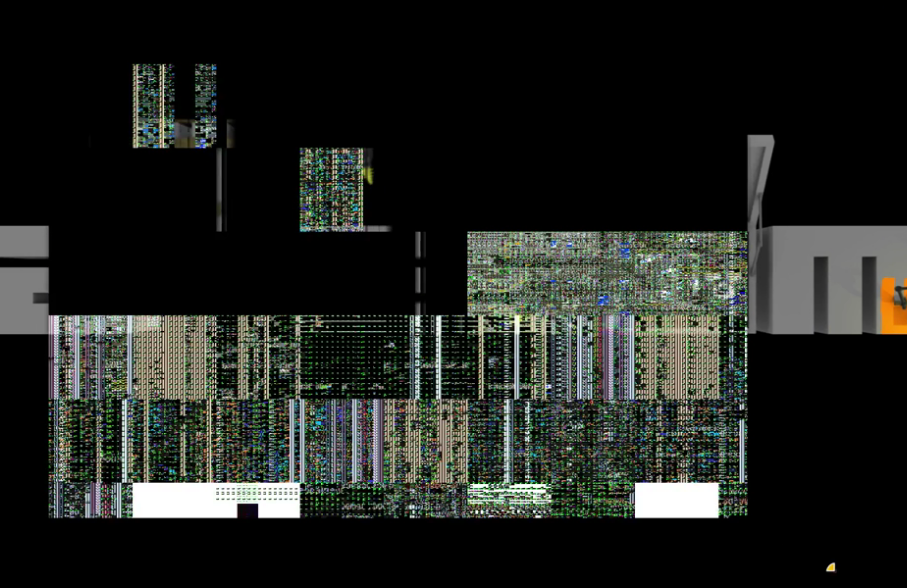
When I resize a window , some artifacts are drawn on the window area, a very noticeable result.
Other details
I have tried a lot of different compton settings but without success. Note that the problem only occurs with the GLX backend! No matter if a vsync method is enabled or not.
I have made a video that illustrates the problem very well : https://streamable.com/8oj6b
Thanks for your help.
 Catvert
All 29 comments
I don't think compton is doing anything wrong here per se. I think resizing the window invalidates the windows' content, and compton is just painting the window when the content is invalid.
Hmm, can you maybe try --xrender-sync-fence? I don't really think it will help, but it's worth trying.
 yshui
on 6 Jan 2019
yshui
on 6 Jan 2019
Hum it's really strange. That's really ugly as you can see in the video. And this issue only happen in compton with glx. I've tried xcompmgr, the xrender backend, mutter, kwin.. and this problem does not occur with them. Note that the problem is less noticeable with a vsync method but still there.
The --xrender-sync-fence change nothing.
Catvert
on 6 Jan 2019
@Catvert Interesting... I can't reproduce this problem on NVIDIA or intel. Maybe other amdgpu users can chime in.
I will have a look into this.
yshui
on 6 Jan 2019
@Catvert Does compton print out anything when this happens?
yshui
on 6 Jan 2019
Two months ago, I also had an NVIDIA card and I didn't have this problem. No nothing is printed with the "info" log level. The "trace" level does print some informations but nothing that seems relative to it.
Here is the log when I resize a window in "trace" level : https://pastebin.com/Dv2NZPNM
Edit : Just tried with my laptop with the same system but with Intel and the problem doesn't occured.
Additionnal information : I use the amdgpu.dc = 1 on my desktop pc, without it, my amd card doesn't work.
Catvert
on 6 Jan 2019
@Catvert Can you test the resize-hack branch? It _might_ help.
yshui
on 6 Jan 2019
I just tried this branch, with the following command to launch compton : "./compton --conf /dev/null --backend glx --vsync none" and with my configuration posted in this post and I didn't notice any changes unfortunately :/
Edit : I have also tried an another distro to be sure that it was not my Archlinux config that have the issue and Linux Mint give me the same result(via live-usb).
Catvert
on 6 Jan 2019
@Catvert alright, can you record a trace of compton with apitrace?
yshui
on 6 Jan 2019
Wow it's really weird. I didn't know how to use apitrace, this is the command I have launched : "apitrace trace compton --conf /dev/null --backend glx". The problem disappears when I launch compton with apitrace. I don't know if that's the function of this application but I doubt it.
The trace file is join in a zip(I only let the application run for a few seconds because the file gets very large very quickly).
compton.trace.zip
Catvert
on 6 Jan 2019
@Catvert I was kind of expecting that. Although I still don't have an idea how to fix the problem :/
Hmm...
yshui
on 6 Jan 2019
I don't know if it can help you, but I have this warning sent by apitrace when I launch it with compton: "apitrace: warning: glXCreatePixmap: unknown key 0x20D5, interpreting value as int". If you have any questions or want me to run tests, I am at your disposal.
Catvert
on 6 Jan 2019
Amd cards have always been fucked with compton. So many issues. Polaris cards have some driver issue which is still not fixed when you use compton then the scrolling is very slow stuttery like 10fps feeling.
 rislah
on 6 Jan 2019
rislah
on 6 Jan 2019
@GoingFast Personally, the only issue I get is that weird rendering when resizing. I even have the right to have 2 screens with different refresh rates without "any problem" (which is not the case with all compositors, only Kwin and xcompmgr offer me this possibility). And the scroll is extremely smooth on my 144hz screen (the only compositor with xcompmgr who offers it to me).
Catvert
on 6 Jan 2019
@Catvert I don't think having you run more tests is going to be helpful. And I think this issue might involve knowledge of inner workings of the driver, which I don't have. So I will send an email to Mesa developers asking about this, maybe they will have some ideas.
yshui
on 6 Jan 2019
If you want to, you can keep an eye on this
yshui
on 6 Jan 2019
Ok ! Thank you for your investment, I will follow this post carefully :).
Catvert
on 6 Jan 2019
Weirdly, I don't have the issue on Arch, with a vega 64. Same mesa and xorg version, same kernel version but I'm using zen (though it shouldn't change anything). Although, I only have 60hz screens. Maybe the glitches are only present in > 60Hz?
 aruhier
on 7 Jan 2019
aruhier
on 7 Jan 2019
Vega might also not show this issue since it's modernized GPU vs. Polaris, which also means differences between drivers.
I don't think that this is a Compton issue, I've seen such artifacts various times before with Polaris, even very rarely on Windows. I especially encountered them when I had 100% CPU usage during compiling and then pin windows to parts of the screen etc.
However, I just tried to reproduce two days ago and I wasn't able to. Maybe it's because I switched to xf86-video-amdgpu-git, but that's just a wild guess and I would have to recheck. Could also be related to newer versions of AMD's 4.21-wip kernels I'm using atm.
 aufkrawall
on 7 Jan 2019
aufkrawall
on 7 Jan 2019
@Anthony25 I have tried with only 1 60hz monitor and the problem still persist.
@aufkrawall I have tried the 4.21 too and with the xf86-video-amdgpu-git and it doesn't solve my issue. It does seem to be a problem with the driver and not compton. Personally, I noticed this problem only with compton and glx. For the moment I will stay on KDE/KWin which gives me good performances. Thank you for your feedback!
Catvert
on 7 Jan 2019
@Catvert Yeah, I was just compiling linux 5.0-rc1 and saw it again. As a layman, I would guess this might be some timing related corruption of data in video memory, which gets provoked more easily when the CPU is busy.
aufkrawall
on 7 Jan 2019
Vega might also not show this issue since it's modernized GPU vs. Polaris, which also means differences between drivers.
I don't think that this is a Compton issue, I've seen such artifacts various times before with Polaris, even very rarely on Windows. I especially encountered them when I had 100% CPU usage during compiling and then pin windows to parts of the screen etc.
However, I just tried to reproduce two days ago and I wasn't able to. Maybe it's because I switched to xf86-video-amdgpu-git, but that's just a wild guess and I would have to recheck. Could also be related to newer versions of AMD's 4.21-wip kernels I'm using atm.
Sure, but @Catvert said in its 1st post that he has a vega 56. I also have some artifacts during high CPU consumption, but it's the same on my laptop with an intel card.
aruhier
on 7 Jan 2019
@Catvert There seems to be a fix for this in xf86-video-amdgpu: https://gitlab.freedesktop.org/xorg/driver/xf86-video-amdgpu/merge_requests/21
Can you try it?
yshui
on 9 Jan 2019
Thanks for the hint. I applied the patch and started compiling with GCC on all available threads. So far I haven't encountered the issue again.
aufkrawall
on 9 Jan 2019
You can confirm to them that their patch works, here
yshui
on 9 Jan 2019
I'm rather being a bit more careful than the last time before thinking it's really gone, so I'll wait a day or two with this.
aufkrawall
on 9 Jan 2019
It works !!
Thanks a lot for opening this ticket and for your help in general!
Catvert
on 9 Jan 2019
@Catvert You should thank the person who actually fixed this problem!
yshui
on 9 Jan 2019
Well, that was really quick by AMD then. :clap:
aufkrawall
on 9 Jan 2019
Closing as this is resolved upstream.
yshui
on 17 Jan 2019
Related issues
 zezic
·
12Comments
zezic
·
12Comments
 BurhanDanger
·
7Comments
BurhanDanger
·
7Comments
 vn971
·
8Comments
vn971
·
8Comments
 Anarky
·
6Comments
Anarky
·
6Comments
 GOKOP
·
3Comments
GOKOP
·
3Comments
Most helpful comment
@Catvert There seems to be a fix for this in xf86-video-amdgpu: https://gitlab.freedesktop.org/xorg/driver/xf86-video-amdgpu/merge_requests/21
Can you try it?