Phpmyadmin: Issue adding new user with MySql 8.0.11
Steps to reproduce
- In phpmyadmin, open a database
- Select tab Priviledges
- Select Add user account, provide username and password + re-type (plugin = Native MySQL authentication), otherwise default options, select OK
Expected behaviour
New user should be created without error
Actual behaviour
#1064 - You have an error in your SQL syntax; check the manual that corresponds to your MySQL server version for the right syntax to use near 'REQUIRE NONE WITH MAX_QUERIES_PER_HOUR 0 MAX_CONNECTIONS_PER_HOUR 0 MAX_UPDATES_' at line 1
Additional information:
1) The SQL command in the inline-box is : CREATE USER 'aaa'@'%' IDENTIFIED WITH mysql_native_password AS '***';GRANT USAGE ON *.* TO 'aaa'@'%' REQUIRE NONE WITH MAX_QUERIES_PER_HOUR 0 MAX_CONNECTIONS_PER_HOUR 0 MAX_UPDATES_PER_HOUR 0 MAX_USER_CONNECTIONS 0;
2) User is created, but with no password.
3) With same conf except MySQL=5.7, there is no error.
Server configuration
Windows 10 Pro x64 1709
Web server:
Apache x64 2.4.33
Database:
MySQL 8.0.11
PHP version:
7.2.4
phpMyAdmin version:
4.8.0.1
Client configuration
Browser:
Chrome
Operating system:
Windows 10 Home x64 1709
 tm8544
All 41 comments
According to my tests, breaking SQL in two parts, one for creating the user and second for granting rights, works with MySQL 8.0.11
CREATE USER 'aaa'@'%' IDENTIFIED WITH mysql_native_password AS '***' REQUIRE NONE WITH MAX_QUERIES_PER_HOUR 0 MAX_CONNECTIONS_PER_HOUR 0 MAX_UPDATES_PER_HOUR 0 MAX_USER_CONNECTIONS 0;
GRANT USAGE ON *.* TO 'aaa'@'%'
tm8544
on 21 Apr 2018
Possibly related: #14220.
 ibennetch
on 22 Apr 2018
ibennetch
on 22 Apr 2018
I researched some notes for whoever fixes this:
From the release notes:
The following features related to account management have been removed:
- Using GRANT to create users. Instead, use CREATE USER. Following this practice makes the NO_AUTO_CREATE_USER SQL mode immaterial for GRANT statements, so it too is removed.
- Using GRANT to modify account properties other than privilege assignments. This includes authentication, SSL, and resource-limit properties. Instead, establish such properties at account-creation time with CREATE USER or modify them afterward with ALTER USER.
- IDENTIFIED BY PASSWORD 'hash_string' syntax for CREATE USER and GRANT. Instead, use IDENTIFIED WITH auth_plugin AS 'hash_string' for CREATE USER and ALTER USER, where the 'hash_string' value is in a format compatible with the named plugin.
- Additionally, because IDENTIFIED BY PASSWORD syntax has been removed, the log_builtin_as_identified_by_password system variable is superfluous and has been removed.
- The PASSWORD() function. Additionally, PASSWORD() removal means that SET PASSWORD ... = PASSWORD('auth_string') syntax is no longer available.
- The old_passwords system variable.
ibennetch
on 22 Apr 2018
As the PASSWORD() function has been removed, function getHashedPassword needs a modification like this:
public static function getHashedPassword($password)
{
if (Util::getServerType() == 'MySQL' && $GLOBALS['dbi']->getVersion() >= 80011) {
$hashedPassword = '*' . strtoupper(SHA1(SHA1($password, true)));
} else {
$result = $GLOBALS['dbi']->fetchSingleRow("SELECT PASSWORD('" . $password . "') AS `password`;");
$hashedPassword = $result['password'];
}
return $hashedPassword;
}
hi,
Same issue for me : #1064 - Erreur de syntaxe près de 'REQUIRE NONE WITH MAX_QUERIES_PER_HOUR 0 MAX_CONNECTIONS_PER_HOUR 0 MAX_UPDATES_' à la ligne 1 when i try to create a new user.
Could it be possible to put the fix in the next release ?
MySQL 8.0.11 and phpmyadmin 4.8.1
 thelittlefireman
on 19 Jun 2018
thelittlefireman
on 19 Jun 2018
I don't use phpmyadmin and i have the same issue. I'm using MySQLWorkbench or Sequel Pro and same issue. That come from mysql. @mysql
Anyone have a solution ?
I'm on a fresh release of mysql 8.0.11 on a mac High Sierra.
 AnthoRdev
on 30 Jun 2018
AnthoRdev
on 30 Jun 2018
mysql release 8.0 on windows server 2013,
MySQLWorkbench 6.3 CE causes this issue as well. Any new users or attempts to update passwords on existing users will corrupt their passwords resulting in those users not being able to sign in. Previous untouched users and root can still be accessed normally with their saved passwords. Note that it was working just fine a few weeks ago because I was able to create a few users.
At no point did I change/update software versions anywhere because this was just a test setup that has been running for less than a month.
Is there a fix for this?
Can I just export all my schemas and data and reinstall mysql server and import them?
 sifuvue
on 6 Jul 2018
sifuvue
on 6 Jul 2018
Same issue right now, fresh install of MySQL community server 8.0.11 and phpmyadmin 4.8.2.
I was able to create a user from the command line:
CREATE USER 'mytest'@'localhost' IDENTIFIED BY 'HelloWorld222';
 TedMurphy
on 24 Jul 2018
TedMurphy
on 24 Jul 2018
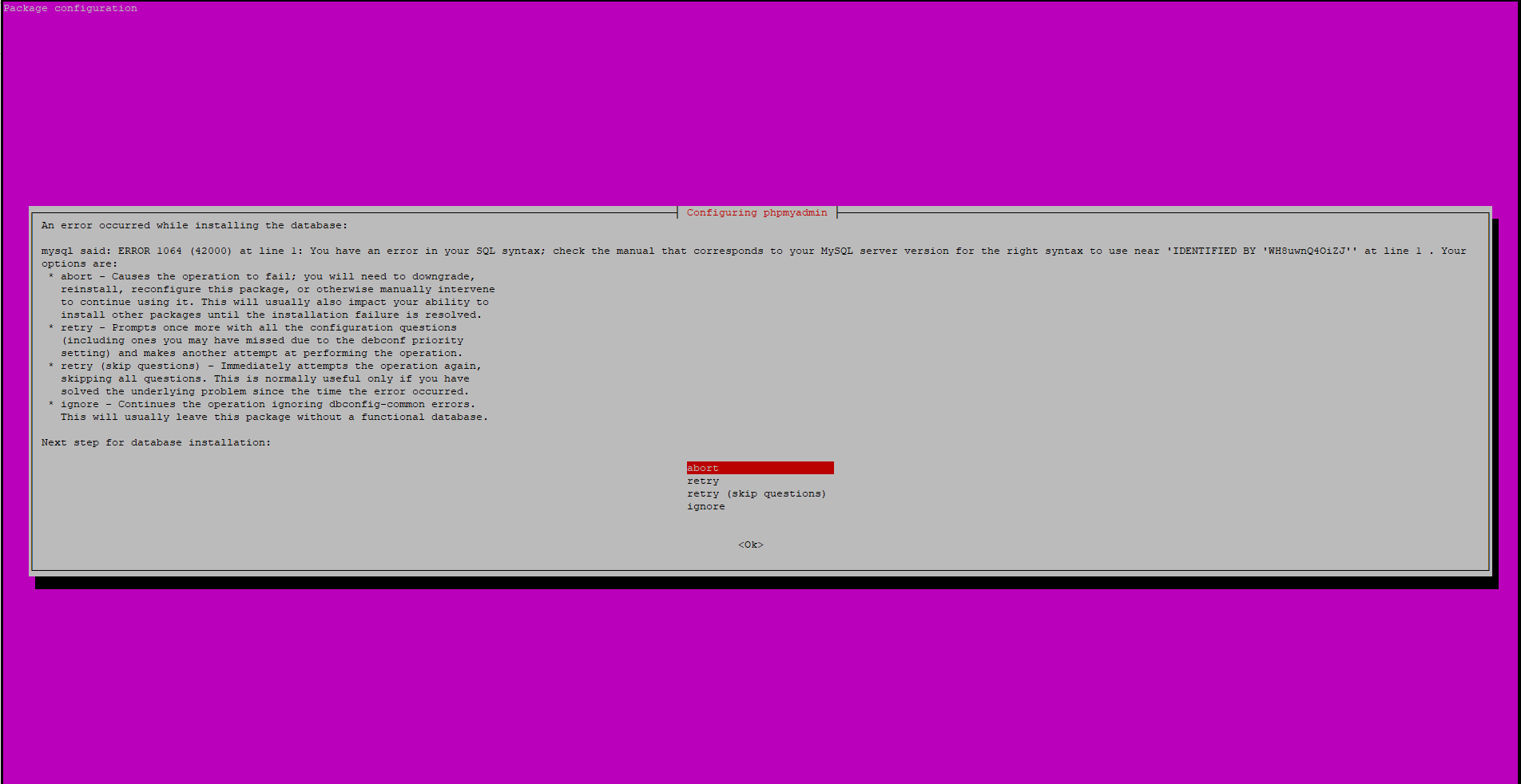
The phpmyadmin installation fails for me too because it's trying to create a user using IDENTIFIED BY
(using mysql server v8.0.12)
EDIT: Probably worth adding that I enabled the more secure (without backwards-compatibility) mysql password system while upgrading to 8.0
 xorinzor
on 29 Jul 2018
xorinzor
on 29 Jul 2018
Any ETA on a fix?
 dpacmittal
on 22 Aug 2018
dpacmittal
on 22 Aug 2018
I don't know if this will solve it for you but after upgrading MySQL from 8.0.11 to 8.0.12 this issue no longer occurs for me. Keep in mind I was only managing privileges/user accounts with MySQL workbench which was having critical errors with .11 but is now functioning perfectly fine with .12. The workaround with version .11 of MySQL is to use the command line with the MySQL console (see TedMurphy's example, you can also change a user's credentials with the proper command).
sifuvue
on 22 Aug 2018
I am having the same problem and running on CentOS7.5
MySQL Version 8.0.12
PHP Version 7.2.9
mysqlnd Version 5.0.12-dev
phpMyAdmin Version 4.8.3
Even when i try the manual syntax in mysql console - it will error out so I'm not sure that this is specifically phpmyadmin issue. issue is something to do with the way
REQUIRE NONE WITH MAX_QUERIES_PER_HOUR 0 MAX_CONNECTIONS_PER_HOUR 0 MAX_UPDATES_PER_HOUR 0 MAX_USER_CONNECTIONS 0;
is processed. Any ideas?
 maretodoric
on 23 Aug 2018
maretodoric
on 23 Aug 2018
Sorry, It has been passed for a long time. I forgot about the detail.
While the problem was that mysql that I used at that time was too advanced so the phpmyadmin cannot compile.
I remember that I reloaded a lower vision of my mysql from official website to match.
You can try it.
Best,
On Aug 23, 2018, at 5:28 PM, maretodoric notifications@github.com wrote:
I am having the same problem and running on CentOS7.5
MySQL Version 8.0.12
PHP Version 7.2.9
mysqlnd Version 5.0.12-dev
phpMyAdmin Version 4.8.3Even when i try the manual syntax in mysql console - it will error out so I'm not sure that this is specifically phpmyadmin issue. issue is something to do with the way
REQUIRE NONE WITH MAX_QUERIES_PER_HOUR 0 MAX_CONNECTIONS_PER_HOUR 0 MAX_UPDATES_PER_HOUR 0 MAX_USER_CONNECTIONS 0;is processed. Any ideas?
—
You are receiving this because you commented.
Reply to this email directly, view it on GitHub, or mute the thread.
 Lilyours
on 23 Aug 2018
Lilyours
on 23 Aug 2018
Yeah, i've figured it has to do with mysql server itself. Nevermind, server is still in pilot phase and if needed we'll downgrade the mysql version. So far client asked for version 8.
Thanks !
maretodoric
on 23 Aug 2018
I'm having this issue on Ubuntu 16.04.5 LTS
Server version: 8.0.12 - MySQL Community Server - GPL
Apache/2.4.18 (Ubuntu)
PHP version: 7.2.9-1
PHpMyadmin Version information: 4.8.3
I have enabled legacy support, but I don't think that is the issue.
If you click through the error, the user appears to be created but without a password.
 ixnu
on 23 Aug 2018
ixnu
on 23 Aug 2018
...and it will not have any privileges, that is it will only have USAGE
maretodoric
on 23 Aug 2018
I have the same issue installing phpmyadmin:
mysql said: ERROR 1064 (42000) at line 1: You have an error in your SQL syntax; check the manual that
corresponds to your MySQL server version for the right syntax to use near 'IDENTIFIED BY
Please, Have someone the solution for this?
 juanmiguel431
on 14 Nov 2018
juanmiguel431
on 14 Nov 2018
Same issue on Insert or Update.
Server version: 8.0.13 - MySQL Community Server - GPL
PHP version: 7.2.10-0ubuntu0.18.04.1
nginx version: nginx/1.14.0 (Ubuntu)
PHpMyadmin Version information: 4.8.3
Git revision: 90de334 from STABLE branch
 rdemendoza
on 17 Nov 2018
rdemendoza
on 17 Nov 2018
ditto
phpmyadmin Version information: 4.8.3 (up to date)
Server: Localhost via UNIX socket
Server type: MySQL
Server connection: SSL is not being used Documentation
Server version: 8.0.11 - MySQL Community Server - GPL
Protocol version: 10
User: root@localhost
Server charset: UTF-8 Unicode (utf8)
Apache/2.4.27 (Ubuntu)
Database client version: libmysql - mysqlnd 5.0.12-dev - 20150407
PHP extension: mysqli
PHP version: 7.1.17-0ubuntu0.17.10.1
 boxrec
on 21 Nov 2018
boxrec
on 21 Nov 2018
same issue
 dvdobrovolskiy
on 24 Nov 2018
dvdobrovolskiy
on 24 Nov 2018
 Gemorroj
on 24 Nov 2018
Gemorroj
on 24 Nov 2018
GRANT ALL PRIVILEGES ON . TO 'phpmyadmin'@'localhost' WITH GRANT OPTION;
 christheoalex
on 28 Nov 2018
christheoalex
on 28 Nov 2018
In MySql 8.0 the "REQUIRE NONE" is been absolute and "MAX_QUERIES_PER_HOUR 0 MAX_UPDATES_PER_HOUR 0 MAX_CONNECTIONS_PER_HOUR 0 MAX_USER_CONNECTIONS 0"
version 8.0 doc:
https://dev.mysql.com/doc/refman/8.0/en/grant.html
old doc:
https://dev.mysql.com/doc/refman/5.7/en/grant.html
so the command should be like
GRANT ALL PRIVILEGES ON . TO 'xxxxxxx'@'localhost' WITH GRANT OPTION;
 aapav01
on 29 Nov 2018
aapav01
on 29 Nov 2018
Operating system: Ubuntu 18.04.1 LTS
Web server: nginx/1.14.0 (Ubuntu)
Database version: MySQL Ver 8.0.13 for Linux on x86_64
PHP version: PHP 7.2.10-0ubuntu0.18.04.1
Having same issue with the install
Error: mysql said: ERROR 1064 (42000) at line 1: You have an error in your SQL syntax; check the manual that corresponds to your MySQL server version for the right syntax to use near 'IDENTIFIED BY 'password'' at line 1

Are there any work arounds to get PHPMyAdmin installed and working? Or any tips on how to downgrade to an older version on a new DigitalOcean droplet?
 LucyTurtle
on 30 Nov 2018
LucyTurtle
on 30 Nov 2018

Yup. I'm having the same error. I am using IIS 10 with PHP 7.2.7 and MySQL 8.0.13. My os is Windows Server 2016. PHPMyAdmin version is 4.8.4.
If I click trough all the erors when creating a new user, the user will be created anyway. But with the wrong privileges. As you can see in the screenshot, it isn't possible to change them later with PHPMyadmin. I had to change them manually.
 arcardy
on 18 Dec 2018
arcardy
on 18 Dec 2018
Closed by #14788
 mauriciofauth
on 21 Dec 2018
mauriciofauth
on 21 Dec 2018
Strange... I downloaded the latest version of phpMyAdmin available on the website (I also tried 4.8+ and 5.0) and it's still an issue, even though it was fixed. Before opening an entirely new issue, I thought I'd comment here.

 Nopm
on 3 Jan 2019
Nopm
on 3 Jan 2019
@Nopm
"mauriciofauth added this to the 4.8.5 milestone 13 days ago"
Seems normal as we currently are in 4.8.4
 vinise
on 3 Jan 2019
vinise
on 3 Jan 2019
🤔 I guess I must have missed that. Thanks, I'll clone the 4.8.5 branch.
Nopm
on 3 Jan 2019
Issue is fixed in PR https://github.com/phpmyadmin/phpmyadmin/pull/14788 but only when you add a user, when editing an existing user the problem still exists..
 Steffaan
on 8 Jan 2019
Steffaan
on 8 Jan 2019
Can confirm. I cloned 4.8.5 recently and well, the issue still exists with user editing. Creating a new user works fine.
Nopm
on 16 Feb 2019
Can confirm. I cloned 4.8.5 recently and well, the issue still exists with user editing. Creating a new user works fine.
I took a look at libraries/classes/Server/Privileges.php and adjusted the function updatePrivileges(), so that a statement like
GRANT ALL PRIVILEGES ON *.* TO 'test'@'localhost' REQUIRE NONE WITH MAX_QUERIES_PER_HOUR 0 MAX_CONNECTIONS_PER_HOUR 0 MAX_UPDATES_PER_HOUR 0 MAX_USER_CONNECTIONS 0;
gets split in two statements:
GRANT ALL PRIVILEGES ON *.* TO 'test'@'localhost' WITH GRANT OPTION;
ALTER USER 'test'@'localhost' REQUIRE NONE WITH MAX_QUERIES_PER_HOUR 0 MAX_CONNECTIONS_PER_HOUR 0 MAX_UPDATES_PER_HOUR 0 MAX_USER_CONNECTIONS 0;
This is a quick and dirty fix for me, someone closer to the project should review it. To avoid changes for older mysql versions the splitting only takes effect for mysqlVersion >=80011. The changed Privileges.php and a diff-file is attached.
privileges-php.tar.gz
 bastux
on 18 Feb 2019
bastux
on 18 Feb 2019
Operating system: Ubuntu 18.04.1 LTS
Web server: nginx/1.14.0 (Ubuntu)
Database version: MySQL Ver 8.0.13 for Linux on x86_64
PHP version: PHP 7.2.10-0ubuntu0.18.04.1Having same issue with the install
Error:
mysql said: ERROR 1064 (42000) at line 1: You have an error in your SQL syntax; check the manual that corresponds to your MySQL server version for the right syntax to use near 'IDENTIFIED BY 'password'' at line 1
Are there any work arounds to get PHPMyAdmin installed and working? Or any tips on how to downgrade to an older version on a new DigitalOcean droplet?
Hi,
If anyone is struggling on installing phpmyadmin on ubuntu 18.04 and mysql 8, here is the guide that will lead you through manual installation of latest stable phpmyadmin version.
 milosilic
on 17 Nov 2019
milosilic
on 17 Nov 2019
I downloaded today phpMyAdmin 5.0.1 - and have MySQL 8.0.19 - and I am also not able to change user permissions:
#1064 - Fehler in der SQL-Syntax. Bitte die korrekte Syntax im Handbuch nachschlagen bei 'REQUIRE NONE WITH MAX_QUERIES_PER_HOUR 0 MAX_CONNECTIONS_PER_HOUR 0 MAX_UPDATES_' in Zeile 1
Createing a new user works :)
 ThomasCr
on 18 Mar 2020
ThomasCr
on 18 Mar 2020
please reopen this bug:)
ThomasCr
on 18 Mar 2020
@ThomasCr please try the latest version in development (phpMyAdmin 5.0+snapshot)
And if the issue persists open a new issue so we can have a discussion outside of this closed issue
 williamdes
on 18 Mar 2020
williamdes
on 18 Mar 2020
if you still got the problem you can only run this SQL command :
GRANT ALL PRIVILEGES ON . TO 'the-user'@'%' ;
 alvianaufan
on 27 Mar 2020
alvianaufan
on 27 Mar 2020
@ThomasCr please try the latest version in development (phpMyAdmin 5.0+snapshot)
And if the issue persists open a new issue so we can have a discussion outside of this closed issue
Tried. Also get:
1064 - Fehler in der SQL-Syntax. Bitte die korrekte Syntax im Handbuch nachschlagen bei 'REQUIRE NONE WITH MAX_QUERIES_PER_HOUR 0 MAX_CONNECTIONS_PER_HOUR 0 MAX_UPDATES_' in Zeile 1
QUERY:
GRANT ALL PRIVILEGES ON *.* TO 'sammy'@'%' REQUIRE NONE WITH MAX_QUERIES_PER_HOUR 0 MAX_CONNECTIONS_PER_HOUR 0 MAX_UPDATES_PER_HOUR 0 MAX_USER_CONNECTIONS 0;
 saschaende
on 25 May 2020
saschaende
on 25 May 2020
@saschaende what version are you using and what version of MySQL do you use?
williamdes
on 25 May 2020
This issue seems to have still something to fix, tracking the progress in #16166
williamdes
on 7 Jun 2020
Hi everybody, I posted the fix in https://github.com/phpmyadmin/phpmyadmin/issues/16166#issuecomment-640241943
Please try it out and let me know on #16166
williamdes
on 7 Jun 2020
Related issues
 ntinti
·
54Comments
ntinti
·
54Comments
 nik6018
·
64Comments
williamdes
·
71Comments
nik6018
·
64Comments
williamdes
·
71Comments
 y2kbadbug
·
40Comments
y2kbadbug
·
40Comments
 aschuch247
·
41Comments
aschuch247
·
41Comments
Most helpful comment
I took a look at libraries/classes/Server/Privileges.php and adjusted the function updatePrivileges(), so that a statement like
gets split in two statements:
This is a quick and dirty fix for me, someone closer to the project should review it. To avoid changes for older mysql versions the splitting only takes effect for mysqlVersion >=80011. The changed Privileges.php and a diff-file is attached.
privileges-php.tar.gz