Photos: HEIC photo viewing does not work in nextcloud 20
Describe the bug
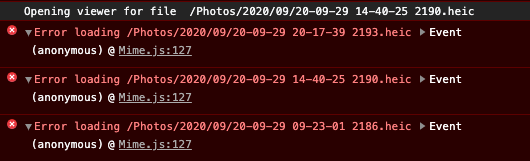
Currently viewing heic images does not work in Nextcloud 20. But this MR seems to have added heic support https://github.com/nextcloud/photos/pull/318. Also opening the images using in the files app of nextcloud works and the preview of the image gets opened correctly.
To Reproduce
- Open the Photos page
- Select a Album
- Open a heic image
Expected behavior
The image should be displayed.
Screenshots

Desktop (please complete the following information):
- OS: macOS
- Browser: chrome
Browser log
 ntimo
ntimo
All 32 comments
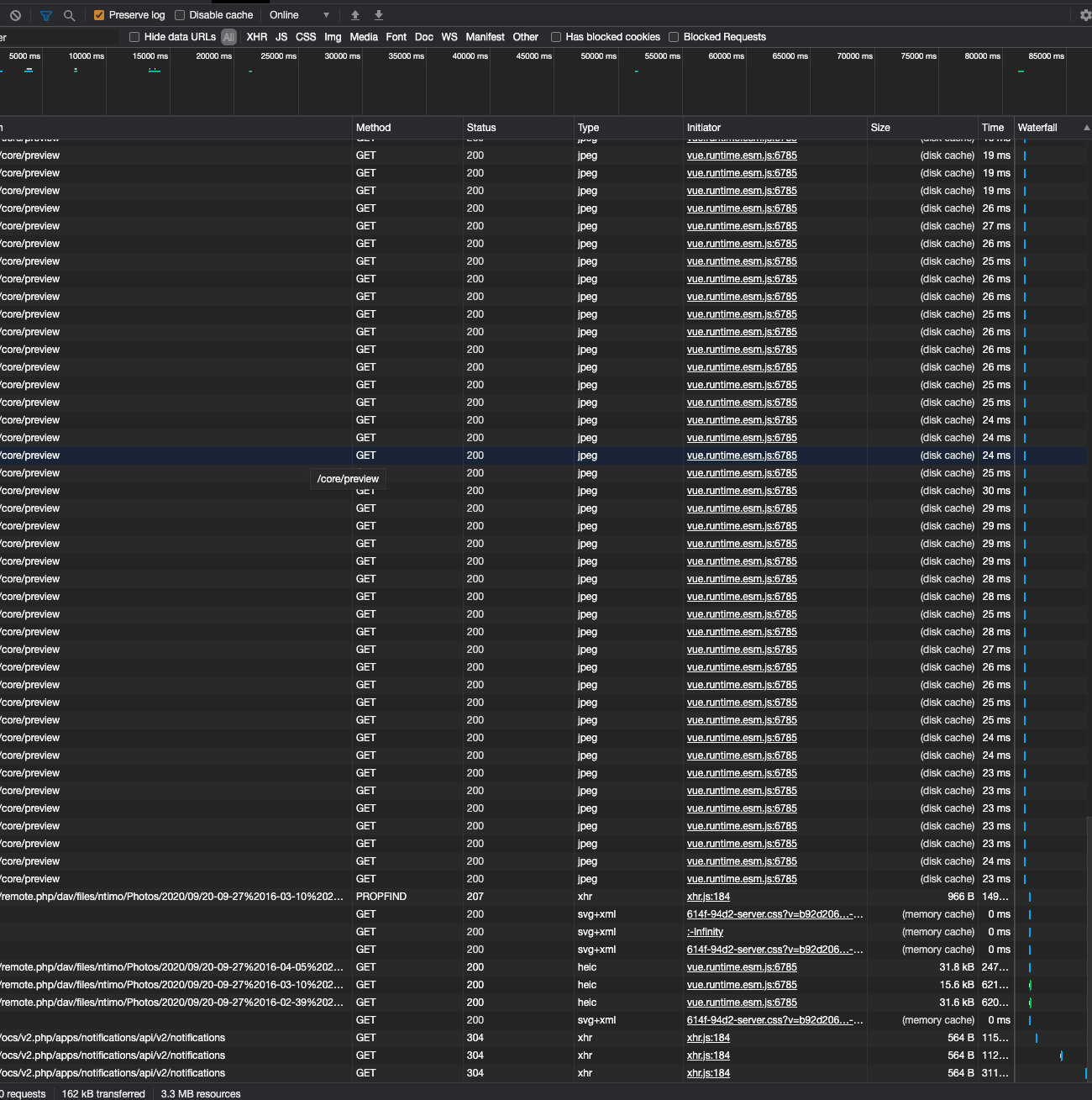
I will need a screenshot of your network requests.
Before you do anything, still on the development tools, there is a tab called network. Click on it, then do your action and screenshot the network log like this:

I assume there will be some failed requests in red
 skjnldsv
on 19 Oct 2020
skjnldsv
on 19 Oct 2020
@skjnldsv
Hey sure here is the screenshot. But there is are no failed requests:
ntimo
on 19 Oct 2020
Ah, you need to enable the previews for heic on your nextcloud config.
Though we should know what file is available for the previews, related issue: https://github.com/nextcloud/server/issues/22873
skjnldsv
on 19 Oct 2020
@skjnldsv I have the following in my nextcloud server config.php:
  'enabledPreviewProviders' =>
  array (
    0 => 'OC\\Preview\\PNG',
    1 => 'OC\\Preview\\JPEG',
    2 => 'OC\\Preview\\GIF',
    3 => 'OC\\Preview\\HEIC',
    4 => 'OC\\Preview\\BMP',
    5 => 'OC\\Preview\\XBitmap',
    6 => 'OC\\Preview\\MP3',
    7 => 'OC\\Preview\\TXT',
    8 => 'OC\\Preview\\MarkDown',
    9 => 'OC\\Preview\\OpenDocument',
    10 => 'OC\\Preview\\Krita',
  ),
this should enable HEIC previews if I am not mistaken right? I also wasn't able to find any documentation about this :(
ntimo
on 19 Oct 2020
should work™ :)
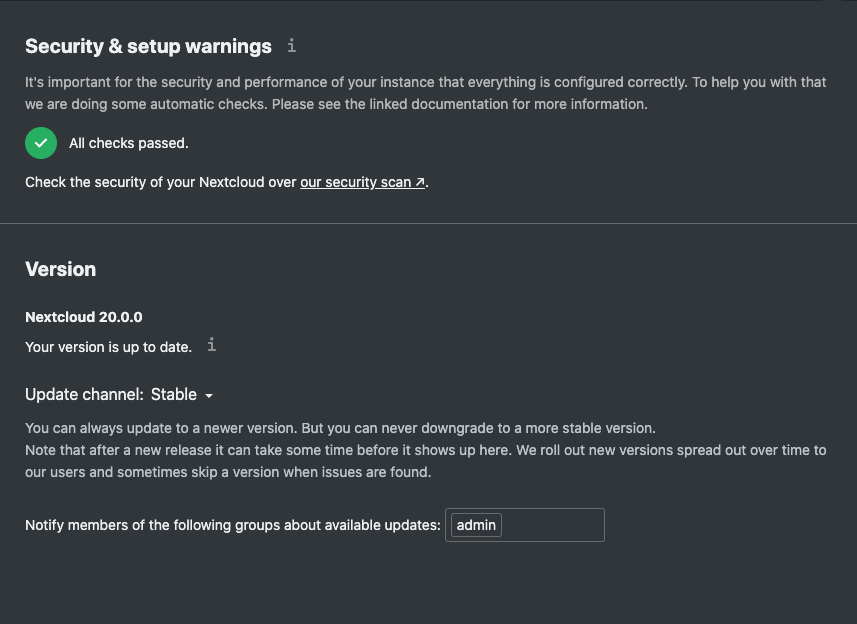
Can you screenshot the setup warning of your instance in /settings/admin/overview ?
skjnldsv
on 19 Oct 2020
Sure there you go :)
ntimo
on 19 Oct 2020
Weird, so I guess you have imagick installed and setup. :thinking:
skjnldsv
on 19 Oct 2020
Yes, I am using the nextcloud docker container nextcloud:20.0.0-apache. So imagick should already be installed :)
ntimo
on 19 Oct 2020
Can you check the propfind request on your network screenshot and copy/paste the response content here? :)
skjnldsv
on 19 Oct 2020
@skjnldsv
Sure
<?xml version="1.0" encoding="UTF-8"?>
<d:multistatus xmlns:d="DAV:" xmlns:nc="http://nextcloud.org/ns" xmlns:oc="http://owncloud.org/ns" xmlns:s="http://sabredav.org/ns">
    <d:response>
        <d:href>/remote.php/dav/files/ntimo/Photos/2020/09/20-09-27%2016-04-05%202168.heic</d:href>
        <d:propstat>
            <d:prop>
                <d:getlastmodified>Sun, 27 Sep 2020 21:48:05 GMT</d:getlastmodified>
                <d:getetag>"5f8c1cd55b548"</d:getetag>
                <d:getcontenttype>image/heic</d:getcontenttype>
                <d:resourcetype />
                <oc:fileid>99754</oc:fileid>
                <oc:permissions>RGDNVW</oc:permissions>
                <oc:size>3751667</oc:size>
                <d:getcontentlength>3751667</d:getcontentlength>
                <nc:has-preview>true</nc:has-preview>
                <nc:mount-type />
                <x1:share-permissions xmlns:x1="http://open-collaboration-services.org/ns">19</x1:share-permissions>
                <oc:tags />
                <oc:favorite>0</oc:favorite>
                <oc:comments-unread>0</oc:comments-unread>
                <oc:owner-id>ntimo</oc:owner-id>
                <oc:owner-display-name>Timo</oc:owner-display-name>
                <oc:share-types />
            </d:prop>
            <d:status>HTTP/1.1 200 OK</d:status>
        </d:propstat>
        <d:propstat>
            <d:prop>
                <nc:is-encrypted />
            </d:prop>
            <d:status>HTTP/1.1 404 Not Found</d:status>
        </d:propstat>
    </d:response>
</d:multistatus>
So it does have preview, weird that it doesn't use it :thinking:
skjnldsv
on 19 Oct 2020
Does it work with this file?
https://github.com/nextcloud/viewer/blob/master/cypress/fixtures/image.heic?raw=true
skjnldsv
on 19 Oct 2020
Nope does not work. Here is the output of the profind request:
<?xml version="1.0"?>
<d:multistatus
xmlns:d="DAV:"
xmlns:s="http://sabredav.org/ns"
xmlns:oc="http://owncloud.org/ns"
xmlns:nc="http://nextcloud.org/ns">
<d:response>
<d:href>/remote.php/dav/files/ntimo/Photos/test/image.heic</d:href>
<d:propstat>
<d:prop>
<d:getlastmodified>Mon, 19 Oct 2020 12:39:50 GMT</d:getlastmodified>
<d:getetag>"5f8d8942f09e2"</d:getetag>
<d:getcontenttype>image/heic</d:getcontenttype>
<d:resourcetype/>
<oc:fileid>160687</oc:fileid>
<oc:permissions>RGDNVW</oc:permissions>
<oc:size>2049547</oc:size>
<d:getcontentlength>2049547</d:getcontentlength>
<nc:has-preview>true</nc:has-preview>
<nc:mount-type></nc:mount-type>
<x1:share-permissions
xmlns:x1="http://open-collaboration-services.org/ns">19
</x1:share-permissions>
<oc:tags/>
<oc:favorite>0</oc:favorite>
<oc:comments-unread>0</oc:comments-unread>
<oc:owner-id>ntimo</oc:owner-id>
<oc:owner-display-name>Timo</oc:owner-display-name>
<oc:share-types/>
</d:prop>
<d:status>HTTP/1.1 200 OK</d:status>
</d:propstat>
<d:propstat>
<d:prop>
<nc:is-encrypted/>
</d:prop>
<d:status>HTTP/1.1 404 Not Found</d:status>
</d:propstat>
</d:response>
</d:multistatus>
Does this displays something for you? https://yourdomain.com/index.php/core/preview?fileId=160687&x=2560&y=1440&a=true
Of course replace with your instance url :stuck_out_tongue:
skjnldsv
on 19 Oct 2020
Yes that works fine :)
ntimo
on 19 Oct 2020
That is weird! :thinking:
skjnldsv
on 19 Oct 2020
Can you create a folder with two images in it and share the folder to me?
[email protected]
skjnldsv
on 19 Oct 2020
Sure, you should have received a email with the shared folder :)
ntimo
on 19 Oct 2020
Did email share work? :) @skjnldsv
ntimo
on 19 Oct 2020
Installing preview-generator app fixed that for me.
 tborychowski
on 19 Oct 2020
tborychowski
on 19 Oct 2020
@tborychowski I have it installed, and it still does not work
ntimo
on 19 Oct 2020
@ntimo
That's weird.
I'm using the same - docker v20, apache and that fixed it for me (installing preview-generator and adding the OC lines to config.php).
And struggling since morning with heic & mov thumbnail generation :-)
Have you tried generating them manually (run this command inside the running container), e.g. (if you're using docker-compose):
docker-compose exec -u www-data app bash -c ."/occ preview:generate-all -vvv"
Does it list your images?
If not try another command (that solved MOV previews for me, but it's a workaround rather than a proper fix):
docker-compose exec app bash -c "apt update && apt upgrade -y && apt install -y ffmpeg imagemagick ghostscript"
Also - it wouldn't be cache would it? :-)
Maybe try opening it in a Private browser window, just to make sure?
EDIT: do you also have this line in your config.php:
'enable_previews' => true,
Hey @tborychowski,
I am now letting the preview:generation run again. Also clearing my browser cache did not help :).
And yes of course I have the 'enable_previews' => true, line in my config. Since I have more then 20k images in my nextcloud the generation takes ages and I will have to wait for it to reach the HEIC image folder.
ntimo
on 19 Oct 2020
Did email share work? :) @skjnldsv
Received! I will have a look tomorrow :)
skjnldsv
on 19 Oct 2020
@ntimo ah, it expired! Please share it again, feel free to put like 3 days on it as I am also working on other areas :wink: :pray:
skjnldsv
on 20 Oct 2020
Hey @skjnldsv sorry for my late reply. I have now reshared the folder with you. But in the meantime I have completely reinstalled my Nextcloud using local storage since before I was using S3 as primary storage. I also tested if the preview image can be requested for the photo and that works just fine. But the photos app still says it can't display the image.
ntimo
on 23 Oct 2020
Thanks, I can also see that it works fine.
Ha, coming from the photo app, I can see an issue in my head, I need to investigate.
skjnldsv
on 23 Oct 2020
@ntimo are you opening from Albums? or timeline? or tags?
skjnldsv
on 23 Oct 2020
@skjnldsv I am opening from Albums
ntimo
on 23 Oct 2020
Thank you for fixing it :) Can't wait for the MR to be merged and for a new release that contains the fix.
ntimo
on 23 Oct 2020
Merged and backported.
Will be present in the upcoming releases :rocket:
skjnldsv
on 23 Oct 2020
@skjnldsv Thanks for merging the fix. Is heic support working in nextcloud 19 or what do you mean by backported? Nextcloud 19 snap does not have heic support so before reporting a bug I wanted to be clear.
 montvid
on 4 Jan 2021
montvid
on 4 Jan 2021
Related issues
 JonOfUs
·
13Comments
JonOfUs
·
13Comments
 Skeebopstop
·
9Comments
Skeebopstop
·
9Comments
 phenomax
·
3Comments
phenomax
·
3Comments
 grenzverkehr
·
7Comments
grenzverkehr
·
7Comments
 steiny2k
·
11Comments
steiny2k
·
11Comments
Most helpful comment
Merged and backported.
Will be present in the upcoming releases :rocket: