Just looked through the app (on the albums branch) and noted down some of the possible issues and enhancements:
- [x] Heading in "Your albums" view says "Photos", should be "Your albums" (and for other sections that respective section :)
- [x] The font-size of the album cover texts is a bit big, it’s the equivalent of 19px. That’s almost the 20px of the h2. Better would be something like 16px
- [x] The breakpoint at 1024 when the navigation shows again makes the images look really small. Goes from 5 pictures without nav → 6 pictures _with_ nav. Instead should be 5 pics without → 4 pics with nav?
- [ ] When you zoom the interface it’s a bit strange, as when you zoom in actually the pictures get smaller? This seems to be cause the navigation gets bigger but the pictures stay the same amount and thus get smaller?
- [x] On mobile, the heading overlaps with the menu icon. Heading should be moved to the right accordingly → only on mobile. Also the menu icon could be moved down a bit to vertically align with the heading
- [x] On mobile in subfolders, the back button and menu icon overlap. When in a subfolder, only the back button should show and not the menu icon
- [x] Back button in empty folders seems missing still? Also should show the title as heading for reference
- [x] The emptycontent text says "This folder does not contain pictures", better "No photos in here" (like "No files in here" in Files) much shorter
- [ ] (The Undraw emptycontent graphic looks a bit out of place. Very round etc, where the Photos app is blocky and sleek. Not sure if this is an issue)
- [x] Failed preview on folder should be dismissed (if 4 images -> show 3) https://github.com/nextcloud/photos/pull/112
- [ ] Image load flash on preview (this is because we use a trick to load the Image asynchronously to allow for request cancellation if the user browse away, otherwise it will wait until all pictures are loaded and then navigate away
- [x] Navigation should ellipsis the folder name (for you @jakobroehrl ?)
- [ ] Opening the sidebar resize the files previews, we should reflow the list
- [x] Locations should open in a new tab
@skjnldsv let me know what you think and if I’m missing anything :)
 jancborchardt
All 15 comments
The breakpoint at 1024 when the navigation shows again makes the images look really small. Goes from 5 pictures without nav → 6 pictures _with_ nav. Instead should be 5 pics without → 4 pics with nav?
ah yes, we need to rethink this as last time we did it there was no navigation :)
Can you play a bit with the values in https://github.com/nextcloud-gmbh/photos/blob/master/src/assets/grid-sizes.js
(you'll need to run npm run dev, not watch as webpack doesn't understand config changes when using watch)
 skjnldsv
on 18 Nov 2019
skjnldsv
on 18 Nov 2019
The emptycontent text says "This folder does not contain pictures", better "No photos in here" (like "No files in here" in Files) much shorter
And videos? Shall we add this in the message? Or is photos enough?
skjnldsv
on 18 Nov 2019
The font-size of the album cover texts is a bit big, it’s the equivalent of 19px. That’s almost the 20px of the h2. Better would be something like 16px
default is set to 1.2rem (~19.2px)
16 looks a bit small, or at least too compact ?
| Before | After |
|:---------:|:------:|
|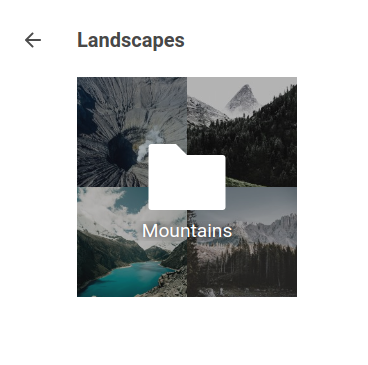 |
|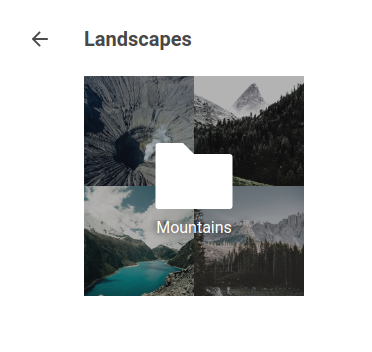 |
|
skjnldsv
on 18 Nov 2019
@skjnldsv I think most of the list items in the original comment are good first issues for @jakobroehrl? :)
jancborchardt
on 28 Nov 2019
→ moved to top comment for overview :)
skjnldsv
on 17 Dec 2019
@skjnldsv feel free to add the points to the original issue, then we have better overview. :) (Edit: I just did it :)
jancborchardt
on 17 Dec 2019
Is the goal to have albums not based upon folders?
What I mean is that i'd like to create albums with photos picked in different folders.
Example, i sort my photos in folders by months, but i want to do an album of my trip (to somewhere) that run over two months.
Other example: I want to create an album to share with a friend but i don't want to include all photos where he is not on.
 Mikescops
on 26 Dec 2019
Mikescops
on 26 Dec 2019
@Mikescops yes, so of course at the moment we are at an early point in the app. The closest thing we look at regarding the design and features is macOS and iOS Photos:
- One thing they do is automatic albums grouped by time and position, including automatically naming it through the GPS data. This is super neat and helpful as it totally takes off the manual sorting work.
- Another thing they do is face recognition, which comes in super handy for what you mention with sharing only the photos where people are actually on with those people.
Of course that’s a bit further out, but those 2 things together make this organization and sharing workflow super nice and seamless without much manual work on people’s part, which is our goal.
jancborchardt
on 29 Dec 2019
I like the GPS idea, however it happens that at some point of your trip, you deactivate your GPS or you use a camera that is not using geolocation. So if we can tag photos on the fly that would be nice.
@jancborchardt do you have design templates ready, so we can see where we want to go?
Mikescops
on 30 Dec 2019
Yes, so this is of course very far out and we have to get the pieces in place first. Here are some steps as I see them:
Simple:
- The "Your photos" stream should get date separators, as per #45
Difficult:
- We get geo information out of the pictures to be able to group pictures accordingly
- We implement some face recognition. @skjnldsv had some library or other app there which we could use as base, if you are interested to look into it @Mikescops?
however it happens that at some point of your trip, you deactivate your GPS or you use a camera that is not using geolocation
Yes, but we could judge according to photos before and after. E.g. if you have photos from Osaka at 13:00 on a day, then some not geotagged, then a few from Osaka at 16:00, we can simply group them in with Osaka. Even if they were not strictly _in_ Osaka, it makes sense to think of it as "the Osaka trip". iOS does this pretty well.
However this gets pretty far away from the original issue. :) @Mikescops do you want to create 2 separate issues about the geolocation and face recognition stuff if you are interested, and we can continue discussion there? :)
jancborchardt
on 30 Dec 2019
Ok in my opinion having the date separator is a must have for sure as well as the geolocation tagging.
To me face recognition is out of scope, even if there is an app from the community doing that. It's really difficult to have an AI model well trained and get good results. Also there are lot of cool functionalities that needs to be implemented before trying to innovate.
Not exhaustive list:
- album creation (Google photos like, you select batch of photos and you add them to the album)
- on the fly group of photo sharing (you select batch of photos from the grid and you get a sharing link // this is similar to album creation in term of coding)
- photo editing and tagging, add meta info to your pictures
- root folder selection
- .noimage to avoid having not needed folders
- fast video preview
- ability to select image preview generator (gd or imagick (there is a long discussion about it about security issues but choice should be on the admin side))
- crop, resize, flip and rotate photos
- delete batch of photos from the grid
- have original image ratio thumbnails in the grid (cool if you take panoramas)
Mikescops
on 30 Dec 2019
Good stuff, all good proposals – the only question is the prioritization of course. :) The point about face recognition is that it would be the one "awesome" feature, one thing which is really cool and not just "ah ok I guess it’s a Photos app" – you know what I mean? :)
So very nice to have you on the team! Please do open separate issues for these things and we can see about specifying and planning?
jancborchardt
on 30 Dec 2019
Do you mind if we add issues but also a Kanban so we can prioritize and see who is working on what?
Mikescops
on 30 Dec 2019
Sure, feel free to use the Github Projects feature. :) Best coordinate with @skjnldsv on the planning there as he is the main developer. I’m just here for design and making sure we focus on the right things. :)
jancborchardt
on 30 Dec 2019
He is not responding much on the tchat tho', but ok!
Mikescops
on 30 Dec 2019
Related issues
 DanBenHa
·
12Comments
DanBenHa
·
12Comments
 Skeebopstop
·
9Comments
Skeebopstop
·
9Comments
 xf-
·
9Comments
xf-
·
9Comments
 phenomax
·
3Comments
phenomax
·
3Comments
 steiny2k
·
11Comments
steiny2k
·
11Comments
Most helpful comment
Ok in my opinion having the date separator is a must have for sure as well as the geolocation tagging.
To me face recognition is out of scope, even if there is an app from the community doing that. It's really difficult to have an AI model well trained and get good results. Also there are lot of cool functionalities that needs to be implemented before trying to innovate.
Not exhaustive list: