Photo_view: [BUG] Switching from portrait to landscape orientation in gallery mode skips ahead of selected image
Describe the bug
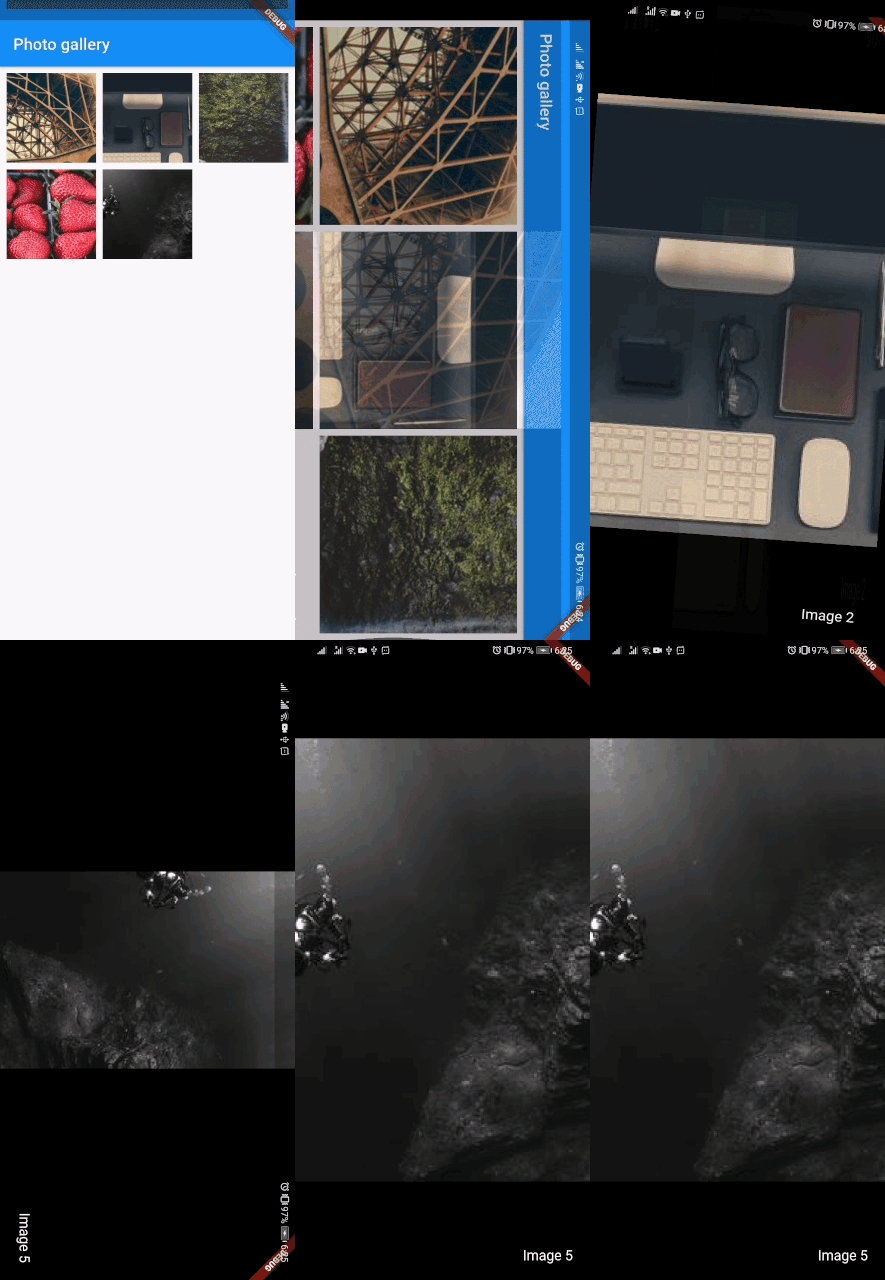
When in gallery mode and switching from portrait to landscape, the image displayed is not always the same and sometimes jumps 2 images ahead of the current one.
To Reproduce
- Use the following code:
import 'package:flutter/material.dart';
import 'package:photo_view/photo_view.dart';
import 'package:photo_view/photo_view_gallery.dart';

void main() => runApp(MyApp());

class MyApp extends StatelessWidget {
  @override
  Widget build(BuildContext context) {
    return MaterialApp(
      title: 'Welcome to Flutter',
      home: DemoPage(),
    );
  }
}

class DemoPage extends StatefulWidget {
  @override
  _DemoPageState createState() => _DemoPageState();
}

class _DemoPageState extends State<DemoPage> {
  List<MediaItem> media = [
    MediaItem(imgUrl: 'https://picsum.photos/seed/1/200/300'),
    MediaItem(imgUrl: 'https://picsum.photos/seed/2/200/300'),
    MediaItem(imgUrl: 'https://picsum.photos/seed/3/200/300'),
    MediaItem(imgUrl: 'https://picsum.photos/seed/4/200/300'),
    MediaItem(imgUrl: 'https://picsum.photos/seed/5/200/300'),
  ];

  @override
  Widget build(BuildContext context) {
    return Scaffold(
      appBar: AppBar(title: Text('Photo gallery')),
      body: GridView.builder(
        padding: const EdgeInsets.all(4.0),
        gridDelegate:
            SliverGridDelegateWithFixedCrossAxisCount(crossAxisCount: 3),
        itemCount: media?.length ?? 0,
        itemBuilder: (_, i) {
          return Container(
            margin: const EdgeInsets.all(4.0),
            child: GestureDetector(
              child: Image.network(
                media[i].imgUrl,
                fit: BoxFit.cover,
              ),
              onTap: () => Navigator.of(context).push(
                MaterialPageRoute(
                  builder: (context) => PhotoView(
                    options: Options(
                      galleryItems: media,
                      initialIndex: i,
                      backgroundDecoration: const BoxDecoration(
                        color: Colors.black,
                      ),
                    ),
                  ),
                ),
              ),
            ),
          );
        },
      ),
    );
  }
}

class MediaItem {
  static int count = 0;
  final int id;
  final String imgUrl;
  final NetworkImage image;

  MediaItem({this.imgUrl})
      : id = count++,
        image = NetworkImage(imgUrl);
}

class Options {
  final Decoration backgroundDecoration;
  final int initialIndex;
  final PageController pageController;
  final List<MediaItem> galleryItems;

  Options({
    this.backgroundDecoration,
    this.initialIndex,
    @required this.galleryItems,
  }) : pageController = PageController(initialPage: initialIndex);
}

class PhotoView extends StatefulWidget {
  final Options options;

  PhotoView({this.options});

  @override
  State<StatefulWidget> createState() {
    return _PhotoViewState();
  }
}

class _PhotoViewState extends State<PhotoView> {
  int currentIndex;

  @override
  void initState() {
    currentIndex = widget.options.initialIndex;
    super.initState();
  }

  void onPageChanged(int index) {
    setState(() {
      currentIndex = index;
    });
  }

  @override
  Widget build(BuildContext context) {
    return Scaffold(
      body: Container(
        decoration: widget.options.backgroundDecoration,
        constraints: BoxConstraints.expand(
          height: MediaQuery.of(context).size.height,
        ),
        child: Stack(
          alignment: Alignment.bottomRight,
          children: <Widget>[
            PhotoViewGallery.builder(
              scrollPhysics: const BouncingScrollPhysics(),
              builder: _buildItem,
              itemCount: widget.options.galleryItems.length,
              backgroundDecoration: widget.options.backgroundDecoration,
              pageController: widget.options.pageController,
              onPageChanged: onPageChanged,
            ),
            Container(
              padding: const EdgeInsets.all(20.0),
              child: Text(
                "Image ${currentIndex + 1}",
                style: const TextStyle(
                  color: Colors.white,
                  fontSize: 17.0,
                  decoration: null,
                ),
              ),
            )
          ],
        ),
      ),
    );
  }

  PhotoViewGalleryPageOptions _buildItem(BuildContext context, int index) {
    final MediaItem item = widget.options.galleryItems[index];
    return PhotoViewGalleryPageOptions(
      imageProvider: item.image,
      initialScale: PhotoViewComputedScale.contained,
      minScale: PhotoViewComputedScale.contained,
      maxScale: PhotoViewComputedScale.covered * 1.5,
      heroAttributes: PhotoViewHeroAttributes(tag: item.id),
    );
  }
}
- Select 3rd, 4th, or 5th picture (in portrait orientation)
- Rotate the device
What is the current behavior?
Shown image is different from selected image after changing orientation
Expected behavior
Selected and shown image should be the same
Screenshots
Is this a feature or report a bug?
Bug
Which versions of Flutter/Photo View, and which browser / OS are affected by this issue? Did this work in previous versions of Photo View?
Flutter 1.20
photo_view: ^0.10.0
 flikkr
👍2
All 2 comments
The same problem occurs here, it happens with the 2nd half of images.
 haytham-c01
on 15 Aug 2020
haytham-c01
on 15 Aug 2020
👍1
Issue related with https://github.com/flutter/flutter/issues/60288
 darioxtx
on 23 Aug 2020
darioxtx
on 23 Aug 2020
👍1
Was this page helpful?
0 / 5 - 0 ratings
Related issues
flikkr
·
5Comments
 vanelizarov
·
7Comments
vanelizarov
·
7Comments
 bierbaumtim
·
7Comments
bierbaumtim
·
7Comments
 darrylong
·
5Comments
darrylong
·
5Comments
 nobutakaes
·
4Comments
nobutakaes
·
4Comments