Photo_view: Ability to close PhotoView with pan down gesture
Let's say we have an app with two screens. The first screen contains only one button which on press presents the second screen. On second screen there is single or multiple PhotoViews (in that case we can wrap them in PageView or PhotoViewGallery). So, the idea is to add ability to close this screen with pan down gesture. And the problem is that if we wrap PhotoView or the entire scaffold with GestureDetector widget with supplied onVerticalDrag... listeners, these listeners conflict with PhotoView's zoom and pan gestures.
I've now finished with solution in which I "lock" the PageView when scale state is not equal to initial so my custom pan gesture doesn't get called when photo is zoomed or is now moving with finger. Here's the code for my solution. It kinda works, but with bugs:
import 'package:flutter/cupertino.dart';
import 'package:photo_view/photo_view.dart';

const kTranslucentBlackColor = const Color(0x66000000);
const _kMaxDragSpeed = 400.0;

class App extends StatelessWidget {
  @override
  Widget build(BuildContext context) {
    return CupertinoApp(
      debugShowCheckedModeBanner: false,
      home: Home(),
    );
  }
}

class Home extends StatefulWidget {
  @override
  _HomeState createState() => _HomeState();
}

class _HomeState extends State<Home> {
  @override
  Widget build(BuildContext context) {
    return CupertinoPageScaffold(
      navigationBar: CupertinoNavigationBar(
        middle: Text('Home'),
      ),
      child: Center(
        child: CupertinoButton(
          child: Text('Open Image Viewer'),
          onPressed: () {
            showCupertinoDialog(
              context: context,
              builder: (context) {
                return ImageViewer(
                  imageProviders: [
                    NetworkImage('https://via.placeholder.com/800/0000FF/808080'),
                    NetworkImage('https://via.placeholder.com/800/FF0000/FFFFFF'),
                    NetworkImage('https://via.placeholder.com/800/FFFF00/000000'),
                    NetworkImage('https://via.placeholder.com/800/000000/FFFFFF'),
                  ],
                );
              },
            );
          },
        ),
      ),
    );
  }
}

class ImageViewer extends StatefulWidget {
  ImageViewer({
    this.initialIndex = 0,
    this.imageProviders,
  });

  final int initialIndex;
  final List<ImageProvider> imageProviders;

  @override
  _ImageViewerState createState() => _ImageViewerState();
}

class _ImageViewerState extends State<ImageViewer> with TickerProviderStateMixin {
  PageController _pageController;
  int _currentPageIndex;
  bool _isLocked = false;

  double _start;
  AnimationController _offsetController;
  Animation<Offset> _offsetAnimation;
  Tween<Offset> _offsetTween;
  bool _isDragging = false;

  AnimationController _opacityController;
  Animation<double> _opacityAnimation;
  Tween<double> _opacityTween;

  @override
  void initState() {
    _pageController = PageController(initialPage: widget.initialIndex ?? 0);
    _currentPageIndex = widget.initialIndex ?? 0;

    _offsetController = AnimationController(vsync: this, duration: Duration.zero);
    _offsetTween = Tween<Offset>(begin: Offset.zero, end: Offset.zero);
    _offsetAnimation = _offsetTween.animate(
      CurvedAnimation(
        parent: _offsetController,
        curve: Curves.easeOut,
      ),
    );

    _opacityController = AnimationController(vsync: this, duration: Duration.zero);
    _opacityTween = Tween<double>(begin: 1.0, end: 0.0);
    _opacityAnimation = _opacityTween.animate(_opacityController);

    super.initState();
  }

  @override
  void dispose() {
    _pageController.dispose();
    _offsetController.dispose();
    _opacityController.dispose();
    super.dispose();
  }

  void _onScaleStateChanged(PhotoViewScaleState scaleState) {
    setState(() => _isLocked = scaleState != PhotoViewScaleState.initial);
  }

  void _onPageChanged(int index) {
    setState(() => _currentPageIndex = mapToRange(index, 0, widget.imageProviders.length - 1));
  }

  void _onDragStart(DragStartDetails details) {
    _start = details.globalPosition.dy;

    setState(() => _isDragging = true);
  }

  void _onDragEnd(double velocity) {
    _start = null;

    if (velocity > _kMaxDragSpeed ||
        _offsetTween.end.dy >= MediaQuery.of(context).size.height / 2) {
      Navigator.of(context).pop();
    } else {
      _opacityTween.begin = _opacityTween.end;
      _opacityTween.end = 1.0;
      _opacityController.duration = Duration(milliseconds: 200);
      _opacityController.reset();
      _opacityController.forward();

      _offsetTween.begin = Offset(0, _offsetTween.end.dy);
      _offsetTween.end = Offset.zero;
      _offsetController.duration = Duration(milliseconds: 200);
      _offsetController.reset();
      _offsetController.forward();
    }

    setState(() => _isDragging = false);
  }

  void _onDrag(double dy) {
    if (dy < 0) {
      return;
    }
    _offsetTween.begin = Offset.zero;
    _offsetTween.end = Offset(0, dy);

    _offsetController.duration = Duration.zero;
    _offsetController.reset();
    _offsetController.forward();

    _opacityTween.begin = _opacityTween.end;
    _opacityTween.end = mapValue(dy, 0, MediaQuery.of(context).size.height, 1.0, 0.0);
    _opacityController.duration = Duration.zero;
    _opacityController.reset();
    _opacityController.forward();
  }

  Widget _buildPage(_, int index) {
    final idx = mapToRange(index, 0, widget.imageProviders.length - 1);
    final ImageProvider provider = widget.imageProviders[idx];

    return ZoomableImage(
      imageProvider: provider,
      onScaleStateChanged: _onScaleStateChanged,
    );
  }

  Widget _wrapWithCloseGesture({Widget child}) {
    return GestureDetector(
      onVerticalDragStart: _isLocked ? null : _onDragStart,
      onVerticalDragUpdate: _isLocked
          ? null
          : (details) {
              _onDrag(details.globalPosition.dy - _start);
            },
      onVerticalDragCancel: _isLocked ? null : () => _onDragEnd(0.0),
      onVerticalDragEnd: _isLocked
          ? null
          : (details) {
              _onDragEnd(details.velocity.pixelsPerSecond.dy);
            },
      child: child,
    );
  }

  @override
  Widget build(BuildContext context) {
    final pageView = PageView.builder(
      itemBuilder: _buildPage,
      physics: _isLocked || widget.imageProviders.length <= 1
          ? const NeverScrollableScrollPhysics()
          : null,
      controller: _pageController,
      onPageChanged: _onPageChanged,
    );

    return OffsetTransition(
      offset: _offsetAnimation,
      child: FadeTransition(
        opacity: _opacityAnimation,
        child: CupertinoPageScaffold(
          backgroundColor: CupertinoColors.black,
          navigationBar: CupertinoNavigationBar(
            automaticallyImplyLeading: false,
            backgroundColor: kTranslucentBlackColor,
            middle: widget.imageProviders.length > 1
                ? AnimatedOpacity(
                    duration: const Duration(milliseconds: 200),
                    opacity: _isDragging ? 0.0 : 1.0,
                    child: Text(
                      '${_currentPageIndex + 1} of ${widget.imageProviders.length}',
                      style: TextStyle(
                        color: CupertinoColors.white,
                      ),
                    ),
                  )
                : null,
            leading: AnimatedOpacity(
              duration: const Duration(milliseconds: 200),
              opacity: _isDragging ? 0.0 : 1.0,
              child: CupertinoButton(
                padding: const EdgeInsets.symmetric(vertical: 0.0),
                onPressed: () => Navigator.of(context).pop(),
                child: Text(
                  'Close',
                  style: TextStyle(
                    color: CupertinoColors.white,
                    fontSize: 17.0,
                  ),
                ),
              ),
            ),
          ),
          child: SafeArea(
            child: _wrapWithCloseGesture(child: pageView),
          ),
        ),
      ),
    );
  }
}

class ZoomableImage extends StatefulWidget {
  ZoomableImage({
    this.imageProvider,
    this.onScaleStateChanged,
  });

  final ImageProvider imageProvider;
  final PhotoViewScaleStateChangedCallback onScaleStateChanged;

  @override
  _ZoomableImageState createState() => _ZoomableImageState();
}

class _ZoomableImageState extends State<ZoomableImage> {
  final _controller = PhotoViewScaleStateController();

  @override
  void dispose() {
    _controller.dispose();
    super.dispose();
  }

  @override
  Widget build(BuildContext context) {
    return PhotoView(
      imageProvider: widget.imageProvider,
      loadingChild: Center(
        child: CupertinoActivityIndicator(),
      ),
      enableRotation: false,
      initialScale: PhotoViewComputedScale.contained,
      minScale: PhotoViewComputedScale.contained,
      maxScale: 5.0,
      scaleStateController: _controller,
      scaleStateChangedCallback: (s) {
        if (widget.onScaleStateChanged != null) {
          widget.onScaleStateChanged(s);
        }
        if (s == PhotoViewScaleState.originalSize) {
          _controller.setInvisibly(PhotoViewScaleState.initial);
        }
      },
    );
  }
}

double mapValue(double value, double low1, double high1, double low2, double high2) {
  return low2 + (high2 - low2) * (value - low1) / (high1 - low1);
}

int mapToRange(int value, int low, int high) {
  assert(low <= high);
  if (value >= low && value <= high) {
    return value;
  }

  int len = high - low + 1;
  return value % len;
}

class OffsetTransition extends AnimatedWidget {
  const OffsetTransition({
    Key key,
    @required Animation<Offset> offset,
    this.child,
  }) : super(key: key, listenable: offset);

  final Widget child;

  Animation<Offset> get offset => listenable;

  @override
  Widget build(BuildContext context) {
    return Transform.translate(
      offset: offset.value,
      child: child,
    );
  }
}

main() => runApp(App());
You can copy-paste this code into main.dart and run it to see what happens.
Here is the video representation:
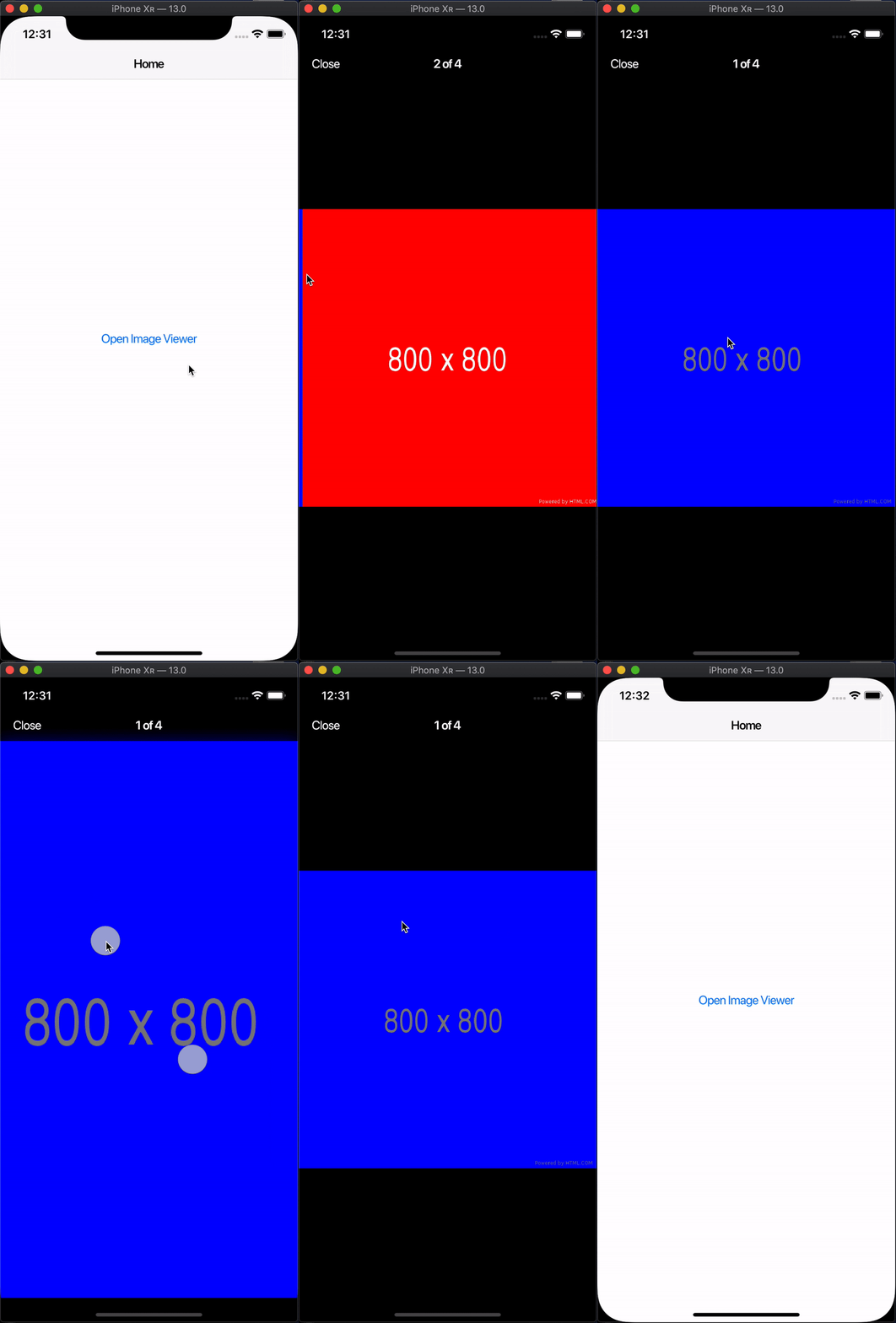
UPDATE
Determined what problem actually is. When you pinch with both fingers - zoom correctly appears, but if you tap the screen with two fingers and move only one - instead of zoom the pan gesture (vertical drag) appears
 vanelizarov
All 7 comments
Gonna check it. Ref #167 BTW.
 renancaraujo
on 19 Aug 2019
renancaraujo
on 19 Aug 2019
@renancaraujo ok, I understood, that your package is only about displaying an image as zoomable/rotatable/pannable widget, not about displaying it as screen and dismissing. I've posted my question with the hope that you can suggest a way to a solution if you already have it ready-made 🙂 Thanks for the response btw!
I ended up with such solution:
int _pointersOnScreen = 0;

Widget _wrapWithCloseGesture({Widget child}) {
  return Listener(
    onPointerDown: (event) {
      _pointersOnScreen++;
      setState(() => _isLocked = _pointersOnScreen >= 2);
    },
    onPointerUp: (event) => _pointersOnScreen--,
    child: GestureDetector(
      dragStartBehavior: DragStartBehavior.down,
      onVerticalDragStart: _isLocked ? null : _onDragStart,
      onVerticalDragUpdate: _isLocked
          ? null
          : (details) {
              _onDrag(details.globalPosition.dy - _start);
            },
      onVerticalDragCancel: _isLocked ? null : () => _onDragEnd(0.0),
      onVerticalDragEnd: _isLocked
          ? null
          : (details) {
              _onDragEnd(details.velocity.pixelsPerSecond.dy);
            },
      child: child,
    ),
  );
}
Long story short, I've wrapped theGestureDetector part with Listener widget, in which I supplied two callbacks for pointer up and pointer down events. And if the number of points on the screen is currently greater than or equal to 2, I lock the panning ability. It kinda resolves glitch problem and that problem in UPDATE
It would be cool if you test it too, then we could add it as a separate feature to your package
vanelizarov
on 19 Aug 2019
I just posted the ref to make it easier to reference all related issues on a possible future release or once I get more free time, look into those big issues.
Thanks for your suggestions and I'm sorry if it takes too long, I'm working on a big flutter project which demands absolutely all my spare time.
renancaraujo
on 19 Aug 2019
@renancaraujo okay, thanks!
vanelizarov
on 20 Aug 2019
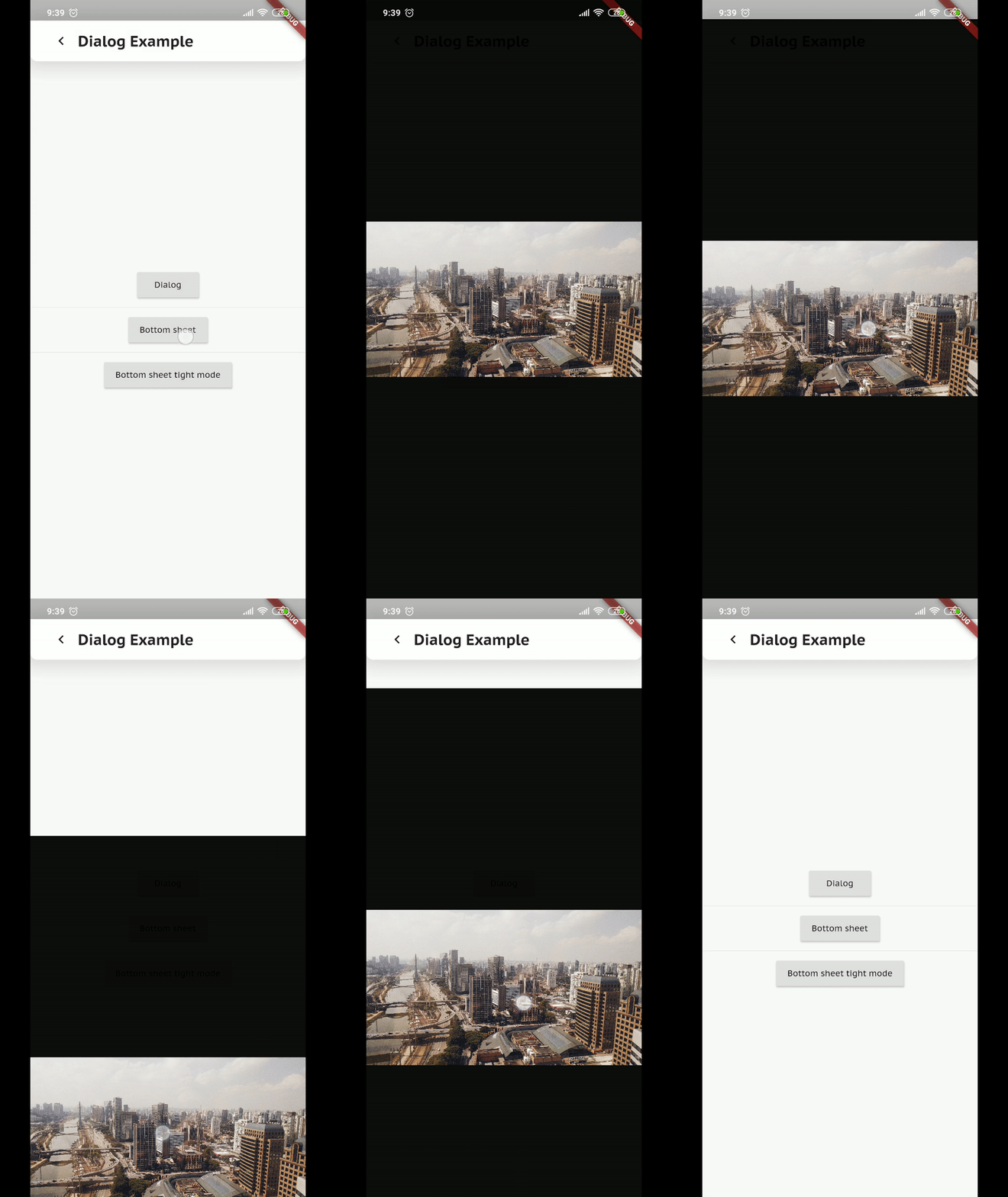
Just solved this on 0.9.0. Now we have an example showing how to combine PhotoView with showBottomSheet.
Check the example app:
renancaraujo
on 21 Nov 2019
PhotoViewGestureDetectorScope only work with one axis so how could we both have pageview and pan to dismiss?
My bad, when trying to add Axes instead of Axis i noticed the only check on value was to check if it equals vertical. so if i set the PhotoViewGestureDetectorScope axis to vertical it works for both axis.
 neckaros
on 15 Feb 2020
neckaros
on 15 Feb 2020
Just solved this on 0.9.0. Now we have an example showing how to combine PhotoView with
showBottomSheet.
Unfortunately this does not work if there is already a FloatingActionButton on the page. In this case the button is simply pushed up.
 ndhbr
on 21 Oct 2020
ndhbr
on 21 Oct 2020
Related issues
 Purus
·
3Comments
Purus
·
3Comments
 clragon
·
8Comments
clragon
·
8Comments
 barangungor
·
7Comments
barangungor
·
7Comments
 nobutakaes
·
4Comments
nobutakaes
·
4Comments
 UlanNurmatov
·
7Comments
UlanNurmatov
·
7Comments
Most helpful comment
Just solved this on 0.9.0. Now we have an example showing how to combine PhotoView with
showBottomSheet.Check the example app: