Version 3.11, 3.12 WEBGL only. Appears on Windows / Ubuntu / Android. Mac OS / IOS looks fine.
Also has an error in console
[.Offscreen-For-WebGL-0x12c8df817000]RENDER WARNING: texture bound to texture unit 0 is not renderable. It maybe non-power-of-2 and have incompatible texture filtering.
WebGL: too many errors, no more errors will be reported to the console for this context.
With default font families like Arial / Times New Roman everything is fine, but with custom Troika / Gilroy / Passion One black rectangles appear.
And the interesting thing that bug in my case is only with numbers


 alexeymolchan
All 7 comments
@photonstorm i recreated this, https://alexeymolchan.github.io/phaser-font-bug/ (windows / ubuntu / android)
text becomes broken after setFontSize is called.
scene create method is pretty simple
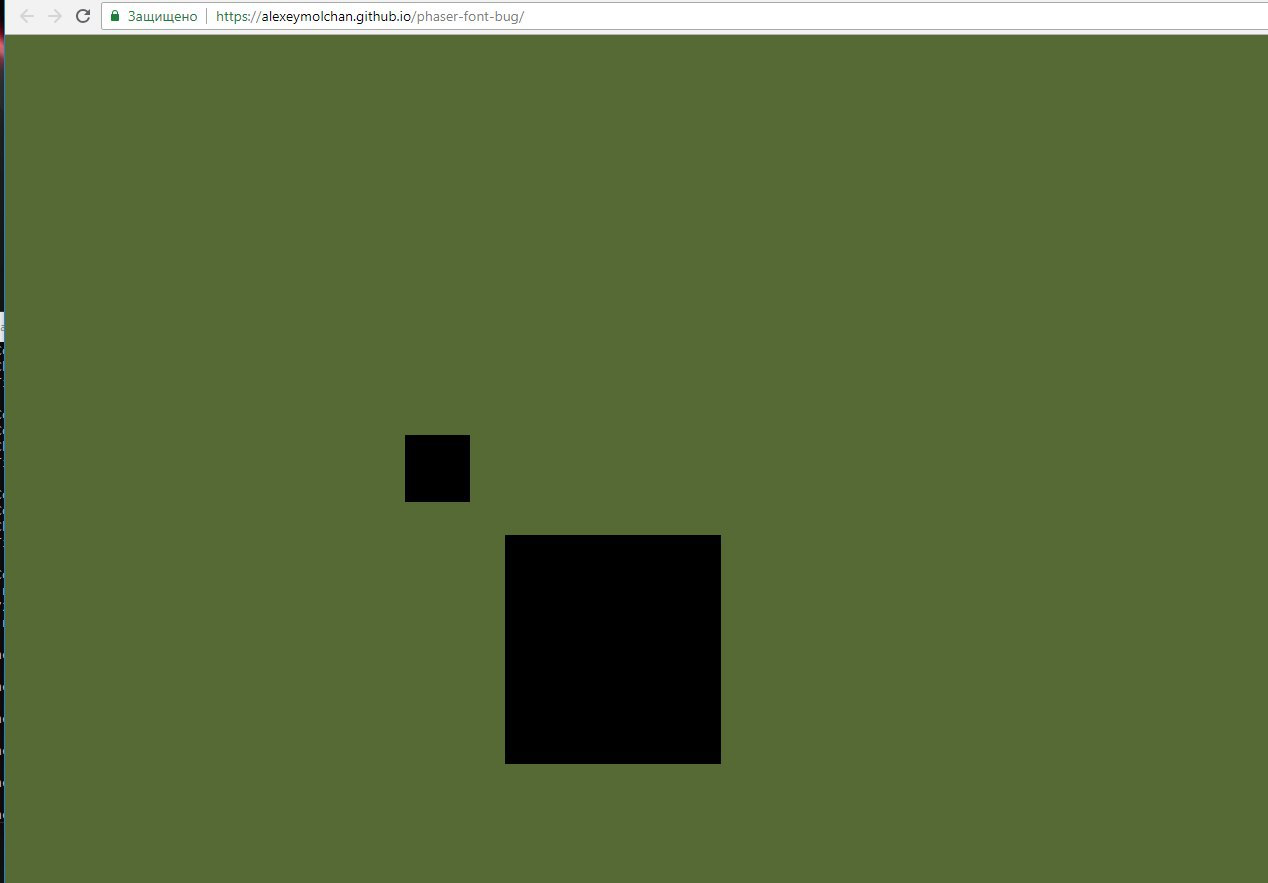
this.firstText = this.add.text(400, 400, '92', {fontFamily: 'troika', color: 'aquamarine'});
this.secondText = this.add.text(500, 500, '37', {fontFamily: 'troika', color: 'aquamarine'});

this.firstText.setFontSize(66);
this.secondText.setFontSize(228);
also have this error in a console
Error: WebGL warning: drawArrays: Active texture 0 for target 0x0de1 is 'incomplete', and will be rendered as RGBA(0,0,0,1), as per the GLES 2.0.24 $3.8.2: Non-power-of-two textures must have a wrap mode of CLAMP_TO_EDGE. TextureTintPipeline.js:344
Check this against 3.13 in the master branch, because I'm certain this is already fixed.
 photonstorm
on 10 Sep 2018
photonstorm
on 10 Sep 2018
@photonstorm still exist

alexeymolchan
on 10 Sep 2018
I can't view your source in the example as it's all bundled, so what are you doing to ensure the webfont is loaded and ready before being used in Phaser? Which font loader are you using?
Where can I get the font you're using to test with? Unless I can re-create here, I can't look at this any further really.
photonstorm
on 10 Sep 2018
@photonstorm you can take unbundled version in master branch, bundled only in gh-pages.
https://github.com/alexeymolchan/phaser-font-bug , font in src/assets
i use webfontloader https://github.com/typekit/webfontloader
first i load font via css
@font-face {
  font-family: 'troika';
  font-style: normal;
  font-weight: normal;
  src: url('./assets/troika.otf') format('opentype');
}
then i promisified webfontloader load
export default () =>
  new Promise(resolve => {
    WebFont.load({
      classes: false,
      custom: {
        families: ['troika']
      },
      active: resolve
    });
  });
and then after font loaded i start phaser game
import Phaser from 'phaser';
import {debounce} from './utils';
import loadFont from './utils/fontLoader';
import RootScene from './scenes/RootScene';

import './index.css';

const config = {
  type: Phaser.WEBGL,
  width: window.innerWidth,
  height: window.innerHeight,
  autoResize: true,
  backgroundColor: '#556B2F',
  resolution: window.devicePixelRatio || 1,
  scene: [
    RootScene,
  ]
};

let game;

const gameResizeHadler = () => {
  game.resize(window.innerWidth, window.innerHeight);
};

loadFont()
  .then(() => {
    game = new Phaser.Game(config);

    window.addEventListener('resize', debounce(gameResizeHadler, 500));
  })
  .catch(error => {
    console.error(error);
  });
Ok, I've just spent several hours looking at this and it was beyond mental. In the troika font, only 4 numbers caused it! I tried several other web fonts and they were all fine. Under normal canvas, worked great too. After a massive debugging session it boiled down to an issue with resizing WebGLTextures that are canvas backed. I replaced that with just removing and re-creating the texture and it works perfectly now. Damn, that was a weird one! Fix is in master branch.
photonstorm
on 13 Sep 2018
thanks, richGod
alexeymolchan
on 13 Sep 2018
Related issues
 MarkSky
·
3Comments
MarkSky
·
3Comments
 rexrainbow
·
4Comments
rexrainbow
·
4Comments
 HDouss
·
3Comments
HDouss
·
3Comments
 sercand
·
3Comments
sercand
·
3Comments
 halilcakar
·
4Comments
halilcakar
·
4Comments
Most helpful comment
Ok, I've just spent several hours looking at this and it was beyond mental. In the troika font, only 4 numbers caused it! I tried several other web fonts and they were all fine. Under normal canvas, worked great too. After a massive debugging session it boiled down to an issue with resizing WebGLTextures that are canvas backed. I replaced that with just removing and re-creating the texture and it works perfectly now. Damn, that was a weird one! Fix is in master branch.