Phaser: Unable to set tile depth on tilemap
Version
- Phaser Version:
3.9.0 - Operating system:
Windows - Browser:
Chrome 68
Description
When using a tilemap (either dynamic or static), I am unable to set the depth for each tile individually.
I just did
const layer = createDynamicLayer(0,...);

layer.forEachTile(tile => {
  tile.depth = tile.y * tile.height + tile.height / 2;
});
Additional Information
I noticed that this isometric tilemap example is creating the map manually by placing images. It makes me think that it may not (yet) be possible to set a per-tile depth without placing images manually in the world.
 Telokis
All 8 comments
Tiles don't have a depth property, so setting it won't do anything. All you've done in the code above is to give your tile a new dynamic property, but nothing will actually use it. There are no plans for this as a feature either, as it doesn't really make sense because tiles generally never overlap, so there's no depth required for them within their own layer. Even in isometric maps you still just define them using a single draw order.
We are going to provide alternative tile draw orders though (see #3284)
 photonstorm
on 9 Aug 2018
photonstorm
on 9 Aug 2018
Ok, thanks for the quick answer. I am used to RPG Maker mapping in which each tile has an inherent depth value and I thought Phaser worked the same way.
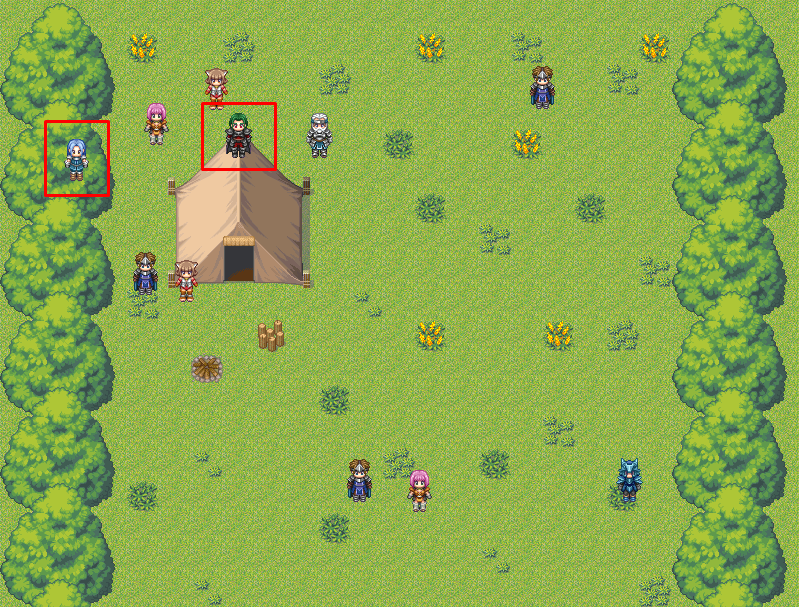
On the screenshot provided, you can see the map I made. Everything on screen is the tilemap except the characters.
Should I change and make the trees and tent pure image objects in order to be able to use the depth on them?
Telokis
on 9 Aug 2018
@Telokis, you can split your map into multiple layers and then adjust the depth on those layers. Are you using Tiled? If so, your Tiled setup might look something like:
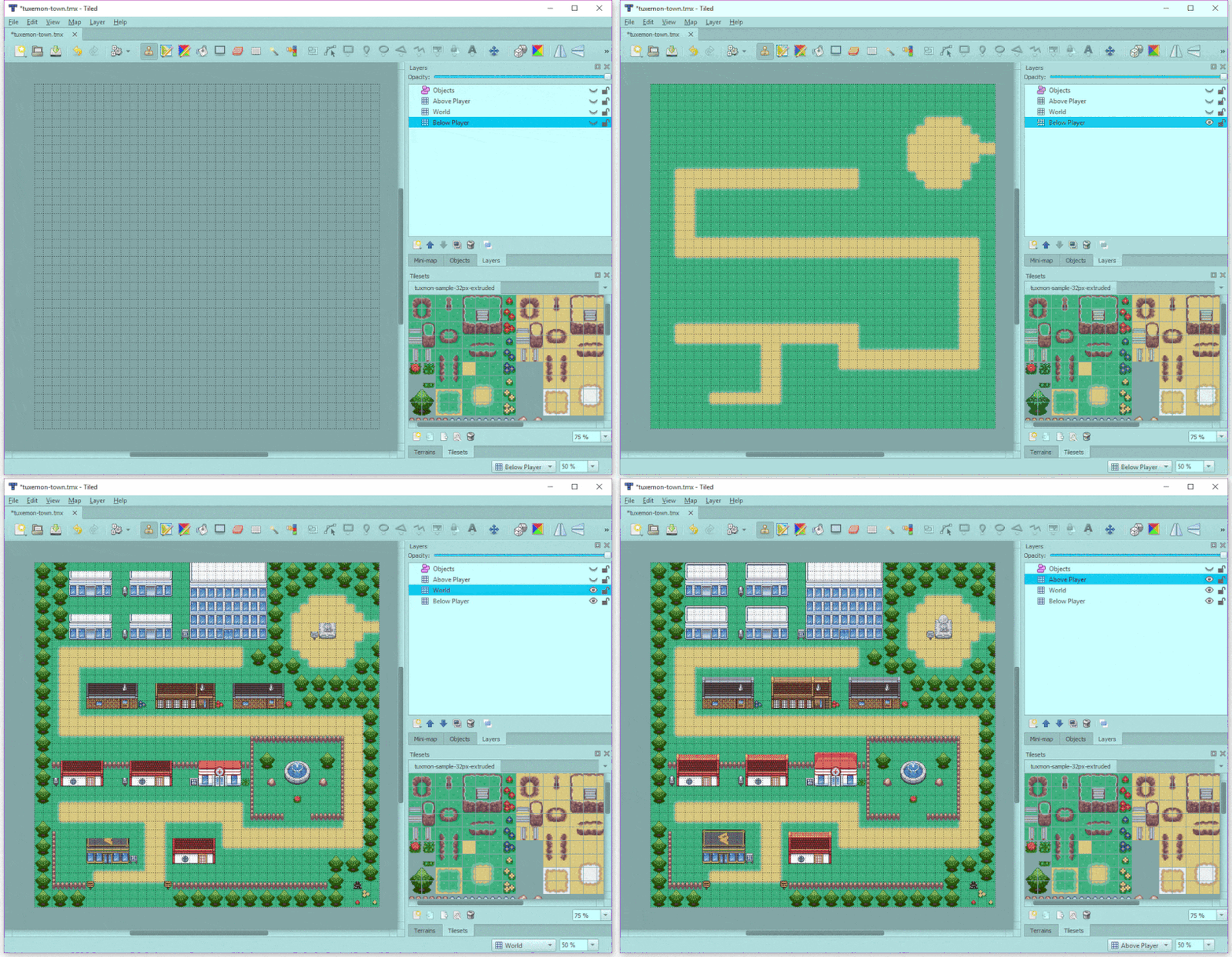
This example from Phaser Labs features multiple layers. You might also want to join the Phaser Slack or Discord where you could ask for more of a step-by-step breakdown of how to split you map into layers.
 mikewesthad
on 10 Aug 2018
mikewesthad
on 10 Aug 2018
Yes, I am using Tiled.
However, the player's depth is dynamic (let's say it's player.depth = player.y) so I have to set the layers' depths to at least the map's height in order for the player to never be able to step in front of it. Am I right?
This is a good solution before I make my own Tilemap GameObject to handle it better! Thank you !
Telokis
on 10 Aug 2018
Layers have a depth property, just like sprites, so you can change them dynamically as needed. You just can’t do it on a per tile per layer basis.
photonstorm
on 10 Aug 2018
Just to say that the feature of tile draw orders has been implemented and is now in the master branch.
photonstorm
on 21 Aug 2018
@photonstorm Wow! That's nice! Is there a doc available for it? Or just a method name I should find in the code to get started understanding it, please? (Not scared of your code, I've read it a lot! :) )
Telokis
on 21 Aug 2018
@Telokis if you use Tiled it'll just pick it up automatically from the map data. If you don't, you can use the setRenderOrder method (either on the map, or on a layer)
photonstorm
on 21 Aug 2018
Related issues
 Colbydude
·
4Comments
Colbydude
·
4Comments
 halilcakar
·
4Comments
halilcakar
·
4Comments
 rootasjey
·
3Comments
rootasjey
·
3Comments
 lilijreey
·
4Comments
lilijreey
·
4Comments
 SKEPDIMI
·
4Comments
SKEPDIMI
·
4Comments
Most helpful comment
@Telokis, you can split your map into multiple layers and then adjust the depth on those layers. Are you using Tiled? If so, your Tiled setup might look something like:
This example from Phaser Labs features multiple layers. You might also want to join the Phaser Slack or Discord where you could ask for more of a step-by-step breakdown of how to split you map into layers.