Phaser: Camera stuttering when using with camera.startFollow, a tilemap and zoom
Hi!
I was playing around with Phaser and tried to make a Zelda-like RPG.
I chose to use a tilemap to design my map. The map is bigger than the screen, so a camera follows the player.
The thing is: the camera is very choppy!
I use the startFollow method.
- If I follow the player with a
lerpvalue of 1 (follow the player without any delay), then the player looks smooth but the background choppy - If I follow the player with a
lerpvalue of 0.05 (follow the player with a delay), then both the player and the background look choppy
Other informations:
- my map is pretty big, but I tried with a smaller one and I still had the issue.
- I use the
arcadephysics engine - I use a zoom of 3
Update: I just noticed that if I removed the zoom and put the lerp value of the camera to 1, the character is smooth and the background is okay (but still a little choppy).
Here is the scene code 🖋 and the index.js code 📝
And here is a video 🎬
Am I doing something wrong, or is it indeed an issue with Phaser?
Thanks 😊
 pierpo
All 9 comments
This can happen if your camera has its roundPixels property enabled.
 hexus
on 12 Jun 2018
hexus
on 12 Jun 2018
I noticed this bug today, too and i can confirm that it happens even without any zoom and without enabling roundPixels on the camera. In my game i only have pixelArt enabled on the main game config which activates image-rendering: pixelated on the canvas. Enabling roundPixels on the camera OR the game config doesn't change anything on my side.
Plus, i noticed that spritesheets get distorted, too. See this screenshot. That's because positions of sprites aren't rounded. I expected that pixelArt would enable that as sprites don't seem to have have a roundPixels property. Shouldn't enabling pixelArt on the main game config do all of this because pixel games rely on integers?
 bonsaiheldin
on 13 Jun 2018
bonsaiheldin
on 13 Jun 2018
That screen shot doesn't look like a roundPixels or pixelArt issue, it looks like a standard WebGL issue when sprite sheets aren't correctly prepared for GL textures and get pixel bleeding from edge frames.
pixelArt will enable linear texture mapping for any GL texture Phaser creates. It's not possible to enable on a per-Sprite basis, because Sprites share textures, and it's a texture level setting.
 photonstorm
on 13 Jun 2018
photonstorm
on 13 Jun 2018
Thank you all for your answers!
Do you have a recommendation to solve the issue?
pierpo
on 13 Jun 2018
Sorry, my comments above were directed at @bonsaiheldin - I've not looked into the original issue yet because I can't run the example provided stand-alone, so it'll take time to re-create a local test case before I can dig in to it.
photonstorm
on 13 Jun 2018
@photonstorm Oh... Why can't you run it? May I be of any help?
pierpo
on 13 Jun 2018
It would help if it was immediately available as a Codepen or JSBin that's as small as possible to reproduce the issue.
hexus
on 13 Jun 2018
I am having a similar problem, this what happens when this.cameras.main.startFollow(this.player, true); round pixel is set to true on camera in version 3.10 (but not in 3.9), background tile sprite is fine, but the player character is not:

It can be hard to see because of the low FPS, but the character is really shaking.
Does not shake if the round pixel is set to false this.cameras.main.startFollow(this.player, false); :
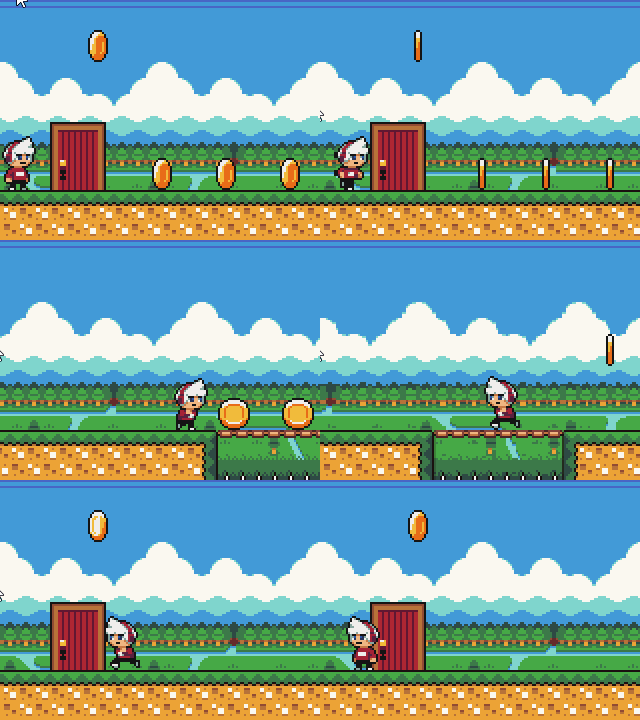
And when this.background.setScrollFactor(0.5); is set the background tile sprite i no longer get pixels rounded:

 AndreaBoeAbrahamsen
on 16 Jun 2018
AndreaBoeAbrahamsen
on 16 Jun 2018
Thank you for submitting this issue. We have fixed this and the fix has been pushed to the master branch. It will be part of the next release. If you get time to build and test it for yourself we would appreciate that.
photonstorm
on 25 Jun 2018
Related issues
 Secretmapper
·
3Comments
Secretmapper
·
3Comments
 BigZaphod
·
4Comments
BigZaphod
·
4Comments
 HDouss
·
3Comments
HDouss
·
3Comments
 lilijreey
·
4Comments
lilijreey
·
4Comments
 halilcakar
·
4Comments
halilcakar
·
4Comments
Most helpful comment
Thank you for submitting this issue. We have fixed this and the fix has been pushed to the
masterbranch. It will be part of the next release. If you get time to build and test it for yourself we would appreciate that.