Pfelk: Getting wrong "tracker" field to convert on 35-rules-desc.conf
In 35-rules-desc.conf has an example line for tracker field export from pfsense
_#Add additional rule descriptions here
#"00000" => "this is a rule description example"_
The tracker number is 6 digits field.
The export from pfctl -vv -sr | grep USER_RULE | sed 's/[^(]*(\([^)]*\).*"USER_RULE: *\([^"]*\).*/"\1"=> "\2"/' | sort -t ' ' -k 1,1 -u output the tracker field with 10 digits
"1491162915"=> "Easy Rule: Passed from Firewall Log View"
If you use that 10 digits line like this above it shows a logstash error and shutdown UDP listener.
Error log from logstash.runner:
[2020-04-24T02:25:36,622][INFO ][logstash.runner          ] Starting Logstash {"logstash.version"=>"7.6.2"}
[2020-04-24T02:25:41,813][ERROR][logstash.agent           ] Failed to execute action {:action=>LogStash::PipelineAction::Create/pipeline_id:main, :exception=>"LogStash::ConfigurationError", :message=>"Expected one of [ \\t\\r\\n], \"#\", \"{\", \"}\" at line 22, column 7 (byte 633) after filter {\r\n  if [tracker] {\r\n    mutate {\r\n      convert => [\"tracker\", \"string\"]\r\n    }\r\n  }\r\n  if [tracker] {\r\n    translate {\r\n      field => \"[tracker]\"\r\n      destination => \"[rule][description]\"\r\n      dictionary => {\r\n      \"0\" => \"null\"\r\n\r\n      #Add additional rule descriptions here\r\n      #\"00000\" => \"this is a rule description example\"\r\n      ", :backtrace=>["/usr/share/logstash/logstash-core/lib/logstash/compiler.rb:41:in `compile_imperative'", "/usr/share/logstash/logstash-core/lib/logstash/compiler.rb:49:in `compile_graph'", "/usr/share/logstash/logstash-core/lib/logstash/compiler.rb:11:in `block in compile_sources'", "org/jruby/RubyArray.java:2580:in `map'", "/usr/share/logstash/logstash-core/lib/logstash/compiler.rb:10:in `compile_sources'", "org/logstash/execution/AbstractPipelineExt.java:161:in `initialize'", "org/logstash/execution/JavaBasePipelineExt.java:47:in `initialize'", "/usr/share/logstash/logstash-core/lib/logstash/java_pipeline.rb:27:in `initialize'", "/usr/share/logstash/logstash-core/lib/logstash/pipeline_action/create.rb:36:in `execute'", "/usr/share/logstash/logstash-core/lib/logstash/agent.rb:326:in `block in converge_state'"]}
[2020-04-24T02:25:42,284][INFO ][logstash.agent           ] Successfully started Logstash API endpoint {:port=>9600}
[2020-04-24T02:25:47,047][INFO ][logstash.runner          ] Logstash shut down.
If I change it to use 6 digits like that its working but it does not find the right tracker on Index
"162915"=> "Easy Rule: Passed from Firewall Log View"
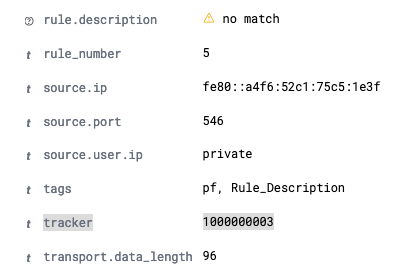
I wonder if there is other way to find the tracker ID in message to identify the rules.
Thanks for that great Project!
_Linux 4.15.0-96-generic x86_64
NAME="Ubuntu"
VERSION="18.04.3 LTS (Bionic Beaver)"
elasticsearch 7.6.2
logstash 1:7.6.2-1
kibana 7.6.2_
 geomaraugusto
All 13 comments
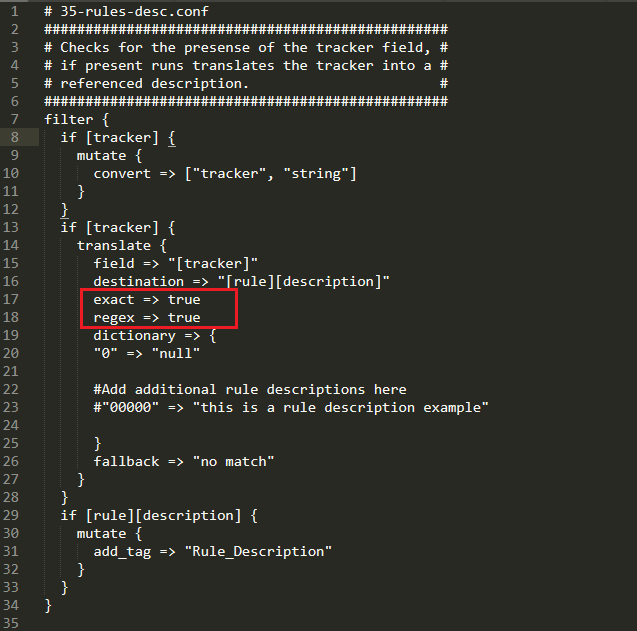
add these two lines:
exact => true
regex => true
restart logstash and let me know if that fixes it.
 a3ilson
on 24 Apr 2020
a3ilson
on 24 Apr 2020
I'm not sure that i noticed this behavior, but since i am also on pfsense i made this update to my 35-rules-desc.conf and will watch it today
 revere521
on 24 Apr 2020
revere521
on 24 Apr 2020
@revere521 - thanks! Hopefully this will resolve issues with others too.
a3ilson
on 24 Apr 2020
So far i don't have any shutdown errors, but with those two lines i get "null" for all descriptions
here are a bunch of pfsense specific tracker id and rules, not sure if any are specific to my setup (user rules omitted)
"1000000001" => "pass IPv6 loopback"
"1000000002" => "pass IPv6 loopback"
"1000000003" => "Block all IPv6"
"1000000004" => "Block all IPv6"
"1000000101" => "Block IPv4 link-local"
"1000000102" => "Block IPv4 link-local"
"1000000103" => "Default deny rule IPv4"
"1000000104" => "Default deny rule IPv4"
"1000000105" => "Default deny rule IPv6"
"1000000106" => "Default deny rule IPv6"
"1000000107" => "Block traffic from port 0"
"1000000108" => "Block traffic to port 0"
"1000000109" => "Block snort2c hosts"
"1000000110" => "Block snort2c hosts"
"1000000201" => "Block Carp from Self to Any"
"1000000202" => "Pass Carp all no state"
"1000000301" => "sshguard"
"1000000351" => "GUI Lockout"
"1000000400" => "virusprot overload table"
"11000" => "block bogon IPv4 networks from WAN"
"1000001570" => "block drop in log on ! pppoe0 inet from WAN to any"
"12000" => "Block private networks from WAN block 10/8"
"1000002641" => "allow access to DHCP server"
"1000002642" => "allow access to DHCP server"
"1000002643" => "allow access to DHCP server"
"1000003670" => "block drop in log on ! ovpnc1 inet from VPN to any"
"1000005770" => "block drop in log on ! em0 inet from 192.168.254.0/24 to any"
"1000006861" => "pass IPv4 loopback"
"1000006862" => "pass IPv4 loopback"
"1000006863" => "let out anything IPv4 from firewall host itself"
"1000006961" => "let out anything from firewall host itself"
"1000006962" => "let out anything from firewall host itself"
"10000" => "anti-lockout rule"
it might be too simple, but @geomaraugusto ---
does changing
"162915"=> "Easy Rule: Passed from Firewall Log View"
to
"162915" => "Easy Rule: Passed from Firewall Log View" (notice the space between " and =>)
Fix the issue without the two extra lines that @a3ilson suggested?
revere521
on 24 Apr 2020
Thank you guys. I could be doing some thing wrong, then following @revere521 figured out, I anyway just took off some spaces and it worked!
Round 1 :}
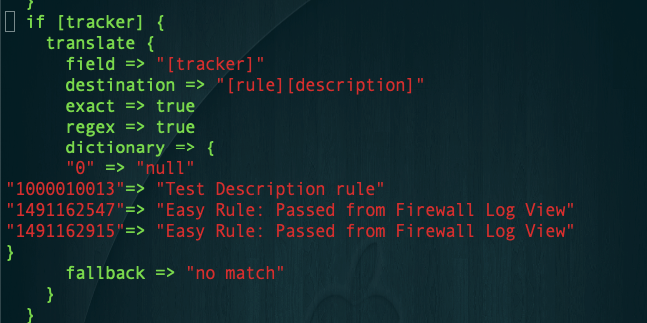
Round 2: it shows NULL.
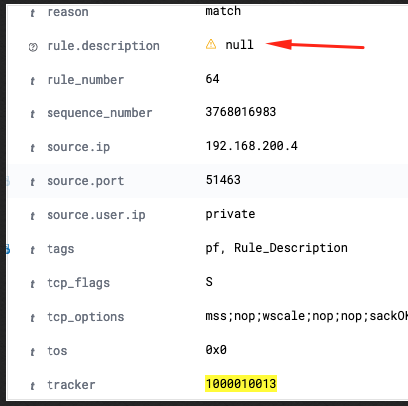
I just refreshed field in index patterns but I also get "null" for all description
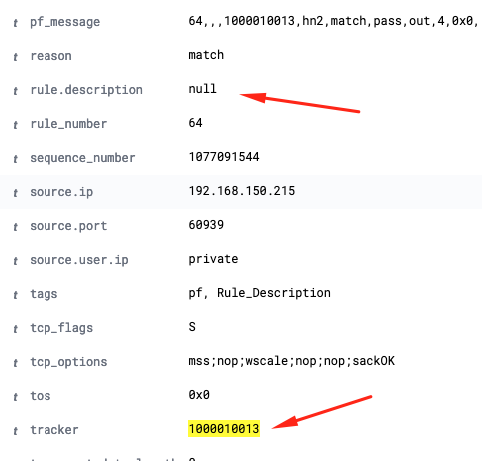
Not sure if this should be in other topic/issue.
Thank you
geomaraugusto
on 24 Apr 2020
now try without the
exact => true
regex => true
and see what happens
revere521
on 24 Apr 2020
as an aside - @a3ilson i created a simple rules visualization:
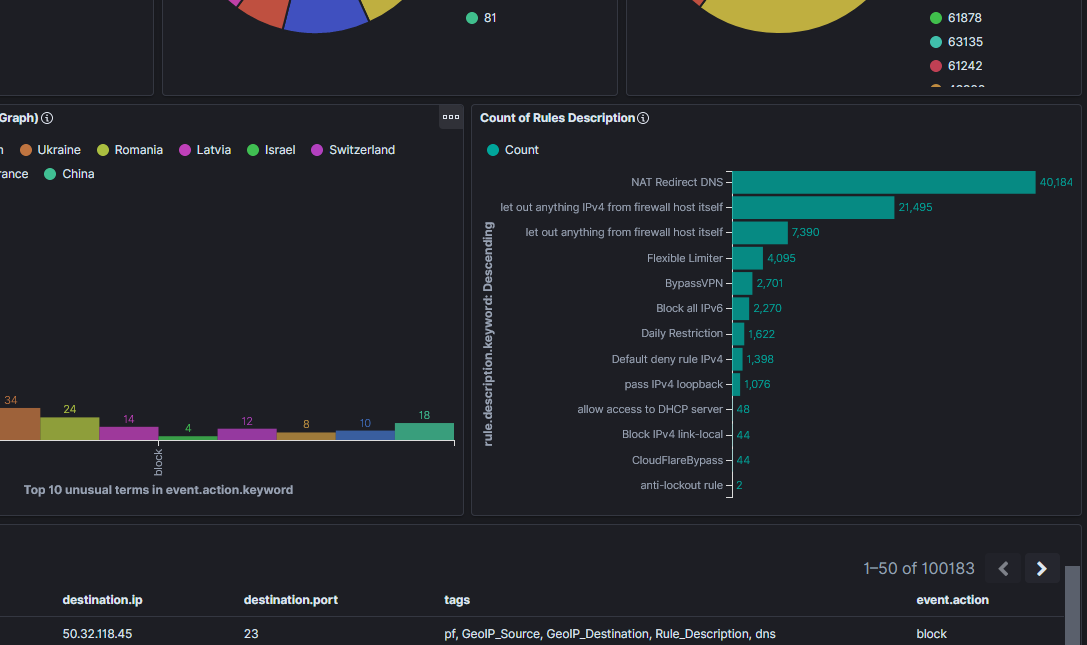
If you want i can upload jut that visulization as an optional element
revere521
on 24 Apr 2020
Sweet! Once the kinks are worked out of the Rule Description enhancement - add to the Dashboard...or I guess you could do that now.
a3ilson
on 24 Apr 2020
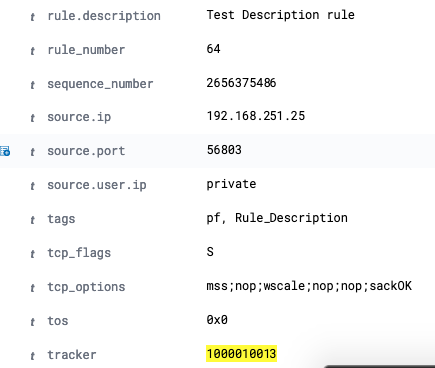
Here we go! Thanks!!!
geomaraugusto
on 24 Apr 2020
@geomaraugusto - What does your 35-rules-desc.conf look like? What was the issue?
a3ilson
on 24 Apr 2020
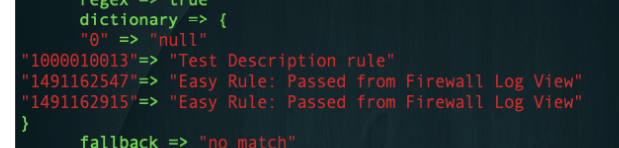
@geomaraugusto - What does your 35-rules-desc.conf look like? What was the issue?
Not sure if it was copy/paste issue or something on #commented lines with space, I just cleaned up and it worked
geomaraugusto
on 24 Apr 2020
Great! I'll close this issue.
a3ilson
on 24 Apr 2020
Related issues
 keshif
·
26Comments
keshif
·
26Comments
 fastxl
·
5Comments
revere521
·
17Comments
fastxl
·
5Comments
revere521
·
17Comments
 squirrelboot
·
12Comments
squirrelboot
·
12Comments
 fktkrt
·
21Comments
fktkrt
·
21Comments