Thanks first of all. I have setup everything and got logs into elasticsearch.
However while importing dashboard into kibana it gives
Sorry, there was an error
The file could not be processed.
Is it because the josn is in exported format and cannot be imported directly.
https://discuss.elastic.co/t/unable-importing-json-file-from-kibana-ui/175388/4
Any help is appreciated.
kibana version 6.8.3
 vakarthik
All 11 comments
the current version of the ELK stack is 7.6.2, you should update to current (everything here is built on the current 7.x version)
the new dashboards are .ndjson files.
Make sure also you are not trying to import the pattern json file, that's not a dashboard. The dashboards are here: https://github.com/3ilson/pfelk/tree/master/Dashboard
 revere521
on 22 Apr 2020
revere521
on 22 Apr 2020
sorry.
updated to version 7.6.2 but still could not import. (import takes long time and throws and error), btw i have updated both logstash and elasticsearch to 7.6.2 (oss) and i could get logs using "pf-*" index patterns,
_Sorry, there was an error
The file could not be processed._
btw, is there a reddit page or something so that i can get some help :) because i am not a dev. hope its okay :)
vakarthik
on 22 Apr 2020
no reddit page that I am aware of...
However, which of the files are you trying to import for the dashboards?
revere521
on 22 Apr 2020
The .ndjson files in master/Dashboards.
Both snort and main showing same error
vakarthik
on 23 Apr 2020
@vakarthik - Please confirm that you are receiving logs.
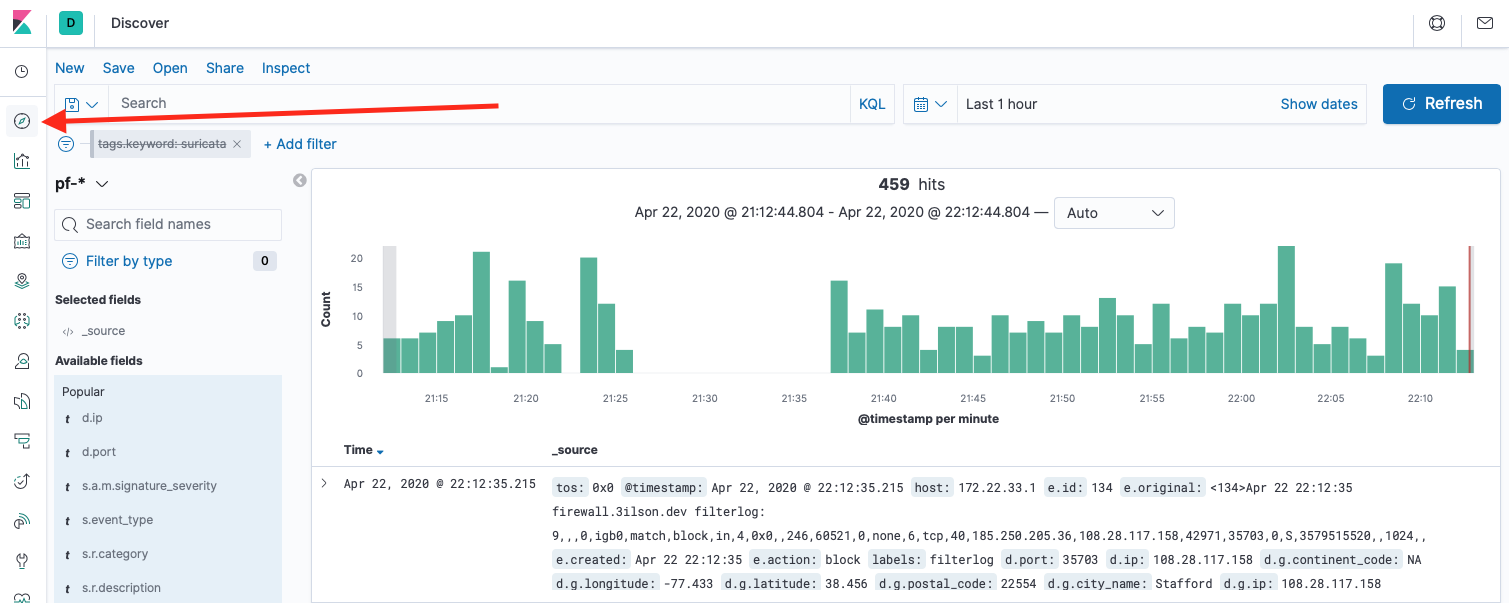
 a3ilson
on 23 Apr 2020
a3ilson
on 23 Apr 2020
Next, go to "Management" ==> "Index Pattern" (under Kibana) ==> Click on "Pf-*" and "Refresh" your index pattern.
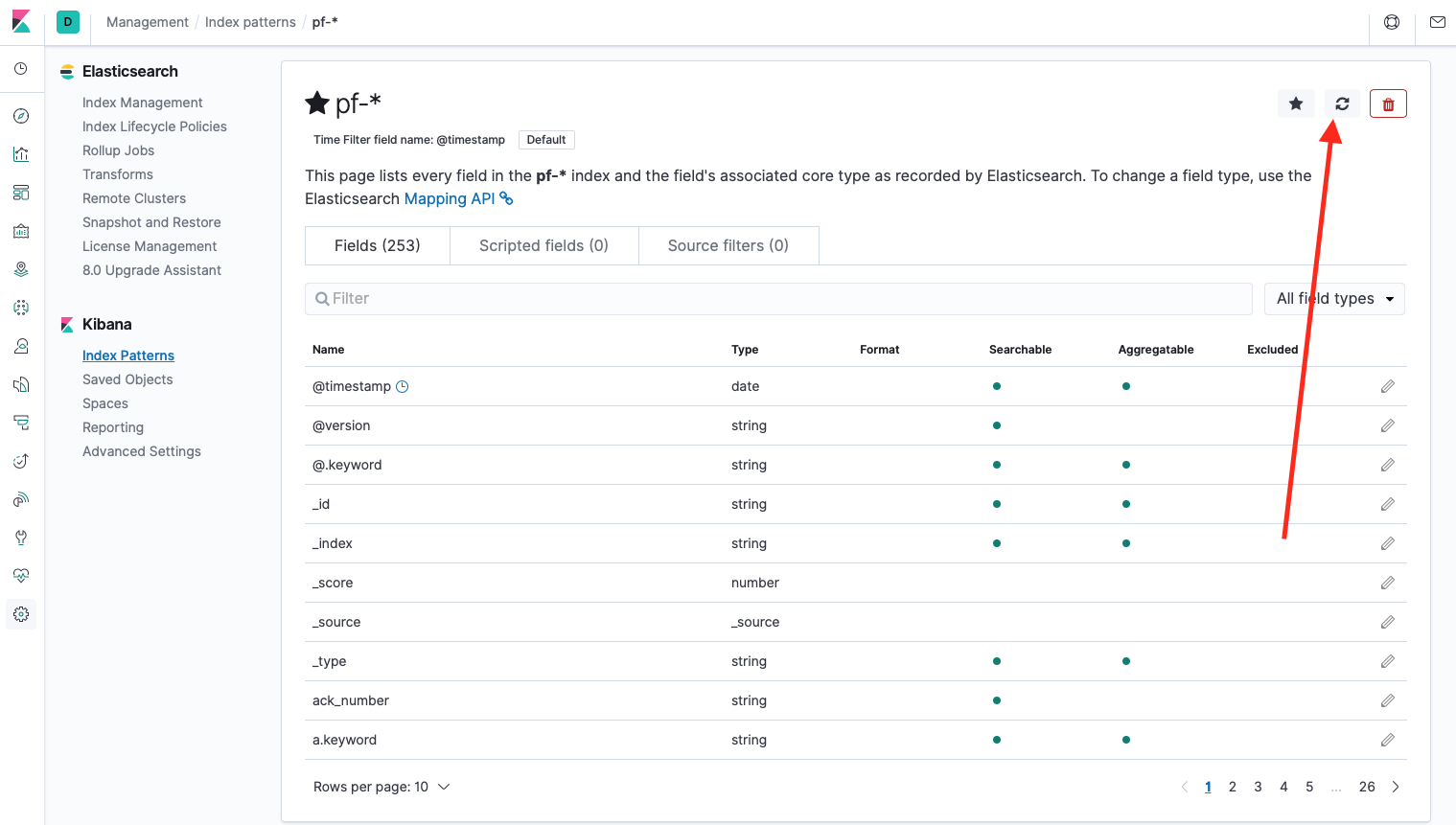
a3ilson
on 23 Apr 2020
Download the Dashboard file(s):
https://raw.githubusercontent.com/3ilson/pfelk/master/Dashboard/v4.2%20(042020)%20Dashboard.ndjson
Next, go too "Management" ==> "Saved Objects" (under Kibana) ==> Click on "Import" and select the downloaded dashboard file.
Reference Video: https://www.youtube.com/watch?v=iqhuQSdbXlU
a3ilson
on 23 Apr 2020
thank you.
I have imported the dashboards. only maps are not getting imported. I'll figure it out
map [id=40ede350-76bd-11ea-8ddd-292a14a1fd86] unsupported type map [id=2e64edb0-2b17-11ea-ab1e-a7b53bdffa74] unsupported type
The issue is with the file. Now i opened the raw file ndjson and saved it using notepad. works fine. When i right click and do 'save as', that file could not be imported. thanks..
vakarthik
on 23 Apr 2020
when you import the dashboards, in the next screen where it tells you that there is a missing index, in the dropdown - select pf-* and it will assign your index
revere521
on 23 Apr 2020
@vakarthik - If you copy the ndjson contents and paste into Microsoft Notepad it will not save as the correct extension type resulting in your error. Notepad will save the file as "filename.ndjson.txt"
I recommend opening and saving with a different editor such as Notepad++ (I utilize sublime text: https://www.sublimetext.com/)
https://notepad-plus-plus.org/
Otherwise, you'll need to change the extension. Run powershell, navigate to the location of where the file is saved and type "ren filename.ndjson.txt filename.ndjson"
Example:
Powershell
cd Desktop
ren filename.ndjson.txt filename.ndjson
a3ilson
on 23 Apr 2020
@vakarthik - For the maps to work properly, you need to make sure you accomplished steps 19-21. This is vital in correlating the GeoPoint data/fields.
a3ilson
on 23 Apr 2020
Related issues
 fktkrt
·
5Comments
revere521
·
17Comments
fktkrt
·
5Comments
revere521
·
17Comments
 collse
·
8Comments
fktkrt
·
21Comments
collse
·
8Comments
fktkrt
·
21Comments
 fastxl
·
5Comments
fastxl
·
5Comments
Most helpful comment
the current version of the ELK stack is 7.6.2, you should update to current (everything here is built on the current 7.x version)
the new dashboards are .ndjson files.
Make sure also you are not trying to import the pattern json file, that's not a dashboard. The dashboards are here: https://github.com/3ilson/pfelk/tree/master/Dashboard