Pengwin: Extensions in VS Code
Code will not install extensions correctly if you start it from a unix path. If you start code in /mnt/c/blah/blah it will install extensions correctly. If you start code from /home/xyz extensions will not install.
The wlinux-setup script needs to be updated to add
        if [[ $(grep -c "root" /etc/wsl.conf) -eq 0 ]]; then
            sudo sed -i 's$\[automount\]$\0\nroot=/$' /etc/wsl.conf

        else
            sudo sed -i 's$\(root=\)\(.*\)$\1/$' /etc/wsl.conf
        fi
Just like it does for docker.
Without the correct wsl.conf configuration, code will not import extensions correctly. It works fine when wsl.conf is configured with root = /
[automount]
root = /
 blemis
All 30 comments
Ok, thank you for reporting. We will check what should be the best approach
 crramirez
on 14 Jan 2019
crramirez
on 14 Jan 2019
Hello @blemis,
I need more data, because when I test in /home/xyz with root=/mnt it installs extensions correctly. Could you give em exactly what extension are you trying to install? Also how you state that the extension wasn't installed?
Regards
crramirez
on 14 Jan 2019
Every extension doesn't work. ( I tried many, but for testing I used python, docker, and google search)
I was able to reproduce with a fresh install.
Steps to reproduce.
1) Install wlinux from Microsoft Store
2) setup username and password
3) run wlinux-setup
4) Pick Editors
5) Pick code
6) Let Code install.
7) From Home DIR (/home/blemis) run code . (make sure X server running, I am using x410)
8) Pick any extension and try to install

9) to "Fix" run code . from /mnt/c/Users/blemis, extensions install correctly.
Note: I have not installed ANYTHING except code with wlinux-setup
blemis
on 14 Jan 2019
Good enough information to test. Thank you
crramirez
on 14 Jan 2019
I am sorry but I followed exactly your steps and I can do everything from my /home/crramirez. I chose upgrade to the latest wlinux-setup when it asked.
What Windows version do you have? And also what WLinux one
crramirez
on 14 Jan 2019
Interesting!
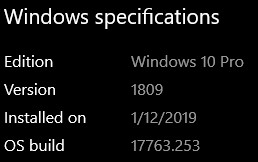
I re-did everything today so a fresh download from the store(1/14/19). I also upgraded to the latest wlinux-setup when it asked.
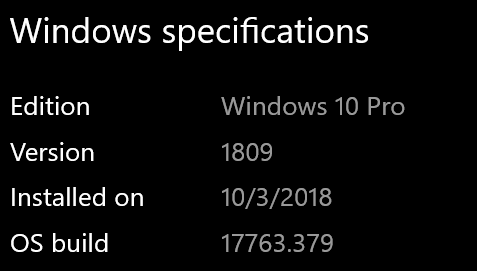
I am on windows 1809.
blemis
on 15 Jan 2019
Looks like this may be an issue with WSL and 1809?? I found this on reddit.
https://www.reddit.com/r/bashonubuntuonwindows/comments/9xrjsa/vscode_cant_install_extensions/
Ubuntu Bionic
blemis
on 15 Jan 2019
Well I asked for some help in testing because I have exactly the same Windows version as you. I will read this. Thanks
crramirez
on 15 Jan 2019
Here is the Code log when I run code . in /home/blemis
blemis@NexGenBlemis:~/.config/Code/logs/20190115T095441$ cat sharedprocess.log
[2019-01-15 09:54:45.170] [sharedprocess] [info] main {"machineId":"33dfc962c5ca8a18e962bdca694412a66a32f6a44b86efb83e6212482e5e1c1f"}
[2019-01-15 09:54:45.197] [sharedprocess] [info] Scanned user extensions: 0
[2019-01-15 09:54:45.203] [sharedprocess] [info] Scanned user extensions: 0
[2019-01-15 09:54:45.211] [sharedprocess] [info] Scanned user extensions: 0
[2019-01-15 09:54:45.220] [sharedprocess] [info] Scanned user extensions: 0
[2019-01-15 09:54:45.305] [sharedprocess] [info] Scanned system extensions: 71
[2019-01-15 09:54:45.305] [sharedprocess] [info] Scanned system extensions: 71
[2019-01-15 09:54:45.309] [sharedprocess] [info] Scanned system extensions: 71
[2019-01-15 09:54:47.497] [sharedprocess] [info] Scanned user extensions: 0
[2019-01-15 09:54:47.507] [sharedprocess] [info] Scanned user extensions: 0
[2019-01-15 09:54:47.509] [sharedprocess] [info] Scanned user extensions: 0
[2019-01-15 09:54:47.517] [sharedprocess] [info] Scanned user extensions: 0
[2019-01-15 09:54:47.594] [sharedprocess] [info] Scanned system extensions: 71
[2019-01-15 09:54:47.597] [sharedprocess] [info] Scanned system extensions: 71
[2019-01-15 09:54:47.600] [sharedprocess] [info] Scanned system extensions: 71
[2019-01-15 09:54:49.191] [sharedprocess] [info] Installing extension: python
[2019-01-15 09:54:49.193] [sharedprocess] [info] Scanned user extensions: 0
[2019-01-15 09:54:50.024] [sharedprocess] [info] Downloaded extension: python /tmp/4535b39e-ee6c-4d03-aab5-c4d771f5dce3
[2019-01-15 09:54:51.508] [sharedprocess] [info] Extracted extension to /home/blemis/.vscode/extensions/.ms-python.python-2018.12.1: ms-python.python-2018.12.1
[2019-01-15 09:54:51.539] [sharedprocess] [info] Rename failed. Deleting from extracted location /home/blemis/.vscode/extensions/.ms-python.python-2018.12.1
[2019-01-15 09:54:52.192] [sharedprocess] [error] Failed to install extension: ms-python.python EACCES: permission denied, rename '/home/blemis/.vscode/extensions/.ms-python.python-2018.12.1' -> '/home/blemis/.vscode/extensions/ms-python.python-2018.12.1'
[2019-01-15 09:54:52.300] [sharedprocess] [info] Scanned user extensions: 0
[2019-01-15 09:54:52.304] [sharedprocess] [info] Scanned user extensions: 0
[2019-01-15 09:54:52.384] [sharedprocess] [info] Scanned system extensions: 71
[2019-01-15 09:54:52.389] [sharedprocess] [info] Scanned system extensions: 71
[2019-01-15 09:55:25.175] [sharedprocess] [info] Starting to clean up unused language packs.
blemis
on 15 Jan 2019
The directory referenced in the error has 777. (again all I have done is install vscode at this point)

blemis
on 15 Jan 2019
I must admit that it is really weird
[2019-01-15 11:47:14.355] [sharedprocess] [info] Scanned system extensions: 71
[2019-01-15 11:47:14.358] [sharedprocess] [info] Scanned system extensions: 71
[2019-01-15 11:47:14.362] [sharedprocess] [info] Scanned system extensions: 71
[2019-01-15 11:47:23.757] [sharedprocess] [info] Installing extension: python
[2019-01-15 11:47:23.760] [sharedprocess] [info] Scanned user extensions: 2
[2019-01-15 11:47:24.228] [sharedprocess] [info] Downloaded extension: python /tmp/ffd92c99-8dbb-45b8-ba48-1974e7f84781
[2019-01-15 11:47:31.916] [sharedprocess] [info] Extracted extension to /home/crramirez/.vscode/extensions/.ms-python.python-2018.12.1: ms-python.python-2018.12.1
[2019-01-15 11:47:31.938] [sharedprocess] [info] Renamed to /home/crramirez/.vscode/extensions/ms-python.python-2018.12.1
[2019-01-15 11:47:31.944] [sharedprocess] [info] Installation completed. ms-python.python-2018.12.1
[2019-01-15 11:47:31.960] [sharedprocess] [info] Extensions installed successfully: ms-python.python
[2019-01-15 11:47:32.108] [sharedprocess] [info] Scanned user extensions: 3
[2019-01-15 11:47:32.153] [sharedprocess] [info] Scanned system extensions: 71
[2019-01-15 11:47:37.691] [sharedprocess] [info] Scanned user extensions: 3
[2019-01-15 11:47:37.693] [sharedprocess] [info] Scanned user extensions: 3
But also you are facing the same error that the question in reddit
crramirez
on 15 Jan 2019
Can you send me the log when you change the root to / ?
I have some things in my head, like you don't have long paths activated or you are not in Developers mode but it should work without these. I need to do intensive testing with the team for at least reproduce the error
crramirez
on 15 Jan 2019
Interesting....
I originally thought it was the root = / flag. So I set that and tried some other combinations.
It still fails in any directory under /home, (with / flag) but if I goto /usr (or some other dir) and start code there it works fine.
With root = / ...... starting code in /home/blemis
[2019-01-15 13:54:31.456] [sharedprocess] [info] Installing extension: vscode-docker
[2019-01-15 13:54:31.462] [sharedprocess] [info] Scanned user extensions: 1
[2019-01-15 13:54:31.612] [sharedprocess] [info] Downloaded extension: vscode-docker /tmp/907fb4d0-149d-42c5-958f-19e1220febfa
[2019-01-15 13:54:32.322] [sharedprocess] [info] Extracted extension to /home/blemis/.vscode/extensions/.peterjausovec.vscode-docker-0.5.1: peterjausovec.vscode-docker-0.5.1
[2019-01-15 13:54:32.412] [sharedprocess] [info] Rename failed. Deleting from extracted location /home/blemis/.vscode/extensions/.peterjausovec.vscode-docker-0.5.1
[2019-01-15 13:54:32.806] [sharedprocess] [error] Failed to install extension: peterjausovec.vscode-docker EACCES: permission denied, rename '/home/blemis/.vscode/extensions/.peterjausovec.vscode-docker-0.5.1' -> '/home/blemis/.vscode/extensions/peterjausovec.vscode-docker-0.5.1'
[2019-01-15 13:54:32.931] [sharedprocess] [info] Scanned user extensions: 1
[2019-01-15 13:54:32.932] [sharedprocess] [info] Scanned user extensions: 1
[2019-01-15 13:54:32.983] [sharedprocess] [info] Scanned system extensions: 71
[2019-01-15 13:54:32.989] [sharedprocess] [info] Scanned system extensions: 71
[2019-01-15 13:55:01.203] [sharedprocess] [info] Starting to clean up unused language packs.
With root = / ..... starting code in /usr
[2019-01-15 13:59:55.473] [sharedprocess] [info] Installing extension: vscode-docker
[2019-01-15 13:59:55.485] [sharedprocess] [info] Scanned user extensions: 1
[2019-01-15 13:59:55.604] [sharedprocess] [info] Downloaded extension: vscode-docker /tmp/c769515a-0342-4f3a-bfca-6d8c9fd2200c
[2019-01-15 13:59:56.355] [sharedprocess] [info] Extracted extension to /home/blemis/.vscode/extensions/.peterjausovec.vscode-docker-0.5.1: peterjausovec.vscode-docker-0.5.1
[2019-01-15 13:59:56.379] [sharedprocess] [info] Renamed to /home/blemis/.vscode/extensions/peterjausovec.vscode-docker-0.5.1
[2019-01-15 13:59:56.388] [sharedprocess] [info] Installation completed. peterjausovec.vscode-docker-0.5.1
[2019-01-15 13:59:56.410] [sharedprocess] [info] Scanned user extensions: 2
[2019-01-15 13:59:56.440] [sharedprocess] [info] Scanned system extensions: 71
[2019-01-15 13:59:56.440] [sharedprocess] [info] Extensions installed successfully: peterjausovec.vscode-docker
[2019-01-15 13:59:56.569] [sharedprocess] [info] Scanned user extensions: 2
[2019-01-15 13:59:56.573] [sharedprocess] [info] Scanned user extensions: 2
[2019-01-15 13:59:56.620] [sharedprocess] [info] Scanned system extensions: 71
[2019-01-15 13:59:56.625] [sharedprocess] [info] Scanned system extensions: 71
[2019-01-15 14:00:25.717] [sharedprocess] [info] Starting to clean up unused language packs.
blemis
on 15 Jan 2019
This behaves as if the temp folder /home/blemis/.vscode/extensions/.peterjausovec.vscode-docker-0.5.1 is open in the console or explorer. Are you by any chance using any other terminal instead of cmd.exe?
crramirez
on 15 Jan 2019
nothing is open but the regular wsl bash terminal and X410
blemis
on 16 Jan 2019
Okay been trying to reproduce this issue myself, but instead ran into the issue that I cannot get Visual Code Studio to run? I'm using a Windows 10 Developer image (not insider) so I need to load up a genuine Windows 10 install and see how it is from there.
 ghost
on 16 Jan 2019
ghost
on 16 Jan 2019
I have had this happen several times actually. Sometimes I do a code . and nothing happens.
Normally a second code . right after seems to trigger the X window. Initially I thought I was just not being patient, but after waiting 10 minutes, something else is probably going on. I have not spent the time to look a the logs, but I am not sure its related to this issue. Windows 1809 is a bit flakey still IMO.
blemis
on 16 Jan 2019
Okay turns out my rootfs image I was building from was a few days out of date.
I can get VSCode running now, and didn't run into the issue that you did :thinking: Going to do some more investigating
ghost
on 16 Jan 2019
If you change the logging level, or run code with the --verbose flag does it give much more information on the problem? Save the output to a file if you want me to have a look through it.
ghost
on 16 Jan 2019
Here is the verbose log...sorry its long. The event happens around line 654 or so.
codelog.txt
blemis
on 20 Jan 2019
I'm able to install extensions within VS Code on 17134 without issue if that helps to narrow down the affected builds.
 WSLUser
on 23 Jan 2019
WSLUser
on 23 Jan 2019
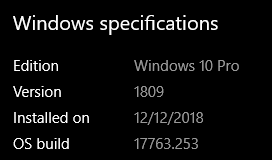
I have the same behavior and Windows 10 version that @blemis reports on both my desktop and ThinkPad. VSCode gets an EACCES error if it tries to install an extension when I launch the X version of Code from my home directory. If I cd into ~/projects (symlinked to a Windows folder) and then launch code, I can install extensions fine.
I'm also the same build:
 bushidocodes
on 23 Jan 2019
bushidocodes
on 23 Jan 2019
i get this as well only when I run code . from ~
If I cd to /c/g as an example the extensions work fine. The chmod on all directories under ~/.vscode are 777 as well.
my wsl.conf
[automount]
enabled = true
options = "metadata,uid=1000,gid=1000,umask=22,fmask=11,case=off"
mountFsTab = true
root = /

[network]
generateHosts = true
generateResolvConf = true
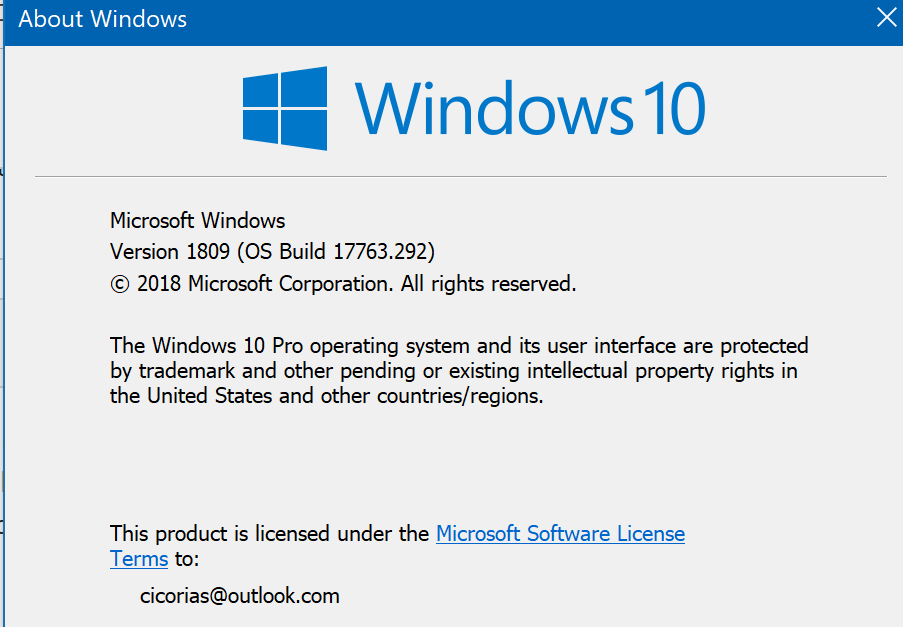
Windows Pro
 cicorias
on 29 Jan 2019
cicorias
on 29 Jan 2019
Same here.
I tried several extensions and none worked when I started code from my WSL home directory, but from a windows partition, it works fine.
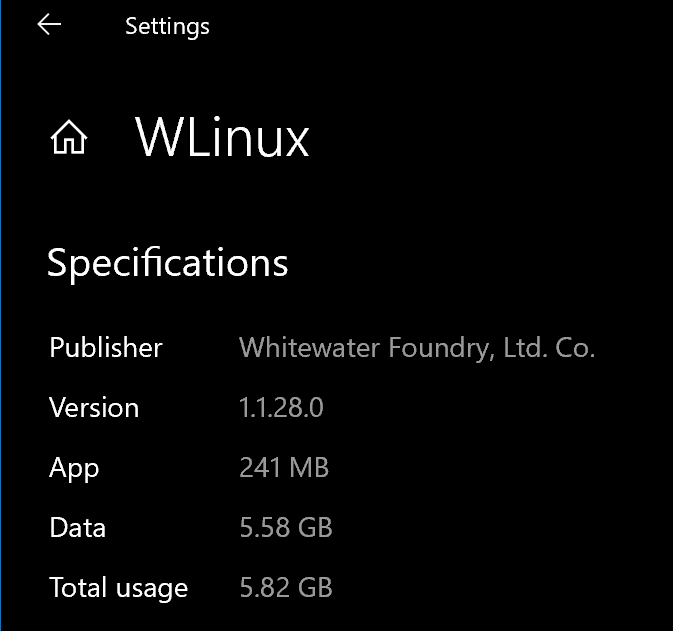
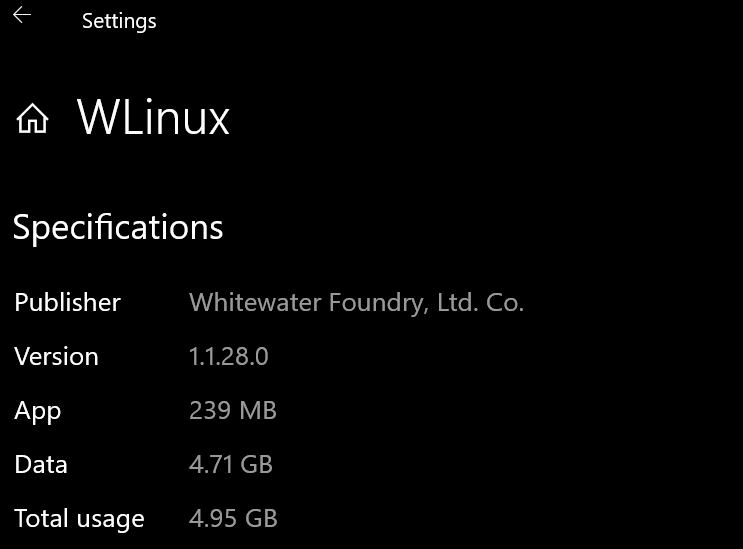
I am using a fresh install of WLinux (just installed it today).
/etc/wsl.conf
[automount]
root=/
enabled = true
options = "metadata,uid=1000,gid=1000,umask=22,fmask=11,case=off"
mountFsTab = true

[network]
generateHosts = true
generateResolvConf = true

 adampiskorski
on 15 Mar 2019
adampiskorski
on 15 Mar 2019
Lol I installed penguin and now extensions install correctly in code. Not sure if anyone else has tried this?
blemis
on 12 Apr 2019
yea, this is now also working just great for me now
cicorias
on 12 Apr 2019
I am impressed. But excellent, good news
crramirez
on 12 Apr 2019
@blemis Which version did you install? I've built pengwin from master and ran into this issue.
My windows 10 pro version is 1903 (insider), and both windows and pengwin installs are fresh.
Just tested this on a fresh install of pengwin and the bug wasn't present.
 DistractionRectangle
on 15 Apr 2019
DistractionRectangle
on 15 Apr 2019
I'm also getting issues installing extensions. Sometimes it works sometimes it doesn't
 deanhtid
on 24 Apr 2019
deanhtid
on 24 Apr 2019
this is the error i get Cannot read property 'local' of undefined
deanhtid
on 26 Apr 2019
Related issues
 ket000
·
5Comments
ket000
·
5Comments
 rdmueller
·
3Comments
rdmueller
·
3Comments
 patmolloy
·
4Comments
patmolloy
·
4Comments
 sirredbeard
·
3Comments
sirredbeard
·
3Comments
 AceHack
·
4Comments
AceHack
·
4Comments
Most helpful comment
i get this as well only when I run
code .from~If I cd to
/c/gas an example the extensions work fine. The chmod on all directories under~/.vscodeare777as well.my wsl.conf
Windows Pro
