Pengwin: Make config changes that enable KDE apps to work better
Describe the bug
A clear and concise description of what the bug is.
Launch the plasma desktop using startkde results in:
kdostartupconfig5: error while loading shared libraries: libQt5Core.so.5: cannot open shared object file: No such file or directory
/usr/bin/startkde: 120: test: Illegal number:
startkde: Starting up...
dbus-update-activation-environment: error sending to dbus-daemon: org.freedesktop.DBus.Error.AccessDenied: rejected attempt to call UpdateActivationEnvironment by connection :1.14 () with unknown uid
startkde: Could not sync environment to dbus.
Warning: Missing charsets in String to FontSet conversion
Warning: Unable to load any usable fontset
To Reproduce
Steps to reproduce the behavior:
From fresh install after running wlinux-setup, do apt install kde-workspace sddm dbus -y. Wait for it to install. Launch X server, used X410 in this case. Run in this order Service dbus start , service sddm start , then startkde. Switch to X410 window and see in left corner "could not sync environment to dbus".
Expected behavior
A clear and concise description of what you expected to happen.
I expect to bring up the Plasma desktop.
Screenshots
If applicable, add screenshots to help explain your problem.
---Unable to attach screen shots due to Github error--
Additional context
Add any other context about the problem here.
Taking a look, discovered a couple things about dbus:
1)Though independent of systemd, dbus is primarily launched via systemd, which isn't supported in WSL for initiating desktop sessions.
2) Looking at wlinux-setup, I discovered configurations for both Stretch and Sid. I believe this is what's causing the environment to fail to sync as it's trying to sync 2 different ones due to the creation of session.conf in more than one place. As we moved from stable to testing, whichever method of configuring dbus is correct for testing should be used while the other is removed. A script will also need to be run to remove the invalid configuration for existing users of Wlinux.
I am able to run xfce4 with the command xfce4-session but not startx.
Basic Troubleshooting Checklist
[x ] I have searched Google for the error message.
[x ] I have checked official WSL troubleshooting documentation: https://docs.microsoft.com/en-us/windows/wsl/troubleshooting#confirm-wsl-is-enabled.
[x ] I have searched the official Microsoft WSL issues page: https://github.com/Microsoft/WSL/issues.
[x ] I have searched the WLinux issues page: https://github.com/WhitewaterFoundry/WLinux/issues.
[ x] I have reset WLinux: Settings->Apps->Apps & features->WLinux->Advanced Options->Reset.
[ x] I have disabled and re-enabled WSL in Windows Features.
[x ] I have run Windows 10 updates and restarted.
What other troubleshooting have you attempted?
Tried plasmashell which resulted in
plasmashell: error while loading shared libraries: libQt5Core.so.5: cannot open shared object file: No such file or directory
Insert here:
WLinux Version
Find: Settings->Apps->Apps & features->WLinux->Advanced Options->Version.
Insert here: 1.1.25.0
Windows Build
Run 'systeminfo | findstr /C:"OS"' in Command Prompt and insert here:
OS Name: Microsoft Windows 10 Pro
OS Version: 10.0.17134 N/A Build 17134
OS Manufacturer: Microsoft Corporation
OS Configuration: Standalone Workstation
OS Build Type: Multiprocessor Free
BIOS Version: American Megatrends Inc. E1781IMS.104, 7/31/2014
For help on retrieving: https://docs.microsoft.com/en-us/windows/wsl/troubleshooting#check-your-build-number
 WSLUser
All 19 comments
The two config files may be an issue. Does removing one or both of them address the issue?
Is dbus-x11 installed?
For the plasma shell error, try installing libqt5gui5, though that could be this.
 sirredbeard
on 30 Nov 2018
sirredbeard
on 30 Nov 2018
So I tried reinstalling the so file once I figured out the package name it was under. Then I went and installed kde-full for good measure but this affects all KDE applications. So I can't even bring up my favorite terminal: Konsole. dbus-x11 is installed as well as libqt5gui5. Kde-full installs everything KDE known under the sun.
WSLUser
on 1 Dec 2018
Does this work on Debian stable?
I will look at it this weekend.
sirredbeard
on 1 Dec 2018
Sorry for the delay. Haven't been able to do much troubleshooting but I can say that it hasn't worked for any distros for at least half a year. I suspect some of the changes made to KDE broke compatibility. When WSL was first released, it was very hacky to set up a desktop environment but you were able to run Plasma via VcxSrv. Don't recall at which point it failed to run since I don't always want or need to run the desktop environment but it took several releases before it no longer retained compatibility.
WSLUser
on 12 Dec 2018
I've successfully installed KDE in Ubuntu. See detailed steps here.
 Biswa96
on 15 Feb 2019
Biswa96
on 15 Feb 2019
I'm having the same problem using X410 and wlinux, both installed yesterday. I talked to the X410 people about it. and they said that the Ubuntu system worked for them. So maybe Ubuntu ie the way to go.
That does suggest that it's some configuration problem in the distribution.
 PTrenholme
on 22 Feb 2019
PTrenholme
on 22 Feb 2019
Great, unfortunately stripping the tag doesn't resolve the issue with dbus.
WSLUser
on 22 Feb 2019
What errors do you see?
Biswa96
on 23 Feb 2019
Being a Fedora "fan," I bought the Fedora remix from the MS store to see if I could get it to work. "Out of the box" no joy. BUT I installed the Xfce4 package, and xfce4-session opened the X410 screen. However, when I opened a terminal window, there was no keyboard input - presumably dbus was not working, WHEN I DID a RT-CLICK -> Applications -> System -> Settings there was an "Input Method Selection" line displayed, Clicking that displayed three options: None / Dbus / X, with Dbus the suggested default. WHEN I SWITCHED TO X, most things started working.
In fact, I'm composing this note using the Fedora 29 Remix running Firefox in the X410 window.
Terminal output whilst running in X410 shows several critical failures because the dbus isn't running, but they don't seem to cause and non-dbus apps to fail. I do note that "Networking disabled" is shown in the top/right screen, even though - as you can see - the Internet connection works OK.
PTrenholme
on 23 Feb 2019
Oops, at my age (78), working from short-term memory is problematical. Anyhow, an easier way to the input setting item: Click on the Applications tab on the upper left of the screen -> Settings -> Input Method Selector.
PTrenholme
on 23 Feb 2019
@Biswa96 Still get
dbus-update-activation-environment: error sending to dbus-daemon: org.freedesktop.DBus.Error.AccessDenied: rejected attempt to call UpdateActivationEnvironment by connection :1.14 () with unknown uid
startkde: Could not sync environment to dbus.
I will note that it took awhile for the dbus service to even start and seems to be a underlying symptom of some deeper issue with dbus. If Ubuntu works, then where is the delta between dbus running there and dbus running on Wlinux. Someone motivated could also install Debian proper and see if that has better results. I don't have space to install any more distros and only have 2 (Fedora and Wlinux).
WSLUser
on 25 Feb 2019
We can build-in the config settings @Biswa96 lists here: https://github.com/Biswa96/WSLInstall/blob/master/docs/Install_Desktop_Environments.md#steps so that KDE apps should work better.
sirredbeard
on 9 Mar 2019
Has anybody been successful with this? I am still experiencing the issue, even after following these steps from: https://github.com/Biswa96/WSLInstall/blob/master/docs/Install_Desktop_Environments.md#steps
When startkde is run, there same error, as below;
dbus-update-activation-environment: error sending to dbus-daemon: org.freedesktop.DBus.Error.AccessDenied: rejected attempt to call UpdateActivationEnvironment by connection :1.2 () with unknown uid
startkde: Could not sync environment to dbus.
 Dlido
on 26 Mar 2019
Dlido
on 26 Mar 2019
@Dlido Did you add the /etc/dbus-1/session.conf file as I said?
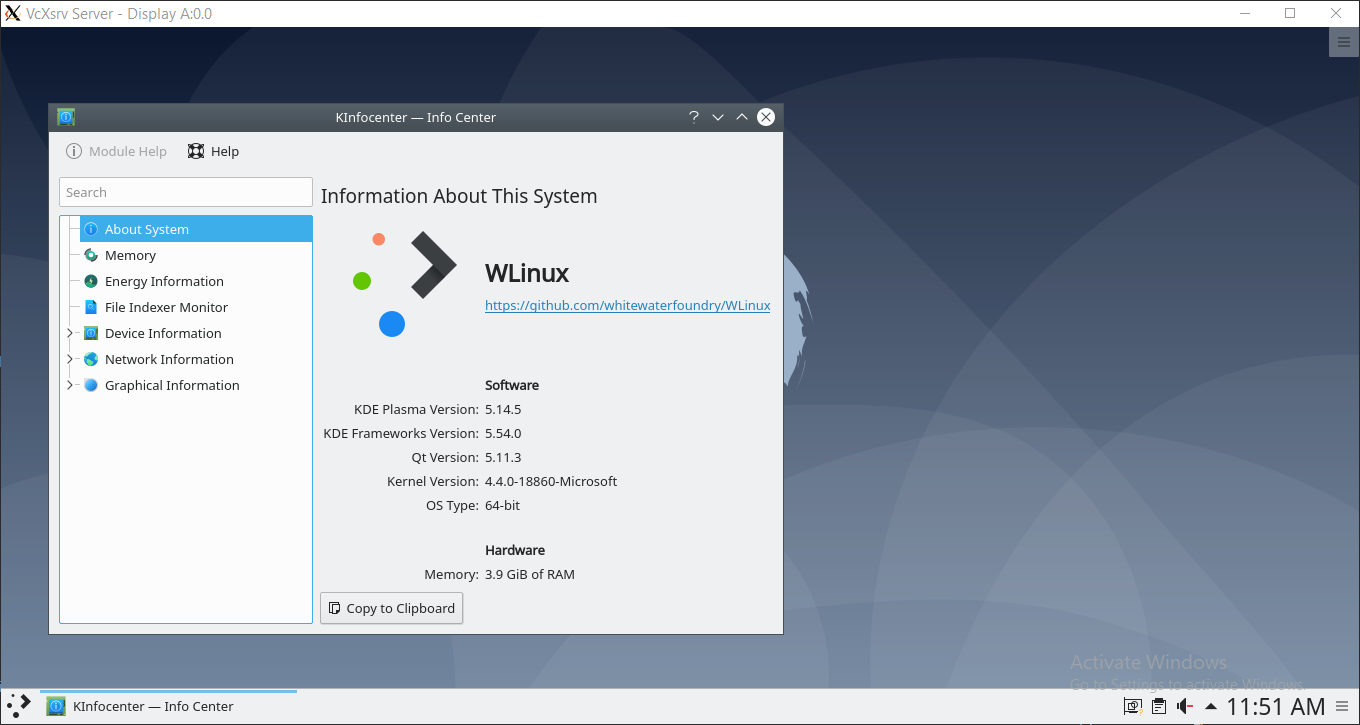
For those who are drooling for KDE in WSL, here is a screenshot of KDE in WLinux/Debian/Ubuntu.
Biswa96
on 27 Mar 2019
@Biswa96 Yes, I have and the contents of the file as below, but it still didn't work. So i've uninstalled, and will reinstall and see if that helps at all.
$ cat /etc/dbus-1/session.conf
<listen>tcp:host=localhost,port=0,family=ipv4</listen>
<auth>ANONYMOUS</auth>
<allow_anonymous/>
Yeah it doesn't work. Even when I tried using xrdp instead. It tries to login but never does. There's more to it than just that entry. I had to create session.conf to start with. So I'm not sure that's what dbus uses, at least by default on Debian (which Pengwin is based on).
WSLUser
on 4 May 2019
I hit the problem as a stupid user trying to use Chrome Remote Desktop on Kubuntu 19.04.
Everything installed and login from remote seems to take pin, but once black screen comes up, and I see the arrow cursor, I get the message in a OK dialog that says "Could not sync environment to dbus."
 zeddock
on 5 May 2019
zeddock
on 5 May 2019
I managed to start KDE with:
- [x] adding the
/etc/dbus-1/session.conffile - [x]
export $(dbus-launch) - [x]
startkde > /dev/null 2>&1
 bgatessucks
on 7 Nov 2019
bgatessucks
on 7 Nov 2019
Hello,
We added all those fixes to pengwin-setup->GUILIB if someone wants to test
Regards
 crramirez
on 10 Apr 2020
crramirez
on 10 Apr 2020
Related issues
 ket000
·
5Comments
ket000
·
5Comments
 sharpninja
·
3Comments
sharpninja
·
3Comments
 patmolloy
·
4Comments
patmolloy
·
4Comments
 mikart143
·
5Comments
mikart143
·
5Comments
 AceHack
·
4Comments
AceHack
·
4Comments
Most helpful comment
I've successfully installed KDE in Ubuntu. See detailed steps here.