Pengwin: The zsh prompt is a character like "question mark"
Describe the bug
The terminal prompt is like a question mark:
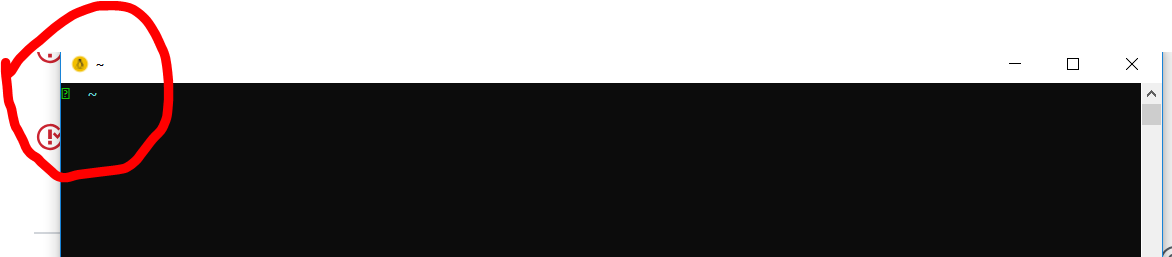 .
.
If I copy&paste it here, it's "➜ ~"
And bash works well.
To Reproduce
Just finish the install and start the wlinux terminal...
Expected behavior
A readable prompt
Screenshots
If applicable, add screenshots to help explain your problem.
Additional context
I'm at China.
I'm using zsh.
Basic Troubleshooting Checklist
[ ] I have confirmed WSL is enabled: https://docs.microsoft.com/en-us/windows/wsl/troubleshooting#confirm-wsl-is-enabled.
[ ] I have searched Google for the error message.
[ ] I have searched the official Microsoft WSL issues page: https://github.com/Microsoft/WSL/issues.
[ ] I have searched the WLinux issues page: https://github.com/WhitewaterFoundry/WLinux/issues.
[ ] I have reset WLinux: Settings->Apps->Apps & features->WLinux->Advanced Options->Reset.
[ ] I have disabled and re-enabled WSL in Windows Features.
[ ] I have run Windows 10 updates and restarted.
What other troubleshooting have you attempted?
Insert here:
WLinux Version
Find: Settings->Apps->Apps & features->WLinux->Advanced Options->Version.
Insert here:1.1.23.0
Windows Build
Run 'systeminfo | findstr /C:"OS"' in Command Prompt and insert here:
OS Name: Microsoft Windows 10 Pro
OS Version: 10.0.17134 N/A Build 17134
OS Manufacturer: Microsoft Corporation
OS Configuration: Standalone Workstation
OS Build Type: Multiprocessor Free
BIOS Version: LENOVO N27ET29W (1.15 ), 8/8/2018
For help on retrieving: https://docs.microsoft.com/en-us/windows/wsl/troubleshooting#check-your-build-number
 simomo
All 6 comments
I think the problem is from terminal emulator (Windows command prompt). If WLinux support other terminal emulator such as mintty/wsltty you can use special fonts.
 aohmusi
on 9 Nov 2018
aohmusi
on 9 Nov 2018
This looks like it may be a duplicate of #132. I think @aohmusi is correct about the terminal emulator. Looks fine in Hyper and ConEmu especially with InconsolataGo as the font.
 kbrock84
on 9 Nov 2018
kbrock84
on 9 Nov 2018
I resolved the issue by changing the front to "Dejavu Sans Mono" :)
Steps:
- Right click on the title bar
- Select
Properties - Go to the tab
Font - Select "Dejavu Sans Mono" in the
Fontsection - Click the
OK
simomo
on 10 Nov 2018
This @simomo solution should be put in a sort of FAQ or in an alert during installation.
Because everytime I install Pengwin with ZSH I have this kind of chars.
Thank you
 aborruso
on 31 May 2019
aborruso
on 31 May 2019
I resolved the issue by changing the front to "Dejavu Sans Mono" :)
Steps:
- Right click on the title bar
- Select
Properties- Go to the tab
Font- Select "Dejavu Sans Mono" in the
Fontsection- Click the
OK
There is no "Dejavu Sans Mono" font option on some WSL versions, but NsimSun font worked. Thx!
 jturi
on 11 Jul 2020
jturi
on 11 Jul 2020
Cascadia Code PL should work pretty well also: https://github.com/microsoft/cascadia-code/releases
 crramirez
on 11 Jul 2020
crramirez
on 11 Jul 2020
Related issues
 laurin1
·
4Comments
laurin1
·
4Comments
 juliosegarra
·
3Comments
juliosegarra
·
3Comments
 ket000
·
5Comments
ket000
·
5Comments
 sharpninja
·
3Comments
sharpninja
·
3Comments
 camilorojasguzman
·
4Comments
camilorojasguzman
·
4Comments
Most helpful comment
There is no "Dejavu Sans Mono" font option on some WSL versions, but NsimSun font worked. Thx!