I tried to be specific, so sorry if it's really long ;^^
It wont show any of the frame unless it's in the upper right section of the view area... It's fine until the 10th time you scroll to zoom in, then the space that you can see gets smaller when zooming in more or when using pan tool to move it around (top will shrink when panned up, right will shrink when panned left).
It does kinda the same thing when you switch from having a bitmap to a vector layer selected (only a corner of the drawing showed up, but the corner that showed up worked like it's supposed to... I drew on the bitmap, and tried to paste it onto the vector layer before this)… Fixed after rebooting the app a few times, but still shows up a lot
It shows me erasing as I'm doing it, but when I let go of the mouse button it all comes back. Also randomly selects stuff after I draw a line with the pencil tool.
Pen pressure wouldn't work (been having that issue with other programs, so idk if its a thing or not), and wouldn't draw inside of a big area (middle section of screen... it actually would work eventually, but I had to press as hard as possible and wait like 15 seconds before anything happened). This was at the same time as the bitmap to vector switch error I talked bout earlier... both of these started getting really bad when it started auto saving every 30 seconds, then an error message popped up that said "internal error: your files may not have been saved correctly"... I tried to re-save a few times and it did the same thing.... I closed the app and tried to re open the file, but it was so corrupted that it wouldn't even load.... I started over and that's when the rest of the stuff popped up (except for the random selection that's always been there)
I use a Huion graphics tablet for all of these, but they all still happened with the mouse only... been having issues with my tablet working in apps lately but I don't think that this had anything to do with this... I also am using an hp touchscreen laptop with windows 10.. idk what version of Pencil2D I have, but I just got it the other day.... closing and re opening the app will sometimes fix the bug for a little, but they'll come back after a few minutes of drawing... Also I was running Chrome in the background for most of the time, and Pencil2D doesn't seem to like that (it lags a lot, but only in bursts, and it'll freeze for a couple seconds at a time)
 5hazz0
All 13 comments
ok so now it wont show any of the Bitmap layer when the Vector is selected :/ (idk if that supposed to happen or not but I guess not....?)
5hazz0
on 30 Aug 2018
@5hazz0 Hmm. Sorry to hear you're having issues. Thanks for reporting.
What seems to be happening is that your computer specs are really on the fence as it sounds you may be having issues with your RAM. Since Pencil2D requires a fair amount of memory to handle frames and a fast CPU (more than 2 cores) to handle drawing your PC is either too low on MEMORY (running chrome doesn't help as it is a known RAM hog) OR the CPU is having a hard time to run the app because it's slower. I've run Pencil2D on a dual-core hp pavillion laptop with 2GB RAM, but it ran not so well. To run it decently I needed at least a quad-core, 4GB computer.
If you're on windows 10, please follow this guide to generate a more in-depth report of your computer to know what specs you actually have https://www.windowscentral.com/how-check-your-computer-full-specifications-windows-10
1) Now, please check if you're using Pencil2D's latest version. To know which version you have go to the menu HELP > ABOUT > The info is shown there. Current download version is 0.6.1.1
IF you have that same version then please try out the most recent development version to see if these issues go away for you. http://pencil2d.org/download#nightlybuild
2) It also sounds like there could be a graphics driver problem with your computer that might be triggered by Pencil2D, so in that case try to update your graphic card drivers as well to rule out that possibility.
3)Autosaving can be modified or disabled. go to menu EDIT > PREFERENCES > TOOLS > [ ] Enable autosave / Number of modifications (a modification is considered as doing something on the canvas, so each stroke, fill, transform etc is considered a "modification")
4) HUION tablets are not supported directly by many programs unless you have the wintab driver compatibility support. Pencil2D can't support huion directly (I don't know if there's a development kit for huion), but if you get the wintab drivers from their vendor website it will work AFAIK.
You should also change the pressure sensitivity threshold in the huion driver configuration settings.
 Jose-Moreno
on 31 Aug 2018
Jose-Moreno
on 31 Aug 2018
@Jose-Moreno Thanks for the advice, it helped a lot! I have that same version of the HP Pavilion, and it's history of deleting it's own drivers and not noticing (when trying to reinstall, says "already installed", even tho it doesn't show up in settings and isn't working; graphics and sound are it's favorite to mess up), hating all input methods except for mouse, and being laggy and glitchy in general wouldn't be very helpful, lol.... I also got the latest version, and it seems to be working well (for now, anyway)
5hazz0
on 1 Sep 2018
@Jose-Moreno oops nvm it only worked in a new project, it still happens on my save file :/
5hazz0
on 1 Sep 2018
@5hazz0 I personally have an HP Pavillion dv6000 special edition. Since that laptop didn't have touchscreen I doubt it's the same you have, but to be honest I no longer purchase hp products considering that laptop died horribly while having windows installed, and I brought it back to life after installing a linux OS distribution.
Anyway, If it's ok with you I'd like to ask you to upload the problem file to a cloud storage service you trust like google drive, mega or dropbox, and leave a comment with the link so developer can take a look. However as mentioned before this might be a problem directly related to the hardware itself and if that's the case it might prove impossible to fix for your specific computer.
IF you want try out other animation software instead of Pencil2D, we have an overview list of competitive free and commercial products that might help you to test and get a software that won't have similar issues, hopefully http://pencil2d-software.tumblr.com/post/145767476221/when-youve-worked-all-day-on-your-animation
Jose-Moreno
on 1 Sep 2018
@5hazz0 Also, if possible please upload a screenshot or a picture of the problem when it happens so the develoeprs know what to look for specifically. Thanks for reporting!
Jose-Moreno
on 1 Sep 2018
@Jose-Moreno Hey its 5hazz0 I have a new account cuz I already forgot my password wheeze
Anyway, here's a link to the google drive folder... i took a screen recording of the things cuz it was easier for me to do that, and I also included the corrupt file that wont open https://drive.google.com/open?id=1N_by1nnjaCTx-EvS4cKzUYuJpR-vxRxH
Also, I found the specific model of my computer, in case you want that: its an HP Pavilion x360 m3 Convertable pc
Thanks for helping, even if it didn't do anything, lol
 5hazzy
on 1 Sep 2018
5hazzy
on 1 Sep 2018
@5hazzy @5hazz0 Hey. Ok I saw the video. So, here are some things I noticed, wall of text incoming, but please read:
1) You have the vector layer active / selected. And you're trying to erase the drawing on the bitmap layer. That never is going to work. Consider that each layer is like a different sheet of real life paper. Just as you cannot erase or draw stuff on other stacked sheets of paper when drawing on the top one, you can't do that on Pencil2D unless the individual layer is selected. Only program that does that and I hate it when it does, and it doesn't tell you, is Flash.
2) You're not using the latest development build. I know because you're supposed to get these buttons in the color inspector and the Color "wheel" is now called color box and the color inspector is also named and the color palette has a ( - ) minus icon:
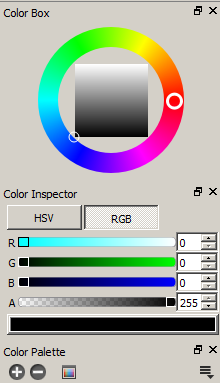
Here's the direct link for the development build from August 20th for Windows 64bits (any version) https://drive.google.com/open?id=1lE6D5FK8Qe9aRZT508u7sHSOxakSJTQf
That one has a lot of fixes and you shouldn't be seeing the graphical glitches, BUT, it's still a work in progress so please use it only to confirm if it fixes the graphical glitches problem for you. If it does then hopefully when the new 0.6.2 version drops, you can use it to avoid many of these problems.
3) Pencil2D has been thought to accommodate the use both bitmap and vector types of graphics, but not interchangeably. That is, you CAN'T copy and paste vector data to bitmap layers and viceversa. In the future (like when cars fly and people don't die) we hope this will be possible, but it's not a priority.
Bitmap should be used for animating roughs, sketching, storyboarding and doing painterly stuff like backgrounds. Vector is normally thought for the clean-up process in a production, that is doing the lineart, managing the color styling and once it's evolved enough to draw like Flash or Harmony for more organic clean-up lines, but that's it.
4) With that said, Please, do NOT use the vector layer for anything right now. It's been mentioned before, on the website but the vector layer is a WIP and is not working properly. Until developers explicitly work on the vector engine it will stay like that. If you want just delete the vector layers from now on.
5) I attempted to recover some of your vector drawings for the "corrupt" file you linked I saw there were quite a few, but not enough so I guess a lot of them were lost. Sadly the .vec files are literally empty, there's nothing written in them and since those .vec files are basically similar to XML files there should be some text written to define how the drawings appear visually but even if there was something right now there's no way to import them into Pencil2D, because the vector workflow is still being worked, sigh :slightly_frowning_face:
For future problems with file corruption or saving / loading issues and to see if you can maybe recover the "corrupt file" as it could still be in your comp, follow this guide and the one linked inside it as well: https://discuss.pencil2d.org/t/answered-making-jpegs-stransparent/2981/4
Jose-Moreno
on 1 Sep 2018
@Jose-Moreno Concerning point 1, the drawing is actually on the vector layer, so the correct layer is selected. Unfortunately the vector eraser appear not to be working very well at the moment.
@5hazz0 The graphical bug with only the one corner displaying is a result of using our buggy vector layers. Please use bitmap layers for the time being. Thanks to some more information on the bug from Dragon I was able to replicate this bug on v0.6.1.1, but not on the nightly build, so as @Jose-Moreno recommended, I would also suggest downloading the nightly build.
 scribblemaniac
on 3 Sep 2018
scribblemaniac
on 3 Sep 2018
Oof thanks for the help guys :P Hope my input helped some stuff get fixed lol
5hazz0
on 4 Sep 2018
All of the bugs brought up in this issue appear to be fixed as of v0.6.2, so I'm closing this issue.
scribblemaniac
on 26 Nov 2018
I have v.0.6.2 64-bit Windows version but the copy/paste is still not working. I can cut, just cannot paste. I've tried both vector and bitmap layers. I've tried restarting the app. What else can I try?
 sorialjo
on 3 Feb 2019
sorialjo
on 3 Feb 2019
Hi @sorialjo Please download the nightly build here: http://pencil2d.org/download#nightlybuild
Copy/paste is a known issue and has been fixed in the latest development version.
 chchwy
on 4 Feb 2019
chchwy
on 4 Feb 2019
Related issues
scribblemaniac
·
3Comments
Jose-Moreno
·
3Comments
Jose-Moreno
·
4Comments
scribblemaniac
·
4Comments
 Kaikogf
·
3Comments
Kaikogf
·
3Comments