Pencil: Transform related issues under specific selection tool conditions
--Issue Summary--
- [x] Issue A After applying a rotation transformation, if you press CTRL + A to select all the content and try to transform the drawing again, the rotation transformation re-applies itself on any subsequent new selection (watch attached video). This happens with both bitmap and vector drawings.
Note: This issue although is not critical it can be annoying, however I was thinking it could also be considered and refactored into a new feature related to the multi-frame transform request but for any transform type (position, rotation, scale). Please discuss.
[x] Issue B When applying a rotation transform multiple times using Issue F method, the image bounding box gets bigger and bigger. This could cause a memory leak.
[x] Issue C (This is present as of JAN 28th 2019 nightly build but it's as old as the other two issues) When translating the selection, if you press enter before confirming the transform modification, it will apply the transformation again but it will do it against the current selection boundary so in most cases it will destroy your drawing. This also happens when using the arrow keys to create minute increments, once you press enter to "confirm" it will instead reapply the transformation. This particularly happens when you move the selection within the previous selection space. If you move it outside the original boundary it will not produce this result. I will add a separate video showcasing this issue
--Expected Results--
This shouldn't happen at least without the user prompting such behavior.
--Video or Image Reference--
Issue A + B
https://youtu.be/-j-qj7n8-Tc
Issue C
...pending recording...
--Steps to reproduce--
- Draw something
- Create a selection
- Rotate the drawing inside the selection and apply the transformation (click outside the selection with the move tool)
- Create a new drawing in a new frame.
- Press CTRL + A to select the new drawing
- Use the move tool only to click the drawing to enter "transformation mode"
- Note how the previous transform is applied to the drawing. This only happens with rotation.
- If you keep applying the transform to the same drawing using this method, Issue B will become apparent as well (watch video).
--System Information--
- Pencil2D Version:
Version: 0.6.1.1
commit: 0a2c87b523fc81c655daf391a26af967134ba733
date: 2018-08-20_11:39:21
Development build
Operating System: Windows 7 SP 1 (6.1)
CPU Architecture: x86_64
 Jose-Moreno
All 8 comments
I can confirm Issue A macOS with commit 504280a. The transformation is probably just not being reset properly after applying, but given its usefulness we may not even want to fix it until we come up with a way to apply transformations to multiple frames. 😑
Issue B is to be expected with the current behavior, it just is not obvious because the selection boundary box is not rotated as well. Here is a picture to help explain the behavior in your example:
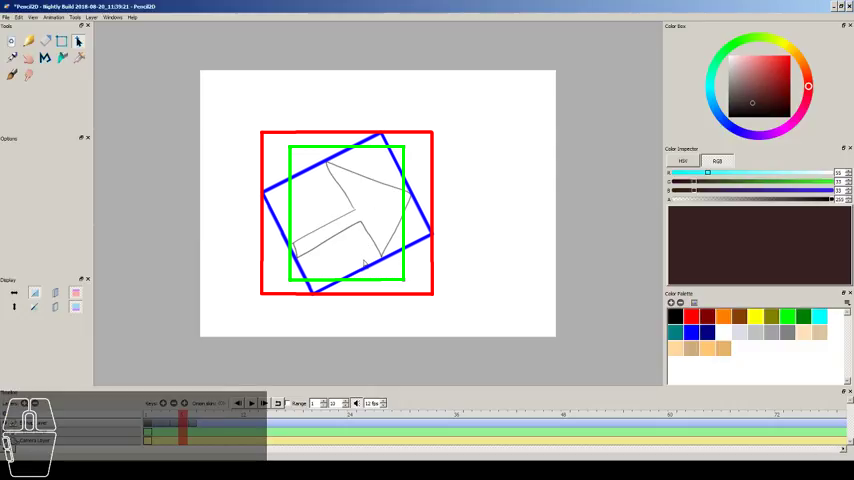
The green box is the selection before transformation, the blue box is the transformed selection box, and the red box is the new image boundaries. As you can see, the new image boundaries had to expand to accommodate the empty area in the corners of the rotated selection, which as far as the computer is concerned is as much a part of the image as the arrow's lines. This issue is related to #774, and will be fixed when #1051 is merged.
 scribblemaniac
on 31 Aug 2018
scribblemaniac
on 31 Aug 2018
_Issue B has been solved as of the following version of Pencil2D_
Version: 0.6.1.1
commit: 3892671dcd7c43f159949e0fb99f8fe078a85feb
date: 2018-09-05_14:03:10
Development build
Operating System: Windows 7 SP 1 (6.1)
CPU Architecture: x86_64
Jose-Moreno
on 7 Sep 2018
[2019] Added Issue C to bug description and changed title to broaden the scope as it's not only related to rotation.
Jose-Moreno
on 30 Jan 2019
@chchwy Upon debugging with scribblemaniac and CandyFace today, it seems like this https://github.com/pencil2d/pencil/commit/56fbc83eba37d7855666e4587b8e2de5004fc133 commit fixed Issue case C. However the rotation problem from Issue case A still remains.
Jose-Moreno
on 2 Mar 2019
@Jose-Moreno Can you please check case a with the latest code from master (or any nightly build from today on)? I think I inadvertedly fixed this in d1d29218d8d924b1b32ad088a8fab7ca872b15a4 😀
scribblemaniac
on 18 Jun 2019
@scribblemaniac Sure thing, will do. I'll report once I test this :ok_hand:
Jose-Moreno
on 18 Jun 2019
@scribblemaniac Well, indeed it seems the commit has fixed the issue. I'm trying my best to break the select tool behavior, but so far is working quite well, congrats! :tada: I'll test some more and close this one soon if all goes well. Thanks a lot!
Now if we only could get rid of the severe bitmap quality degradation that occurs when rotating, haha. I think i'm going to make another issue specifically for that, because it seems I never reported the issue on github :weary:
Jose-Moreno
on 19 Jun 2019
Now if we only could get rid of the severe bitmap quality degradation that occurs when rotating
Well there's not really much we can do about that, that's what happens when you try and rotate bitmaps, because the original pixels do not fit neatly into their new positions. The changes by @CandyFace a long time ago to not apply the rotation until all of the transformations are complete was one of the best things we could do about that.
scribblemaniac
on 19 Jun 2019
Related issues
 petr-akhlamov
·
4Comments
Jose-Moreno
·
3Comments
petr-akhlamov
·
4Comments
Jose-Moreno
·
3Comments
 dov
·
3Comments
dov
·
3Comments
 eszlari
·
3Comments
eszlari
·
3Comments
 Kaikogf
·
3Comments
Kaikogf
·
3Comments