Pencil: [Question] Bitmap Strokes Degraded Quality?
--Issue Summary--
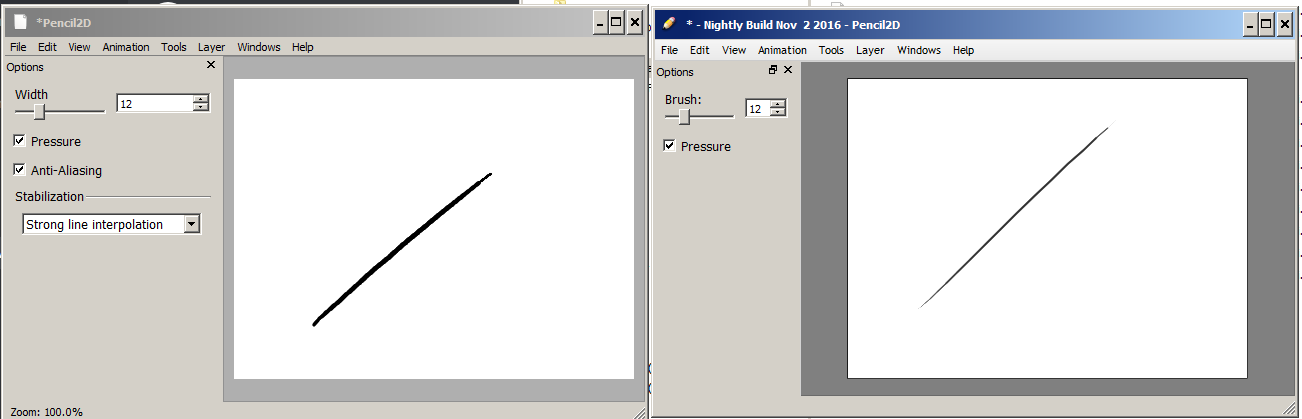
So we were chatting up on discord with @Spark01 and we noticed that there was some degraded quality on the current way that Pencil2D outputs strokes as compared to older version.
For this comparison I used Nov 23rd 2017 and Nov 02 2016 nightly builds.
Note: It seems this has to do as well with the root problem from #806
Note 2: I've also made a comment where I noticed an issue with how the pixels were being created as opposed to a program like photoshop https://github.com/pencil2d/pencil/issues/806#issuecomment-347040517
--Expected Results--
Well, it's hard to put into words, but the overall quality of the resulting stroke should be better than a normal pixel-perfect line. For reference we should look for Krita / Photoshop bitmap linework.
--Video or Image Reference--
Click on Images for Full Size
Krita
Brush Tool (AA ON / OFF)
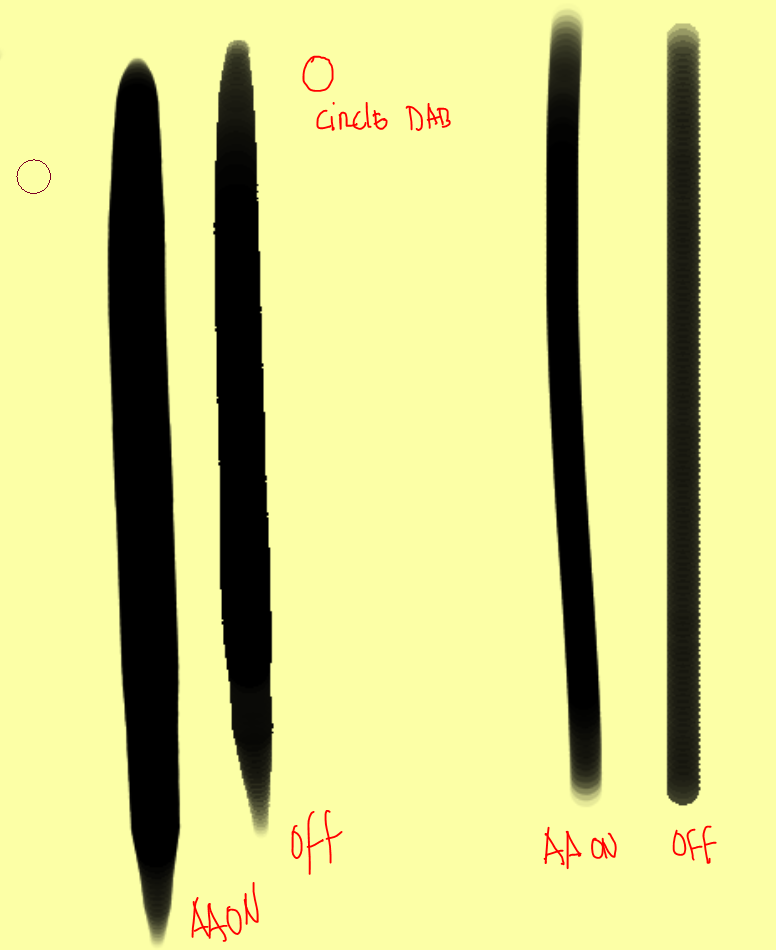
Photoshop
Brush Tool Vs Pencil Tool

LEFT: Nov 23rd 2017 | RIGHT: Nov 2nd 2016
--Steps to reproduce--
1) Open Pencil2D
2) Create a stroke with the pen tool on both versions. Notice how the newer version has a more blocky / pixelated look.
Even with the AA (which seems to be very light) the brush interpolation is very weird. It always looks like it's broken, more similar to pixel artwork than to bitmap artwork. (Not necessarily a bad thing if you want pixel-perfect work, but AA should take care of this, right?)
--System Information--
Pencil2D Version:
Version: 0.6.0 (Nov 23rd 2017 Nightly Build from Google Drive)Operating System:
Windows 7 (64 bits)
 Jose-Moreno
All 7 comments
After a quick glance at this issue, I'll put this on the 6.1 todo list.
 chchwy
on 28 Nov 2017
chchwy
on 28 Nov 2017
@chchwy Alright :) I also added an extra note that points to a comment on the other issue where I demosntrated how Pencil2D is creating the pixel arrays, which might be also source for grief on this issue.
Jose-Moreno
on 28 Nov 2017
wasn't this fixed with https://github.com/pencil2d/pencil/commit/a8a1269aa27288201483557c22e29c6e4578d341?
as for the pixelation, i'm certain it looks this smooth because at the time AA on the canvas would be enabled by default, making all lines appear much blurrier than the more recent version.
 CandyFace
on 5 Jan 2018
CandyFace
on 5 Jan 2018
@CandyFace I just tested Jan 01 2018 build and the difference is minimal between having AA is ON or OFF, it feels like there's no AA at all. This screenshot is taken at 100% zoom.

But when rotating and zooming the canvas the line quality worsens considerably. It is also most noticeable with the Pen Tool and the Brush tool without feathering enabled (but AA turned ON).
However, Im testing mypaint and the AA they use seems almost identical, visually, to what Pencil2D when doing curved lines (freehand "straight" lines are a bit better there)
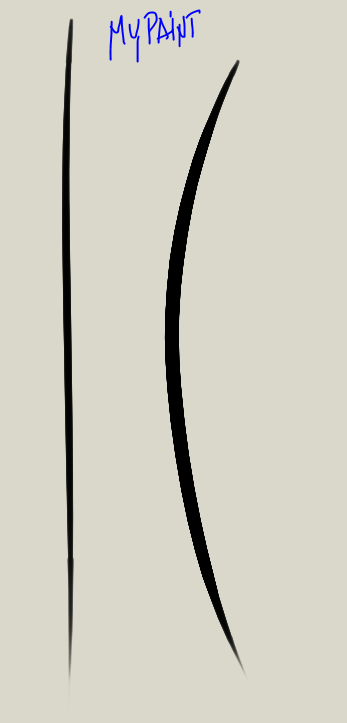
I don't really know if having an optional, yet more aggressive AA toggle (or AA levels? i.e x1, x2, xX) could help improve this, or if we should call it done.
I mean even in Clip Studio Paint it happens (at 100%)
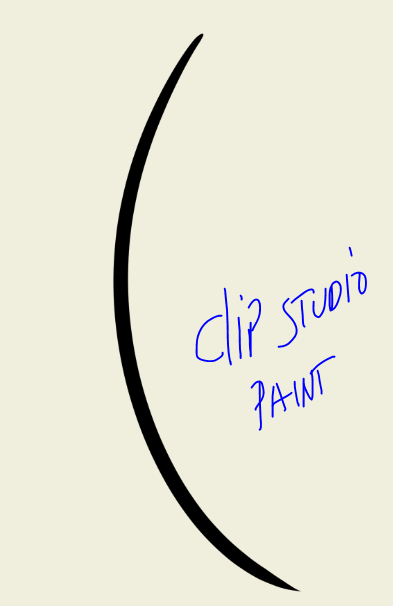
The difference is that when you zoom in or out, the lines in CPS are much more smoother, whereas in MyPaint they look a bit crooked, which I guess is to be expected. And in that regard Pencil2D is having the same issues as MyPaint.
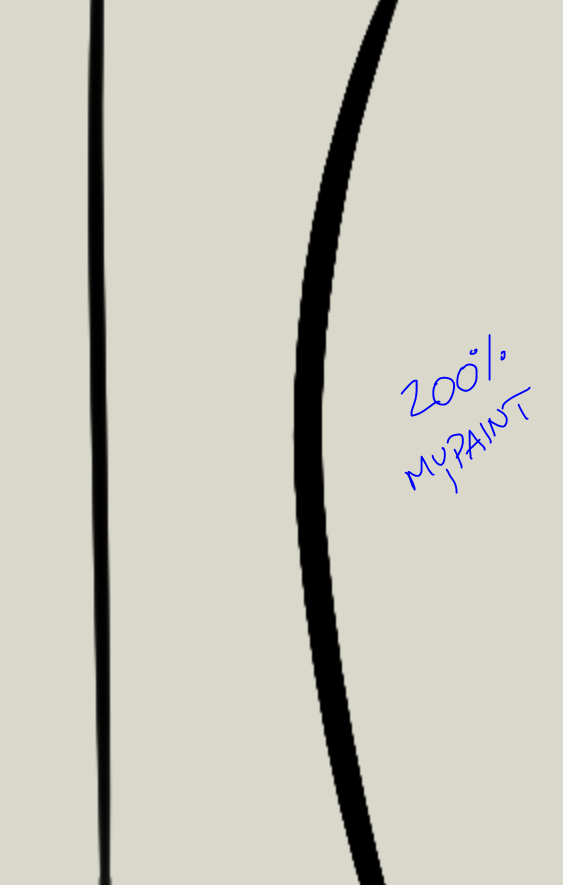

I know it's impossible to get crisp bitmap lines, that's why vector solutions exist and even CSP suggest to use their vector layers for inking linework, but we should aim to have a similar result to CSP for bitmap layers at least when zooming IN, since most of the time roughing in details require you to get much closer to the drawing surface (and this varies due to graphics tablet size as well).
After everything has been said, I feel this is sort of an issue that is much more an enhancement than it is a critical problem, since it doesn't inhibit you to use Pencil2D.
What do you guys think?
Jose-Moreno
on 8 Jan 2018
@Jose-Moreno The reason it looks more jagged when zooming in is because the renderer doesn't smooth the view, it output the zoomed canvas without any interpolation.
The problem is related to my recent commit, but that only affects zooming out. https://github.com/pencil2d/pencil/commit/78876c52c79ddb7c121914569ba890ea3569dde9 It will require subsampling to look smooth but as previously mentioned, our current renderer makes it impossible implement because of huge upscaling. Moving to MyPaint should make a possible though, but it's something that'll have to wait till we've migrated.
As for AA, Qt doesn't allow you to change its anti-aliasing, it's fixed, there is no way to change its aggression unless we come up with our own brush rendering implementation, which wouldn't make sense as that is exactly what the myPaint branch does.
you'll always be able to see jaggy lines in bitmap work when the resolution is low enough, as you said it also happens in Clip Studio Paint unless you change it's anti-aliasing level.
In the picture you posted, the line on the left is anti-aliased and there is a difference, it however still looks jaggy but that's impossible to get around.
I'm curious though, which aggression level is your AA on in CSP and what brush did you use?
CandyFace
on 8 Jan 2018
@CandyFace I used the demo version G-Pen with the "middle" AA level.

either way, I agree with everything you said, it's the same conclusion no matter where I look at it. Migrating to MyPaint is something we have to do as a mid-term goal (unless we go straight at the vector brush engine implementation everyone discussed before lol) .
Also I recently read GIMP is now using MyPaintLib as well, they have a "mypaint" brush to allow for the functionality to behave and had to make a separate brushes lib fork because the newer ones were crashing GIMP, however they also said that MyPaint devs would help maintain that fork in the future.
https://girinstud.io/news/2018/01/new-mypaint-brushes-package/
In any event, I don't think this "issue" is something that can be "solved" for 6.1, seems like based on what we just said, it became dependent on the MyPaint Integration.
Jose-Moreno
on 8 Jan 2018
[2020] This is basically a question of when instead of how. We are waiting for LibMyPaint integration which will render this issue invalid.
Currently the stroke quality is about the same with the Pen tool and a little bit better for both brush and pencil tool, just not by much.
Jose-Moreno
on 30 Aug 2020
Related issues
Jose-Moreno
·
4Comments
Jose-Moreno
·
3Comments
Jose-Moreno
·
3Comments
 scribblemaniac
·
4Comments
Jose-Moreno
·
4Comments
scribblemaniac
·
4Comments
Jose-Moreno
·
4Comments
Most helpful comment
After a quick glance at this issue, I'll put this on the 6.1 todo list.