Pencil: [BUG] Graphic glitch when using move tool to clear selection
--Issue Summary--
Issue No.1
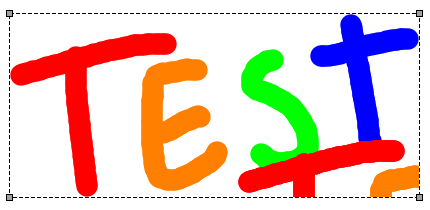
Ok, I was working on a project I was sent and needed to use Pencil2D. So using the marquee tool I began cutting, pasting and moving. But after a few frames I noticed that somehow a portion of the same frame was copied onto the lower right corner of the image.
After investigating thoroughly, I noticed that when you create a marquee selection, and click outside the selection with the move tool (black arrow) it will make the selection marquee disappear, but also it will create a duplicate of the selected artwork on the lower right corner of the selected content boundary box.
Even if you create a different marquee selection on a different place, even if it doesn't cover the artwork, clicking outside with the move tool will copy and paste the same part on the lower right portion of the artwork boundary box.
Related Issue No.2
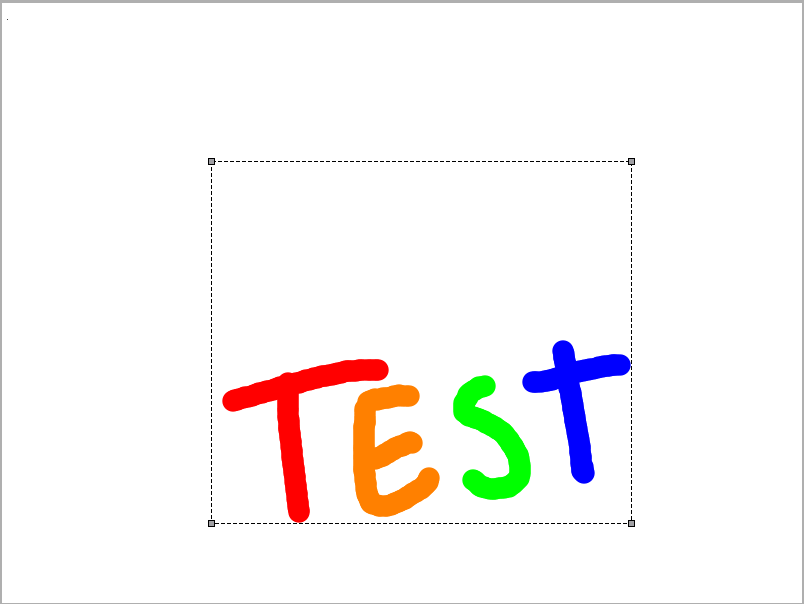
Another issue that seems to be related to this is that while moving the test artwork. When I pressed the select all command (CTRL + A) it wouldn't select just the artwork boundary, but the previous "bitmap space" that the artwork occupied before being moved down.
--Expected Results--
Clicking outside any selection with the black arrow tool should have the same effect as clearing the selection (CTRL + D / Deselect All) and should not copy anything inside the frame canvas, which can potentially damage the artwork.
--Video or Image Reference--
Issue No.1
Issue No.2
--Steps to reproduce--
Issue No.1
1) Open a new pencil file.
2) Draw something
3) Use the marquee tool and select any part of it, or even an empty space on the canvas.
4) Select the move tool and click OUTSIDE the selection.
5) The artwork will become copied inside it's boundary box.
Issue No. 2
1) open a new file
2) draw something
3) Press CTRL + A to select all the artwork. Take note of the current boundary size.
4) Move the whole selected artwork to a different position.
5) Press CTRL+A to select all. Notice the difference between boundaries.
Alternative Steps (for added Whitespace / Transparency):
3) Instead of selecting all the artwork in step, select a portion of the artwork OR select a bigger area and just the drawing, including a lot of whitespace. Take not of how much whitespace you are selecting.
4) Move the artwork
5) Press CTRL+A to select all. Notice that the whitespace is being ADDED to the boundary of the selection.
As far as I understand there was a change in how the bitmap layer behaves in order to optimize how it works. Maybe this has something to do with the issues that are present in this report, but a developer would have to investigate further to pinpoint the issue at hand.
--System Information--
Pencil2D Version:
commit: da990cc5126488ac29d3f971bd05b9164b79fa2e
date: 2017-11-01_13:13:19Operating System:
Windows 7RAM Size:
8GB
 Jose-Moreno
All 10 comments
@Jose-Moreno I also got the same behaviour, with slightly variations to it
 Kaikogf
on 4 Nov 2017
Kaikogf
on 4 Nov 2017
I'd like to report and additional test case which depends on this issue and is far more aggravating on actual production:
After selecting artwork on a bitmap layer, if you move the artwork once and click outside the selection, what happens is that the selection will disappear but the glitch will intensify so if you click anywhere on the canvas will create a new copy of the graphical artifact corrupting your image further.
After this it doesn't matter if you draw or select other things the original stroke will continue to get copied if you click on the canvas, and it will do so inside the new bounding box for the artwork. On a final note, It seems that pressing ESC interrupts this behaviour, perhaps because "clicking outside" the selection is treated as a "move" operation rather than a deselection, while pressing the ESC is not.
Steps:
1) Open Pencil2D
2) Create a single stroke with any tool on bitmap layer
3) create a selection over the stroke
4) Move the stroke once and click outside the selection
5) The selection will disappear as normal, but the partial stroke will be copied inside the original bitmap space before moving.
6) If you keep clicking on the canvas the stroke will be continued to be copied indefinitely, until you press ESC.
Jose-Moreno
on 8 Nov 2017
I'm not able to replicate Issue 1, must be fixed in previous modifications.
 chchwy
on 9 Nov 2017
chchwy
on 9 Nov 2017
I'm not able to replicate Issue 1, must be fixed in previous modifications.
Just tried it on master. I can still replicate it on macOS 10.13.
 scribblemaniac
on 9 Nov 2017
scribblemaniac
on 9 Nov 2017
About issue 2, I cannot really say it is a bug.
It exposes the mechanism underlying the canvas: pencil2d doesn't always create a fixed size canvas for every keyframe. The size of keyframe varies. It starts with a minimal 1x1, and then extends to fit actual needs.
When you use the move tool to move strokes around, the canvas size is extending. And that's why the area of "Select All" becomes bigger. This can be optimized by @scribblemaniac 's auto crop functionality. But it's to be expected.
chchwy
on 9 Nov 2017
@scribblemaniac woooops...let me try again on mac
chchwy
on 9 Nov 2017
@chchwy @scribblemaniac I can still replicate Issue 1 in Nov8th in Windows 7. Do you have other version I can try out?
Regarding the the second issue I agree is not that bad...but when copying and pasting elements to the user it will look as if you're copying the transparency of the canvas as well and this can be confusing. A workaround for the user is to simply use the marquee tool manually to select the part they need instead of depending on the "select all" command.
Lastly, please read this other comment for an additional test case on this same thread, which is something far more bound to happen to normal users and it's directly depending on these both issues: https://github.com/pencil2d/pencil/issues/774#issuecomment-342969355
Jose-Moreno
on 9 Nov 2017
Alright, I can replicate Issue 1 & 3 now. Still looking into them.
chchwy
on 9 Nov 2017
Fixed in 14 Nov 2017 build.
chchwy
on 14 Nov 2017
What a Great Improvement Pencil2D has got lately @chchwy
I haven't tested extensively this new build yet (I will in a few days) but so far it is kind of stable and with lot of good things (like the fixing of this issue) 👍
Great!
Kaikogf
on 15 Nov 2017
Related issues
Kaikogf
·
3Comments
Jose-Moreno
·
4Comments
scribblemaniac
·
3Comments
Jose-Moreno
·
3Comments
Jose-Moreno
·
4Comments