Pencil: Being able to drag layers without swapping
--Issue Summary--
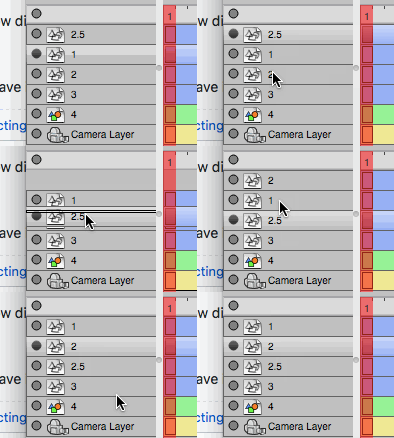
When you drag a layer beneath another or in-between two, the layers will get swapped. This makes it difficult to organize layers when you have a lot of them.
As you add more layers and want them in-between, the problem grows.
--Actual Results
The layers are swapped, putting layer 2.5 at 2 spot and 2 and 2.5 spot.
--Expected Results--
The layer is moved between 2 and 3
--Video or Image Reference--
Example: move 2.5 between 2 and 3:
--Steps to reproduce--
Follow the gif above:
--System Information--
- Pencil2D Version:
date: 2017-07-24_11:03:18
 CandyFace
All 4 comments
This will definitely be fixed in #533.
 scribblemaniac
on 28 Jul 2017
scribblemaniac
on 28 Jul 2017
@scribblemaniac @CandyFace This is related to this issue #436 which was brought up by JonasThomas he even did a video where he explained this and other stuff. https://www.youtube.com/watch?v=INAsUcpywL8&feature=youtu.be He did fix a few other problems around that issues, but this particular layer behavior got stuck. Could be worth taking a look at all that thread to understand what was implemented too.
 Jose-Moreno
on 28 Jul 2017
Jose-Moreno
on 28 Jul 2017
This issue should be closed. Fixed long ago.
 davidlamhauge
on 19 Jul 2019
davidlamhauge
on 19 Jul 2019
@davidlamhauge You're right. This was fixed by #1147
Closing.
Jose-Moreno
on 19 Jul 2019
Related issues
 petr-akhlamov
·
4Comments
petr-akhlamov
·
4Comments
 Kaikogf
·
3Comments
scribblemaniac
·
4Comments
Kaikogf
·
3Comments
scribblemaniac
·
4Comments
 dov
·
3Comments
dov
·
3Comments
 prokoudine
·
4Comments
prokoudine
·
4Comments
Most helpful comment
This will definitely be fixed in #533.