Peeringdb: Add IXP to AS record / dropdown limited
Dear PeeringDB team,
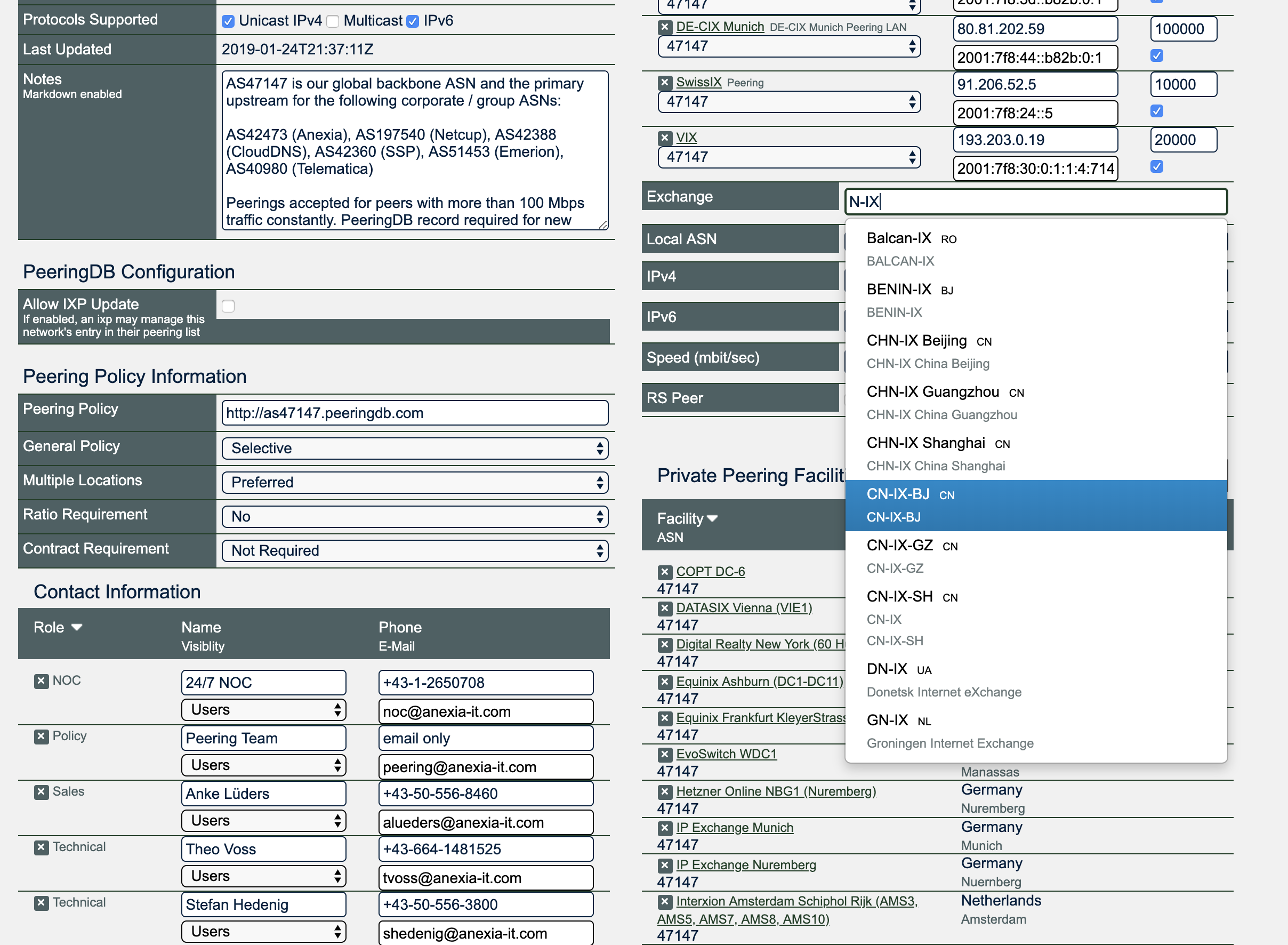
when adding the N-IX IXP (ix/135) to our ASN record (net/13902), the dropdown box for selecting the IXP seems to be limited to a certain number of records. Selecting the N-IX is not possible, work-around was searching by the long name (thanks Arnold).
Best regards,
Theo
 tvberlin
All 9 comments
What's the preferred solution here - more entries, or always include the exact match? Something else?
 vegu
on 14 Aug 2019
vegu
on 14 Aug 2019
Would ^pattern and all entries make the most sense?
 arnoldnipper
on 15 Aug 2019
arnoldnipper
on 15 Aug 2019
@arnoldnipper @vegu don't know if this scales, but keeping the full-text search while displaying more (all) entries would be good as it's a valid use case to search within a string and not only starting from the beginning.
tvberlin
on 25 Aug 2019
Would order the results help?
arnoldnipper
on 25 Aug 2019
I think displaying all entries, and preferring (top of the list) ^pattern is the way to go.
@peeringdb/pc thoughts?
 grizz
on 16 Apr 2020
grizz
on 16 Apr 2020
I think displaying all entries, and preferring (top of the list) ^pattern is the way to go.
+1
arnoldnipper
on 16 Apr 2020
+1 for @grizz's last proposal.
 shane-kerr
on 17 Apr 2020
shane-kerr
on 17 Apr 2020
I think displaying all entries, and preferring (top of the list) ^pattern is the way to go.
+1. To nitpick, I would put == $pattern first, then /^$pattern/, then /$pattern/ but I don't think it'll functionally be any different, so let's just do that
 mcmanuss8
on 17 Apr 2020
mcmanuss8
on 17 Apr 2020
To nitpick, I would put == $pattern first, then /^$pattern/, then /$pattern/ but I don't think it'll functionally be any different, so let's just do that
Definitely, good catch.
grizz
on 18 Apr 2020
Related issues
grizz
·
4Comments
 ccaputo
·
14Comments
ccaputo
·
14Comments
 gordon-shumway-net
·
14Comments
mcmanuss8
·
7Comments
gordon-shumway-net
·
14Comments
mcmanuss8
·
7Comments
 netravnen
·
4Comments
netravnen
·
4Comments
Most helpful comment
I think displaying all entries, and preferring (top of the list) ^pattern is the way to go.
@peeringdb/pc thoughts?