Peek: Countdown from "start recording" to "recording GIF" isn't showing
I tried recording a GIF of my screen, but I if I press "Stop", nothing happens, peek just goes back to the default "record screen" view. The console shows nothing except for GTK CSS messages. There's no "save file" dialog, no error message, nothing.
I don't know:
- Has the image been saved?
- If yes, where has the image been saved (there is no "default file path" or anything")
Not sure if this is related to an earlier issue, but for me right now this app is useless, because it doesn't actually saves the recorded GIF. Is there a "save file" dialog?
I am on Debian 9 and I built the app from source, following the instructions.
 fschutt
All 12 comments
Just curious are you waiting until after the countdown to press stop? Yes there should be a save dialog.
Try running peek with G_MESSAGES_DEBUG=all peek
let's see if anything stands out.
 gort818
on 21 Feb 2018
gort818
on 21 Feb 2018
Aha, so if you press "stop" before the countdown appears, it just does nothing and the save dialog doesn't appear, which was why I was so confused. The countdown appears with a delay of several seconds (if you press "record GIF" it takes roughly 4 seconds to show the countdown).
May I ask why having a delayed countdown is important or why there is no error message "please wait for the countdown to start" ? I only noticed that there is a countdown after you told me, it's not very visible.
fschutt
on 22 Feb 2018
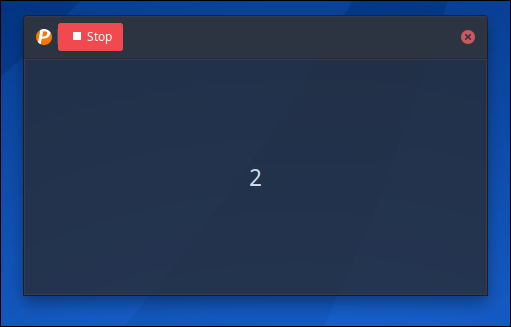
Here is a photo of the countdown it should start as soon as you click record.
Are you talking about the time elapsed counter? Middle of the titlebar?
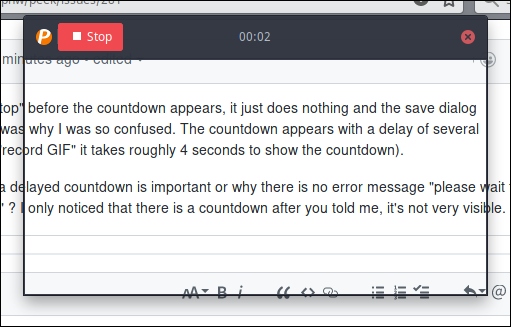
Just want to make sure were are on the same page?
gort818
on 22 Feb 2018
The big number / countdown you have in your first screenshot doesn't appear for me. If I press "start recording", it looks like this:
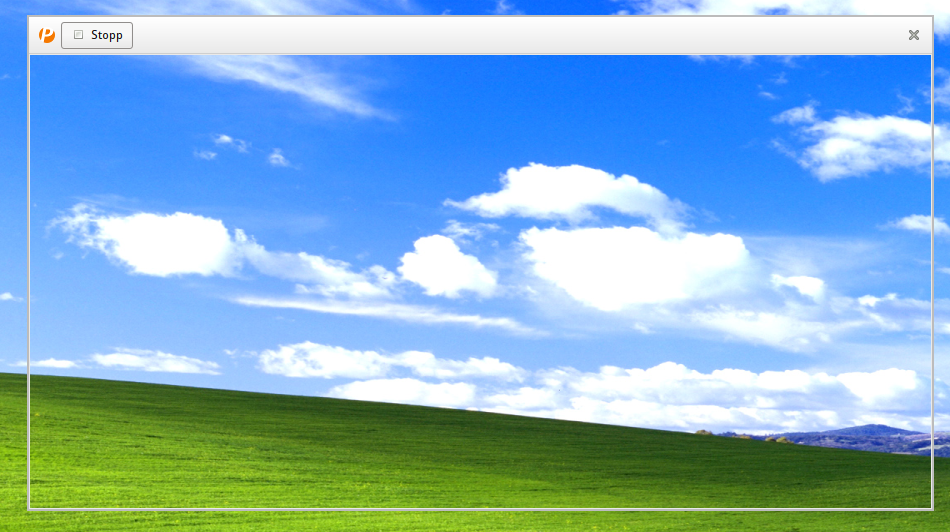
As you can see, the 4..3..2..1 countdown isn't showing (like in your first screenshot), so I assumed that the recorder is immediately running. When I click "stop" in that timeframe, nothing happens (which is probably expected). If I press "stop" after the countdown appears in the top titlebar, it works as expected. So the actual bug is that the 4..3..2..1 countdown blocking the screen isn't showing.
This is using the Trinity Desktop Environment, not sure if this is a bug that may only appear on a non-GNOME DE.
fschutt
on 22 Feb 2018
Ok you can change the the delay to 0 in the preferences. As to why it is
not showing I'm not sure tbh I've never heard of that desktop until today.
I might test out the desktop and see if if I can find out why the countdown
isn't showing up.
On Feb 21, 2018 4:30 PM, "fschutt" notifications@github.com wrote:
The big number / countdown you have in your first screenshot doesn't
appear for me. If I press "start recording", it looks like this:[image: test_1]
https://user-images.githubusercontent.com/12084016/36513359-859f2af4-176f-11e8-878d-6fbfe928c3b2.pngAs you can see, no 4..3..2..1 countdown is showing (like in your first
screenshot), so I assumed that the recorder is immediately running. When I
click "stop" in that timeframe, nothing happens (which is probably
expected). If I press "stop" after the countdown appears in the top
titlebar, it works as expected. So the actual bug is that the 4..3..2..1
countdown blocking the screen isn't showing.This is using the Trinity Desktop Environment, not sure if this is a bug
that may only appear on a non-GNOME DE.—
You are receiving this because you commented.
Reply to this email directly, view it on GitHub
https://github.com/phw/peek/issues/281#issuecomment-367525981, or mute
the thread
https://github.com/notifications/unsubscribe-auth/AIrTiS9b1KoZHQYiCxXoL-HMroG1EwqZks5tXLU2gaJpZM4SJk1g
.
gort818
on 22 Feb 2018
Working as expected. It can take a short time before the recorder has initialized. And just quickly clicking start / stop wouldn't create a usable video in most cases anyway, therefore if you cancel before 1s it just stops.
 phw
on 23 Feb 2018
phw
on 23 Feb 2018
@phw I believe the issue @fschutt is having is the countdown is active but it is invisible.
gort818
on 23 Feb 2018
Ah, ok. That's of course a different issue.
@fschutt This is actually the first time I hear of the Trinity desktop, I have to see how I can run that for testing. Does it support compositing and if so, is this enabled for you?
Also as a quick workaround you can set the countdown to 0 (disabling it) in settings. That way Peek at least behaves less confusing.
phw
on 23 Feb 2018
I haven't had the time to check, sorry. I think I have it off, because the performance isn't great when I turn it on / problems with graphics drivers. I'll see if it still happens if I turn on compositing.
fschutt
on 26 Feb 2018
So as it turns out, if the compositor is active it works as expected. Why drawing a number in a window requires a compositor is beyond me, but I don't think that's the fault of peek. Maybe it's because of the transparency effect.
If no compositor is active, it either shows a black screen or a completely blank one.
fschutt
on 11 Mar 2018
Yes, the compositor is required for the transparency. But actually the countdown is supposed to still appear even without compositor, it would in this case just render on a solid dark gray background.
I can test on Xfce without compositor and see how it works there. But if I cannot reproduce it there I won't be able to do much as supporting Trinity is just way outside the scope of DEs I am actively willing to support.
phw
on 16 Mar 2018
It works on Xfce without compositing, also on Mate. I won't investigate this any further since supporting a window manager that is obsolete for over a decade now is not something I would do. More than likely any fix to this would nee to be done to the Trinity version of KWin.
phw
on 5 Jun 2018
Related issues
 Jokero
·
4Comments
Jokero
·
4Comments
 jjnilton
·
7Comments
jjnilton
·
7Comments
 msongz
·
7Comments
msongz
·
7Comments
 chteuchteu
·
6Comments
chteuchteu
·
6Comments
 fbruetting
·
3Comments
fbruetting
·
3Comments