Having a Snap package will it make easy to install Peek and also takes care of the dependency issues regarding ffmpeg and imagemagick.
I have done some initial work on it, after it looked to be quite easy. There is a snapcraft.yml file and snap packages get automatically build on Launchpad.
Unfortunately it turned out to be not quite as easy with bundling ffmpeg and imagemagick. Open issues that should be solved:
- [x] ImageMagick does not find the configuration installed under
/etc/ImageMagick-6/. There is a workaround to load it from the provided home folder instead, but this is not ideal - [x] ImageMagick does not run and complains about missing delegate, even once it has loaded the configuration
- [x] The package size is very large (~ 100MB), especially for an application as small as Peek. Maybe this can be reduced a bit by removing unneeded things and providing custom builds of ImageMagick and ffmpeg with only what is actually required.
- [ ] Access org.freedesktop.FileManager1 DBus service in strict mode or find alternative solution to open file manager
- [ ] Access org.gnome.Shell.Screencast DBus service in strict mode for recording under Gnome Shell even in Wayland.
- [x] Snap does not detect global menu setting on Unity
- [ ] Handle "prefer-dark-theme" setting. Basically copy the solution from [data/flatpak/launch-peek](https://github.com/phw/peek/blob/master/data/flatpak/launch-peek]
 phw
phw
All 56 comments
Imagesize is now down to about 66 MB and everything is running in devmode.
If using strict mode the app just hangs when stopping the recording without any output, post processing does not start and there is not file chooser shown. Also no output in /var/log/syslog . Not sure what is happening or how to debug.
phw
on 7 Mar 2017
If somebody wants to try snap packages are built regularly at https://code.launchpad.net/~phw/+snap/peek-daily
phw
on 7 Mar 2017
@phw Wow! Great that you're trying to support Flatpak, AppImage, and Snap!
And if it's working in devmode could you upload your master branch as Snaps to an Edge channel on the Snappy store (there's probably a switch for this in Launchpad)? Then anyone could install it with sudo snap install --edge --devmode peek and it would stay automatically updated so we wouldn't need to redownload it every new build :)
 Ads20000
on 13 Mar 2017
Ads20000
on 13 Mar 2017
Agree with @Ads20000 this is fantastic! If you can push directly to the store, we can certainly get more testing done. I tested the snap here and it works well, so thank you so much for the work you've done so far!
 popey
on 13 Mar 2017
popey
on 13 Mar 2017
I have enabled publishing to the store into edge, should be available once the current build is finished :)
For what is missing I am unsure. If I run in strict mode if you click stop it just never shows the save dialog and never starts the post processing. And absolutely no output, not even something about missing permissions in syslog. I had no time to look into this in more detail so far, but I just build it using this snapcraft.yaml which does not yet add any permissions.
@popey: When you say you tested the app and it works, it was also in devmode, right?
Great that you're trying to support Flatpak, AppImage, and Snap!
I have no strict preferences, but I see how important it is to let users access the app as easy as possible :) I gave this kind of a race with the goal to support at least one of those for Peek 1.0. Flatpak made it, Snap had some troubles just before the finishing line and AppImage still confuses me ;)
phw
on 13 Mar 2017
Looks like this will take some time until it hits the store. There is a manual review required for some reason. I will keep you updated.
phw
on 13 Mar 2017
I've rejected the first upload in the store to allow the review to move to the next release you uploaded. Which wasn't the right move, sorry. I'll sort this. :)
popey
on 13 Mar 2017
@popey Sorry, we probably had bad timing, as I just had pushed some unrelated changes and the build triggered again. At least I got both the unblock and the review reqiured mails. I have now pushed another change from which I think it will not trigger the review. I think the dbus slot I added for testing is unneeded but causes the review, see https://github.com/phw/peek/commit/50af73a0d1572a78e588b72b06776068f80b2b1f
phw
on 13 Mar 2017
Ok, awesome. I'll keep an eye out for it.
popey
on 13 Mar 2017
ok, looks like the review passed and they're ready to publish.
popey
on 13 Mar 2017
Published on Edge. I have not yet tested it myself.
phw
on 13 Mar 2017
I have. It works. For anyone else who wants to try:-
snap install peek --edge --devmode is the magic.
popey
on 13 Mar 2017
I have it locally almost running in strict mode. Only thing currently missing is opening the file manager after saving. This requires access to the DBus interface "org.freedesktop.FileManager1", but I have no idea how to grant this. Documentation is very sparse on this.
phw
on 13 Mar 2017
Accessing arbitrary DBus services does not seem to be possible right now. Also found not other way to launch the file manager from within a snap. snapd-xdg-open looked promising at first, but it does not allow file:// scheme. Also it requires installation on the host side, since it is a snapd plugin.
In general the only way to solve this seems to be to have a snapd plugin which handles this. With such a plugin the "org.freedesktop.FileManager1" DBus service could be made accessible. But in any way, this always requires the user to install a separate package on the host beside the snap for Peek.
It does definitely not make sense to provide a plugin just for Peek, then the user could just install Peek from PPA. Some more generic solution is needed. Right now I probably have to disable the "launch file manager" option for the snap version.
phw
on 14 Mar 2017
To be honest however i run peek, i never "use" the file manager dialogue. I generally just press enter an additional time to make it save the gif. Same for most screen casting apps i care less where it is saved and more that it is saved. If it ends up always saving in the same place that's a bonus in my mind because I know where i will find it, wherever that may be.
popey
on 14 Mar 2017
@popeye I find that interesting, because I get similar feedback a lot. For me this is a major annoyance with most screenshot/-cast apps as I want to use the file usually directly after saving :)
phw
on 14 Mar 2017
I had some quick talk on IRC. The current view on this from snapd is to only provide access to selected DBus services that have been security reviewed. For this reason alone I don't see much chance to get support for org.gnome.Shell.Screencast (as it currently does not require any user interaction to give permission to record the screen, and it is also not used on Ubuntu).
I have requested some way to open the file manager at https://bugs.launchpad.net/snapd/+bug/1672652
Otherwise this snap somewhat works, but I would have to disable the "open in file manager" feature for now before turning on strict mode. But I honestly don't want to implement any workarounds for Snap and invest too much time getting this to run, so I will leave it as is for now. Snap just does not seem to be ready for prime time at the moment. If someone wants to use Peek via Snap it works fine in devmode. New builds will be pushed to the edge channel and, I will probably add a note in the README on how to install and run those.
phw
on 14 Mar 2017
Yeah, making specific Snappy workarounds in your application sounds too demanding, sounds like the Snappy devs need to sort this out...
Unless if they can't because their security standards don't allow them to @popey? Maybe Peek should then just use Classic confinement, but then would it be displayed in Ubuntu Software and also ideally we'd want Peek working on Ubuntu Next (all-Snappy, Unity8, and Mir)?
Ads20000
on 15 Mar 2017
One more question @phw , does the Edge build publish the master branch or the released version? Because you can use Devmode in Beta builds too if I recall correctly, maybe you should release your stable version Snaps to Beta and have automated master branch Edge builds, until strict 100% works.
Because you can use a string for your version number, the version of the master branch builds can just be 'master'!
Maybe perhaps you could then recommend the Snap command-line install instead of the PPA because everything is working and Snaps are less risky when it comes to dependencies and update silently.
Ads20000
on 15 Mar 2017
also ideally we'd want Peek working on Ubuntu Next (all-Snappy, Unity8, and Mir)
Mir is a completely different story, I wouldn't hold my breath for this :) But good point is they at least want to support screenshot / screen recording capabilities for third-party apps. See https://github.com/phw/peek/issues/39 for details.
does the Edge build publish the master branch or the released version?
Currently Launchpad automatically builds the latest master and publishes it to next. When there is a new release I can also publish this to beta as stable.
Maybe perhaps you could then recommend the Snap command-line install instead of the PPA because everything is working and Snaps are less risky when it comes to dependencies and update silently.
PPA will likely stay the recommended default as long as devmode is required. The PPA installed version is easier to support for me for now, with Snap specific issues harder to replicate and debug. But I will add the snap install instructions.
phw
on 15 Mar 2017
Just if you wondered why there was no update to the package dispite code changes: The package is in manual review mode again, don't know how long that will take.
Reason is, that the package exports the peek DBus service, and exporting a DBus service triggers the manual review. This is not required for devmode, but will be required (or at least desirable) in strict mode. I will wait a bit for the review to happen.
phw
on 18 Mar 2017
I'm afk most of the weekend, so will take a look at the review (if nobody else beats me to it) on Monday.
popey
on 19 Mar 2017
Edit: Not sure about this, hold on
Urgh, I've learnt that actually unconfined (or Edge? I'm guessing it's the fact it's unconfined but I could be wrong) Snaps don't automatically (and in the background) update as I claimed in a previous comment so sorry about that.
So for that to happen we need to fix the bugs preventing this app from being confined.
Ads20000
on 26 Mar 2017
_"Urgh, I've learnt that actually unconfined (or Edge? I'm guessing it's the fact it's unconfined but I could be wrong) Snaps don't automatically (and in the background) update as I claimed in a previous comment so sorry about that"_
This is incorrect. Snaps _do_ auto refresh, but you can also force refresh with "snap refresh".
popey
on 27 Mar 2017
This is incorrect. Snaps do auto refresh, but you can also force refresh with "snap refresh".
The --devmode prevents the auto refresh. Just running snap refresh does nothing, and snap refresh peek gives a warning about devmode. You really have to run snap refresh peek --devmode to update.
phw
on 16 Jun 2017
Ok, you're correct, and I'm incorrect. I have started a thread on the forum because I do not believe this is the right behaviour.
https://forum.snapcraft.io/t/why-do-devmode-snaps-not-auto-update/1028
popey
on 16 Jun 2017
I have now changed the package to use classic confinement. In theory this should allow us to get a fully functional package, that is distributable in the stable or beta channels and can auto-update.
This once again requires a manual review. @popey Can I bug you about this once more :)
phw
on 20 Jun 2017
Hm. Shall we wait until we get a reply from the thread? I've bumped the architect about it.
popey
on 20 Jun 2017
Yes, let's wait for some feedback 👍
phw
on 20 Jun 2017
@phw @popey OK yes Niemeyer says that 'classic is today a viable alternative if people can't confine their snaps properly yet but want to do non-development releases.'
Unfortunately we don't seem to be able to confine Peek properly, so we'll have to use classic for the time being, which is a shame, because it means that either our snapcrafting skills or snappy itself isn't good enough yet to confine apps like Peek properly.
Ads20000
on 22 Jun 2017
@Ads20000 This is just part of the process, and we shouldn't feel bad for it. Snapping up applications with proper confinement is literally getting easier every day with new interfaces and new capabilities in snaps. Having an application that is half-way there means half the work has been done and we can benefit from it today. The second half can easily come next.
 niemeyer
on 22 Jun 2017
niemeyer
on 22 Jun 2017
Ok, so I think the best way forward for now is using the classic confinement. This way I will be able to release this as a stable application where users get proper updates and can use the full functionality of the app. @evandandrea contacted me regarding the review for the store and I just answered him with some details.
I am sure snap will continue to gain more possibilities, and I am more than happy to update the snap to get access to the missing functionality (currently this is opening the file manager on the location of the saved file somehow, and accessing org.gnome.Shell.Screencast on GNOME Shell in order to record in a Wayland session.
@niemeyer @popey Some general Feedback on my experience with Snap: For me getting the snap to this point was more troublesome then I had originally imagined.
For one I still struggle finding some details in the documentation on snapcraft.io. Mostly I have trouble finding the list of available slots, it is somewhat well hidden in a link on one of the documentation pages. And in general the whole plugs / slots system is not explained in detail. Also I read about the gnome platform app being available soon, but could not find any details on how such a platform snap would be used.
Testing was difficult for me, as I don't use Ubuntu. Did most of the initial work in a Virtual Machine, which was not that comfortable for me to use. Never managed to get the snapcraft utility to run with docker.
Having only the option between strict and classic assignment is a bit strange. Basically it is an all or nothing approach, whereas e.g. in Flatpak you can punch holes to the parts you need (e.g. give access to a specific DBus service). I understand where you are aiming at, and the end result will be great, but in the meantime it can be hard to package legacy apps or apps with special requirements (and the whole screencasting / screenshooting things seems to be a rather unsolved issue in the post-X era with Wayland and sandboxing).
Still I think Snap is a good thing to move and I am quite happy to support it here. By the way, build.snapcraft.io is fantastic.
phw
on 22 Jun 2017
Thanks for the feedback, @phw. Some follow ups:
Indeed, that's a problem and we're working on it. You'll have a much more clear list of available interfaces in the command line itself (PR is already up), and we're constantly working on improving the documentation via the forum at https://forum.snapcraft.io/c/doc. Some further organization is needed and we'll work on that.
If you can't run snapd locally, a VM is indeed the best shot at the moment I think. Running snapd inside Docker requires Docker itself to do some work, because both Docker and snapd make use of the same kernel infrastructure and require wide access into the system to set the containers up.
That's exactly what interfaces are for in snaps, and it is in fact much more flexible than what you might get in some other systems. You can poke arbitrary holes in DBus, AppArmor, seccomp, udev, and pretty much anything else necessary through them. Even file sharing across snaps is possible (the content interface). These are what enable strict snaps to claim what they need.
niemeyer
on 22 Jun 2017
That's exactly what interfaces are for in snaps...
But to my understanding an interface is provided by the host system, there is no way for me to implement an interface which gets shipped as part of my snap, right? So how would I go about getting my Peek Snap access e.g. org.gnome.Shell.Screencast?
phw
on 22 Jun 2017
No, the interface _type_ is defined by snapd. The interface _endpoints_ (the plugs and slots) are actually part of snaps themselves. Each one of these types defines what happens when the given interface is connected, and the two ends may get specific benefits out of it depending on how the interface is defined.
Here is the implementation of the _network-status_ interface, for example, offering access to particular DBus services:
https://github.com/snapcore/snapd/blob/master/interfaces/builtin/network_status.go
And here is a more general DBus one:
https://github.com/snapcore/snapd/blob/master/interfaces/builtin/dbus.go
niemeyer
on 23 Jun 2017
Also worth into the ever-growing list which includes other kinds of interfaces:
https://github.com/snapcore/snapd/tree/master/interfaces/builtin
niemeyer
on 23 Jun 2017
@niemeyer Thanks a lot for the details, but I was aware of most of it already. I will watch this list and switch to proper interfaces for the missing functionality once available. Currently I don't have the time to look into this myself to provide patches for what I need, especially as those cases are probably difficult to get right with security.
phw
on 6 Jul 2017
On other news: Peek is now up with classic confinement and thus installable with the --classic flag and not devmode, and in theory this would enable me to move it to a stable channel. In practice I cannot install it at all on my Arch system as "classic confinement is not yet supported on your distribution" :( No matter how I turn this, some problem pops up :( There is a list of which distribution supports classic confinement. The ones missing it are Fedora, CentOS and Arch. One could argue that Fedora users are better of with Flatpak, and Arch users will probably stick more to native packages.
I will test with Ubuntu next, and if everything is fine proceed with publishing the Peek Snap in a stable channel.
phw
on 6 Jul 2017
kayover@kayover-Lenovo-G580:~$ sudo snap install peek --edge --devmode
ошибка: This revision of snap "peek" was published using classic
confinement and thus may perform arbitrary system changes outside
of the security sandbox that snaps are usually confined to, which
may put your system at risk.
If you understand and want to proceed repeat the command
including --classic.
kayover@kayover-Lenovo-G580:~$ sudo snap install peek --edge --devmode --classicошибка: cannot install "peek": cannot use classic and devmode flags
together
kayover@kayover-Lenovo-G580:~$ sudo snap install peek --edge --classicpeek (edge) 1.0.3+git from 'phw' installed
kayover@kayover-Lenovo-G580:~$ peek
/ not root-owned 1023:1023
kayover@kayover-Lenovo-G580:~$ sudo peek
/ not root-owned 1023:1023
kayover@kayover-Lenovo-G580:~$ snap run peek
/ not root-owned 1023:1023
kayover@kayover-Lenovo-G580:~$ sudo snap run peek
/ not root-owned 1023:1023
kayover@kayover-Lenovo-G580:~$
What's wrong? I'm using Ubuntu 32bit 17.04 with gnome de.
Even tried from root terminal, no luck too.
 sziberov
on 1 Aug 2017
sziberov
on 1 Aug 2017
@sziberov sudo snap install peek --edge --classic should be correct now (the docs need updating). Not sure what this error means. So far I only tested on my Ubuntu 16.04 64bit VM without issues. But this sounds more like a general snap support question to me.
phw
on 20 Aug 2017
Just as a reminder to myself: Found out snapd 2.27 should allow users to enable classic confinement on distributions not officially supporting it (e.g. Arch and Fedora, see my comment above). This will help me test this. See https://forum.snapcraft.io/t/install-classic-on-arch/1576 for details.
phw
on 20 Aug 2017
@phw I seen on other snap package here that "sudo chown root:root /" will fix this error, and yes, this error is gone. But new is appeared : /snap/peek/224/command-peek.wrapper: 2: exec: desktop-launch: not found
sziberov
on 20 Aug 2017
@sziberov I could reproduce and rebuilt the package with strict confinement again.
Can you test installing peek with
sudo snap install peek --beta
If this works well (it does for me) I will promote this to stable.
Note that my solution now for the limitations is that I completely disable gnome-shell recorder and file manager integration in the snap build. That just can't work right now.
I am also going to test using the gnome platform snap, that probably will reduce the snap size further.
phw
on 22 Sep 2017
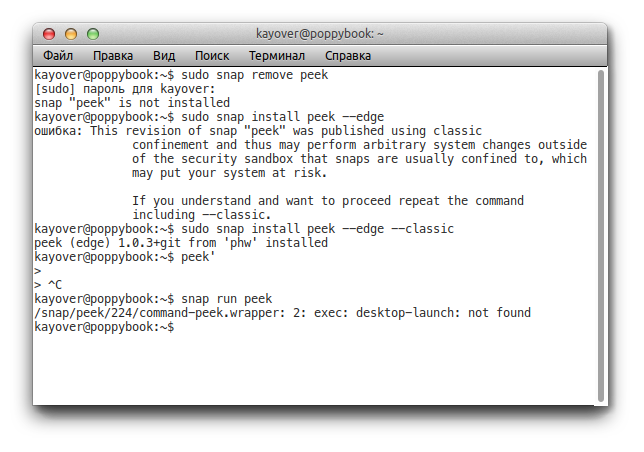
sziberov
on 22 Sep 2017
Note that @phw said snap install peek --beta and you did snap install peek --edge --classic. Has the i386 build also been bumped along with the x86_64 one? Looks like it hasn't because when I tried to snap install peek --beta in my i386 VM, it tells me it's a classic snap.
However, I have seen the issue 'desktop-launch: not found' when installing a classic desktop snap. The app launch line might need to be:-
command: bin/desktop-launch $SNAP/bin/peek # (or whatever the path to the peek binary is)
However, peek worked fine for me using snap install peek --beta (without classic)

popey
on 22 Sep 2017
@popey Wait, he edited his comment. There was '--edge' minute ago!
sziberov
on 22 Sep 2017
@phw With using the gnome platform snap, you may find this thread helpful if you haven't seen it yet. The snap you want to connect to is gnome-3-26-1604 and snappy will auto-connect your snap to it so no extra commands needed from the user.
Ads20000
on 22 Sep 2017
@sziberov edge and beta contain the same. That's not the issue. It's the fact you used --classic.
Running snap info peek n my x86_64 laptop:-
tracking: beta
installed: 1.0.3+git (225) 74MB -
refreshed: 2017-09-22 12:44:17 +0100 BST
channels:
stable: –
candidate: –
beta: 1.0.3+git (225) 74MB -
edge: 1.0.3+git (225) 74MB -
On my x86 VM:
channels:
stable: –
candidate: –
beta: 1.0.3+git (224) 78MB classic
edge: 1.0.3+git (227) 78MB -
@sziberov Coul well be that the package was not yet updated when you tried. Also i386 builds are sometimes a bit behind, since they are built on launchpad and the other packages on snapcraft.io, as the latter does not do i386 builds.
And I changed to beta so people can test the build I think is stable and I can mess around with edge :)
@Ads20000 Thanks for that thread, will try this. Is there some actual documentation on how to use the gnome-platform snap? So far it is mostly trial and error on my part based on the infos provided at https://wiki.ubuntu.com/snapcraft/parts
phw
on 22 Sep 2017
Also i386 builds are sometimes a bit behind, since they are built on launchpad and the other packages on snapcraft.io, as the latter does not do i386 builds.
Aside: support for i386 on https://build.snapcraft.io is coming. It's waiting on being able to specify the architectures you want your snap to build on in the snapcraft.yaml, which is getting final design next week.
 evandandrea
on 22 Sep 2017
evandandrea
on 22 Sep 2017
Ok, new status on the edge channel :) I have finally used the gnome-3.24-platform content snap, brings down the size to ~58 MB (still much, not sure I miss something). But it requires additional command line foo to get running, complete install involves:
sudo snap install peek --edge
sudo snap install gnome-3-24
sudo snap connect peek:gnome-3-24-platform gnome-3-24:gnome-3-24-platform
Could not figure out how to use the gnome-3-26-1604 content snap instead that @Ads20000 mentioned, as the desktop-gnome-platform part seems to rely on 3.24. As I understand gnome-3-26-1604 would allow auto connecting, which at least would remove the third command from above. Not sure about installing the content snap itself, but I guess this is not yet automated.
Not happy with so many commands to be run :(
phw
on 22 Sep 2017
Not happy with so many commands to be run :(
Yeah it's not good. The last one won't be necessary if we can get the 3.26 (16.04) content snap working, I know it means you'll need to make a forum account but could you comment in the actual thread and try and get an answer from jdstrand (a snappy dev, I think!?) and/or daniel (a much more experienced, technical, and successful snapcrafter than I am)? I think that'll be the fastest way to get help (they'll want it to be easy to use for other upstreams too) :)
As for the second command, I've filed a forum topic here, hopefully someone will answer :)
Ads20000
on 23 Sep 2017
I asked on the forum topic about using gnome-3-26-1604 . Once this is solved I would be more or less happy with it (not 100%, as I had to cut down features to make it work). My plan is to definitely release a stable snap together with the next Peek release.
phw
on 24 Sep 2017
I installed Peek via sudo snap install peek --beta and was pleasantly surprised to find it working perfectly in 14.04! Thanks for a great utility.
 Kukanani
on 25 Sep 2017
Kukanani
on 25 Sep 2017
I have releases Peek 1.1.0 and with it finally a stable Snap package. The newest install instructons are:
sudo snap install gnome-3-26-1604
sudo snap install peek
The README has been updated. i386 package is currently building and will be available later.
Thanks to everybody who provided support here. This was harder than expected, but with all your help I got it working in the end :)
phw
on 5 Oct 2017
Aside: support for i386 on https://build.snapcraft.io is coming.
Just saw i386 builds on snapcraft.io are working snce recently :D Great
phw
on 13 Oct 2017
Related issues
 msongz
·
7Comments
msongz
·
7Comments
 CasperHK
·
5Comments
CasperHK
·
5Comments
 fbruetting
·
3Comments
phw
·
3Comments
fbruetting
·
3Comments
phw
·
3Comments
 Jokero
·
4Comments
Jokero
·
4Comments
Most helpful comment
I have releases Peek 1.1.0 and with it finally a stable Snap package. The newest install instructons are:
The README has been updated. i386 package is currently building and will be available later.
Thanks to everybody who provided support here. This was harder than expected, but with all your help I got it working in the end :)