My use case is that a user can add an image (with a named key/index), save the PDF, re-process the saved PDF and remove the image (by key/index) that they originally added. Is that possible at all? Thought I might be able to use the page.delete(key) function, but doesn't work for me.
 philipjmurphy
All 9 comments
Hello @philipjmurphy!
There are two ways to approach this task:
- Actually remove the image from the PDF file (what you're describing)
- Overwrite the image with a transparent PNG
I think the second option is probably the best approach. This is because simply deleting an image (with a known key) from a PDF file is relatively simple. But modifying all the content streams to remove references to the image is not. All major PDF readers will still show the PDF even if some content streams reference deleted images. But some readers (Adobe Acrobat) will still pop up a warning message that may be undesirable.
All that being said, I created a script to demonstrate how to go about deleting the image. Here's the two resulting PDFs:
And here's the script itself:
// ...imports omitted...
/*************************** Create pdfDoc1 ***********************************/
const pdfDoc1 = PDFDocumentFactory.create();
const [JpgCatRidingUnicorn] = pdfDoc1.embedJPG(
fs.readFileSync('cat_riding_unicorn.jpg')
);
const contentStream = pdfDoc1.register(
pdfDoc1.createContentStream(
drawImage('CatRidingUnicorn', {
y: 500 - 1080 * 0.2,
width: 1920 * 0.2,
height: 1080 * 0.2,
}),
),
);
const page1 = pdfDoc1
.createPage([500, 500])
.addXObject('CatRidingUnicorn', JpgCatRidingUnicorn)
.addContentStreams(contentStream);
pdfDoc1.addPage(page1);
const pdfDoc1Bytes = PDFDocumentWriter.saveToBytes(pdfDoc1);
/*************************** Create pdfDoc2 ***********************************/
const pdfDoc2 = PDFDocumentFactory.load(pdfDoc1Bytes);
const firstPage = pdfDoc2.getPages()[0];
const imageRef = firstPage
.get('Resources')
.get('XObject')
.get('CatRidingUnicorn');
pdfDoc2.index.index.delete(imageRef);
firstPage
.get('Resources')
.get('XObject')
.delete('CatRidingUnicorn');
const pdfDoc2Bytes = PDFDocumentWriter.saveToBytes(pdfDoc2);
/******************************************************************************/
fs.writeFileSync('with_image.pdf', pdfDoc1);
fs.writeFileSync('without_image.pdf', pdfDoc2);
I hope this helps. Please let me know if you have any further questions!
 Hopding
on 15 Jun 2019
Hopding
on 15 Jun 2019
Hi @Hopding
Thanks for the code snippet. As you mention, removing images is difficult and with the popup warning in Acrobat it makes this option a no-go for me unfortunately. Using qpdf I can see that there are remnants of the CatRidingUnicorn stream being left behind. I think that the transparent image might be a better bet.
I was originally going to use HummusJS for this job, however, I much prefer to use pdf-lib as it can run in the browser. When I asked a similar question over there (before I found pdf-lib) one possible solution was to create a form and add the image to it. Later on it would be just a matter of removing it from the form.
https://github.com/galkahana/HummusJS/issues/395#issuecomment-501651237 Could I apply that approach using pdf-lib or maybe I'll end up with the same warnings again?
Thanks,
Philip
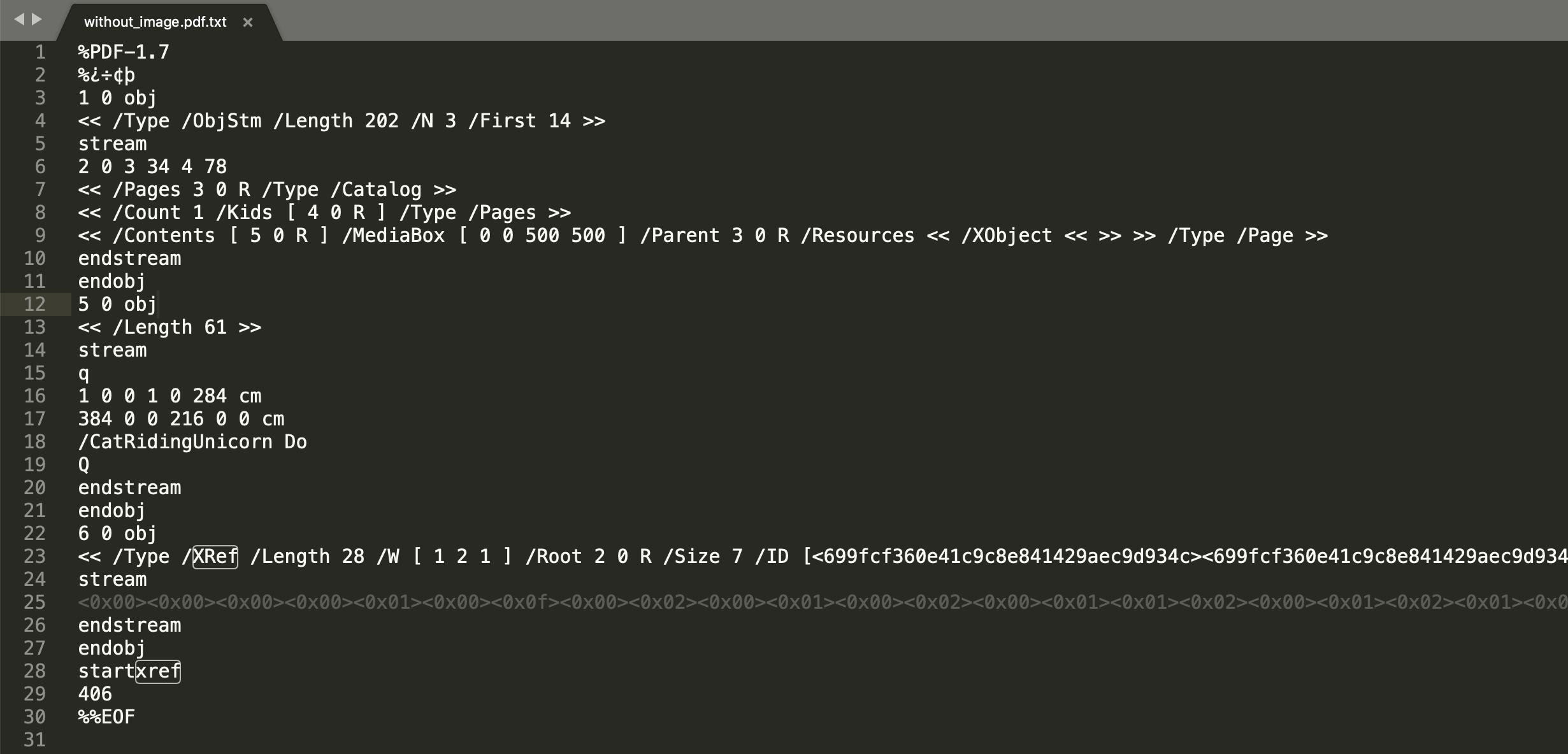
generated with qpdf (install on Mac: brew install qpdf):
qpdf --stream-data=uncompress ~/Downloads/without_image.pdf ~/Downloads/without_image.pdf.txt
philipjmurphy
on 15 Jun 2019
Replacing the image XObject with an empty one, like @galkahana suggested, is a nice approach. I wrote up a script that does this, and it appears to work very well. The image is removed, and none of the readers show any errors/warnings (nor should they).
Here's the resulting PDF:
with_empty_form_xobject.pdf
// ...imports omitted...

const createEmptyXObject = (pdfDoc: PDFDocument) => {
  const xObjDict = PDFDictionary.from(
    {
      Type: PDFName.from('XObject'),
      Subtype: PDFName.from('Form'),
      BBox: PDFArray.fromArray(
        [
          PDFNumber.fromNumber(0),
          PDFNumber.fromNumber(0),
          PDFNumber.fromNumber(0),
          PDFNumber.fromNumber(0),
        ],
        pdfDoc.index,
      ),
      Length: PDFNumber.fromNumber(0),
    },
    pdfDoc.index,
  );
  return PDFRawStream.from(xObjDict, new Uint8Array(0));
};

/*************************** Create pdfDoc1 ***********************************/

const pdfDoc1 = PDFDocumentFactory.create();

const [JpgCatRidingUnicorn] = pdfDoc1.embedJPG(
  assets.images.jpg.cat_riding_unicorn,
);

const contentStream = pdfDoc1.register(
  pdfDoc1.createContentStream(
    drawImage('CatRidingUnicorn', {
      y: 500 - 1080 * 0.2,
      width: 1920 * 0.2,
      height: 1080 * 0.2,
    }),
  ),
);

const page1 = pdfDoc1
  .createPage([500, 500])
  .addXObject('CatRidingUnicorn', JpgCatRidingUnicorn)
  .addContentStreams(contentStream);

pdfDoc1.addPage(page1);

const pdfDoc1Bytes = PDFDocumentWriter.saveToBytes(pdfDoc1);

/*************************** Create pdfDoc2 ***********************************/

const pdfDoc2 = PDFDocumentFactory.load(pdfDoc1Bytes);

const firstPage = pdfDoc2.getPages()[0];

const imageRef = firstPage
  .get<PDFDictionary>('Resources')
  .get<PDFDictionary>('XObject')
  .get<PDFIndirectReference>('CatRidingUnicorn');

pdfDoc2.index.index.delete(imageRef);

const emptyXObject = createEmptyXObject(pdfDoc2);
pdfDoc2.index.assign(imageRef, emptyXObject);

const pdfDoc2Bytes = PDFDocumentWriter.saveToBytes(pdfDoc2);

/******************************************************************************/

fs.writeFileSync('with_image.pdf', pdfDoc1);
fs.writeFileSync('with_empty_form_xobject.pdf', pdfDoc2);
Sweet - I've ported the code snippet to JavaScript and integrated with the browser version that I had. When you press the generate PDF button it now generates the two PDFs in the browser - the first with the image and the second without. If you download them, they open in Acrobat without warnings.
Your library is blowing my mine as I never thought that you'd be able to do this type of processing in the browser. It's the best. Thanks again.
I've attached the new code for anyone else looking for a similar example:
philipjmurphy
on 15 Jun 2019
While those solutions of replacing the image works, I would have been interested in
Actually remove the image from the PDF file (what you're describing)
I do get the Adobe Reader warning when deleting the image and removing the Resource associated with. But it renders correctly
 jpsimard-nyx
on 16 Jul 2019
jpsimard-nyx
on 16 Jul 2019
@jpsimard-nyx The approach I shared in my last comment should actually delete the image from the file. That is done in this snippet of the code:
const imageRef = firstPage
  .get<PDFDictionary>('Resources')
  .get<PDFDictionary>('XObject')
  .get<PDFIndirectReference>('CatRidingUnicorn');

pdfDoc2.index.index.delete(imageRef);
The next couple of lines then replace the image with an empty XObject to avoid the warning:
const emptyXObject = createEmptyXObject(pdfDoc2);
pdfDoc2.index.assign(imageRef, emptyXObject);
TL;DR You don't have to deal with the Acrobat warning if you want to actually remove the image from the file.
Hopding
on 21 Jul 2019
with the 1.0.x I'm back to square 1 on this
index.index ain't a thing anymore. Some objects got the from renamed of, others got the feature removed completly.
jpsimard-nyx
on 19 Aug 2019
This has become a bit more tricky to do in 1.0.x. But it's still possible. Here's an updated version of the above script that works in 1.0.1:
import fs from 'fs';
import { PDFDict, PDFDocument, PDFName } from 'pdf-lib';

const findKeyForValue = (value, dict) => {
  const entries = Array.from(dict.dict.entries());
  const match = entries.find(([_key, val]) => val === value);
  if (match) return match[0];
  return undefined;
};

const createEmptyXObject = (pdfDoc) =>
  pdfDoc.context.stream(new Uint8Array(0), {
    Type: 'XObject',
    Subtype: 'Form',
    BBox: [0, 0, 0, 0],
  });

(async () => {
  const pdfDoc1 = await PDFDocument.create();

  const catRidingUnicornJpg = fs.readFileSync(
    'assets/images/cat_riding_unicorn.jpg',
  );
  const catRidingUnicornImg = await pdfDoc1.embedJpg(catRidingUnicornJpg);
  const catRidingUnicornDims = catRidingUnicornImg.scale(0.2);

  const page = pdfDoc1.addPage([500, 500]);

  page.drawImage(catRidingUnicornImg, {
    ...catRidingUnicornDims,
    y: 500 - catRidingUnicornDims.height,
  });

  const pdfDoc1Bytes = await pdfDoc1.save();

  /*************************** Create pdfDoc2 ***********************************/

  const pdfDoc2 = await PDFDocument.load(pdfDoc1Bytes);

  const firstPage = pdfDoc2.getPages()[0];

  const xObjects = firstPage.node
    .Resources()
    .lookup(PDFName.of('XObject'), PDFDict);

  const key = findKeyForValue(catRidingUnicornImg.ref, xObjects);

  const imageRef = xObjects.get(key);

  pdfDoc2.context.delete(imageRef);

  const emptyXObject = createEmptyXObject(pdfDoc2);
  pdfDoc2.context.assign(imageRef, emptyXObject);

  const pdfDoc2Bytes = await pdfDoc2.save();

  /******************************************************************************/

  fs.writeFileSync('with_image.pdf', pdfDoc1Bytes);
  fs.writeFileSync('with_empty_form_xobject.pdf', pdfDoc2Bytes);
})();
How would I get catRidingUnicornImg.ref if I didn't already have it from the pdf creation?
 timstrasser
on 6 Jul 2020
timstrasser
on 6 Jul 2020
Related issues
 matthopson
·
4Comments
matthopson
·
4Comments
 faxemaxee
·
6Comments
faxemaxee
·
6Comments
 keyhoffman
·
4Comments
keyhoffman
·
4Comments
 kevinswartz
·
5Comments
kevinswartz
·
8Comments
kevinswartz
·
5Comments
kevinswartz
·
8Comments
Most helpful comment
Replacing the image XObject with an empty one, like @galkahana suggested, is a nice approach. I wrote up a script that does this, and it appears to work very well. The image is removed, and none of the readers show any errors/warnings (nor should they).
Here's the resulting PDF:
with_empty_form_xobject.pdf