Pdf-lib: drawText() draws with the wrong orientation on specific file
Hi guys,
I have a file here that appears to be detected in the wrong orientation. If I view it, it shows in portrait mode. If I call drawText() on it, it draws my text in the doc as if it had been rotated 90 degrees. So it draws text at the proper coordinates, but from the bottom left of the page, and rotated vertically.
If I view the file in finder on a mac, it views in portrait mode, but I can see that the pixel height/width is flipped. If I re-save the file this gets fixed. I'm unable to share this file, as it has sensitive information in it.
It definitely looks like there's a problem with the file, is there any way I can detect this scenario and possibly correct for it?
 kevinswartz
All 8 comments
Ok, we were able to open the pdf with vi, clear all the contents out and re-save. The resulting file still gives us this behavior. I've attached it here, please let me know if you need anything else.
kevinswartz
on 15 Jan 2019
Hello @kevinswartz. I've been pretty busy lately and haven't had time to look into this yet. Hopefully I'll get a chance this weekend.
 Hopding
on 24 Jan 2019
Hopding
on 24 Jan 2019
Hello @kevinswartz.
I finally got a chance to take a look at this. Based on the PDF you provided, I don't think you're dealing with a corrupt file or anything. I think you're just dealing with a PDF whose pages are rotated.
You'll have to rotate the text you draw on the pages to account for this. I've created an example script that demonstrates how to:
- Extract the rotation angle of a page
- Rotate text that you draw with
drawText(ordrawLinesOfText) - "Cancel" the rotation of the page when you're drawing text
const getPageRotation = (page) => {
  let rotation;

  // Check for Rotate on the page itself
  const isRotated = !!page.getMaybe('Rotate');
  if (isRotated) {
    rotation = page.index.lookup(page.get('Rotate')).number;
  }

  // Check for Rotate on each parent node
  page.Parent.ascend((parent) => {
    const parentIsRotated = !!parent.getMaybe('Rotate');
    if (rotation === undefined && parentIsRotated) {
      rotation = parent.index.lookup(parent.get('Rotate')).number;
    }
  }, true);

  // A rotation of 0 is the default
  if (rotation === undefined) rotation = 0;

  return rotation;
};

const pdfPath = './landscape_bug_test.pdf';
const pdfDoc = PDFDocumentFactory.load(fs.readFileSync(pdfPath));

const [helveticaRef, helveticaFont] = pdfDoc.embedStandardFont(
  StandardFonts.Helvetica,
);

const page1 = pdfDoc.getPages()[0];

const pageRotation = getPageRotation(page1);

console.log('Page Rotation:', pageRotation);

const { width, height } = getPageDimensions(page1);
const centerX = width / 2;
const centerY = height / 2;

const angles = [0, 45, 90, 135, 180, 225, 270, 315, 360];
const red = [1, 0, 0];
const black = [0, 0, 0];

// Draw the string 'Testing 1 2 3' at 9 different rotation angles
const contentStream = pdfDoc.register(
  pdfDoc.createContentStream(
    ...angles.map((angle) =>
      drawText('Testing 1 2 3', {
        font: 'Helvetica',
        size: 45,
        x: centerX,
        y: centerY,
        rotateDegrees: angle,

        // Draw the text in red when we match the page's rotation angle
        colorRgb: angle === pageRotation ? red : black,
      }),
    ),
  ),
);

page1
  .addFontDictionary('Helvetica', helveticaRef)
  .addContentStreams(contentStream);

return PDFDocumentWriter.saveToBytes(pdfDoc);
Here's the PDF generated by the above script: text-rotation.pdf
I hope this is what you're looking for. Let me know if you have any further questions!
Hopding
on 9 Feb 2019
Hi @Hopding,
This solves part of my problem. I can now detect the text rotation angle and can correct for it. However, I'm having trouble translating the xy coordinates to the proper rotated position. Where does the center point from the rotation angle get calculated from? In the text-rotation.pdf file you attached, it looks like the center point is a few pixels out from the middle left of the text.
So, I have x/y coordinates calculated from the top/left of the page when displayed unrotated. I'm trying to write text, the correct orientation, and at that location within pdf-lib, and so I need to map that xy to the coordinates pdf-lib will use due to the rotation. Does that make sense? Thanks again!
kevinswartz
on 13 Feb 2019
Hello @kevinswartz.
In PDF Land, the default (0, 0) coordinate is located at the bottom left corner of the page. With y increasing upwards and x increasing towards the right.
However, in the case of the PDF you are working with, due to its rotation angle, the (0, 0) coordinate has been moved to the bottom right corner of the page. With y increasing towards the left and x increasing upwards.
As far as the center point of the text I drew in the sample PDF, it is actually in the dead center of the page. It just looks a bit off-center because of the shape of the character T:
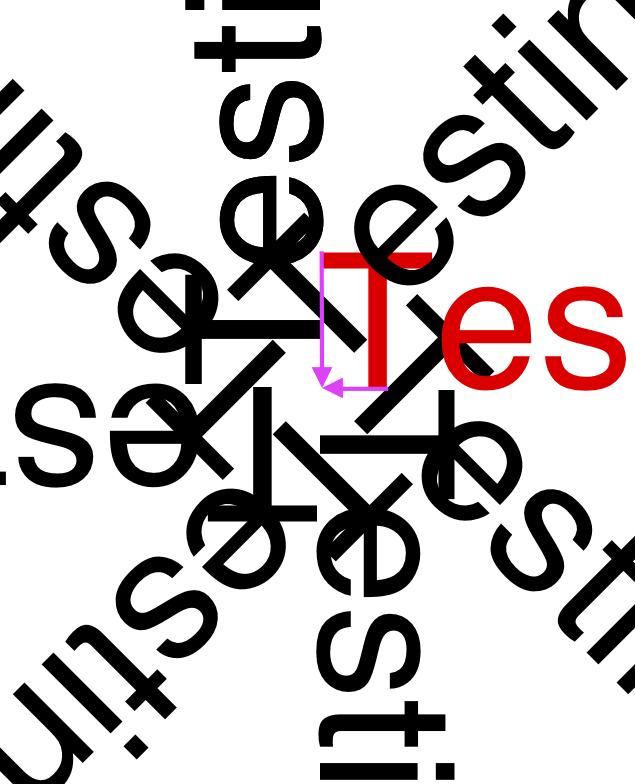
It sounds like what you want to do is leave the page rotated as it is, but draw on it with the
default coordinates and rotation. I'm afraid I don't have time at the moment to demonstrate
exactly how to do this. But I think you'll want to use the following operators:
Let me know if you're unable to get what you're wanting using these operators,
I can write up a script to demonstrate how it works when I get some time.
Hopding
on 24 Feb 2019
Hi @Hopding ,
I spent some time on this today, but wasn't able to totally fix things. I can rotate the text without problem using rotateDegrees(). It's the position that I can't seem to get right. Do you have an example of how to use translate()?
The trick here, is that when placing text, I'm using coordinates based on a view that has been corrected for the rotation (coordinates are from top/left of doc). So the pdf is displayed without this rotation. I need to account for the rotation and position, and place the text such that when viewed with the rotation corrected, it appears in the same spot. Am I making this too hard? Thanks again
kevinswartz
on 26 Feb 2019
Ok, I think we figured out a way to correct for this. Had to get into some rotation matrix math to do it.
Here's what we landed on. Let me know if you see anything that doesn't look right.
For context:
getPageRotation() is mostly the method you gave me
vars x/y are coordinates from the top left of the page.
vars drawX/drawY get passed directly into drawText()
var pageRotation = me.getPageRotation(page);
var rotationRads = pageRotation * Math.PI / 180;

//These coords are now from bottom/left
var coordsFromBottomLeft = {
  x : (x / scale)
}
if(pageRotation === 90 || pageRotation === 270){
  coordsFromBottomLeft.y = dimensions.width - ((y + fontSize) / scale);
}
else{
  coordsFromBottomLeft.y = dimensions.height - ((y + fontSize) / scale);
}

var drawX = null;
var drawY = null;
if(pageRotation === 90){
  drawX = coordsFromBottomLeft.x * Math.cos(rotationRads) - coordsFromBottomLeft.y * Math.sin(rotationRads) + dimensions.width;
  drawY = coordsFromBottomLeft.x * Math.sin(rotationRads) + coordsFromBottomLeft.y * Math.cos(rotationRads);
}
else if(pageRotation === 180){
  drawX = coordsFromBottomLeft.x * Math.cos(rotationRads) - coordsFromBottomLeft.y * Math.sin(rotationRads) + dimensions.width;
  drawY = coordsFromBottomLeft.x * Math.sin(rotationRads) + coordsFromBottomLeft.y * Math.cos(rotationRads) + dimensions.height;
}
else if(pageRotation === 270){
  drawX = coordsFromBottomLeft.x * Math.cos(rotationRads) - coordsFromBottomLeft.y * Math.sin(rotationRads);
  drawY = coordsFromBottomLeft.x * Math.sin(rotationRads) + coordsFromBottomLeft.y * Math.cos(rotationRads) + dimensions.height;
}
else{
  //no rotation
  drawX = coordsFromBottomLeft.x;
  drawY = coordsFromBottomLeft.y;
}
Your matrix rotation solution looks solid 👍
This seems like an issue that might crop up quite often. When I get some time, I'll probably surface this solution via a simple API option.
Hopding
on 10 Mar 2019
Related issues
 AlanHadzic
·
3Comments
AlanHadzic
·
3Comments
 DanielJackson-Oslo
·
3Comments
DanielJackson-Oslo
·
3Comments
 jboxxx
·
4Comments
jboxxx
·
4Comments
 dhollenbeck
·
4Comments
dhollenbeck
·
4Comments
 MarcGodard
·
3Comments
MarcGodard
·
3Comments
Most helpful comment
Your matrix rotation solution looks solid 👍
This seems like an issue that might crop up quite often. When I get some time, I'll probably surface this solution via a simple API option.