Hello,
Is it possible to add metadata to the PDF?
Thanks!
 erjimmmy
All 23 comments
Hello @erjimmmy. You can add metadata to PDFs with pdf-lib. There isn't currently a nice high level API for it, though. So the code is a bit ugly, but it works nonetheless!
(Note that PDFs store metadata in XMP format. The XMP standard supports a wide variety of options, and even allows you to add your own custom tags.)
Here's a snippet that creates a PDF and adds metadata to it with a couple details omitted for brevity:
...

const addMetadataToDoc = (pdfDoc, options) => {
  const metadataXML = `
    <?xpacket begin="" id="W5M0MpCehiHzreSzNTczkc9d"?>
      <x:xmpmeta xmlns:x="adobe:ns:meta/" x:xmptk="Adobe XMP Core 5.2-c001 63.139439, 2010/09/27-13:37:26        ">
        <rdf:RDF xmlns:rdf="http://www.w3.org/1999/02/22-rdf-syntax-ns#">

          <rdf:Description rdf:about="" xmlns:dc="http://purl.org/dc/elements/1.1/">
            <dc:format>application/pdf</dc:format>
            <dc:creator>
              <rdf:Seq>
                <rdf:li>${options.author}</rdf:li>
              </rdf:Seq>
            </dc:creator>
            <dc:title>
               <rdf:Alt>
                  <rdf:li xml:lang="x-default">${options.title}</rdf:li>
               </rdf:Alt>
            </dc:title>
            <dc:subject>
              <rdf:Bag>
                ${options.keywords
                  .map((keyword) => `<rdf:li>${keyword}</rdf:li>`)
                  .join('\n')}
              </rdf:Bag>
            </dc:subject>
          </rdf:Description>

          <rdf:Description rdf:about="" xmlns:xmp="http://ns.adobe.com/xap/1.0/">
            <xmp:CreatorTool>${options.creatorTool}</xmp:CreatorTool>
            <xmp:CreateDate>${options.documentCreationDate.toISOString()}</xmp:CreateDate>
            <xmp:ModifyDate>${options.documentModificationDate.toISOString()}</xmp:ModifyDate>
            <xmp:MetadataDate>${options.metadataModificationDate.toISOString()}</xmp:MetadataDate>
          </rdf:Description>

          <rdf:Description rdf:about="" xmlns:pdf="http://ns.adobe.com/pdf/1.3/">
            <pdf:Subject>${options.subject}</pdf:Subject>
            <pdf:Producer>${options.producer}</pdf:Producer>
          </rdf:Description>

        </rdf:RDF>
      </x:xmpmeta>
      ${whitespacePadding}
    <?xpacket end="w"?>
  `.trim();

  const metadataStreamDict = PDFDictionary.from(
    {
      Type: PDFName.from('Metadata'),
      Subtype: PDFName.from('XML'),
      Length: PDFNumber.fromNumber(metadataXML.length),
    },
    pdfDoc.index,
  );

  const metadataStream = PDFRawStream.from(
    metadataStreamDict,
    typedArrayFor(metadataXML),
  );

  const metadataStreamRef = pdfDoc.register(metadataStream);

  pdfDoc.catalog.set('Metadata', metadataStreamRef);
};

const pdfDoc = PDFDocumentFactory.create();
const [TimesRomanFont] = pdfDoc.embedStandardFont('Times-Roman');
const [HelveticaFont] = pdfDoc.embedStandardFont('Helvetica');

const contentStream = pdfDoc.createContentStream( ... );

const page = pdfDoc
  .createPage([500, 600])
  .addFontDictionary('Helvetica', HelveticaFont)
  .addFontDictionary('TimesRoman', TimesRomanFont)
  .addContentStreams(pdfDoc.register(contentStream));

pdfDoc.addPage(page);

addMetadataToDoc(pdfDoc, {
  author: 'Humpty Dumpty',
  title: 'The Life of an Egg',
  subject: 'An Epic Tale of Woe',
  keywords: ['eggs', 'wall', 'fall', 'king', 'horses', 'men'],
  producer: `Your App's Name Goes Here`,
  creatorTool:
    'pdf-lib pdf-lib_version_goes_here (https://github.com/Hopding/pdf-lib)',
  documentCreationDate: new Date(),
  documentModificationDate: new Date(),
  metadataModificationDate: new Date(),
});

const pdfBytes = PDFDocumentWriter.saveToBytes(pdfDoc);
- Here is the resulting PDF file: the_life_of_an_egg.pdf
- And here is a screenshot of the resulting PDF in Acrobat, with the "File -> Properties" window opened:
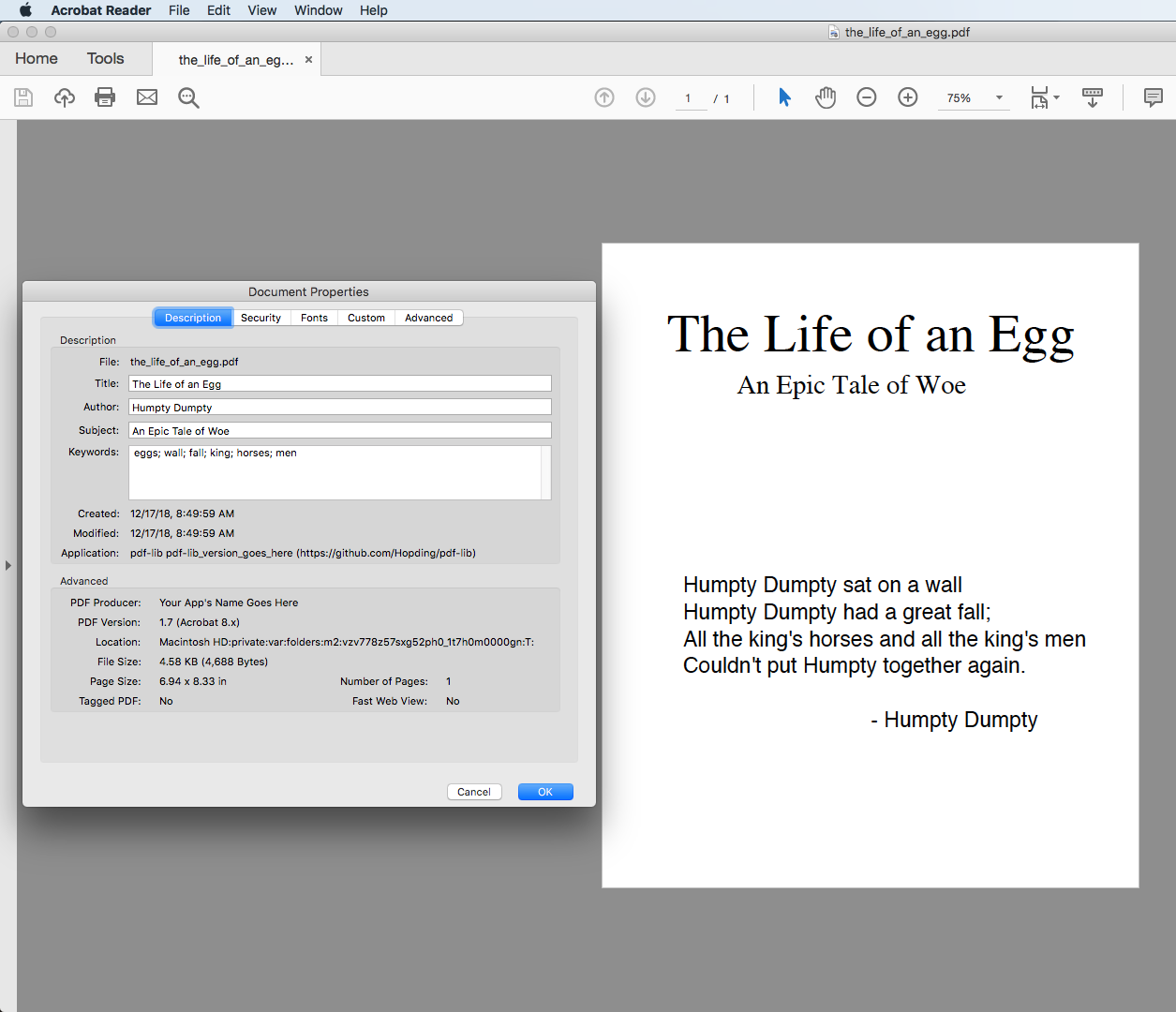
- Finally, here is the complete Node.js script (the
.txtextension is to make GitHub happy): humpty_dumpty.js.txt
Please let me know if this is what you're looking for!
 Hopding
on 17 Dec 2018
Hopding
on 17 Dec 2018
Thanks @Hopding!! It works! You are very kind! :)
erjimmmy
on 19 Dec 2018
Great! I'm glad it's working for you 👍
Hopding
on 19 Dec 2018
Hello @Hopding,
I edit a PDF (I add a signature to the document) and I would like to add metadata. It's an Ionic project and I generate the pdf without problems, but when I try to add metadata I don't get my goal, the fields are empty. The output of the following code is "x: undefinied" (I have omitted the rest of your code from above). Can you help me? Thanks!
```
let x = addMetadataToDoc (pdfDoc, {
author: 'Humpty Dumpty',
title: 'The Life of an Egg',
subject: 'An Epic Tale of Woe',
keywords: ['eggs', 'wall', 'fall', 'king', 'horses', 'men'],
producer: 'Your App's Name Goes Here',
creatorTool:
'pdf-lib pdf-lib_version_goes_here (https://github.com/Hopding/pdf-lib)',
documentCreationDate: new Date (),
documentModificationDate: new Date (),
metadataModificationDate: new Date (),
});
console.log ('x:' + x);
 jaserma
on 4 Jan 2019
jaserma
on 4 Jan 2019
Hello @jaserma.
The addMetadataToDoc() function (defined in this script) does not return anything. Instead of returning an object that you have to add to the pdfDoc yourself, it just adds the metadata to the pdfDoc that you pass in. So the x: undefined that you are seeing looks correct.
When you open the resulting PDF in a reader, are you able to see the metadata?
Hopding
on 4 Jan 2019
Hi @Hopding,
Also, I have tried to create the document as your example, but the fields are empty:

In my case, I have created a function to add a signature to the document:
editPdf(data: any, image: any, iso: any): any{
    const {
      PDFDictionary,
      PDFDocumentFactory,
      PDFDocumentWriter,
      PDFName,
      PDFNumber,
      PDFRawStream,
      drawImage,
    } = require('pdf-lib');
    const charCodes = (str) => str.split('').map((c) => c.charCodeAt(0));
    const typedArrayFor = (str) => new Uint8Array(charCodes(str));
    const whitespacePadding = new Array(20).fill(' '.repeat(100)).join('\n');
    const addMetadataToDoc = (pdfDoc, options) => {
      const metadataXML = `
        <?xpacket begin="" id="W5M0MpCehiHzreSzNTczkc9d"?>
          <x:xmpmeta xmlns:x="adobe:ns:meta/" x:xmptk="Adobe XMP Core 5.2-c001 63.139439, 2010/09/27-13:37:26        ">
            <rdf:RDF xmlns:rdf="http://www.w3.org/1999/02/22-rdf-syntax-ns#">

              <rdf:Description rdf:about="" xmlns:dc="http://purl.org/dc/elements/1.1/">
                <dc:format>application/pdf</dc:format>
                <dc:creator>
                  <rdf:Seq>
                    <rdf:li>${options.author}</rdf:li>
                  </rdf:Seq>
                </dc:creator>
                <dc:title>
                   <rdf:Alt>
                      <rdf:li xml:lang="x-default">${options.title}</rdf:li>
                   </rdf:Alt>
                </dc:title>
                <dc:subject>
                  <rdf:Bag>
                    ${options.keywords
                      .map((keyword) => `<rdf:li>${keyword}</rdf:li>`)
                      .join('\n')}
                  </rdf:Bag>
                </dc:subject>
              </rdf:Description>

              <rdf:Description rdf:about="" xmlns:xmp="http://ns.adobe.com/xap/1.0/">
                <xmp:CreatorTool>${options.creatorTool}</xmp:CreatorTool>
                <xmp:CreateDate>${options.documentCreationDate.toISOString()}</xmp:CreateDate>
                <xmp:ModifyDate>${options.documentModificationDate.toISOString()}</xmp:ModifyDate>
                <xmp:MetadataDate>${options.metadataModificationDate.toISOString()}</xmp:MetadataDate>
              </rdf:Description>

              <rdf:Description rdf:about="" xmlns:pdf="http://ns.adobe.com/pdf/1.3/">
                <pdf:Subject>${options.subject}</pdf:Subject>
                <pdf:Producer>${options.producer}</pdf:Producer>
              </rdf:Description>

            </rdf:RDF>
          </x:xmpmeta>
          ${whitespacePadding}
        <?xpacket end="w"?>
      `.trim();

      const metadataStreamDict = PDFDictionary.from(
        {
          Type: PDFName.from('Metadata'),
          Subtype: PDFName.from('XML'),
          Length: PDFNumber.fromNumber(metadataXML.length),
        },
        pdfDoc.index,
      );

      const metadataStream = PDFRawStream.from(
        metadataStreamDict,
        typedArrayFor(metadataXML),
      );

      const metadataStreamRef = pdfDoc.register(metadataStream);

      pdfDoc.catalog.set('Metadata', metadataStreamRef);
    };
    // End Add metadata

    let res = new RespuestaModel(data);
    let existingPdfDocBytes = this.toUint8Array(res.Res.Datos)

    const pdfDoc = PDFDocumentFactory.load(existingPdfDocBytes);
    const pages = pdfDoc.getPages();

    // Add signature
    const page  = pages[0];
    const [pngImage, pngDims] = pdfDoc.embedPNG(image);
    const contentStream = pdfDoc.createContentStream(
      drawImage('MySignature', {
        x: 300,
        y: 0,
        width: pngDims.width * 0.5,
        height: pngDims.height * 0.5,
      }),
    );

    // Create PDF with signature
    page.addContentStreams(pdfDoc.register(contentStream)).addImageObject('MySignature', pngImage);

// Add values to metadata
    addMetadataToDoc(pdfDoc, {
      author: 'Humpty Dumpty',
      title: 'The Life of an Egg',
      subject: 'An Epic Tale of Woe',
      keywords: ['eggs', 'wall', 'fall', 'king', 'horses', 'men'],
      producer: `Your App's Name Goes Here`,
      creatorTool:
        'pdf-lib pdf-lib_version_goes_here (https://github.com/Hopding/pdf-lib)',
      documentCreationDate: new Date(),
      documentModificationDate: new Date(),
      metadataModificationDate: new Date(),
    });

    const pdfBytes = PDFDocumentWriter.saveToBytes(pdfDoc);
    return pdfBytes;
  }
After I convert "pdfBytes" to base64 with this code:
let base64Pdf = btoa(String.fromCharCode.apply(null, new Uint8Array(pdfBytes)));
And then I generate the pdf file from the 'base64pdf' code on this web https://www.freeformatter.com/base64-encoder.html, but the fields of metadata are empty.
Thanks!
jaserma
on 4 Jan 2019
@jaserma I'm wondering if this is an issue specific to Foxit's Reader.
- What version of Foxit Reader are you using?
- Can you view the metadata if you open the PDF in another reader, such as Acrobat?
- Would you please upload the specific file you're working with, just in case it's somehow different from the one generated by the example script?
Hopding
on 8 Jan 2019
Hi @Hopding ,
You're right. In Acrobat Reader I can see the metadata. The strange thing is that in Foxit Reader I can see metadata of another documents (not generated with the library), but it doesn't matter, your method works well.
Thank you very much for your help.
jaserma
on 9 Jan 2019
Hello @Hopding ,
It looks like most of the classes used for the adding metadata code are no longer exported post-1.0.0. Is there still a way to add the metadata in the current version?
Thanks,
AG
 yltlatl
on 1 Sep 2019
yltlatl
on 1 Sep 2019
Hello @yltlatl! Here's an updated version of the script for post-1.0.0: humpty_dumpty.js.txt
Here are the key parts of the script so you can look at it without downloading the file:
const addMetadataToDoc = (pdfDoc, options) => {
  const metadataXML = `
    <?xpacket begin="" id="W5M0MpCehiHzreSzNTczkc9d"?>
      <x:xmpmeta xmlns:x="adobe:ns:meta/" x:xmptk="Adobe XMP Core 5.2-c001 63.139439, 2010/09/27-13:37:26        ">
        <rdf:RDF xmlns:rdf="http://www.w3.org/1999/02/22-rdf-syntax-ns#">

          <rdf:Description rdf:about="" xmlns:dc="http://purl.org/dc/elements/1.1/">
            <dc:format>application/pdf</dc:format>
            <dc:creator>
              <rdf:Seq>
                <rdf:li>${options.author}</rdf:li>
              </rdf:Seq>
            </dc:creator>
            <dc:title>
               <rdf:Alt>
                  <rdf:li xml:lang="x-default">${options.title}</rdf:li>
               </rdf:Alt>
            </dc:title>
            <dc:subject>
              <rdf:Bag>
                ${options.keywords
                  .map(keyword => `<rdf:li>${keyword}</rdf:li>`)
                  .join('\n')}
              </rdf:Bag>
            </dc:subject>
          </rdf:Description>

          <rdf:Description rdf:about="" xmlns:xmp="http://ns.adobe.com/xap/1.0/">
            <xmp:CreatorTool>${options.creatorTool}</xmp:CreatorTool>
            <xmp:CreateDate>${options.documentCreationDate.toISOString()}</xmp:CreateDate>
            <xmp:ModifyDate>${options.documentModificationDate.toISOString()}</xmp:ModifyDate>
            <xmp:MetadataDate>${options.metadataModificationDate.toISOString()}</xmp:MetadataDate>
          </rdf:Description>

          <rdf:Description rdf:about="" xmlns:pdf="http://ns.adobe.com/pdf/1.3/">
            <pdf:Subject>${options.subject}</pdf:Subject>
            <pdf:Producer>${options.producer}</pdf:Producer>
          </rdf:Description>

        </rdf:RDF>
      </x:xmpmeta>
      ${whitespacePadding}
    <?xpacket end="w"?>
  `.trim();

  const metadataStream = pdfDoc.context.stream(metadataXML, {
    Type: 'Metadata',
    Subtype: 'XML',
    Length: metadataXML.length,
  });

  const metadataStreamRef = pdfDoc.context.register(metadataStream);

  pdfDoc.catalog.set(PDFName.of('Metadata'), metadataStreamRef);
};

const pdfDoc = await PDFDocument.create();

const timesRomanFont = await pdfDoc.embedFont(StandardFonts.TimesRoman);
const helveticaFont = await pdfDoc.embedFont(StandardFonts.Helvetica);

const page = pdfDoc.addPage([500, 600]);

page.setFont(timesRomanFont);
page.drawText('The Life of an Egg', { x: 60, y: 500, size: 50 });
page.drawText('An Epic Tale of Woe', { x: 125, y: 460, size: 25 });

page.setFont(helveticaFont);
page.drawText(
  [
    'Humpty Dumpty sat on a wall',
    'Humpty Dumpty had a great fall;',
    `All the king's horses and all the king's men`,
    `Couldn't put Humpty together again.`,
  ].join('\n'),
  { x: 75, y: 275, size: 20, lineHeight: 25 },
);
page.drawText('- Humpty Dumpty', { x: 250, y: 150, size: 20 });

addMetadataToDoc(pdfDoc, {
  author: 'Humpty Dumpty',
  title: 'The Life of an Egg',
  subject: 'An Epic Tale of Woe',
  keywords: ['eggs', 'wall', 'fall', 'king', 'horses', 'men'],
  producer: `Your App's Name Goes Here`,
  creatorTool:
    'pdf-lib pdf-lib_version_goes_here (https://github.com/Hopding/pdf-lib)',
  documentCreationDate: new Date(),
  documentModificationDate: new Date(),
  metadataModificationDate: new Date(),
});

const pdfBytes = await pdfDoc.save();
That's awesome, thank you @Hopding ! Simpler than the older version. I will try it out.
yltlatl
on 7 Sep 2019
Version 1.2.0 is now published.
It contains several new methods on PDFDocument to easily add metadata to documents:
PDFDocument.setTitle(string)PDFDocument.setAuthor(string)PDFDocument.setSubject(string)PDFDocument.setKeywords(string[])PDFDocument.setProducer(string)PDFDocument.setCreator(string)PDFDocument.setCreationDate(Date)PDFDocument.setModificationDate(Date)
The full release notes are available here.
You can install this new version with npm:
npm install [email protected]
It's also available on unpkg:
Hopding
on 9 Oct 2019
Heya :wave:. Thanks for `pdf-lib!' :clap:
Small question. What is the purpose of ${whitespacePadding} in the above script?
 nokome
on 11 Oct 2019
nokome
on 11 Oct 2019
Hello @nokome. The whitespace padding is recommended by the PDF spec so that additional metadata can be added later without having to change the byte offset of other objects in the document.
However, I would suggest that you shy away from the XMP metadata approach used in the snippets in this thread. The metadata methods on PDFDocument use a more widely supported format (plain PDF objects). I would recommend using only those methods to set metadata on documents, as the resulting metadata will be visible in almost all PDF readers. Whereas the XMP approach seems to only be supported by Acrobat Reader.
Hopding
on 11 Oct 2019
Thanks for the detailed answer @Hopding.
We are using already using setAuthor, setTitle etc but need to add additional custom XML metadata so XMP is the best fit for that.
Slightly off topic but what is the best way to read the "Info Dict" metadata. Currently, I'm resorting to this:
  // @ts-ignore that getInfoDict is private
  const info = pdf.getInfoDict()
  const title = info.get(PDFName.of('Title')).toString()
@nokome What you are doing is probably the best way at the moment. There are currently no special methods built for reading values out of the Info dict. getInfoDict probably doesn't really need to be private either. The rationale for labeling it as such was that dedicated read methods would be preferable, so users shouldn't need to access the Info dict directly.
Hopding
on 28 Dec 2019
@Hopding Hi, I really like the pdf-lib you have created. Especially the functions to modify the pdf metadata.
I'm trying to read the pdf metadata fields in another javascript/typescript application. You encode the strings with PDFHexString.fromText(title) (UTF16 or something?). I was wondering how I can decode the values. I'm reading them as @nokome pointed out. I really am a pdf noob, so thanks in advance for the help.
Having appropriate read methods would be a great feature. But if you could point out a solution that would also be helpful.
 timKraeuter
on 12 Jan 2020
timKraeuter
on 12 Jan 2020
Hello @timKraeuter! I agree that having getter methods would be useful. Feel free to open a feature request for this.
As you noticed, the text is encoded in UTF-16 and stored in a hex string. I'm afraid I don't have time at the moment to create a working example, but decoding the hex strings involves the following steps:
- Extract the hex string.
- Convert it to an array of numbers (or a typed array). Note that each pair of hex digits in the string constitutes a single byte of data.
- Convert the array from (2) to a
stringobject.pdf-libonly contains functions for utf8/16 _encoding_ (https://github.com/Hopding/pdf-lib/blob/master/src/utils/unicode.ts). It provides nothing for _decoding_. You can implement the decoding algorithm yourself if you feel adventurous. Otherwise there are probably some libraries for it (e.g.utfx). Or you could try this implementation: https://gist.github.com/also/912792.
Hopding
on 12 Jan 2020
Hello @Hopding sounds great thanks! I will try to implement it later when i get back to my computer and inform you if i need further help.
timKraeuter
on 13 Jan 2020
@Hopding
I had time yesterday and managed to read the metadata as wanted. Thanks for the step by step explanation on how to do it.
I used the following code to read the Keywords field from a pdf.
private readKeywords(pdfDocument: PDFDocument): string {
        // @ts-ignore that getInfoDict is private
        const info = pdfDocument.getInfoDict();
        let keywords: string = info.get(PDFName.of('Keywords')).toString();
        // Extract hex value
        keywords = keywords.substr(keywords.indexOf('<') + 1, keywords.lastIndexOf('>') - 1);

        const bytes: number[] = [];

        // ignore bom for the string output
        keywords = keywords.substr(4);
        while (keywords.length > 1) {
            const nextTwoDigits = keywords.substr(0, 2);
            // Get the first two digits
            keywords = keywords.substr(2);

            // Ignore whitespaces
            if (nextTwoDigits === '00') {
                continue;
            }

            // Hex is base 16
            bytes.push(parseInt(nextTwoDigits, 16));
        }
        return new TextDecoder('UTF-16').decode(new Uint16Array(bytes));
    }
I plan to open a Pull-Request with a generalized version of this example code (so we have getters for the metadata fields we now only have setters for). But I don't really have time till the end of February.
I have also tried https://gist.github.com/also/912792 instead of the TextDecoder. It also works fine.
timKraeuter
on 15 Jan 2020
I added a pull request with cleaned up code see https://github.com/Hopding/pdf-lib/pull/336.
timKraeuter
on 26 Jan 2020
Hi @Hopding thank you for your example here. My issue: it seems like the module PDFDictionary isn't part of pdf-lib anymore. There is a PDFDict but it doesn't provide a from method, as used in your example.
Could you please update your example according to the changed API?
Best regards,
Tobias
 tbelch-at-eHealth-Tec
on 16 Nov 2020
tbelch-at-eHealth-Tec
on 16 Nov 2020
@Hopding I followed your post-1.0.0: humpty_dumpty.js example, then added a custom XMP tag xmp:Foo:
           ...
          <rdf:Description rdf:about="" xmlns:xmp="http://ns.adobe.com/xap/1.0/">
            ...
            <xmp:MetadataDate>${options.metadataModificationDate.toISOString()}</xmp:MetadataDate>
            <xmp:Foo>Bar</xmp:Foo> <-- added this
          </rdf:Description>
          ...
Then ran the script. Using exiftool cli, I can confirm my custom tag is correctly written:
> exiftool -j -g -all -xmp -b new.pdf | jq '.[0].XMP.Foo'
"Bar"
Q: Now how do I do the same exact thing of extracting the value, but in js? getInfoDict doesn't seem to work for me as it only exposes Producer, ModDate, Creator, CreationDate
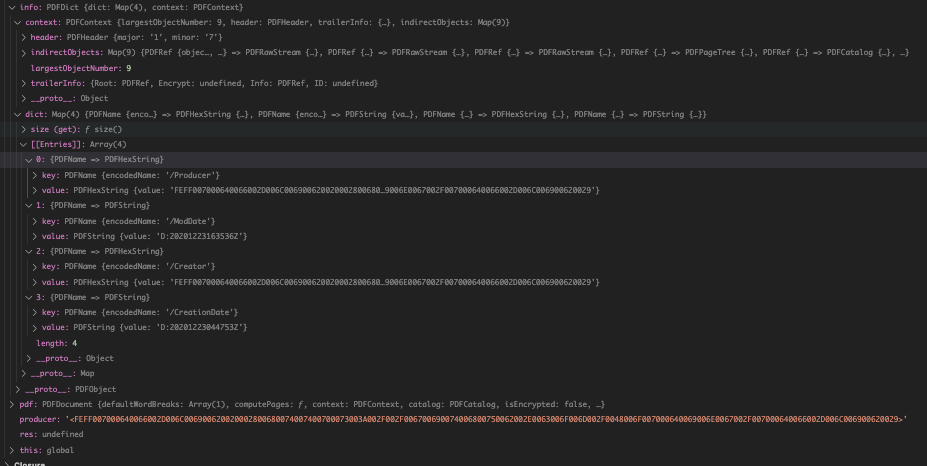 . I'm using the same code has @nokome above.
Also, @nokome could you share your minimal example? What I have:
info.get(PDFName.of('Producer')) // yields `{ value: "FEFF007000640066002D006C006900620020002800680074007400700073003A002F002F006700690074006800750062002E0063006F006D002F0048006F007000640069006E0067002F007000640066002D006C006900620029"}`
info.get(PDFName.of('Foo')) // yields `undefined`
 bhsiaoNFLX
on 23 Dec 2020
bhsiaoNFLX
on 23 Dec 2020
Related issues
 faxemaxee
·
6Comments
faxemaxee
·
6Comments
 matthopson
·
4Comments
matthopson
·
4Comments
 emilsedgh
·
5Comments
emilsedgh
·
5Comments
 msvargas
·
6Comments
msvargas
·
6Comments
 BoLaMN
·
5Comments
BoLaMN
·
5Comments
Most helpful comment
Version
1.2.0is now published.It contains several new methods on
PDFDocumentto easily add metadata to documents:PDFDocument.setTitle(string)PDFDocument.setAuthor(string)PDFDocument.setSubject(string)PDFDocument.setKeywords(string[])PDFDocument.setProducer(string)PDFDocument.setCreator(string)PDFDocument.setCreationDate(Date)PDFDocument.setModificationDate(Date)The full release notes are available here.
You can install this new version with npm:
It's also available on unpkg: