Pcsx2: Steps for bringing the newest build to OSX
Hey guys, this is just some exploratory thinking I'm doing but:
Seeing as PCSX2 supports both Linux and Windows and is (as far as I can see) based mostly on cross-platform libs. This leads to the suspicion that a proper port to OSX wouldn't be a herculanean task. The (free) OSX 10.9 supports OpenGL 4.1 and the drivers are "ok" (not great). Given the fact that 10.9 is free and the OpenGL implementation is far less buggy than earlier incarnations, I see no reason to support anything earlier.
Instead of plowing through the codebase, I'd like to ask the devs: what do you see as the major hurdles that someone porting PCSX2 would encounter?
EDIT: I'm aware of earlier versions of PCSX2 being made available for OSX and I've noticed some vestigial bits in the CMake files et al.
 aktau
aktau
All 116 comments
Porting gsdx ogl to osx won't be difficult. It mostly need the bits to create the ogl surface and context. Then various ifdef linux must be checked. It would also need pthread (or a port to std::thread).
 gregory38
on 4 Apr 2014
gregory38
on 4 Apr 2014
Yes indeed, it's usually the surface creation, small driver bugs and different GL context <-> threading interactions that cause the problems on the 3D side. In my own projects I tend to use SDL2 to get a surface. This works very well over linux/osx/win without code changes on my part.
I've noticed in build.sh that there is actually a --sdl2 option already. Since I'm very unfamiliar with wxWidgets ('m a C dev at heart), does wxWidgets use SDL2 behind the scenes for cross-platform GL surface creation? A bit of googling says that it doesn't, but I could be wrong. Is the --sdl2 option actually in use?
aktau
on 4 Apr 2014
And after trying to build it I suddenly realize why this might be harder than anticipated: pcsx2 is 32-bit only (CMake tells me). That usually causes no end of troubles on systems where 32-bit is uncommon (such as OSX 10.9).
aktau
on 4 Apr 2014
Porting to X64 would have exactly the same issue as porting to ARM: most of the core emulation (cpu, memory, VUs) is only designed for x86 and would have to be rewritten. There may be LESS work involved in porting to x64, but it would still be a huge project.
 gigaherz
on 4 Apr 2014
gigaherz
on 4 Apr 2014
@gigaherz yes I've read up on it on the forums. I wasn't advocating porting to 64-bit despite possible (dis)advantages, as it would be a lot of work as you said. Just mentioning to myself and others who would want to attempt the same that this might be one of the reasons why pcsx2 doesn't have an up-to-date OSX build.
aktau
on 4 Apr 2014
Same here, I was just mentioning, in case anyone wondered, that the porting would require a huge effort. I guess I should have specified ;P
gigaherz
on 4 Apr 2014
The creation of surface/context is nothing. You get the glx file and you replace glx with the name of osx api. 90% jobs done. It took me 1 or 2 days to port linux ogl to windows (and I'm not even sure I booted on a win machine to test the code). Besides you can based the code on zzogl mac.
Note: gsdx normally support egl too but I haven't test it for a long time.
Note2: yes sdl2 can do some stuff. But we don't want an extra dependency on windows. Besides it creates subtle issues for packaging.
gregory38
on 4 Apr 2014
The creation of surface/context is nothing
After looking at the situation a bit more, I agree. By the way: as far as I know EGL on apple is a bit crippled, better to use something like sdl2 or if you prefer the cocoa api. I usually prefer sdl2 because I like to avoid working with Objective C whenever I can. What do you mean by extra dependency? If people don't want to, sdl2 doesn't need to be included for windows. Not sure what packaging issues you guys face, but in my projects I just statically link with sdl2, no problems afterwards.
All that seems to be just peanuts in comparison to the 64-bit issue though, that's the real killer because it touches the most complex part of the code.
aktau
on 4 Apr 2014
Wx just use std os api as sdl. However wx could potentially depend on sdl. That mean you also need to package wx. Anyway it isn't the linux way.
By the way when I said surface, I meant the gl back buffer not the window. The window is already created by wx. So it only miss CGL (hum maybe C stand for cocas :p). Either you copy the one from zzogl and you rename a couple of variable. Or you could use sdl on mac.
Don't you have fat binary on osx which support both x86 and x86-64.
Note: egl is the future (even if no drivers support it yet). Gsdx only does the minimum with egl, it would work with a primitive implementation (which is likely a copy/paste of glx/wgl/cgl).
gregory38
on 4 Apr 2014
Don't you have fat binary on osx which support both x86 and x86-64.
Possibly, although in the age of OSX 10.9 that's not that relevant anymore, almost anyone will have x86-64 chips and installs. It wouldn't matter anyway. The true problem is the dependencies, you can't freely mix/link 32-bit and 64-bit libraries. Since modern OSX is very 64-bit focused, you don't generally have something like multi-arch. Moreover, OSX 10.9 does not have a 32-bit variant. So you can't use the same trick as on linux:
- Build on a 32-bit linux system
- Run on a 64-bit linux system with multi-arch
This doesn't work for modern OSX. So the options for a native build are:
- Build on older, 32-bit OSX versions. Or...
- Make sure everything builds as 64-bit. Or...
- Split out the 32-bit specific parts (recompiler et al.) and the 64-bit parts and make them communicate via IPC (easy to do with the likes of nanomsg/libuv/..., works cross-platform). Or..
- ... (I've probably missed something)
I'm not really sure what would be most feasible between the last two.
aktau
on 5 Apr 2014
What is the issue compiling 32bits code? running 32bits code? both?
gregory38
on 5 Apr 2014
What is the issue compiling 32bits code? running 32bits code? both?
Running 32-bits code seems to be more or less ok, at least for console programs. I'm not sure how GUI programs deal with it, I don't know if apple still deploys 32-bit .dylibs/frameworks for cocoa and the likes. For a simple console program one just needs to supply the -m32 flag to both the linker and the compiler. (EDIT: I just tested with a very simple AppKit binary, and it still seems to work with the -m32 flag, which probably means that apple distributes some important .dylibs as universal binaries)
It gets a bit nastier when you're using lots of libraries though. This basically means that for a 32-bit OSX build, all libraries would have to be compiled on the spot by the buildsystem instead of downloaded with a package manager (like the populer homebrew). So there would have to be a shellscript/makefile/cmake-file that downloads and compiles the dependencies with the right flags. A bit like neovim does when it can't find the right dependencies (libuv and luajit).
aktau
on 6 Apr 2014
As far as I know you can still compile code for i386 in clang with -arch i386. The system shared libraries (e.g. those in /usr/lib) are available as fat binaries, even on 10.9. You'd just need to explicitly compile any 3rd-party dependencies for i386 and it would work just fine.
 chrisballinger
on 20 Apr 2014
chrisballinger
on 20 Apr 2014
10.9 only supports OpenGL 4.1, with some 4.2 extensions.
chrisballinger
on 20 Apr 2014
You'd just need to explicitly compile any 3rd-party dependencies for i386 and it would work just fine.
Exactly, compiling every non-system dependency is definitely a prerequisite. In my very simplistic tests with some Cocoa things I only needed to specify -m32, how is -arch i386 different?
10.9 only supports OpenGL 4.1, with some 4.2 extensions.
Indeed, is that not sufficient for PCSX2? What kind of GL version do gdsx-gl or zzogl expect?
aktau
on 20 Apr 2014
Gl must be fine. 3.3 is mostly enough. I used various gl4 functions but they aren't yet mandatory. Actually I managed to run gsdx on gles3 on the past. Now it is bitrotten&broken.
Extension checking is done on GLLoader.cpp. If you can generate me a list of extension supported I can tell you the limitation.
gregory38
on 20 Apr 2014
Extension checking is done on GLLoader.cpp. If you can generate me a list of extension supported I can tell you the limitation.
Is the list provided by @chrisballinger not sufficient? Should I check on my Mavericks unit? By the way, you should not take the HD Graphics 3000/4000 into account as they are the integrated cards that are not used for 3D apps. (this can be forced by the user, but is not the default).
aktau
on 20 Apr 2014
Presentation of the list suck. They could have sorted it by gl version. Anyway it would be fine, it will use several slower code path but nothing critical.
However I do hope they release a newer version that support a better glsl syntax. So I can drop various useless code.
Note for debugging: they are option to autodetect/enable/disable extension (-1/0/1) on gsdx.ini. Just disable geometry shader and enable shader debug too.
Note2: convert shader will fail to compile just comment the bad code.
gregory38
on 20 Apr 2014
However I do hope they release a newer version that support a better glsl syntax. So I can drop various useless code.
Could you detail what that is please? (I'm curious). As I understand you now, #version 410 is not enough? Most "modern" glsl features do seem to work in my tests.
aktau
on 20 Apr 2014
Version 330 is enough + some extensions.
See that http://www.opengl.org/registry/specs/ARB/shading_language_420pack.txt
For example it allow to set an index of various parameter. Current method is to let the compiler set a random position. Then get current location of the parameter program, and then set it. Lots of work for nothings.
Those extensions are only useful to make the code faster and cleaner. It would work flawlessly without them.
Edit: just add the window creation with SDL2, and it will work (minus geometry shader and a shader that use 420_pack feature).
gregory38
on 20 Apr 2014
For example it allow to set an index of various parameter. Current method is to let the compiler set a random position. Then get current location of the parameter program, and then set it. Lots of work for nothings.
Yes, for uniforms that was already possible on OSX 10.7
#version 150
#extension GL_ARB_explicit_attrib_location : enable
However it doesn't seem to be possible with uniform buffers yet, you would need OpenGL 4.2. As far as I can see, OSX 10.9 doesn't support that extension.
aktau
on 21 Apr 2014
attrib is attribut not uniform. Single uniform need 4.3.
gregory38
on 21 Apr 2014
attrib is attribut not uniform. Single uniform need 4.3.
You're right, I had misread, explicit uniforms are indeed an OpenGL 4.3 feature. That said, these things aren't the most important missing things, they can be fixed with some boiler-plate on the client-side and by using fixed names in the shaders (which is a good idea anyway). I'm more "worried" about features in 4.2+ that can't easily be emulated or that provide a nice speed boost.
aktau
on 21 Apr 2014
Gl must be fine. 3.3 is mostly enough. I used various gl4 functions but they aren't yet mandatory.
Actually I managed to run gsdx on gles3 on the past. Now it is bitrotten&broken.
And
Those extensions are only useful to make the code faster and cleaner. It would work flawlessly without them.
I clearly said that it would work.
gregory38
on 21 Apr 2014
You did indeed, I should've said "was worried" instead of "am worried".
aktau
on 21 Apr 2014
Btw, you're probably already aware but this GDC presentation about fast, modern OpenGL by some driver authors just came online for free: http://gdcvault.com/play/1020791/. I also found it really cool to look at Dolphin's source code to see how they handle running on different levels of OpenGL: https://code.google.com/p/dolphin-emu/source/browse/Source/Core/VideoBackends/OGL/StreamBuffer.cpp
aktau
on 21 Apr 2014
bumping this. Sounds complicated but if the work is outlined I wouldn't mind taking a shot at it.
 morenoh149
on 7 May 2014
morenoh149
on 7 May 2014
@morenoh149 from a high-level perspective here's what I can see:
- making sure everything that the cmake buildsystem builds has the flag
-m32passed to it. - downloading some external dependencies like
wxWidgets/sdl2and compiling them as 32-bits as well. - selecting a minimal set of plugins that should work on OSX without many changes, which can be used as a bootstrap base. I'm sure @gregory38 has some good insights here. (building the full set of plugins is going to be madness at first anyway, let's not attempt that).
aktau
on 7 May 2014
Well use null plugins :) Onepad is based on SDL so it could work. GSdx can be run in standalone mode with one major difference. The replayer uses GSopen1 (window created by GSdx) whereas the standard behavior is GSopen2 (window created by PCSX2)
See plugins/GSdx/linux_replay.cpp. Then you can use this kind of command
pcsx2_GSReplayLoader libGSdx-0.1.16.so ./trace_me/colin_bencg_25fps.gs gsdx_ini_dir/
You create gs files on windows/linux with ctrl/shift/f8, they will be written in the snapshot directory
gregory38
on 7 May 2014
you may have to edit the cmake files to make it work, change the linux to mac parts, remove the gtk2 requirement (wx will use cocca), and don't link with "libc" (librt is missing)
there's a lot more to do to make the cmake files compatible with macs.
 uyjulian
on 9 May 2014
uyjulian
on 9 May 2014
Oh, also, the asm file (.S) do not compile on newer versions of OSX, 'cause clang clang clang.
uyjulian
on 17 May 2014
Oh, also, the asm file (.S) do not compile on newer versions of OSX, 'cause clang clang clang.
That might be temporarily worked around by just requiring gcc. Real easy with homebrew.
aktau
on 17 May 2014
ASM files: https://github.com/PCSX2/pcsx2/blob/master/pcsx2/x86/aVUzerorec.S https://github.com/PCSX2/pcsx2/blob/master/pcsx2/x86/ix86-32/aVif_proc-32.asm https://github.com/PCSX2/pcsx2/blob/master/pcsx2/IPU/yuv2rgb.asm
also zzogl/zerogs has asm too.
The rest of the asm: https://github.com/PCSX2/pcsx2/search?p=1&q=__asm__&type=Code (inline asm)
Also, macs/FreeBSD have some platform specific asm, asm may have to be adjusted a bit.
uyjulian
on 17 May 2014
On the topic of assemblers...
gcc will still use the system assembler.
Apple Inc version cctools-855, GNU assembler version 1.38
and it will give the same errors as clang.
uyjulian
on 23 May 2014
I used to have a script at /usr/local/bin/as which used to refer to the GNU as (gas) because the old-ass apple assembler didn't support AVX instructions. So I know gas is somewhere...
aktau
on 24 May 2014
I don't think GNU as generates code required for Macs (Mach-O)
I'm not sure if anything has changed, however.
uyjulian
on 24 May 2014
I'm reasonably sure it does, as I've used it for my binaries up until OSX 10.9 (where the native as was upgraded).
aktau
on 24 May 2014
Ah, later versions of binutils support Mach-O (i.e. 2.2)
uyjulian
on 24 May 2014
However, I don't know how to get binutils to build GNU as on mac.
uyjulian
on 24 May 2014
Found out how to make gas build, needs to be built for 32bit.
https://gist.github.com/uyjulian/c7c759127d303d4b4499
Point homebrew to that file.
Ex: brew install https://gist.githubusercontent.com/uyjulian/c7c759127d303d4b4499/raw/39c0f2d6867d99db3f1a2a1ee3ce5965e6de6290/binutils-gas.rb
Figured that out by reading configure.ac in binutils.
uyjulian
on 26 May 2014
I would think rewriting the asm files for mac will be easier than fiddling for mac versions of binutils/gcc. GCC won't see that the version of gas is the binutils version, not the cctools version.
Or, throwing out all this 32-bit lib madness would make things wayyy easier, just use IPC/shared memory.
uyjulian
on 1 Jun 2014
Would this be of any help? https://github.com/libav/gas-preprocessor
chrisballinger
on 1 Jun 2014
Yeah, that will be useful.
Once I get my 16GB of RAM, I can start working on PCSX2 (because I have enough memory to run a Linux VM).
uyjulian
on 1 Jun 2014
On the earlier asm list most of them are useless.
Fps2bios -> not used
SuperVu -> deprecated
On others be sure they are really used, sometimes it just dead code.
gregory38
on 2 Jun 2014
Guess I can clean up those parts.
uyjulian
on 2 Jun 2014
Has there been any progress with this? I'm just wondering if it would be possible to try and build it myself just to mess around with.
 drcreek
on 4 Jul 2014
drcreek
on 4 Jul 2014
There's libaio and librt, which aren't available on Macs, so we need replacements for those.
uyjulian
on 4 Jul 2014
Does anything in Yosemite help fill in the gaps with this? Like the improved OpenGL support. Also, I have very little experience but I think Transmission for OSX uses something else as a libaio replacement. But I'm not sure exactly what they use, I'm a web developer so the details of this stuff is a little outside my area.
drcreek
on 15 Aug 2014
As far as I know, there are no OpenGL advancements on Yosemite (it's still 4.1), and there's not even any more extensions. Perhaps the drivers are more stable?
As for libaio, I'm not sure how PCSX2 is using it, but at the neovim project we're using libuv on win/linux/mac and it works great.
aktau
on 15 Aug 2014
I have been working on porting code to OSX. Here's current status.
DONE:
-cmake build using wxgtk-2.8 from macports
-PCSX2 Core with interpreter core and null SPU/GS plugins.
TODO:
-Async IO port for AsyncFileReader
-GSdx to use Apple's GL interface GL/gl.h (OSX X11 GL not feasible, only OpenGL 2.1 ctx is supported)
BUGS:
-memcpy optimizations
-SPU2x linker issue
-nasty side effects related to using dispatch/dispatch.h for semaphores
-Recompiler doesn't work which seems to be a mmap issue..
FINAL TASKS:
-cmake bake so that output is "PCSX2.app" with all dependencies
I will post a pull req once I feel this is in a more mature state.
 juhalaukkanen
on 29 Aug 2014
juhalaukkanen
on 29 Aug 2014
-memcpy optimizations
Not sure if you've been following the recent commits, but a lot of the custom memcpy's have been replaced by the standard memcpy, because it's faster (and increases portability and icache usage and and and): https://github.com/PCSX2/pcsx2/pull/280
aktau
on 29 Aug 2014
-GSdx to use AGL (OSX X11 GL not feasible, only 2.1 CTX is supported)
I'm unsure what you mean with AGL. Do you mean Apple GL? Instantiated from Objective-C? I would very much advise to use SDL 2.x for that, it basically takes care of that and can create a 4.1 context with just a few function calls. No messing with Obj-C necesasry. I believe pcsx2 has fledgling support for SDL2.
Note that SDL1.2 won't work, as it can only create 2.1 contexts. I would definitely keep X11 out of everything on OSX, it works very badly for me (on OSX Mavericks).
aktau
on 29 Aug 2014
cmake build with using wxgtk-2.8 from
I've seen some commits whir by for enabling clean builds with wxWidgets 3.0. This would be quite a bit easier since mac homebrew packages wx 3.0.1 at the moment and not wx 2.8. This was one of my first roadblocks when trying to compile pcsx2 for OSX.
The commits are not part of a PR so it's not easy to reference them, but they're usually prefixed with wx3.0 and done by @gregory38. One of them: https://github.com/PCSX2/pcsx2/commit/deb69c4c722753c1bfdbddee82e38436ba2595e2
I also remember a user reporting that wx 3.0 builds worked fine, save for a few graphical glitches.
Sorry for the comment spam, I should've just typed it all up in one comment.
aktau
on 29 Aug 2014
I have pushed branch https://github.com/juhalaukkanen/pcsx2/tree/apple_osx_support for people interested to take a look.
Macports dependencies:
sudo port install wxgtk-2.8 +universal
sudo port install sparsehash +universal
sudo port install soundtouch +universal
sudo port install portaudio +universal
sudo port install glew +universal
mkdir build && cmake ..
Caveat no.1: wx-config needs to be in path, but macports build doesn't do it.
Lots of kudos to anyone who can help on GSdx OSX porting effort. I am not sure yet what is the best approach there. Apple's OpenGL framework implementation or SDL2 or something else....
juhalaukkanen
on 2 Sep 2014
I have pushed branch https://github.com/juhalaukkanen/pcsx2/tree/apple_osx_support for people interested to take a look.
I'm quite interested. It looks really good, didn't expect to see it all squashed into one commit but then again it's quite difficult to predict the work necessary and thus split it into multiple commits to work on it. Good job, in my opinion :).
Apple's OpenGL framework implementation or SDL2 or something else....
I'm quite fuzzy on how wxWidgets interoperates with other helpers/toolkits for GL context. But I found this wxWidgets bug-report / patch which I think allows creating a core profile directly from wxWidgets (for a PS3 emulator no less): http://trac.wxwidgets.org/ticket/16402. (A core profile is needed because otherwise OpenGL is limited to 2.1). This could perhaps avoid the need for SDL2.
That said, I make most of my stuff with SDL2 and it's very simple (no Objective-C for the user of the library) so perhaps that can be used to get things up and running quicker. pcsx2 currently has an option to build with SDL support, with some vestigial bits of SDL2 even. I'm not sure for what end SDL2 is actually used (joystick support?). I believe PPSSPP uses it for joysticks, or something, but uses mostly Qt for the actual windowing. At least last time I tried, the pure SDL version of PPSSPP worked better than the Qt+SDL hybrid, which crashed.
Sorry I'm of no more use, especially codewise, for now I'm just applauding from the sidelines.
aktau
on 3 Sep 2014
You don't need to port opengl. You need to port glx (wgl). It just a matter to 5 functions to get the context. + A couple to extract a surface from the window (this part could be tricky actually). Otherwise create a local window (aka GSOpen instead of GSOpen2). By the way GSdx support egl, so if you have it you don't even need to port glx stuff.
Ps if you really need to do the glx port, just replace glx by apple equivalent prefix (80% will already be done)
Note. Pcsx2 works also with sdl2 to ease future upgrade. Only force feedback require sdl2.
Final note: go with x11 road. Once it work it will be easier to replace. Gsdx barely uses x11/glx, it is limited to the basic of an hello word. Don't compare it with te requirement of a full desktop.
gregory38
on 3 Sep 2014
X11 on OS X is crippled, unprofessional, and almost all around bad. I would not recommend relying on X11 for anything on OS X.
Edit: while X11 is especially horrible on OS X, it's pretty damn bad elsewhere too :)
 archshift
on 3 Sep 2014
archshift
on 3 Sep 2014
Don't require X11 on OS X! @juhalaukkanen will this work using Homebrew instead? Macports kind of blows.
chrisballinger
on 3 Sep 2014
@chrisballinger There's no reason dependency installs shouldn't work with homebrew. On a different note, @juhalaukkanen, couldn't you use generic wxwidgets instead of wx-gtk which also blows on OS X?
archshift
on 3 Sep 2014
Oh yeah sure finally generic wxWidgets should be used so that X11 layer is dropped from between. This wxgtk-2.8 uses X11 backend which sure is not optimal. I heard that someone already tested wx 3.0 support so there shouldn't be any difficulties switching to it.
@gregory38 thanks for wxGL heads up! I'll be definitely try it if and see if it offers OpenGL 3/4 context.
juhalaukkanen
on 3 Sep 2014
If you manage to make PCSX2/OSX running on X11, even if it is ubber slow, it would be much easier to port it to others frameworks.
My 2 cents.
gregory38
on 16 Sep 2014
If you manage to make PCSX2/OSX running on X11, even if it is ubber slow, it would be much easier to port it to others frameworks.
All these things are non-conflicting. That's the beauty of it. The changes I'm making should only increase compatibility with OSX and 64-bits while keeping it the same for all others. I'm making sure that I don't use any hacks, and that all changes can be cleanly applied.
This, in turn, will make OSX/32-bits/X11 (even) easier. For this specific combination, I believe @zedr0n has the most experience, since he has gotten it working before.
aktau
on 16 Sep 2014
Well it seems that wxGLCanvas that I create is only 2.1. I dunno why. However wxWidgets 3.1 supports requesting version so maybe I'll test with that later.
http://docs.wxwidgets.org/trunk/glcanvas_8h.html#wxGL_FLAGS
Shame since seeing PS2 BIOS boot picture would have been a major break thru. I can already hear the BIOS with spu2-x plugin, but only seeing is believing...
OTOH does anyone know what is the OSX equivalent for glXGetProcAddress? If there is no such dynamic querying functionality then just static references needs to be used.
juhalaukkanen
on 17 Sep 2014
OTOH does anyone know what is the OSX equivalent for glXGetProcAddress? If there is no such dynamic querying functionality then just static references needs to be used.
It shouldn't be necessary. The Apple headers contain all included GL functions and extensions. It's the only platform for which one doesn't have to request function pointers and the like. GLEW is not necessary.
This is what I use for a project of mine:
#ifdef __APPLE__
    #include <OpenGL/gl3.h>
    #include <OpenGL/gl3ext.h>
#else
    #include <GL3/gl3.h>
#endif
However, if for some reason these things still need to be requested, I think it might be instructive to look at the code that glloadgen generates:
#if defined(__APPLE__)
#include <mach-o/dyld.h>

static void* AppleGLGetProcAddress (const GLubyte *name)
{
  static const struct mach_header* image = NULL;
  NSSymbol symbol;
  char* symbolName;
  if (NULL == image)
  {
    image = NSAddImage("/System/Library/Frameworks/OpenGL.framework/Versions/Current/OpenGL", NSADDIMAGE_OPTION_RETURN_ON_ERROR);
  }
  /* prepend a '_' for the Unix C symbol mangling convention */
  symbolName = malloc(strlen((const char*)name) + 2);
  strcpy(symbolName+1, (const char*)name);
  symbolName[0] = '_';
  symbol = NULL;
  /* if (NSIsSymbolNameDefined(symbolName))
     symbol = NSLookupAndBindSymbol(symbolName); */
  symbol = image ? NSLookupSymbolInImage(image, symbolName, NSLOOKUPSYMBOLINIMAGE_OPTION_BIND | NSLOOKUPSYMBOLINIMAGE_OPTION_RETURN_ON_ERROR) : NULL;
  free(symbolName);
  return symbol ? NSAddressOfSymbol(symbol) : NULL;
}
#endif /* __APPLE__ */
Then it fetches through this macro:
#define IntGetProcAddress(name) WinGetProcAddress(name)
#else
    #if defined(__APPLE__)
        #define IntGetProcAddress(name) AppleGLGetProcAddress(name)
    #else
        #if defined(__sgi) || defined(__sun)
            #define IntGetProcAddress(name) SunGetProcAddress(name)
        #else /* GLX */
            #include <GL/glx.h>

            #define IntGetProcAddress(name) (*glXGetProcAddressARB)((const GLubyte*)name)
        #endif
    #endif
#endif
However, as I said, this shouldn't be necesary. One of my testbeds (name prototype) can use all OpenGL 4.1 functionality just fine by including the header files. No pointer business required. That project uses SDL2.
Well it seems that wxGLCanvas that I create is only 2.1. I dunno why. However wxWidgets 3.1 supports requesting version so maybe I'll test with that later.
I think this is because it uses an outdated Apple API. SDL1 had the same problem. But now, in SDL2, that problem doesn't exist anymore, I get a 4.1 context. Note that one _has_ to request a core profile, afaik.
Not sure, but perhaps you can try creating a context with SDL2 instead?
Also, are you now using wxWidgets 3.x or wxWidgets 2.x?
I'm impressed that you got a sound! My way (no X11, no gtk2) is much more painful ;). Did OnePad compile without a hitch for you?
aktau
on 17 Sep 2014
I am using native wx 3.0. I have omitted GTK problem for since it is only used for like plugin config dialogs which can be done later. I am aiming for a POC. Then onepad uses X11 input and also needs same type of replacement. Doesn't wx have wrapper for input?
juhalaukkanen
on 17 Sep 2014
I see this issue is still open even if (as I understand it) the branch apple_osx_support has been merged int master.
When I try to compile with ./build I get:
$ ./build.sh --clang --debug
...
(snip)
...
-- Detecting CXX compiler ABI info - done
CMake Warning at cmake/BuildParameters.cmake:73 (message):


      PCSX2 does not support a 64-bits environment and has no plan to support a 64-bits architecture in the future.
      It would need a complete rewrite of the core emulator and a lot of time.


      You can still run a 32-bits binary if you install all 32-bits libraries (runtime and dev).
Call Stack (most recent call first):
  CMakeLists.txt:59 (include)


Compiling 32bit build on 32/64bit architecture
...
(snip)
...
CMake Warning:
  Manually-specified variables were not used by the project:

    CMAKE_BUILD_PO


-- Build files have been written to: <path>/pcsx2/build
grep: /proc/cpuinfo: No such file or directory
make: the `-j' option requires a positive integral argument
Usage: make [options] [target] ...
Options:
...
(snip)
...
Scanning dependencies of target x86emitter
[ 11%] Building CXX object common/src/x86emitter/CMakeFiles/x86emitter.dir/3dnow.cpp.o
[ 11%] Building CXX object common/src/x86emitter/CMakeFiles/x86emitter.dir/cpudetect.cpp.o
/var/folders/z6/ws9h79j53z1984r6_phc0cs80000gn/T/cpudetect-3516cf.s:1526:no such instruction: `xgetbv'
/var/folders/z6/ws9h79j53z1984r6_phc0cs80000gn/T/cpudetect-3516cf.s:3658:section type does not match previous section type
/var/folders/z6/ws9h79j53z1984r6_phc0cs80000gn/T/cpudetect-3516cf.s:3660:section type does not match previous section type
clang: error: assembler command failed with exit code 1 (use -v to see invocation)
make[2]: *** [common/src/x86emitter/CMakeFiles/x86emitter.dir/cpudetect.cpp.o] Error 1
make[1]: *** [common/src/x86emitter/CMakeFiles/x86emitter.dir/all] Error 2
make: *** [all] Error 2
Any ideas?
 damian0815
on 30 Oct 2014
damian0815
on 30 Oct 2014
@damiannz I have commits for most of the issues you'll encounter (they're similar to what's @juhalaukkanen is doing but more separated).
Check out this PR: https://github.com/PCSX2/pcsx2/pull/297
HTH
aktau
on 30 Oct 2014
Ahh, thanks! switching to your PR.
damian0815
on 30 Oct 2014
Just to note that this is still alive. I don't have too much time per week to work with this so progress is rather slow.
juhalaukkanen
on 21 Jan 2015
I'm copying my question from #304 :
Care to give a some update on the current status?
- On what system do you compile and which XCode version?
- Any special flags/modifications/etc instructions to get it to build?
- What builds successfully? PCSX2 itself? plugins? which?
- Does it run? what works and what doesn't?
- Any other info? does it run in reasonable speed? any gotchas?
- Do you have patches you're happy with and can do a PR?
 avih
on 21 Jan 2015
avih
on 21 Jan 2015
This is a merge between my work and aktau's.
- I have compiled against Darwin 13.x (Mavericks) (Macbook Pro native) and 14.x (Yosemite) (VirtualBox VM). Xcode 5.x/6x SDK required since with fresh c++0x / stdlib features
- Some Xcode versions seem to require explicit -msse -msse2 -msse3 switches
- PCSX2 builds and all null plugins.
- Some runtime errors remain and GSdx/onepad are not yet ported. Also none of the GTK dialogs do not yet have WX equivalent implementation for OSX.
- also really big issue with dynarec mmap so only interpreter core works now (seems to be 32bit Darwin mmap issue)
- spu2x has some minor related issues like homebrew not providing 32bit sound-touch build and I have not yet tested it well
Deps
brew install cmake
brew install wxwidgets --universal
brew install glew --universal
brew install portaudio --universal
Build
./build.sh --debug
juhalaukkanen
on 22 Jan 2015
Cheers, good info. I'd imagine the trickiest part would be to make the recompiler work.
As for the gtk dialogs, TBH they're just dialogs to end up with a gsdx.ini file. One could as well make the config a stand alone application which gsdx invokes and then waits for it to complete, then read the ini file.
avih
on 22 Jan 2015
@juhalaukkanen No 32 bit/universal option for libs on homebrew? Here, send a pull request to the homebrew repo (https://github.com/Homebrew/homebrew)
uyjulian
on 22 Jan 2015
On what system do you compile and which XCode version?
Any special flags/modifications/etc instructions to get it to build?
What builds successfully? PCSX2 itself? plugins?
Does it run? what works and what doesn't?
Any other info? does it run in reasonable speed? any gotchas?
Do you have patches you're happy with and can do a PR?
First of all, apologies for my long silence. I have a new job and I've moved countries. Things are still not as quiet as they should be and I've still got much to learn at work so I don't expect to have loads of free time.
As indicated by @juhalaukkanen we started working on porting PCSX2 to OSX in parallel, I guess sometimes taking hints from each other (I know I peeked at his branch a few times :). Our philosophy was/is a bit different though:
- OSX tooling for 32-bit is a bit weak, and also an unknown for me (homebrew, the unofficial OSX package manager doesn't "do" 32-bit, for example).
- OSX (Apple) has been trying to get rid of X11 for a decent time, and they're making it more difficult to install. That, and a "non-native" solution feels unclean to me.
So I started my porting work by wholesale porting the codebase to work on 64-bit OSX (PR #297, in the top post you can see what's "done", e.g.: some libraries compile). Needless to say, this means I'm unable to test anything at all until I get a binary compiled. And most likely when that happens, the binary will instantly crash.
A few courses of actions that make more sense:
1) Get 64-bit working on Linux, then port to OSX (this is advocated by @gregory38)
2) Get PCSX2 32-bit working on OSX, then get it working (this is being done by @juhalaukkanen)
To counteract the fact that my approach is the crazier one, I'm trying to create small, focused commits so they're easily reviewable. That doesn't really offset anything of course.
aktau
on 23 Jan 2015
Here is now latest status: https://github.com/juhalaukkanen/pcsx2/commits/master
- SPU2x ported but not tested well. I have submitted pull req to homebrew for 32bit sound-touch
- GSdx has now SDL2 OpenGL backend which can be utilized on OSX/Linux. Possibly Windows also. I have not tested this with Linux. OSX is unsuable because of mmap issue (see below)
I have not been able to solve mmap problem in 32bit OSX. It causes random runtime pagefaults and GSdx cannot even execute properly. Any help on this topic really much appreciated.
juhalaukkanen
on 28 Jan 2015
How's the progress on this going?
 rodneyrod
on 7 Jul 2015
rodneyrod
on 7 Jul 2015
I don't think the repo updated since February.
Little bits:
It's fine to port PCSX2 to 32-bit OSX, but OpenGL is only up to 4.1.
I doubt that Apple will update OpenGL anymore because now they are pushing Metal on Macs now.
GSdx still requires OpenGL 4.5 even for software mode.
There is gtk-mac-integration that makes GTK applications seamless with the Mac desktop, so we don't need to write new GUIs for the plugins. (and we don't need X11!)
uyjulian
on 7 Jul 2015
Progresses slowly. Now I have been trying to hunt down those crashes. Finding the root is really hard. I can avoid one crash by adding sleep delays in appropriate areas so it is a race condition between threads, so solving is time consuming. Dunno why only in OSX it happens. Most likely timer APIs work now a bit different way. The other crash is with recompiler not yet working properly.
So is this OpenGL 4.5 really hard requirement? I see GLES support there also and it should be able work without that high context?
juhalaukkanen
on 7 Jul 2015
The requirement is gl 3.3 + a couple (2) gl 4.2 extensions. All others gl4 extensions are a bonus to improve speed/accuracy.
I really hope apple will implement newer gl extensions. At least some of them.
gregory38
on 7 Jul 2015
They already introduced OSX 10.11 (El Capitan) and did not mention OpenGL afaik. Historically, this indicates they won't be bumping the OpenGL so @uyjulian is right. There is a very faint possibility that there are more OpenGL extensions on 10.11, but I haven't seen anything like that mentioned online, sadly.
aktau
on 7 Jul 2015
What's the status of this whole thing? I'd be willing to help test any builds you guys come up with to help keep and get this going... I've been trying to get the latest 1.3.1 Git build working under WineSkin without much luck. Just so this is out there: I'm not a developer... I'm only a casual gamer wanting to better the PS2 emulation scene for all. Thanks.
 shiggitay
on 11 Nov 2015
shiggitay
on 11 Nov 2015
GL_ARB_shading_language_420pack isn't on Mac OS 10.11.
However GL_ARB_texture_storage is in Mac OS 10.11.
There's really no update because porting PCSX2 to 64-bit would take a lot of work.
The recompiler is really ugly too.
@shiggitay check http://forums.pcsx2.net/Thread-Testers-Wanted-PCSX2-CE-for-OS-X-v1-0?action=newpost for latest information about making PCSX2 working under wineskin
uyjulian
on 12 Nov 2015
@uyjulian Yeah I know of that project. That user posts on a site I used to frequent (EmuScene, though nowadays it's called MacScene) and he's got a similar thread there as he does on the main PCSX2 site. I'll read into it more when I have some time. Thanks for the response and pseudo-update. lol :)
shiggitay
on 13 Nov 2015
Honestly it sucks. It would cost nothing to support recent openGL. They just do it to locked-in their clients.
@juhalaukkanen
I have not been able to solve mmap problem in 32bit OSX. It causes random runtime pagefaults and GSdx cannot even execute properly. Any help on this topic really much appreciated.
Are you sure the runtime pagefaults aren't expected. PCSX2 uses pagefaults to handle buffer allocation and to detect self-modyfied code. The former will less appear in the future (see #967).
gregory38
on 13 Nov 2015
Might be that..
Anyway I am thinking of pushing this in current state so it compiles but runtime errors. Is this OK? Otherwise code just diverges too much..
juhalaukkanen
on 14 Nov 2015
Linux port wasn't done in 1 day. I'm in favor to merge as much code as possible. However we want to do a release soon. So I propose to you that you do a pr. We select all the safe commits and merge them. The other will be merged later. It will reduce the maintenance burden on your side.
gregory38
on 14 Nov 2015
FWIW I merged my branch. The number of expected SIGSEGV is greatly reduce. It mostly remains the one to protect the EE memory (address 0x2000_00000, with a 32MB area).
gregory38
on 15 Nov 2015
I wouldn't ever expect 32-bit PCSX2 to work perfectly on OSX. The i686 api is second-class to the x86_64, and Apple discourages developing new software against it. I wouldn't be surprised if it has anomalies. FWIW Dolphin/Mupen64Plus/Mednafen/Higan/DeSmuME/OpenEmu/everyone except Project 64 (& who cares, Mupen64Plus replaced them) targets x86_64 OS X, and I believe some never explicitly targeted i686 at all.
 alexchandel
on 26 Dec 2015
alexchandel
on 26 Dec 2015
Seriously, could people understand that a complex port must be done step by step. None of intermediate step will be the final port. So we don't care about others emulator. Neither we care about the current situation of any libs/arch on OSx.
As a side note, I think that recompiler's issues are linked with the OSx abi. I have some code to factorize stack frame creation so it would be easier to fix all recompilers in one shot.
gregory38
on 26 Dec 2015
Has any progress been made on this since late 2015? I tried to compile @juhalaukkanen's fork but it died on what I think was the GSDX plugin. I'm running macOS 10.13 High Sierra GM Candidate with XCode 9 beta. I'm still willing to help you guys get this working with modern code on macOS (as a build tester ofc, since I can't code for beans). I'd like to record some gameplay for a YouTube channel I have, but running v1.4.0 or 1.5.0 git under WINE makes it run all glitchy, or not well at all.
BTW, here's what happens when I try and compile that forked code:
https://bpaste.net/show/2315e29a1bc7
EDIT: I've also tried compiling the source for 1.4.0 on macOS:
shiggitay
on 23 Sep 2017
Even if you are abke to compile it that doesn't mean you can run it. Even if you can compile and run it that doesn't mean that you can run it with the target framerate.
First pcsx2 needs to be ported to x64 which is IIRC already done or rather easy to achieve for the interpreter and gsdx software mode. The recompilers however seem to be much harder.
When the recompiler and gsdx hw mode are ported to x64 one can consider to port it to mac and I guess it would be rather easy.
x64 port is currently low priority.
 willkuer
on 23 Sep 2017
willkuer
on 23 Sep 2017
@willkuer oh I see. Well I've not given up hope. I guess I'll wait it out and see what happens.
shiggitay
on 23 Sep 2017
So what are we going to do with this, given that Apple dropped support for OpenGL ?
 lightningterror
on 30 Dec 2018
lightningterror
on 30 Dec 2018
OpenGL is deprecated but is not taken out of macOS yet.
32-bit applications are deprecated but is not taken out of macOS yet.
Future progress on Apple platforms involves 64-bit JIT (which I doubt will get finished soon) and Metal (which can be solved with MoltenVK if a Vulkan renderer get implemented, which I doubt will get finished soon).
Good news: Linux runs on the newest Macs with T2 chip just fine; you just need to use an external HDD since the T2 chip does not allow internal disk access on unsigned OS. Your best experience for intensive workloads is on Linux, since it has better graphics drivers and does not use up CPU time when temperature rises above a threshold.
uyjulian
on 30 Dec 2018
Now that the next version of macOS is dropping 32 bit apps, it seems pretty apparent that this is no longer going to be able to be ran on macOS at all even in Wine. Is there any progress on a macOS port? Is there anything that I could do to help make it possible?
 bryce13950
on 3 Jul 2019
bryce13950
on 3 Jul 2019
No progress is being made for 1.6.0
You can try getting the build working on MacOS. That would be a step.
 tadanokojin
on 3 Jul 2019
tadanokojin
on 3 Jul 2019
No progress is being made for 1.6.0
You can try getting the build working on MacOS. That would be a step.
Are there instructions anywhere on getting the project setup for linux development?
bryce13950
on 3 Jul 2019
The not funny part. Apple 64bits != Linux 64bits != Windows 64bits !!!
gregory38
on 3 Jul 2019
You can build the project on Linux using the usual cmake commands.
macOS won't happen anytime soon. Well, unless you can port the Linux-specific functions to Mach-specific functions. Even if you did that, the recompiler is still 32-bit, and a 64-bit port of the recompiler won't be happening for a while.
uyjulian
on 4 Jul 2019
On Linux, what I would usually do to compile pcsx2 as 64 bit would be:
sh build.sh --clean --no-cross-multilib
Lately, I've been adding --clang to the arguments as well. However, I would then go into PCSX2, emulation settings, uncheck Preset, under EE/IOP, set both EmotionEngine and IOP to Interpreter, and under VUs, set VU0 and VU1 to Interpreter.
Having any of those settings on a recompiler will crash a 64 bit build. On a Mac, I imagine getting it to compile that far, even, will be a challenge, though.
 arcum42
on 4 Jul 2019
arcum42
on 4 Jul 2019
You can build the project on Linux using the usual cmake commands.
macOS won't happen anytime soon. Well, unless you can port the Linux-specific functions to Mach-specific functions. Even if you did that, the recompiler is still 32-bit, and a 64-bit port of the recompiler won't be happening for a while.
Is there anybody currently working on the 64-bit port? What needs to be done? I am all in to help make it possible.
bryce13950
on 4 Jul 2019
On Linux, what I would usually do to compile pcsx2 as 64 bit would be:
sh build.sh --clean --no-cross-multilib
Lately, I've been adding --clang to the arguments as well. However, I would then go into PCSX2, emulation settings, uncheck Preset, under EE/IOP, set both EmotionEngine and IOP to Interpreter, and under VUs, set VU0 and VU1 to Interpreter.Having any of those settings on a recompiler will crash a 64 bit build. On a Mac, I imagine getting it to compile that far, even, will be a challenge, though.
Thanks for the advice. I think I will start by getting it to compile for linux before trying it on macOS
bryce13950
on 4 Jul 2019
64-bit interpreter already works. However, getting a 64-bit recompiler to work requires knowledge of AMD64, r3000, and r5900 assembly.
uyjulian
on 4 Jul 2019
Clearly colors are the most important so I bring you... colors
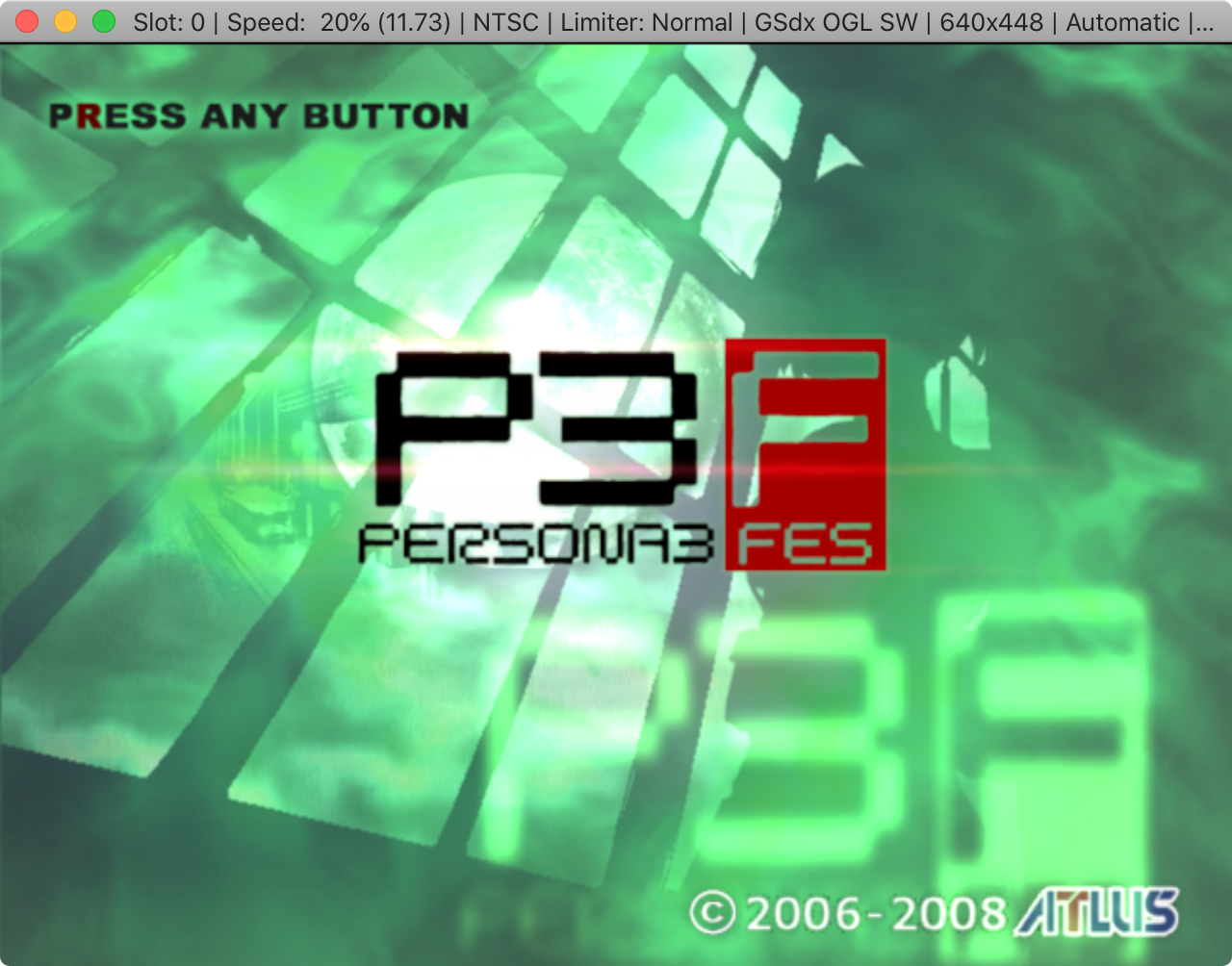
Current status:
- 64-bit interpreter working
- GSdx working (sw only)
onepad not yet workingnow workingspu2-x not yet workingnow workingApplication freezes if you try to quit it (requires force quit)Fixed- spu2-x and GSdx configuration dialogs crash if you try to access them more than once
If someone has a version of macOS that still supports 32-bit apps and wants to test to see if the JIT works: https://github.com/tellowkrinkle/pcsx2/tree/MacOS
At the moment I'm on Catalina so I'll be sticking with my 20% speed for now
 tellowkrinkle
on 14 Apr 2020
tellowkrinkle
on 14 Apr 2020
Clearly colors are the most important so I bring you... colors
Current status:
- 64-bit interpreter working
- GSdx working
- onepad not yet working
- spu2-x not yet working
- Application freezes if you try to quit it (requires force quit)
If someone has a version of macOS that still supports 32-bit apps and wants to test to see if the JIT works: https://github.com/tellowkrinkle/pcsx2/tree/MacOS
At the moment I'm on Catalina so I'll be sticking with my 20% speed for now
You are doing the lord's work! Is that a native binary?
Also I do have a copy of Mojave available to me on my AMD rig here (Hackintosh). I could swap in my AMD GPU to see how it runs.
shiggitay
on 14 Apr 2020
macOS Catalina has functionality for 32-bit code fragments to be run in a 64-bit process (this allows wine32on64 to work). It may be possible that this functionality could be used to allow the 32 bit JIT to run in a 64 bit process.
uyjulian
on 14 Apr 2020
You are doing the lord's work! Is that a native binary?
Also I do have a copy of Mojave available to me on my AMD rig here (Hackintosh). I could swap in my AMD GPU to see how it runs.
Yep it's native (hopefully no one minds my usage of ObjC++ for getting an OpenGL context but I can try to do something else later if I need to)
If you're going to try to build a 32-bit binary just be prepared to compile every non-system dependency from source as Homebrew doesn't ship them. To give an example, here's what the 32-bit wine package's build looked like before Homebrew dropped it https://github.com/Homebrew/homebrew-core/blob/ece7323f93ac7a52fe56133af9e79aecb3bd5530/Formula/wine.rb
Edit: Oh yeah, and at the moment you'll need to rename all the plugins from .so to .dylib because macOS uses a different file extension from linux and otherwise PCSX2 will ignore them. You'll also want to build with --extra (or -DEXTRA_PLUGINS=ON if you're invoking cmake directly) for the null audio and input plugins
(And remember, no audio or input yet so it's not the most useful, though I do plan to work on those next)
A few other things to note
- I bumped the wxWidgets version to 3.1 in a lazy attempt to fix a bug that was causing crashes when attempting to load specific languages in the load-all-languages-and-see-which-ones-work workaround using wxMac 3.0.4. Annoyingly wx3.1 added additional validation that verifies that you don't try to put right-aligned buttons in horizontally-stretching containers (or bottom-aligned in vertically-stretching) which kind of disagrees with our "apply one style to all buttons" way of doing things. Queue sketchy workaround. If that's not preferred I can see if the bug was fixed in later 3.0.x releases instead.
- I had to bring two mandatory OpenGL extensions optional workarounds back from the dead (
GL_ARB_shading_language_420packandGL_ARB_buffer_storage) - Whatever version of GDK the GSdx config panel uses looks absolutely disgusting on macOS
And finally a question to the other pcsx2 devs:
What was this put here for?
https://github.com/PCSX2/pcsx2/blob/49e316e488c224bf50df0ee1e3bfbc55fa738343/plugins/GSdx/stdafx.cpp#L158-L160
macOS Catalina didn't like it (any attempts to mmap with that flag would fail) and removing it hasn't blown anything up yet, but I feel like that was at least important at some point...
Edit: Oh yeah, and why does PadNull make X11 calls? For now I just ifdef'd them out, but I feel like a null api shouldn't need to do anything...
tellowkrinkle
on 14 Apr 2020
You are doing the lord's work! Is that a native binary?
Also I do have a copy of Mojave available to me on my AMD rig here (Hackintosh). I could swap in my AMD GPU to see how it runs.Yep it's native (hopefully no one minds my usage of ObjC++ for getting an OpenGL context but I can try to do something else later if I need to)
If you're going to try to build a 32-bit binary just be prepared to compile every non-system dependency from source as Homebrew doesn't ship them. To give an example, here's what the 32-bit wine package's build looked like before Homebrew dropped it https://github.com/Homebrew/homebrew-core/blob/ece7323f93ac7a52fe56133af9e79aecb3bd5530/Formula/wine.rb
Edit: Oh yeah, and at the moment you'll need to rename all the plugins from.soto.dylibbecause macOS uses a different file extension from linux and otherwise PCSX2 will ignore them. You'll also want to build with--extra(or-DEXTRA_PLUGINS=ONif you're invoking cmake directly) for the null audio and input plugins(And remember, no audio or input yet so it's not the most useful, though I do plan to work on those next)
A few other things to note
- I bumped the wxWidgets version to 3.1 in a lazy attempt to fix a bug that was causing crashes when attempting to load specific languages in the load-all-languages-and-see-which-ones-work workaround using wxMac 3.0.4. Annoyingly wx3.1 added additional validation that verifies that you don't try to put right-aligned buttons in horizontally-stretching containers (or bottom-aligned in vertically-stretching) which kind of disagrees with our "apply one style to all buttons" way of doing things. Queue sketchy workaround. If that's not preferred I can see if the bug was fixed in later 3.0.x releases instead.
- I had to bring two mandatory OpenGL extensions optional workarounds back from the dead (
GL_ARB_shading_language_420packandGL_ARB_buffer_storage)- Whatever version of GDK the GSdx config panel uses looks absolutely disgusting on macOS
And finally a question to the other pcsx2 devs:
What was this put here for?
https://github.com/PCSX2/pcsx2/blob/49e316e488c224bf50df0ee1e3bfbc55fa738343/plugins/GSdx/stdafx.cpp#L158-L160macOS Catalina didn't like it (any attempts to
mmapwith that flag would fail) and removing it hasn't blown anything up yet, but I feel like that was at least important at some point...
Edit: Oh yeah, and why doesPadNullmake X11 calls? For now I just ifdef'd them out, but I feel like a null api shouldn't need to do anything...
Haha awesome work, but I'm not any kind of developer.. I'm just following this thread to see if there are any test builds available for when something significant happens! Keep up the good work! The last time we had a macOS native PCSX2 was when it was at like version 0.9.5 or earlier. That's why I'm so excited! Cheers!
shiggitay
on 14 Apr 2020
The main reason pcsx2 uses wxwidgets 3.0 is because that's the version shipped with most Linux distributions. This is largely because the 3.1 branch is technically the unstable branch, though it's supposed to be fairly stable according to the wx guys...
Technically speaking, the GSdx dialog and any other plugin dialogs remaining that aren't wx should probably be ported to wx. We just keep talking about how we'd like to rip out wx, and it'd probably fall on me to port them anyways if we were going to do that.
It's not really vital that padNull works, and it's largely there as a reference. It's based on onepad, though, and on linux, x11 is used for getting the keyboard state. (If you look at keyboard.cpp in onepad, you can see that a lot of it's x11, and the Windows code in there doesn't even work! That's probably the biggest part you'll need to port. I'd be tempted to disable the keyboard portion initially, and just get the controllers working...)
Not absolutely sure on why that one line in GSdx was there...
arcum42
on 14 Apr 2020
@shiggitay 32-bit testing build is now available https://forums.pcsx2.net/Thread-Native-Mac-Testing-Build-Mojave-and-lower
tellowkrinkle
on 17 May 2020
@shiggitay 32-bit testing build is now available https://forums.pcsx2.net/Thread-Native-Mac-Testing-Build-Mojave-and-lower
Awesome! I'll slot in my AMD Radeon RX 480 GPU to test it out tomorrow when it's not midnight here.
shiggitay
on 17 May 2020
Also for anyone trying to build 32-bit applications on macOS, use MacPorts (not Homebrew) to install your packages. If you add the +universal flag when installing, it'll install dylibs with both 32-bit and 64-bit code so you can link against them from both 32-bit and 64-bit applications.
tellowkrinkle
on 17 May 2020
Also for anyone trying to build 32-bit applications on macOS, use MacPorts (not Homebrew) to install your packages. If you add the
+universalflag when installing, it'll install dylibs with both 32-bit and 64-bit code so you can link against them from both 32-bit and 64-bit applications.
Is it possible to compile PCSX2 and its deps etc in 64bit? Slowly more and more people are gonna have Catalina and nothing lower installed on their systems.
shiggitay
on 17 May 2020
@tellowkrinkle nice work! i just tried it out, and I managed to get the thing to change to SW renderer (after many error messages), now it's complaining it can't find GSdx anymore, and trying to configure it crashes PCSX2
 theLMGN
on 18 May 2020
theLMGN
on 18 May 2020
I managed to get the thing to change to SW renderer (after many error messages), now it's complaining it can't find GSdx anymore, and trying to configure it crashes PCSX2
Ahh yeah forgot to mention that issue. Does it work if you restart PCSX2 between GSdx changes? BTW if you can, try to post issues specific to that build on the forum post instead of here
tellowkrinkle
on 18 May 2020
The issue is 16 byte stack alignment when calling external functions right? So far nothing has blown up so maybe things haven't changed too much since the original port? Admittedly it's not too common for the recompilers to call out into external functions...
As for the specific GCC version, osx no longer uses GCC and everything's been compiling fine on their recent versions of clang
Edit: I swear there was a comment this was replying to... did it get deleted?
tellowkrinkle
on 20 May 2020
Related issues
 bryc
·
5Comments
bryc
·
5Comments
 Javed-Iqbal-1
·
5Comments
Javed-Iqbal-1
·
5Comments
 mirh
·
6Comments
mirh
·
6Comments
 zerr10
·
6Comments
mirh
·
6Comments
zerr10
·
6Comments
mirh
·
6Comments
Most helpful comment
Clearly colors are the most important so I bring you... colors

Current status:
onepad not yet workingnow workingspu2-x not yet workingnow workingApplication freezes if you try to quit it (requires force quit)FixedIf someone has a version of macOS that still supports 32-bit apps and wants to test to see if the JIT works: https://github.com/tellowkrinkle/pcsx2/tree/MacOS
At the moment I'm on Catalina so I'll be sticking with my 20% speed for now