Pcsx2: DX11 wrappers not working in Windows 10 (presumably in Windows 8.1 or higher)
PCSX2 version:
Development build pcsx2-v1.5.0-dev-2211-g58f2b6c25-windows-x86
PCSX2 options:
GSdx DX11 hardware renderer, with any settings inside it.
Plugins used:
Nothing out of the ordinary. Default plugins are enough.
Description of the issue:
DirectX 11 wrappers, such as 3Dmigoto (https://github.com/bo3b/3Dmigoto/releases) don't work in Windows 10, while they worked in Windows 7 perfectly. 3Dmigoto doesn't generate any logs and it doesn't load in any way. I have discussed it with bo3b in this 3Dmigoto github issue: https://github.com/bo3b/3Dmigoto/issues/41
The conclusion is that PCSX2 is doing something wrong (maybe changing the workspace path to something unknown) that makes PCSX2 ignore any "d3d11.dll" file. It hooked fine in Windows 7. 3Dmigoto developers have checked that it isn't a 3Dmigoto problem. In comparison, DX9 wrappers (like the Helixmod DLL) work correctly in DX9 mode. I don't know about OpenGL ones because I didn't try them.
We have some suspicions about some parts of the GSdx code that act differently under W8.1 or higher. See the "!IsWindows8Point1OrGreater()" lines here: https://github.com/PCSX2/pcsx2/search?utf8=%E2%9C%93&q=IsWindows8Point1OrGreater&type=
But I don't think those conditions were there years ago. And builds from 2012-2013 still had that problem, it seems.
How to reproduce the issue:
- Download any 3Dmigoto version from here: https://github.com/bo3b/3Dmigoto/releases
- Unzip its contents in the PCSX2 root folder.
- Boot a game using the DX11 Hardware Renderer.
- The game shows in Windows 7 a green overlay for shader hunting, and a "d3d11_log.txt" file will be generated. In Windows 10, none of that will happen. No overlay and no log file. The wrapper isn't loading.
Last known version to work:
None from what I tried worked on Windows 10. I went as far back as the SVN build "pcsx2-5346-windows-x86", trying multiple versions in the middle. None of them load the wrapper.
PC specifications:
CPU: Intel Core i7 7700K @ 4.9GHz
RAM: 16GB @ 3866MHz
Motherboard: Gigabyte Z270X Gaming 5
GPU: Gainward Phoenix Nvidia GTX 1080 GLH
Monitor: Asus PG278QR
 masterotaku
All 43 comments
VorpX's VR DX11 wrapper works perfectly fine in both software and hardware renderers. I would take a look at your program again and see how the wrapper is interfacing.
 MrCK1
on 25 Oct 2017
MrCK1
on 25 Oct 2017
This issue extends to ReShade with DX11/OGL as well.
 SirFancyBacon
on 28 Oct 2017
SirFancyBacon
on 28 Oct 2017
I still think this has something to do with those particular wrappers. If VorpX's DX11 wrapper works fine, we at least know our implementstion isn't completely botched.
MrCK1
on 2 Nov 2017
Here's a workaround I came up with. Download it and run d3d11_fix_install.bat, and it should work. What this does is install a compatibility database telling Windows to force load "d3d11.dll" from the EXE's directory using the "InjectDLL" fix.
 RibShark
on 10 Jan 2018
RibShark
on 10 Jan 2018
set __COMPAT_LAYER=InjectDLL && pcsx2.exe might also work then
 mirh
on 10 Jan 2018
mirh
on 10 Jan 2018
That won't, but set __COMPAT_LAYER=InjectDLL<.\d3d11.dll> && pcsx2.exe might. As long as you can set the compatibility flag with the parameter in some way it should work.
This also indicates that it is indeed a PCSX2 issue as it is now clear the DLL is not loaded normally and is not simply malfunctioning.
RibShark
on 10 Jan 2018
Sure thing.
For as much 3dmigoto having to handle.. well, supposedly every game (which won't be as nice as pcsx2) I think the road to workaround this should *also* be pursued there.
I think @turtleli might know better about this then.
mirh
on 10 Jan 2018
Dunno why I might be expected to know better.
Random guesses:
Might be related to delay loading?
Something in 8.1+ is loading d3d11 only from system directories (maybe a LoadLibraryEx with the directory search path restricted), effectively bypassing attempts to use a wrapper.
Microsoft might know better.
 turtleli
on 10 Jan 2018
turtleli
on 10 Jan 2018
I still think this has something to do with those particular wrappers. If VorpX's DX11 wrapper works fine, we at least know our implementstion isn't completely botched.
Pretty sure that VorpX does not use wrapping, it uses hooking. He does not install a custom d3d11.dll to override functionality.
Any wrapper based loader (d3d11.dll replacement) will likely be broken here on Win10. As a general rule, 3Dmigoto has no trouble being loaded in any game, by simply being dropped next to the game.exe. We often have problems with the games doing hard to workaround DX11 calls and performance hacks they introduce, but loading is almost never a problem.
Is there any way for us to determine the working directory for pcsx2 at runtime? A log for example? If the working directory is different, we should be able to drop 3Dmigoto in that directory to be loaded.
 bo3b
on 10 Jan 2018
bo3b
on 10 Jan 2018
I can confirm the workaround works. Thanks a lot, @RibShark . I have been trying Kingdom Hearts 2 in 3D on Windows 10, with the modification I made to convert "top and bottom" into the 3D Vision format. I needed to change some 3Dmigoto settings to make it compatible with the SpecialK dll, and to make PCSX2 use the 4xDSR resolution, and I'm still experimenting.
The issue should still be open until there is a real (native to PCSX2 or 3Dmigoto) fix, in my opinion. It's great that there is some advancement.
masterotaku
on 10 Jan 2018
@RibShark Hey, Ribshark, your fix worked wonderfully for me and probably the handful of people who have found this GitHub thread. I was wondering if you could share how you made that sdb file or how to use the set __COMPAT_LAYER command, it'd come in handy for other games or programs/emulators that just don't load ReShade's dll file properly.
 Arcadia34
on 10 Jan 2019
Arcadia34
on 10 Jan 2019
So... You are reporting that this worked?
mirh
on 10 Jan 2019
@mirh I'm not sure if that one worked entirely. Putting that command in cmd tells me that && was unexpected and in PCSX2, I keep getting an error about the pixel layout. "ERROR (2) Can't Find A Suitable PixelFormat" Is what the dialogue box tells me. I... don't know if that's due to ReShade version or what. Let me try an older ReShade version I have.
It also does not work in the older ReShade version I used.
Without ReShade, OpenGL works just fine.
Arcadia34
on 10 Jan 2019
Yes, it's due to reshade version (or at least, that's one of the variables)
So please, if this isn't neatly straightforward like here, keep it in the other thread.
Said this, I just so happened today to check this... And I noticed two possible things.
https://github.com/PCSX2/pcsx2/blob/e0877608ae2c826a8894ae9d20621d827504f5e6/plugins/GSdx/GSUtil.cpp#L406-L409
If I got my funny hour spent debugging in VS right, D3d11.dll is loaded for the first time with the function on the 1st line (which obviously call LoadLibrary), but that eventually unloads it before returning.
And it gets to "stick in memory" for good, only on device creation on the 4th.
One stupid idea could be microsoft in all their wisdom, for whatever spinlock optimization whatever reason, bails the normal loading priority and fallback to SYSTEM32.
https://github.com/PCSX2/pcsx2/blob/1b41d19016f23e10b1545f7314d298c77035c973/plugins/GSdx/vsprops/common.props#L22
Another idea could be looking into the implications of delay loading (which has many secrets behind)
mirh
on 11 Jan 2019
As per the _InjectDLL_ documentation in the Microsoft Application Compatibility Database:
_Some applications may use dynamically loaded DLLs, which could potentially issue calls to static DLLs before the application is ready. This compatibility fix provides a workaround for this behavior by preloading the required static DLLs for the application. This compatibility fix takes a command line containing a list of the DLLs affected. They will be loaded in the order of the command line listing. This compatibility fix is similar to DelayDllInit, which works with statically loaded DLLs._
May suggest that Windows 10 changed the order/timing of static DLL loading thus leading ReShade to fail silently due to an unexpected error. https://github.com/PCSX2/pcsx2/issues/2106#issuecomment-356692516 Maybe thats why the DLL unloads before returning (ReShade crashing on initialization).
 kpanicc
on 12 Jan 2019
kpanicc
on 12 Jan 2019
Neither https://github.com/PCSX2/pcsx2/issues/2106#issuecomment-356597634 , https://github.com/PCSX2/pcsx2/issues/2356#issuecomment-380178396 nor https://github.com/PCSX2/pcsx2/issues/2106#issuecomment-356597634 worked for me. Tested with dx9, dx11 and ogl, they all stopped working with a black screen, crashed PCSX2 or gave the "ERROR (2) Can't Find A Suitable PixelFormat"
Tested with Windows 10 17763.253 and PCSX2 1.4.0
kpanicc
on 12 Jan 2019
Maybe you should use a modern pcsx2, for starters.
mirh
on 12 Jan 2019
Tried again with v1.5.0-dev-2878-g9119e3110, OpenGL32 still gives "ERROR (2) Can't Find A Suitable PixelFormat". With dx11 PCSX2 manages to start the game but nothing is injected.
kpanicc
on 12 Jan 2019
Putting aside at least half of it seems reshade's fault...
Could you test what happens with these two gsdx? (make sure to restart pcsx2 between each try)
mirh
on 12 Jan 2019
Alright, I figured out how the D3D11.dll fix works and was able to implement my own version which worked just as well. Took a while, sdb = shim database file, possibly created with Windows Kits Compatibility Administrator.
If you get a black screen once, retry to boot the game, I think it happens the first time you try to run the fix. If not, you can create your own.
Arcadia34
on 13 Jan 2019
https://github.com/PCSX2/pcsx2/issues/2106#issuecomment-453766754 Downloaded reshade again if that was the issue but PCSX2 is still crashing.
https://github.com/PCSX2/pcsx2/issues/2106#issuecomment-453866353 Can you please show us which shim you are applying to the file?
kpanicc
on 14 Jan 2019
It's supposedly A BUG, not "work of chance".
Now could anybody please check the two dlls I provided?
mirh
on 14 Jan 2019
Both of your GSDX files did not load ReShade. Assuming that's what you wanted to be tested and fixed. D3D11 does not load ReShade's dll and in OpenGL, pixel format is still an issue.
The shim file I used was the one provided by RibShark. I did create my own with my own specific path files for both PCSX2 and d3d11.dll and that shim database file also worked.
Arcadia34
on 14 Jan 2019
Compiled both PCSX2 and ReShade with latest sources and it is now working, need to test again, fix might not be necessary.
Edit: Tested again in another PC, as of commit 3dd8bf1 ReShade OpenGL is working on both PCSX2 1.4.0 and 1.5.0-dev-2878-g9119e3110
kpanicc
on 15 Jan 2019
I spent way too much time trying to build my own version of the latest commit of ReShade and couldn't, never built anything before and I don't entirely understand it, can you upload the commit you built and I'll test it out on my end too.
Arcadia34
on 15 Jan 2019
Compiled ReShade 4.0.2 from sources, it managed to inject without any fix. It might suggest a compilation misconfiguration?.
Anyways I feel this issue should be closed by now @masterotaku.
ReShade 32 bits commit 3dd8bf
kpanicc
on 15 Jan 2019
Okay, well, I'm still have the pixel format issue come up with the ReShade you compiled on the latest version of PCSX2. So.... something is still wrong.
Also, the compiled ReShade won't load up in D3D11, which means you still need an sdb fix if you want to use ReShade, PCSX2 and D3D11 renderer, which you very well might because not everything works best in OGL.
Arcadia34
on 15 Jan 2019
This never was about reshade in the first place?
#2356 is for that
mirh
on 15 Jan 2019
Okay, I think I found the problem, both dxgi and d3d11 get loaded from SysWOW64 before PCSX2 gets to the point of picking a renderer (it happens on GUI initialization), the culprit is RegisterDragDrop, somewhere inside that function dxgi and d3d11 are loaded thus the DLL delay loading doesnt happen, they are already loaded!
Before executing:

After executing:

Any ideas on how to fix this?
kpanicc
on 15 Jan 2019
yells angrily at Wx
Thanks you for your insight (even though I'm a bit baffled by the way I'd have missed it the other day..)
Couldn't you just try to, you know, start to comment random stuff until something change? ^^
mirh
on 16 Jan 2019
Dived a bit in the dissasembled code, _RegisterDragDrop_ ultimately creates an instance of the COM class CLSID found in entry _HKEY_LOCAL_MACHINESOFTWAREMicrosoftOleExtensionsDragDropExtension_. This class is the one who loads both dxgi and d3d11 from SysWOW64 (the COM class is the DataExchange DLL)
I can't think of a way of fixing this without breaking existing functionality (Drag&Drop).
kpanicc
on 16 Jan 2019
I can't think of a way of fixing this without breaking existing functionality (Drag&Drop).
For the sake of testing and confirmation, break DnD :)
 avih
on 16 Jan 2019
avih
on 16 Jan 2019
Tested breaking DnD, commented out the function that does the setup for it.
The moment I boot a game PCSX2 crashes, I think this time the problem is in ReShade's side, I debugged both of them, ReShade throws an exception when trying to redirect the call to _D3D11CreateDeviceAndSwapChain_ (0xC0000005: Access violation executing location 0x00000000)
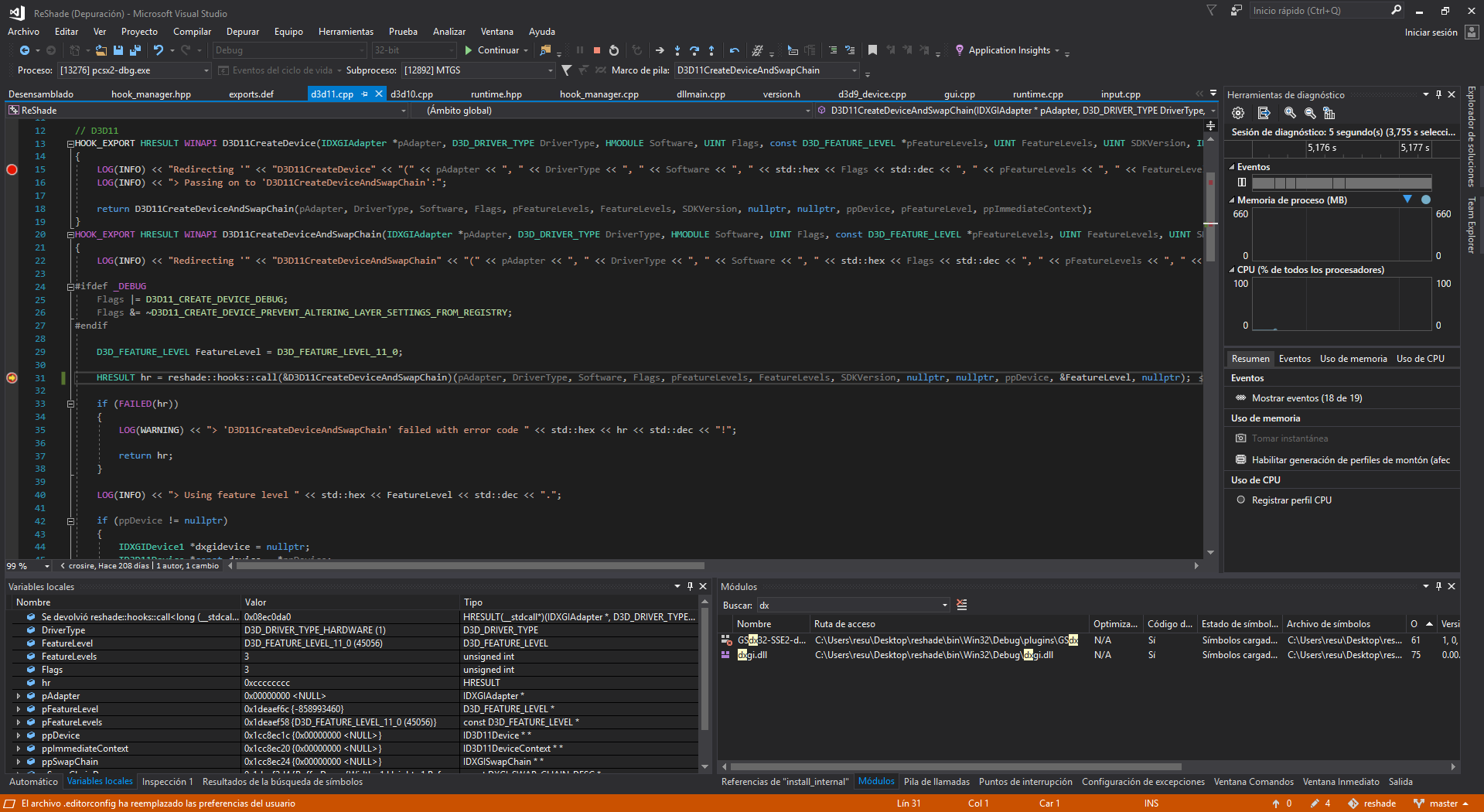
But, as can be seen in the Locals window, the returned pointer is not null. Any idea?
kpanicc
on 16 Jan 2019
FWIW I don't think this is directly related to the PCSX2 issue, but it's an interesting coincidence that you found the same code that I'm suspicious of for another issue: https://github.com/bo3b/3Dmigoto/issues/98
I've got some users reporting crashes with 3DMigoto and ReShade that I am unable to reproduce locally, but I suspect the code in that area might be partially to blame due to an interaction between ReShade's redirect of D3D11CreateDevice to D3D11CreateDeviceAndSwapChain and 3DMigoto's redirect in the opposite direction (we already worked around a similar interaction with SpecialK, but it seems ReShade might have hooked the system32 d3d11.dll directly and has managed to create a three way game of pass the parcel while SpecialK only created a two way game of hot potato), in combination with some as yet unidentified condition (maybe load order or a 3rd tool hooking in here - one user found their issue went away by removing RiverTuner, but other users are hitting it without that).
However, if the D3D11CreateDeviceAndSwapChain trampoline that ReShade is trying to call can be NULL in some circumstance as your debug suggests, perhaps that is a possible explanation for my issue as well.
 DarkStarSword
on 16 Jan 2019
DarkStarSword
on 16 Jan 2019
Realized ReShade might be crashing because Visual Studio forcefully injects the library into PCSX2 when the debugging session starts, however, if the debugger is attached to the process when it's already opened dxgi.dll is already loaded from SysWOW64.
I think the GUI is also loading d3d11 and dxgi, _RegisterDragDrop_ was just the first call that loaded these DLLs.
Loading dxgi at process start might be a feasible workaround.
kpanicc
on 16 Jan 2019
Crashing because reshade forcefully mixes two or three different libraries with the same name is one thing.
Crashing because.. Well, you screwed code with comments, is another.
So could you try some-whatever-else d3d11.dll? Something as inert as bare ultimate asi loader perhaps.
mirh
on 16 Jan 2019
https://github.com/bo3b/3Dmigoto/commit/c947d7e1d0a7d044bf92a9924ce510bd6c1f38b9 something refcounts something?
mirh
on 28 Feb 2019
@mirh not really sure why you are referencing that commit? It's for a totally unrelated issue in 3DMigoto and is completely non-applicable if 3DMigoto's nvapi wrapper is not present: https://github.com/bo3b/3Dmigoto/issues/45
DarkStarSword
on 3 Mar 2019
One dev was suspecting reference counts had something to do with this too, and that seemed like a nice roundup of the madness involved.
mirh
on 3 Mar 2019
Just going to post some musings here:
I recently started looking at dynamically loading D3D (as opposed to delay loading it) and here's what I found concerning this issue:
It's indeed caused by ref counting. And indeed it's to do with wx setting up drag and drop. Commenting out the following line will fix it:
https://github.com/PCSX2/pcsx2/blob/f2b402b0cb9236b902903c29a1924269b7f673b3/pcsx2/gui/MainFrame.cpp#L586
@kpanicc The reason you're crashing is because you are using a debug build of GSdx. Reshade is not playing nice with DXGI in debug mode.
Possible workarounds:
- Loading DXGI before Wx can get the chance to
- Renaming reshade's
dxgi.dllto something likereshade.dlland loading it ourselves in GSdx with a call toLoadLibrary - Stop using Wx :P
Here's the winapi call that is causing DXGI/D3D to be loaded.
 tadanokojin
on 5 Sep 2019
tadanokojin
on 5 Sep 2019
Here's a workaround I came up with. Download it and run d3d11_fix_install.bat, and it should work. What this does is install a compatibility database telling Windows to force load "d3d11.dll" from the EXE's directory using the "InjectDLL" fix.
I came here just to thank ya mate. Be sure that you made me a bit happy today, my eternal thanks!
 culpinha
on 3 Apr 2020
culpinha
on 3 Apr 2020
seems like all this maybe related to why i can no longer use dxgi.dll with the game, while others can
Can someone help ? trying to get reshade to use dxgi.dll , but no longer loads in game, and 3dmigoto already uses d3d11.dll. but only now reshade works when changed to d3d11.dll. i need reshade to use dxgi.dll instead. please anyone ?
 WaterVes82
on 27 Nov 2020
WaterVes82
on 27 Nov 2020
https://my.pcloud.com/publink/show?code=kZDH81kZHH9txOzWRSfidhxYhMviSYe30lW7
Guides everyone and then ReShade. Basically dxgi.dll doesn't work with it.
 RedDevilus
on 27 Nov 2020
RedDevilus
on 27 Nov 2020
Related issues
 zerr10
·
6Comments
zerr10
·
6Comments
 GeekyGami
·
3Comments
GeekyGami
·
3Comments
 Levan7
·
3Comments
Levan7
·
3Comments
 bryc
·
5Comments
bryc
·
5Comments
 IceString3
·
3Comments
IceString3
·
3Comments
Most helpful comment
Here's a workaround I came up with. Download it and run d3d11_fix_install.bat, and it should work. What this does is install a compatibility database telling Windows to force load "d3d11.dll" from the EXE's directory using the "InjectDLL" fix.