PCSX2 version:
(For example, stable build v1.4.0 (or) development builds v1.5.xxx)
pcsx2-v1.5.0-dev-2143-g1d983a681-windows-x86
- Note: It's preferred to only report bugs which are present on the latest development builds.
- Note2: The new backwards compatibility (psx) mode is in active development. Issue reports are too early at this point.
PCSX2 options:
(For example, Clamping/Rounding, Speedhacks, GameFixes)
Default
- Note: Generally it's recommended to have settings as default as possible and use the
Safestpreset along with MTVU speed hack disabled. If there's no issue with these settings but there is an issue with some other non-default option, then please state it explicitly.
Plugins used:
(Relevant/Non-default settings of GS/PAD/SPU2/CDVD/USB plugins)
Default, GSDX SSE4
- Note: In case the issue is a graphical problem with the GSDX plugin, please provide basic information like
Renderer/Internal resolution/CRC Hack level/Other relevant optionswhich were used to reproduce the issue. Additionally, providing a GS dump of the issue would also be helpful.
Description of the issue:
(What's the problem? - Screenshots showing the issue if applicable)
Audio is garbled in the BIOS, almost like it is skipping
How to reproduce the issue:
(Detailed step by step guide on how to replicate the issue)
Try to play any game or load the BIOS
Last known version to work:
(If the issue isn't present in an older PCSX2 version, it would be helpful to mention the full title of that version. Narrowing it down to the build/commit that first introduced the issue is even better!)
Not sure, would test but Orphis website is redir to an index.php for anything other than latest
PC specifications:
(For example: CPU: Intel Core 2 Duo E4600 GPU: Gigabyte GTX 750Ti OS: Windows 10 64 Bit)
Intel i5-2500k @ 4.0GHz, 14GB DDR3, Raedon 7800 Series, Windows 10 64bit Insider Build 16241.1001
 Masamune3210
All 46 comments
Mhh.. not for me?
Are you running at full normal speed?
Do you have Xaudio2 spu2-x backend?
 mirh
on 24 Jul 2017
mirh
on 24 Jul 2017
Yeah, I think I am, its says the emulation is running at 60fps
Here is my SPU2 ini
https://gist.github.com/deadair3210/09b6dbfb76a329fdbe766c237c58de0c
Masamune3210
on 24 Jul 2017
Mhh.. that sounds ok.
Could you try playing with latency slider?
mirh
on 24 Jul 2017
Will when I get home later today, at work right now
Masamune3210
on 24 Jul 2017
Latency seems to affect it, but only very slightly at extreme values. At extreme low, there is almost no difference, at extreme high it seems to slow the garbling but doesn't fix it
Masamune3210
on 25 Jul 2017
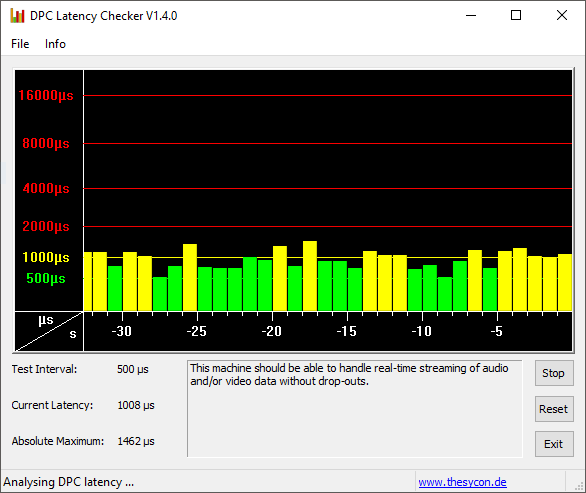
How is your DPC latency?
Also.. If you could try W10 ""stable"", it wouldn't hurt.
mirh
on 25 Jul 2017
min 500, max 1200
I will have to make a win10 virtual machine, as i cannot revert this machine to stable currently
Masamune3210
on 25 Jul 2017
Masamune3210
on 25 Jul 2017
Windows 10 builds... , there are very unstable and can cause some side effect , but try it on a stable Windows 10 (mentioned by #mirh) or, can you use portaudio to see if the issue is present on this audio driver?
 atomic83GitHub
on 25 Jul 2017
atomic83GitHub
on 25 Jul 2017
Portaudio changed nothing, will make a VM tonight and test if i can
Masamune3210
on 25 Jul 2017
min 500, max 1200
That's most likely your problem.
Try to close as much stuff as possible, update bios/drivers, unconnect devices.
mirh
on 25 Jul 2017
I will try, and will let you know
Masamune3210
on 25 Jul 2017
Just a question , what is your audio device ? (Suondblaster , realtek for exemple)
atomic83GitHub
on 25 Jul 2017
AMD HD Audio, through my GPU as my motherboard sound died a while ago.
Masamune3210
on 25 Jul 2017
Also the VM didn't change anything, but I'm not sure if that's due to the bug or not running at totally full speed
Masamune3210
on 25 Jul 2017
as my motherboard sound died a while ago.
Unless you decapped the chip from the pcb, the OS is still running its driver as if nothing happened.
This may help spotting the offender.
mirh
on 25 Jul 2017
Its a hardware issue, sound doesn't work through motherboard in other OS's either. Common problem with Z77 motherboards. Will look at program later when I get home
Masamune3210
on 25 Jul 2017
Latancy was high enough that the program said that my computer might have issues, but I closed everything else running and it said it would be fine. Audio issues were still present before and after closing all other programs
Masamune3210
on 26 Jul 2017
Yes.. but latency was fixed (in the 100ms range) in the other program or not?
Also, hope you have updated bios.
mirh
on 26 Jul 2017
Latency was below 100 after I closed everything, and the issue was still present. Board has latest version of UEFI available
Masamune3210
on 26 Jul 2017
Ok....
Then, what (ps2) BIOS version do you have?
Does it happen with both fast and full boot?
mirh
on 26 Jul 2017
Both BIOS versions that I have do the same thing, sound wise. Fast Boot changed nothing either.

A new build of Windows 10 came out today, will test when it gets done installing to see if the problem has changed
Masamune3210
on 26 Jul 2017
Ehrm....
I'd try US bios.
First japanese ps2 release one is known to give a great deal of problems.
mirh
on 27 Jul 2017
New Windows update didnt fix it, already tried both BIOS versions with the same result
Masamune3210
on 27 Jul 2017
If we're going to try and solve this, could you upload a sample of the garbled audio?
Unfortunately, this really isn't the place for experimenting with multiple BIOSes, and is an overextension of our support policies regardless.
 MrCK1
on 27 Jul 2017
MrCK1
on 27 Jul 2017
Link to video : https://youtu.be/iSV2e6c1CO4
I never intended to start trying to test different versions of the BIOS, and did not mean to make it seem like I was if I did.
Masamune3210
on 27 Jul 2017
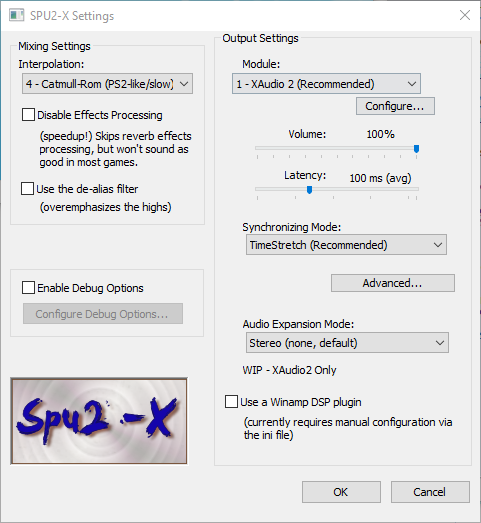
@deadair3210 Can you show you speedhack tab and SPU configuration tab?
 woj1993
on 27 Jul 2017
woj1993
on 27 Jul 2017

Masamune3210
on 28 Jul 2017
@deadair3210 Can you turn preset value to 1 and check if you motherboard soundcard is disabled in bios?
Then recheck it.
woj1993
on 28 Jul 2017
Motherboard sound is not disabled, motherboard sound hardware is damaged. Might just be the jack, not sure but didnt want to mess with it and possibly damage it further. Preset changes nothing. Is there any type of log or program I can use to log the sound as its going through my computer
Masamune3210
on 28 Jul 2017
Do directsound and.. just every thing portaudio has to offer, change anything?
mirh
on 28 Jul 2017
Using Async mix instead of time strech makes any difference?
 prafullpcsx2
on 28 Jul 2017
prafullpcsx2
on 28 Jul 2017
Async seems to play audio normally!
Masamune3210
on 28 Jul 2017
So is this a bug? Or a problem specific to my system
Masamune3210
on 29 Jul 2017
It would be better if we understood why timestretch.. is stretching time even though framerate is fine
EDIT: 1) better if in the video you hadn't used japanese bios 2) @others.. is it fine to load NTSC US games with jpn bios?
mirh
on 30 Jul 2017
Same thing happens with US BIOS, as I have both version 1.0 and version 3.0 US
Masamune3210
on 1 Aug 2017
Uh, randomly crazy idea.
Which audio vendor has your motherboard?
mirh
on 5 Aug 2017
Well, whatever this is the plugin to test with portaudio.
Spu2-X-asio.zip
mirh
on 23 Aug 2017
Did not read the whole thread but possibly the target framerate is wrong. One can play with the base framerate in the ini and try to find out which one is the proper one. Like this one might be able to deduce why the bios frame rate is wrong. Possibly a core timing issue.
 willkuer
on 23 Aug 2017
willkuer
on 23 Aug 2017
Sorry for disappearing for a while, had some personal issues come up. Audio vendor for the motherboard is Realtek as far as I know, that's what AsRock usually uses. The GPU that I'm currently getting sound from is AMD though. Will test the new builds of the emulator when I get home from work today and if they dont fix it I will try the plugin and then messing with the framerate, though as far as I know the emulator said it was running at normal speeds
Masamune3210
on 2 Sep 2017
Async mix works differently. It seems to me the issue is with the time stretcher which isn't able to match the speed correctly, or there about.
Make sure the console is visible (if not, from the main menu "Misc" -> "Show console"). At the SPU2-X config panel, set latency to 100ms, enable debug options (bottom left), then click the button "configure debug options", and in the debug dialog select "Show in console" and "Buffer Over/Underruns".
Make sure the PCSX2 speed is normal (100% - not turbo or slowmo).
Boot the bios and post the log after about 10s of the "spinning lights".
Do this also with other Audio modules (at the SPU2-x config dialog, i.e. PortAudio, DirectSound, etc - whichever you can get to make sounds). Post these logs too.
Maybe they'll shed some light.
Edit - Also, please test with the onboard sound too, i.e. not via the hdmi cable or the GPU..
 avih
on 2 Sep 2017
avih
on 2 Sep 2017
Also, does it only happen at the BIOS? so games sound normally, but at the BIOS it's "choppy"?
avih
on 2 Sep 2017
I'm sorry, I know I said that I would test this when I got home, but I just got off and its late. I will test this tomorrow and will get back to you ASAP
Masamune3210
on 3 Sep 2017
Issue no longer happens as of PCSX2 1.5.0-20170831211143, something changed in between the time I tried it and now must have fixed it. I guess this can be closed, will let everybody know if it happens again.
Thanks for everything!
Masamune3210
on 4 Sep 2017
.-.
Maybe it was MTVU disabling by default on early August?
Cannot see any other 'core' changes otherwise.
You can close the issue yourself.
Windows 10 64bit Insider Build 16241.1001
EDIT: ... or maybe?
mirh
on 4 Sep 2017
It might have been something fixed with a new Insider Build, but I think I tried the new version before I updated to the latest build. MTVU might have fixed it, idk. If I need to test anything I can, but since its working fine now I'm going to close it
Masamune3210
on 12 Sep 2017
Related issues
 IceString3
·
3Comments
IceString3
·
3Comments
 zerr10
·
6Comments
zerr10
·
6Comments
 leyo96
·
5Comments
leyo96
·
5Comments
 vgturtle127
·
4Comments
vgturtle127
·
4Comments
 RinMaru
·
5Comments
RinMaru
·
5Comments