Pcsx2: Siren [NTSC SCUS-97355] Wall Of Fog Hardware Renderer Bug (DX11 matches OpenGL now)
GS Dump
Memory Card with 100% game save
Save State
Siren Mega Folder to download said items - updated Jan 10 2019
PCSX2 version:
(PCSX2 1.5.0-dev-2871-ge0877608a - compiled on Jan 9 2019)
PCSX2 options:
(Default Settings)
Plugins used:
(GSdx 20190109200529 (MSVC 19.00 AVX2/AVX2) 1.1.0)
(Pokopom XInput Pad Plugin 2.1.0)
(Default For Other Plugins)
Description of the issue:
- Wall of Fog when using Hardware Renderer modes. OpenGL and DirectX (directX backend recently improved to match OpenGL) broken with only half of the screen working correctly.
- Software renderer modes work correctly.
How to reproduce the issue:
- Use any hardware video renderer mode (dx11,opengl)
- Using any software video renderer mode works correctly
OpenGL Hardware Mode: Depth Buffer Enabled

OpenGL Hardware Mode: Depth Buffer Disabled

OpenGL Software Mode

DX11 Hardware Mode

DX11 Software Mode

Link Navigator, go to Day 8 with Suda for the same level I was on.

Last known version to work:
No previous version has worked correctly. In version 1.4.0 OpenGL Hardware Mode, enabling depth emulation also fixes half of the screen.
PC specifications:
(For example: CPU: Intel Core i7 4770k 3.8Ghz GPU: ASUS GTX 1080 8GB VRAM OS: Windows 10 Pro 64 Bit)
 64fanatic
All 13 comments
Try using OpenGL and then as i remember correctly one of the hw hacks fixed the second half.
Turn them on/off one by one to figure out which one was it.
 lightningterror
on 11 Jul 2017
lightningterror
on 11 Jul 2017
None of them fix the second half. Are you thinking of Disable Depth Emulation? That only makes it worse.
64fanatic
on 11 Jul 2017
Nah not that , I know one of them did it , can't check now since I'm not home.
lightningterror
on 11 Jul 2017
http://wiki.pcsx2.net/index.php/Siren
Haha, well if you remember/check later I'll add it to the wiki page!
64fanatic
on 11 Jul 2017
First, let's forget about Dx. Then I really need to look at the code to implement lookup inside depth buffer.
 gregory38
on 11 Jul 2017
gregory38
on 11 Jul 2017
Can you test the game with last dev build just for safety.
 atomic83GitHub
on 16 Jul 2017
atomic83GitHub
on 16 Jul 2017
Siren has a missing crc for ntsc , added it but no change and I can't seem to figure out what the crc id's are used for, wasn't able to pickup anything on "search".
lightningterror
on 22 Aug 2017
Late as heck response was out of country, back and testing with latest dev build as @atomic83GitHub requests: PCSX2 1.5.0-20170816173532 - compiled on Aug 16 2017
As per @gregory38, only worrying about OpenGL for video backend:
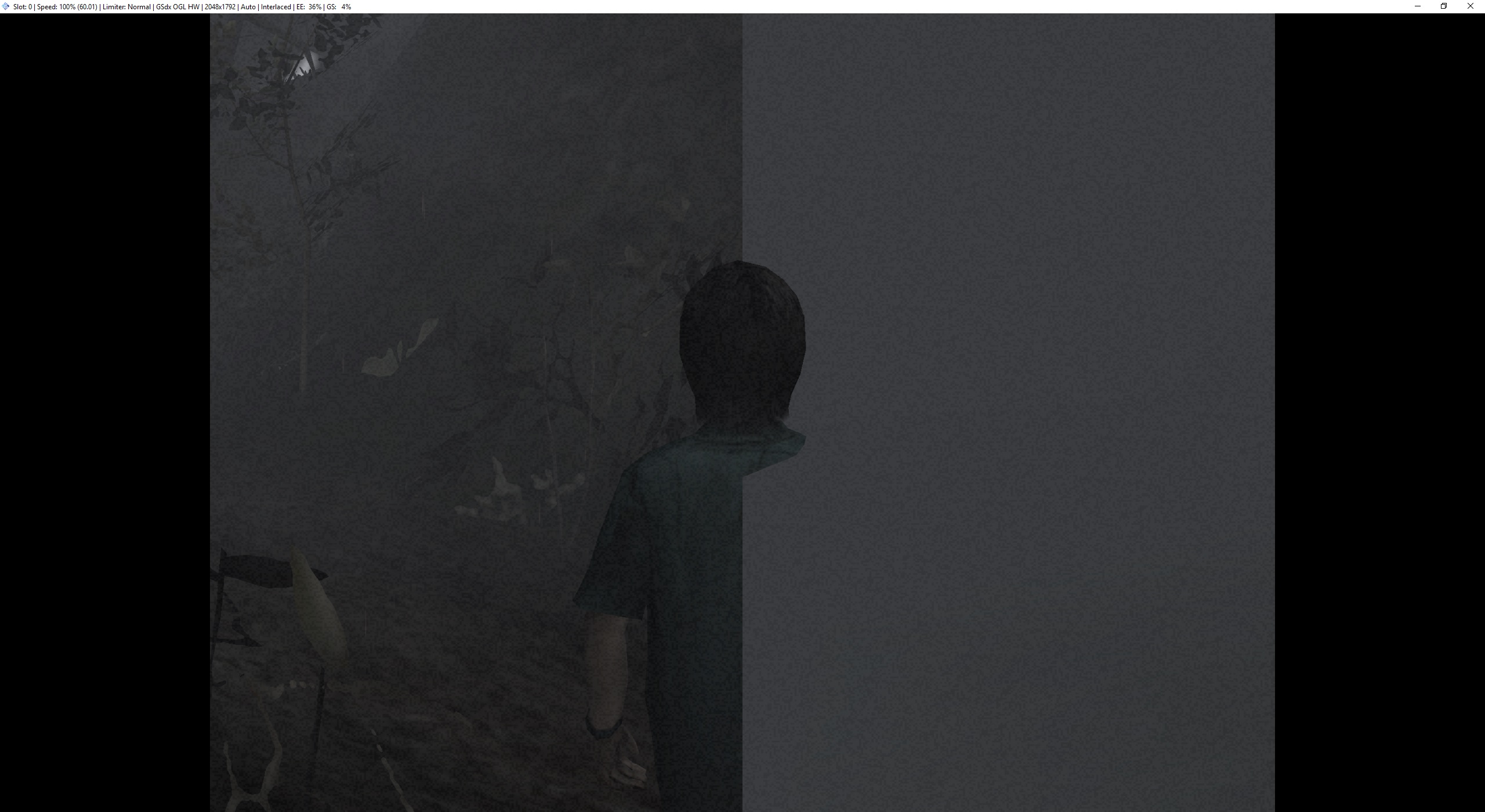
No change as of yet. Evidently I had widescreen patches on without running in 16:9 in the OP, but the end result is the same anyhow as far as this bug goes. Sorry about that.
New GS Dump and save state upload on latest build:
64fanatic
on 23 Aug 2017
Can you try this ? Check if any of the hacks have an effect.
https://drive.google.com/open?id=0B8cQAq-Ko9-uenFwQXo4TTVkQkU
lightningterror
on 31 Aug 2017
Tried it out, no change.
64fanatic
on 12 Sep 2017
Hey all,
Still seeing this issue on v1.5.0-dev-2640-g0cbbf2daf, which is the most recent build available via buildbot as of this post. As with the original post, the bug appears on all hardware rendering modes during 'daytime' scenes, though OpenGL's Depth Emulation seems to fix the issue for the left half of the screen, but not the right. Other video settings and hacks do not make a difference.

Would love to help test any hacks or patches to see if we can finally get this glitch taken care of!
 ListeningGarden
on 24 Oct 2018
ListeningGarden
on 24 Oct 2018
PCSX2 1.5.0-dev-2871-ge0877608a - compiled on Jan 9 2019
Directx11 hardware has improved when it comes to the fog wall bug, now matches OpenGL. Both are still incorrect however.
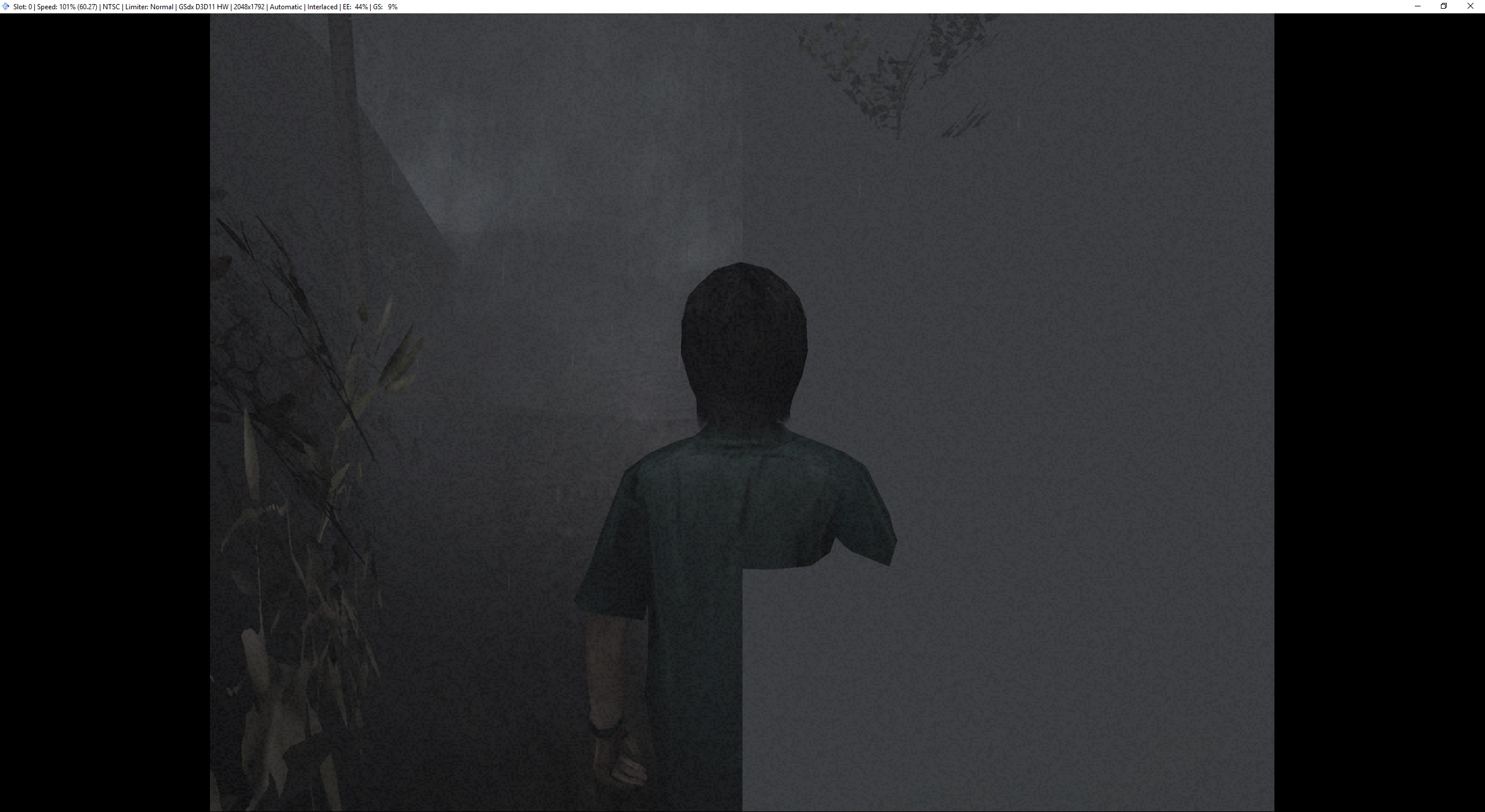
Updating OP.
64fanatic
on 10 Jan 2019
Closing in favor of https://github.com/PCSX2/pcsx2/issues/1341
lightningterror
on 26 Apr 2019
Related issues
 Levan7
·
3Comments
Levan7
·
3Comments
 alucryd
·
6Comments
alucryd
·
6Comments
 mirh
·
6Comments
mirh
·
6Comments
 GeekyGami
·
3Comments
GeekyGami
·
3Comments
 Clarke2131
·
3Comments
Clarke2131
·
3Comments
Most helpful comment
First, let's forget about Dx. Then I really need to look at the code to implement lookup inside depth buffer.