Let's collect games that suffer from lack of mipmap. It would allow to avoid multiple bugs reports and easily see which games are impacted (and how many too).
Active issues:
- [ ] Ape Escape 2 #869 - major issue, requires Full mipmapping(still glitchy) and Trilinear for ground
- [ ] FIFA 2003 & 2005 - "Trilinear" Texture Filtering further improves field textures
- [ ] FIFA 2004 - textures flickering remains in midfield with the goal to goal cam
- [ ] ICO - minor issue, god rays are still missing
- [ ] Jak and Daxter: The Precursor Legacy - tri linear for sea
- [ ] Jak 2
- [ ] Jak 3
- [ ] Jurassic Park : Operation Genesis - major issue
- [ ] No One Lives Forever #2124 - LODs are glitchy/has alignment issues.
Active issues, but not broken without mipmapping:
- [ ] Gran Turismo 4 comment - Ground textures
- [ ] 2002 FIFA World Cup - Mipmapping does not work for any hardware renderer
- [ ] SOCOM II - Enabling mipmapping on hardware will cause graphical issues
Fixed with automatic mipmapping option, but missing CRCs:
- [x] Legacy of Kain Defiance - minor issue, wrong textures on 3D objects
- [x] Legacy of Kain Soul Reaver 2 - minor issue, wrong textures on 3D objects
Fixed with automatic mipmapping option:
- [x] Ace Combat 4: Shattered Skies / Distant Thunder - major terrain flickering (resolved)
- [x] Ace Combat 5: The Unsung War / Squadron Leader - major terrain flickering (resolved)
- [x] Ace Combat Zero: The Belkan War - major terrain flickering (resolved)
- [x] Brian Lara International Cricket 2007 - major issue (resolved)
- [x] Dark Cloud - minor issue, needed for some background scenery (resolved)
- [x] Destroy All Humans
- [x] Destroy All Humans 2
- [x] Ratchet and Clank
- [x] Ratchet and Clank Going Commando / Locked and Loaded
- [x] Ratchet and Clank Up your Arsenal / 3
- [x] Ricky Ponting International Cricket 2005 - major issue (resolved)
- [x] Tomb Raider: Anniversary
- [x] Tribes: Aerial Assault - minor issue, very noticable on vehicle landingpads
- [x] Whiplash
 gregory38
All 219 comments
*Ratchet and Clank
*Ratchet and Clank Going Commando/ Locked and Loaded
*Ratchet and Clank Up your Arsenal / 3
*Ace Combat 4 Shattered Skies
*Ace Combat 5 Skies of Deception
 Nobbs66
on 12 Sep 2016
Nobbs66
on 12 Sep 2016
A quick search showed #168, #775, #869.
Also, iirc Ace Combat zero/belkan war also exhibited the issue, but afaik not Shattered Skies.
 mirh
on 12 Sep 2016
mirh
on 12 Sep 2016
Ratchet: Gladiator (aka Ratchet: Deadlocked) is affected as well afaik
 pepiczech77
on 12 Sep 2016
pepiczech77
on 12 Sep 2016
Also, iirc Ace Combat zero/belkan war also exhibited the issue, but afaik not Shattered Skies.
You recalled incorrectly:
http://wiki.pcsx2.net/index.php/Ace_Combat_04:_Shattered_Skies
http://forums.pcsx2.net/Thread-Ace-Combat-Distant-Thunder-SCES-50410-E
 FlatOutPS2
on 12 Sep 2016
FlatOutPS2
on 12 Sep 2016
Wipeout Fusion, Gran Turismo 4, and Hot Shots Golf 4 have minor flickering due to lack of mip levels. I don't know if they really apply to this list; since they are minor anomalies (other than HSG4 having speed issues w/ depth)
 MrCK1
on 12 Sep 2016
MrCK1
on 12 Sep 2016
Added the two Destroy All Humans games
 refractionpcsx2
on 12 Sep 2016
refractionpcsx2
on 12 Sep 2016
I think there at least one tomb raider. But I don't know which one.
@prafullpcsx2 gives me also some cricket games with mipmap issue.
gregory38
on 15 Sep 2016
I could be completely wrong, but doesn't one of the Hot Shot Golf games have mipmapping as well? I can't remember. I also vaguely remember an FPS game using it as well, but I can't remember what it was.
refractionpcsx2
on 15 Sep 2016
There's a difference between having mipmapping, and having serious issues with mipmapping. The Everybody's Golf(the actual name of the series) games have mipmapping, but they don't have any issues with it(or it has to be the Japan only online game). The games would improve with mipmapping though, as the high res textures don't look as good at a distance.
FlatOutPS2
on 15 Sep 2016
Yes lots of games (maybe nearly all) use mipmapping without any real bad impacts. Nocturne uses it too, for example, the ceiling light color is wrong of 1...
gregory38
on 15 Sep 2016
so you will implement mipmapping in hardware? this is real? : O
 Dokman
on 15 Sep 2016
Dokman
on 15 Sep 2016
I will add many games to this list after 2-3 days (when my tournament ends).
 prafullpcsx2
on 15 Sep 2016
prafullpcsx2
on 15 Sep 2016
Hum, please say if it is major/minor issue.
Good luck ;)
gregory38
on 15 Sep 2016
all the people we want to play our ratchet and clank games and destroy all humans are crazy with the software render i think, because we cannot set a higher resolution and watch the correct textures in the game..
Dokman
on 15 Sep 2016
Really.. Give that man some space. First priority is his family. After that he has to work for a living. After that he has to fulfill all desires and wishes he has. And exactly at the end after he took care about everything in his life he could take care of those who want to play R&C in higher than native or with weak hardware.
 willkuer
on 15 Sep 2016
willkuer
on 15 Sep 2016
I vaguely recall that one of the tomb raiders (legend? anniversary?) also had mipmap issues, though I don't recall if it's HW only.
 avih
on 15 Sep 2016
avih
on 15 Sep 2016
Before GITHUB goes down when rumour of mipmap work goes vrial on the internet. ^^
I have no plan to work on it yet. The purpose of this issue report is to concentrate all the mipmap issue into a single report instead of dozens of them. Less noise in the tracker + easier for tester.
On a side note, my current target is to finish Grandia 2 anniversary edition ;)
gregory38
on 15 Sep 2016
Are you porting all the Grandia 2 AE improvements to the PS2/PCSX2 version?! :P
FlatOutPS2
on 15 Sep 2016
Doesn't Tribes Aerial Assault use mipmaps?
 MonJamp
on 16 Sep 2016
MonJamp
on 16 Sep 2016
Doesn't Tribes Aerial Assault use mipmaps?
Yes, it does and it has several issues with it. I added it to the OP.
FlatOutPS2
on 16 Sep 2016
Added Tomb Raider: Anniversary.
The game has additional problems. An overlay of broken shadow maps, it looks like.
 ramapcsx2
on 16 Sep 2016
ramapcsx2
on 16 Sep 2016
I have a question: assuming that mipmapping doesn't work at all on GSdx: hardware, are these the only games that actually use Mipmapping on the PS2, or is there a certain way they're using mipmapping that's causing severe issues?
I've been trying to look up more on what the games are actually doing since it seems every time a PS2 article/video/anything is posted there's someone saying "does it run R&C yet" or "useless until it runs R&C in hardware," and I'd like to at least be able to rebut them to a degree with what the games are doing and why it's not emulated in hardware.
 JMC47
on 20 Sep 2016
JMC47
on 20 Sep 2016
Lots of game use mipmapping but base layer contains real data. GS mem is more a cache than a standard vram. Mipmap layers are only pointer to memory area. You can do anything you want with the memory. The rule is there is no rule.
Now for RC, I suspect that game only write texture data of the intermediate layers. The plan is to compute in cpu the max layer of the rendering and to upload this layer to the texure (with the help of texture view)
gregory38
on 20 Sep 2016
So, on GSdx hardware, it's pointing to where the actual texture is, rather than where the mipmap is right now? Causing it to load garbage instead of the actual texture? Or, rather, it has no place to actually load the texture since only the mipmap is in memory and nothing is in the base layer?
JMC47
on 20 Sep 2016
Jak and daxter series also has the mipmapping bug
 TheJordanator
on 21 Sep 2016
TheJordanator
on 21 Sep 2016
@TheJordanator That's already in the list
MrCK1
on 21 Sep 2016
@JMC47 Hum, let's use an example
On the game engine, you can compute the lod of the scene. Let's say you find 3. What you can do is
- write Tex pointer to 0x1000
- write Tex layer 1/2/3 to 0x1000,0x1000, 0x1100
- Then do an EE texture write to the address 0x1100.
0x1000 is a random location, it could be anywhere. It could even be in the middle of the frame buffer or depth buffer or whatever. You don't care, as you know the game will only sample the layer 3.
Currently GSdx HW will read the memory located at 0x1000 to generate the texture. The correct behavior will be to upload the 0x1100 part.
Potential solution will be to upload all the layers and to sample the good layer. Perf will suck. So I think we could only upload the top layer that we know will be valid (if we compute the lod on the CPU). It might be enough for some games. However it can become easily complex. So far we reference texture with the layer0 address. Nothing forbid a game to change it but to keep the same layer. We can create new texture based on the layer address (we miss tri-linear filtering). It could to handle EE write in the middle of a layer. But it might create various texture upload based on the camera position (again bad for perf).
Every time, we want to upload a texture. We need to unsizzle it, convert it to 32 bits (or upload a palette). And then ask gl driver to upload which isn't fast. If the game only upload partial mipmap, it likely means that GS mem is too small for its => likely various texture collision/invalidation writes => more texture to upload.
Conclusion we need to do something and see what is the perf. But if it works, nobody will complain anymore ;)
gregory38
on 21 Sep 2016
Forget to say, first step is to do a current state of the game impacted, because I can tell you that all games are likely using different tricks.
And last but not least, extend the internal GS debugger to dump the texture layer. This way we can see what happen.
gregory38
on 21 Sep 2016
Sounds like a total pain in the ass. I do not envy whoever tries to tackle
this issue. At least I have a reference to point people to now when I see
them asking about it. Also, making it a perf vs accuracy issue with no
great solution helps tell users "it's not that simple."
On Wed, Sep 21, 2016 at 6:05 AM, Gregory Hainaut [email protected]
wrote:
Forget to say, first step is to do a current state of the game impacted,
because I can tell you that all games are likely using different tricks.And last but not least, extend the internal GS debugger to dump the
texture layer. This way we can see what happen.—
You are receiving this because you were mentioned.
Reply to this email directly, view it on GitHub
https://github.com/PCSX2/pcsx2/issues/1561#issuecomment-248567332, or mute
the thread
https://github.com/notifications/unsubscribe-auth/AGSuQc50pjcp8JxVwqNIhTbDN5kW42NZks5qsQFagaJpZM4J6aJ4
.
JMC47
on 21 Sep 2016
Oh, you just found the initial name of the GS, PITA ;)
Here the SW implementation
            if(mipmap)
            {
                if(m_vt.m_lod.x > 0)
                    gd.sel.ltf = context->TEX1.MMIN >> 2;
                else
                    // TODO: isbilinear(mmag) != isbilinear(mmin) && m_vt.m_lod.x <= 0 && m_vt.m_lod.y > 0

                gd.sel.mmin = (context->TEX1.MMIN & 1) + 1; // 1: round, 2: tri
                gd.sel.lcm = context->TEX1.LCM;

                int mxl = std::min<int>((int)context->TEX1.MXL, 6) << 16;
                int k = context->TEX1.K << 12;

                if((int)m_vt.m_lod.x >= (int)context->TEX1.MXL)
                {
                    k = (int)m_vt.m_lod.x << 16; // set lod to max level

                    gd.sel.lcm = 1; // lod is constant
                    gd.sel.mmin = 1; // tri-linear is meaningless
                }

                if(gd.sel.mmin == 2)
                    mxl--; // don't sample beyond the last level (TODO: add a dummy level instead?)

                if(gd.sel.fst)
                    gd.sel.lcm = 1;

                if(gd.sel.lcm)
                {
                    int lod = std::max<int>(std::min<int>(k, mxl), 0);

                    if(gd.sel.mmin == 1)
                    {
                        lod = (lod + 0x8000) & 0xffff0000; // rounding
                    }

                    gd.lod.i = GSVector4i(lod >> 16);
                    gd.lod.f = GSVector4i(lod & 0xffff).xxxxl().xxzz();
                }
                else
                {
                    gd.mxl = GSVector4((float)mxl);
                    gd.l = GSVector4((float)(-0x10000 << context->TEX1.L));
                    gd.k = GSVector4((float)k);
                }

                GIFRegTEX0 MIP_TEX0 = TEX0;
                GIFRegCLAMP MIP_CLAMP = context->CLAMP;

                GSVector4 tmin = m_vt.m_min.t;
                GSVector4 tmax = m_vt.m_max.t;

                static int s_counter = 0;

                for(int i = 1, j = std::min<int>((int)context->TEX1.MXL, 6); i <= j; i++)
                {
                    switch(i)
                    {
                    case 1:
                        MIP_TEX0.TBP0 = context->MIPTBP1.TBP1;
                        MIP_TEX0.TBW = context->MIPTBP1.TBW1;
                        break;
                    case 2:
                        MIP_TEX0.TBP0 = context->MIPTBP1.TBP2;
                        MIP_TEX0.TBW = context->MIPTBP1.TBW2;
                        break;
                    case 3:
                        MIP_TEX0.TBP0 = context->MIPTBP1.TBP3;
                        MIP_TEX0.TBW = context->MIPTBP1.TBW3;
                        break;
                    case 4:
                        MIP_TEX0.TBP0 = context->MIPTBP2.TBP4;
                        MIP_TEX0.TBW = context->MIPTBP2.TBW4;
                        break;
                    case 5:
                        MIP_TEX0.TBP0 = context->MIPTBP2.TBP5;
                        MIP_TEX0.TBW = context->MIPTBP2.TBW5;
                        break;
                    case 6:
                        MIP_TEX0.TBP0 = context->MIPTBP2.TBP6;
                        MIP_TEX0.TBW = context->MIPTBP2.TBW6;
                        break;
                    default:
                        __assume(0);
                    }

                    if(MIP_TEX0.TW > 0) MIP_TEX0.TW--;
                    if(MIP_TEX0.TH > 0) MIP_TEX0.TH--;

                    MIP_CLAMP.MINU >>= 1;
                    MIP_CLAMP.MINV >>= 1;
                    MIP_CLAMP.MAXU >>= 1;
                    MIP_CLAMP.MAXV >>= 1;

                    m_vt.m_min.t *= 0.5f;
                    m_vt.m_max.t *= 0.5f;

                    GSTextureCacheSW::Texture* t = m_tc->Lookup(MIP_TEX0, env.TEXA, gd.sel.tw + 3);

                    if(t == NULL) {ASSERT(0); return false;}

                    GSVector4i r;

                    GetTextureMinMax(r, MIP_TEX0, MIP_CLAMP, gd.sel.ltf);

                    data->SetSource(t, r, i);
                }

                s_counter++;

                m_vt.m_min.t = tmin;
                m_vt.m_max.t = tmax;
}
Basically I want to do the same but with a single texture lookup loop (not 6 in worst case).
for(int i = 1, j = std::min<int>((int)context->TEX1.MXL, 6); i <= j; i++)
Hopefully it will be good enough to avoid most of the glitches. It won't be perfect, some game won't be supported but it would be a good start.
However I'm not sure how to handle texture size/clamp behavior etc... Hum, I need to check if mipmap is available with integer texture coordinate.
gregory38
on 22 Sep 2016
@prafullpcsx2 do you remember how this game used to be rendererd (HW, 2x) :stuck_out_tongue_winking_eye:

gregory38
on 24 Sep 2016
@ramapcsx2, is it me or we could see the main character in the painting ?

gregory38
on 24 Sep 2016
@gregory38 : Yes, I do remember

And from your screenshots, I am way too excited now. :+1: With gregory impossible is nothing.
prafullpcsx2
on 24 Sep 2016
@prafullpcsx2 do you remember how this game used to be rendererd (HW, 2x) 😜
I'm just amazed that for someone who does a lot of stuff with graphics, your font (at the window title) uses full hinting and no subpixel antialiasing.. this is so 90's (so actually maybe appropriate) ;)
avih
on 24 Sep 2016
As Napoleon said, "The word impossible is not French." :stuck_out_tongue:
Don't expect too much. Solution is quite hacky and only on gs dump. Strangely it seems to require 8 bit textures. However when I compare with SW renderer. Some parts are better on the HW side, some parts are better on the SW side.
I'm just amazed that for someone who does a lot of stuff with graphics, your font (at the window title) uses full hinting and no subpixel antialiasing.. this is so 90's (so actually maybe appropriate) ;)
Don't you know that I'm blind (nah kidding). Yes I'm an old guy, I enabled subpixel aliasing. Will see on the next reboot (not sure it is required), if there is any diff.
gregory38
on 24 Sep 2016
UserHacks_mipmap = 1
on latest git. Only positive feedbacks are accepted.
gregory38
on 24 Sep 2016
UserHacks_mipmap = 1
We need some automatic GUI for all the hidden options.
avih
on 24 Sep 2016
Works in Tomb Raider for the picture on the wall! Not much else yet though ;p
ramapcsx2
on 24 Sep 2016
so we can expect a hw mip mapping in the near future? : O
Dokman
on 24 Sep 2016
on latest git. Only positive feedbacks are accepted.
Okay. I think it's great how this make the mipmapping issue worse on Jak II compared to no mipmapping. :+1:
FlatOutPS2
on 24 Sep 2016
Seems to help Jak 3, do you want screenshots?
Edit: sort of
pepiczech77
on 24 Sep 2016
Only positive feedbacks are accepted.
Distant textures in Ratchet & Clank don't shimmer as badly as they used to.
Ocean in Jak 3 seems more accurate.
Tree branches in Tribes: Aerial Assault no longer invisible at a distance.
No noticeable performance impact in games I've tried so far.
widesrceen not work hahahahah
In a specific game, or in general?
I haven't encountered any problems (with in-game widescreen modes or with hacks).
 Dreadmoth
on 24 Sep 2016
Dreadmoth
on 24 Sep 2016
@Dreadmoth how you have configurewd it? i don't know how i can do it :( i've gone gsdx and added those hack but... not works :(
Dokman
on 24 Sep 2016
Note: you need to enable mipmap support on the SW renderer too. Anyway, I'm currently working on Ratchet & Clank. There is something wrong somewhere. I will keep you updated if I find the issue.
gregory38
on 24 Sep 2016
Fifa and cricket games look a lot better now, Jurassic park is still very buggy. Overall it's a very positive step forward. :+1:
prafullpcsx2
on 24 Sep 2016
I'm pretty confident that situation will be better when I find a fix for RC. The first line of the texture is good. Remaining is bad. I suspect a wrong buffer width/line size somewhere. So I'm still uploading wrong data to the GPU in some cases.
gregory38
on 24 Sep 2016
Jak 1 and Gran Turismo 4 "scattered" mipmap levels I guess you could say

MrCK1
on 24 Sep 2016
OMG, new improvements on master. @ramapcsx2 @prafullpcsx2 @Dreadmoth could you please retest your game.
gregory38
on 24 Sep 2016
Because I'm quite happy of my code. Here a nice screenshot.

Arg, looking closely it isn't perfect. But it is already a huge improvement.
gregory38
on 24 Sep 2016
I have the feeling this is a huge joke. You decide like some days ago to work on it. Do something like copy pasting from sw to hw and get instantly good results without performance impact? The fuck?
willkuer
on 24 Sep 2016
Wow, good job gregory!
refractionpcsx2
on 24 Sep 2016
Will check it out once the automated build finishes :)
I'm making a PR for something else that might improve R&C...
EDIT: https://github.com/PCSX2/pcsx2/pull/1587
Dreadmoth
on 24 Sep 2016
@Dreadmoth It's done now. I imagine the patience is killing you 😃
Jak 3 looks awesome, besides the rainbow hair :P

MrCK1
on 24 Sep 2016
@willkuer
I started thursday night. Nothing was working, Friday I remembered the offset trick. It was the initial version that I pushed. But actually, I think about it a long time ago.
The remaining issue of RC is potentially a rounding issue to select the good layer. And it seems ace combat is still broken.
gregory38
on 24 Sep 2016
Tribes: Aerial Assault is perfect.
 woj1993
on 24 Sep 2016
woj1993
on 24 Sep 2016
Cricket games are almost perfect now, ICO rays are visible in intro (should be ingame too), Harry Potter Half Blood Prince is looking exactly like Sw mode, Fifa 2003 is also very good (suffers from other separate issue), Jurassic Park also looks much better. Awesome work gregory. :100:
prafullpcsx2
on 24 Sep 2016
HSG4/Everybody's Golf works OK. Tree and ground textures get corrupted based on camera angle
MrCK1
on 24 Sep 2016
I pushed a new fix. It would avoid issue with camera angle or some distance. My R&C dump is really nice now.
gregory38
on 24 Sep 2016
Gregory, will you marry me? I f'ing love you for this!
Nobbs66
on 24 Sep 2016
Jak II - mipmapping went from worse than no mipmapping earlier today to 1:1 with software mode now! :-O :+1:
It did notice a small issue, but it's the same on SW mode and might be on real console to, because it's not that noticeable on native res.
Ace Combat 4 has improved, but still has flashes of the broken graphics and I got a crash...
FlatOutPS2
on 24 Sep 2016
Very nice :+1:

Some textures (seems to be mostly smaller objects?) still pop as you move around or if you stand in specific places - but the majority look correct from almost all angles.
EDIT: Same applies to Jak 3 ^, however the ground is affected more than in R&C
Tribes: Aerial Assault seems to be pretty much perfect
Dreadmoth
on 24 Sep 2016
I got noticed a gap between textures in Ace Combat when close to the ground. Here's a GS dump:
Ace Combat textures close up big black gap.zip
FlatOutPS2
on 24 Sep 2016
@gregory38 : It looks like Jurassic Park got a little worse ingame with your latest commit. Here is a gsdump. I believe it may be suffering from some other issues too.
prafullpcsx2
on 24 Sep 2016
Just tried R&C, the game runs extremely well! But still a bit of glitching, i think it's when it's changing mipmap. There's also a bunch of SPS in the menu which is odd.

What's more annoying, if you're recording a GS Dump of the SPS in the menu. it stops! If i hold down Shift, Ctrl and F8, I don't get any glitching or SPS... Explain that one :P
Destroy All Humans is about at the same point, mostly fixed but some glitching/flicker of textures. Difficult to see it all as the lighting is still messed up leaving a ragged shadow over the screen.
refractionpcsx2
on 25 Sep 2016

This is my case with my R&C copy so...
i cannot zip the gs file... Github don't want to get it...
PS:
i can upload it to mega is in 7z
https://mega.nz/#!s4lwTI6D!5fn8QtlQgoiI803LaVehdPLoZFZSydhTL1l-2nYFORc
Dokman
on 25 Sep 2016
@Dokman you need to put the UserHacks_mipmap = 1 in your gsdx.ini file, then make sure mipmapping is enabled for sw mode, that looks like you haven't done that.
refractionpcsx2
on 25 Sep 2016
okay let me see hahaha
Okay sorry my fault with my new compiled binary of pcsx2
Dokman
on 25 Sep 2016
okay let me tell you now how i watch it

my gs dump
https://mega.nz/#!0tFVzCCa!gfhkkVVdNSFWkZrkjE1G4l-2lPImnGvdf1lb3LT_7O0
Dokman
on 25 Sep 2016
Hmm, are you using an old version or something? Because that looks like how it always looked (or close), but it looks pretty much fine mine with the newest git build.
refractionpcsx2
on 25 Sep 2016
i have the latest build with yor pr for R&C and Jak

Dokman
on 25 Sep 2016
can you try the master branch?
refractionpcsx2
on 25 Sep 2016
i tried it in another binary and i have the same problems

Dokman
on 25 Sep 2016
and you definitely have the right gsdx dll selected, not an old one?
refractionpcsx2
on 25 Sep 2016
it's compiled by a new clone of the code so i think yes hahahaha

Dokman
on 25 Sep 2016
Then that's very strange because it's fine here! :S
refractionpcsx2
on 25 Sep 2016
with autoflush works but i have a a worst performance i have like 10 fps or 15
Dokman
on 25 Sep 2016
Hmm, I have autoflush off.
refractionpcsx2
on 25 Sep 2016
idk what is happening hahahaha
Dokman
on 25 Sep 2016
@Dokman Maybe try the AppVeyor build of the framebuffer shader PR ?
With that build and UserHacks_mipmap=1 added to gsdx.ini, Ratchet & Clank looks like this for me (using these GSDX settings).
Dreadmoth
on 25 Sep 2016
what hacks you have set for r&c?
PS: i have this i set auto flush
Dokman
on 25 Sep 2016
Nothing enabled in the menu - the "Enable HW Hacks" checkbox must be checked for the UserHacks_mipmap=1 ini setting to apply
Dreadmoth
on 25 Sep 2016
I just have fast invalidation enabled, nothing else
refractionpcsx2
on 25 Sep 2016
thanks hahah i don't know that
Dokman
on 25 Sep 2016
Just FYI it doesn't seem to work for me either. I'm using the latest build, HW hacks enabled, UserHacks_mipmap=1 in gsdx.ini.
Edit: Take that back. It does look some better but still pretty damned nasty.
 Sarania
on 25 Sep 2016
Sarania
on 25 Sep 2016
in my case R&C 1 is like perfect, not perfect but it's playable, it has a lot of stuttering but is playable
Dokman
on 25 Sep 2016
Deus Ex makes heavy use of mipmapping. Without the hack, the game looks fine, if a bit shimmery. With the hack enabled, everything breaks.


 AmbientMalice
on 25 Sep 2016
AmbientMalice
on 25 Sep 2016
On the option, I think you could use the keyboard shortcut. The hack ought to be the start/default value only.
Otherwise, code is quite new. Please don't expect too much. I'm not even sure, if it could really work. Remember it is hack not a full implementation.
Just tried R&C, the game runs extremely well! But still a bit of glitching, i think it's when it's changing mipmap. There's also a bunch of SPS in the menu which is odd.
What's more annoying, if you're recording a GS Dump of the SPS in the menu. it stops! If i hold down Shift, Ctrl and F8, I don't get any glitching or SPS... Explain that one :P
@refractionpcsx2
I think there are potentially texture cache issue too for this game.
On the mipmap layer. My hack only loads a single layer. Potential issue
- layer value not correctly computed
- texture cache becomes crazy with tons of texture smaller than a block
- potentially you have texture hole inside layer
gregory38
on 25 Sep 2016
Ok I finally realized this is what you really need to enable mipmapping
mipmap=1
UserHacks=1
UserHacks_mipmap=1
Indeed Ace Combat 5 improves in the distance (while nearest part of the terrain is still kind of glitchy)
mirh
on 25 Sep 2016
@gregory38 : Did you had a look at jurassic park dump I attached above? Is it suffering from only mip map issue or something else is also there?
prafullpcsx2
on 25 Sep 2016
Quick look. Even sw render got some difficulties to replay the dump. There are likely others issues in the mix. I'm still trying to understand how to proper round the mess.
gregory38
on 25 Sep 2016
With latest fixes R&C3 is working near flawless for me now, so ignore my previous message.
Edit: Actually all three are :) And I get full speed in DX11 mode :)
Sarania
on 25 Sep 2016
@gregory38 i have a 4790K @ 4,4Ghz and i can't play with a good fps rate in R&C 1, why is happenning?
i have set the preset to Agressive
Dokman
on 25 Sep 2016
@Dokman Strange, R&C 1 runs full-speed (aside from the in-game menu) using the settings I posted earlier on my 4770 @ 3.4GHz and GTX 770 - what settings / speedhacks are you using?
I have EE Cyclerate and VU Cycle Stealing at 0, all other speedhacks enabled.
(setting EE Cyclerate to negative values and/or VU Cycle Stealing to anything above 0 seems to result in reduced "true" FPS - making the game feel very sluggish even at "full speed")
Dreadmoth
on 25 Sep 2016
okay i will see later
Dokman
on 25 Sep 2016
Just set the preset back to Safe, and make sure the MTVU speedhack is still enabled.
FlatOutPS2
on 25 Sep 2016
maybe we could open a forum thread for mipmap support. So this issue tracker doesn't explode.
By the way, Legacy of kain is much better except when the erratic gliches when you change the camera angle
gregory38
on 25 Sep 2016
eith dx11 it works at full speed
Dokman
on 25 Sep 2016
@gregory38 - I will make the thread now, once sec.
Edit, done: http://forums.pcsx2.net/Thread-New-feature-Needs-testing-GSdx-HW-mode-Experimental-mipmap-support
Sarania
on 25 Sep 2016
By the way, Legacy of kain is much better except when the erratic gliches when you change the camera angle
The same goes for most other games. If you move the camera you can often see (part of) the mipmapping glitches pop back in.
FlatOutPS2
on 25 Sep 2016
Yes Need some tuning. Does the glitches remain if you stop moving on the bad angle ? I need to capture it in a gs dump to understand what going on.
gregory38
on 25 Sep 2016
@gregory38 Here is a vid Nobbs made of R&C 1 that shows more of the total effect:
https://www.youtube.com/watch?v=UNuhWBs8RiA
at around 35 seconds you can see that they do remain if you stop the camera on that angle.
Sarania
on 25 Sep 2016
Yes Need some tuning. Does the glitches remain if you stop moving on the bad angle ? I need to capture it in a gs dump to understand what going on.
They did when I tried Legacy Of Kain Soul Reaver 2.
FlatOutPS2
on 25 Sep 2016
Looking at the video, the rendering is quite good. Geezzz people are never happy :p it is likely a rounding issue of the lod factor. I'm pretty sure it can be improved. I'm surprised it isn't better with latest git
gregory38
on 25 Sep 2016
@gregory38 don't feel sad; people are likely playing above native resolution so these kinds of glitches are far more noticeable
If they were playing in Native Resolution on a CRT then they probably wouldn't even notice :)
I'm loving the work being done to improve this. I'll poke around my PS2 disc collection and do some testing as well.
 jcdenton2k
on 25 Sep 2016
jcdenton2k
on 25 Sep 2016
@gregory38 i am really happy with this changes 😄 i am waiting for more fixes like this
Dokman
on 25 Sep 2016
Just tried Tribes: Aerial Assault. The objects look good, but terrain textures change at the wrong distances.
FlatOutPS2
on 25 Sep 2016
Set to OpenGL, set mipmapping and frameskp to 5 and then profit for your own Destroy All Humans 2
it has the same problem in the camera, sometimes if you have a bad camera the textures are bad
Dokman
on 25 Sep 2016
ICO godrays are visible in HW, but missing at certain angles. Added a GS Dump. Godrays constantly visible in SW, missing a certain angles in HW:
ICO godrays missing at certain angles with HW mipmapping.zip
FlatOutPS2
on 25 Sep 2016
missing letters in Destroy All Humans
https://mega.nz/#!ch0G2QDK!QWoK5tlD7ERClPKIRLcyWMcQKEnmbIJEuc77vpQ79ns
Second option where are you? XD

Dokman
on 25 Sep 2016
@gregory38 Will this finally fix the car textures in Ridge Racer 5 in hardware mode?
They work fine in software mode.
Hardware Mode:

Software Mode:

 Namcot
on 26 Sep 2016
Namcot
on 26 Sep 2016
IIRC, the cars has issues with the texture cache not mip mapping.
Nobbs66
on 26 Sep 2016
Just FYI:
Fezzer, Nobbs and I all get random crashes in R&C(them in 2, me in 3) with the latest build and HW mipmapping. We haven't yet isolated if it's related to having HW mipmap enabled(need more tests) or something else. Nothing useful appears in the log and the crashes are random complete exits of the PCSX2 process. Sometimes it happens very quickly, other times it can go an hour without happening. It's super random :/
I'll try to get some additional tests to this end done tomorrow.
Sarania
on 26 Sep 2016
IIRC, the cars has issues with the texture cache not mip mapping.
Yes, it's a TC issue. RRV doesn't have any mipmapping issues.
FlatOutPS2
on 26 Sep 2016
With the latest build Ace Combat 4 still has the same texture issues close to ground I posted a GS Dump for earlier in this issue.
Legacy Of Kain is much improved.
FlatOutPS2
on 27 Sep 2016
Let's look first at the easy case.
Legacy Of Kain is much improved.
You still have some bad texture in some angles ? If you can capture it on a dump it will be nice, it could be a slight rounding issue.
gregory38
on 27 Sep 2016
It could also be a seperate not mipmapping related issue. I'll look into it later.
FlatOutPS2
on 27 Sep 2016
Yes it could be a YATCI (yet another cache issue). Hopefully moving around can help to see if it is likely mipmap related or not.
gregory38
on 27 Sep 2016
The ICO godrays missing at certain angles GS Dump I posted earlier has gotten worse with the latest mipmapping builds. Now it doesn't shine properly at any angle.
EDIT: It got worse with https://github.com/PCSX2/pcsx2/commit/04d82d81278c564080cc116655e7ad415f90f637
FlatOutPS2
on 27 Sep 2016
Found a couple of remaining bad textures / camera positions:
Ratchet & Clank
Ratchet & Clank 3
Jak 3 has patterns and shimmering noise on some terrain textures at a particular distance from the camera, which only occurs with mipmapping enabled:
Jak 3 - mipmapping enabled
Jak 3 - mipmapping disabled
Jak X has similar shimmering around the vehicle turntable on the main menu:
Jak X - mipmapping enabled
I guess texture cache issues might be affecting certain mip levels?
Dreadmoth
on 27 Sep 2016
@FlatOutPS2 I suspect that ICO will require a full mipmap implementation. And even with it, it might not work well with upscaling.
gregory38
on 27 Sep 2016
Jak & Daxter: The Precursor Legacy isn't correct yet either:
The sea still has squares in it.
Jak & Daxter sea mipmapping.zip
FlatOutPS2
on 27 Sep 2016
I checked up on Soul Reaver 2 and couldn't find the issue with the latest build. I assume it was a fluke. I did see a rare flicker but it too was a one off that couldn't be reproduced.
FlatOutPS2
on 28 Sep 2016
@Dreadmoth I'm looking at your R&C dump. So for the R&C 3, I update a bit the rounding to take care of the issue. I'm still looking at the first one. I try to debug the left "tower" but I think there is a bug in the SW renderer. Here the SW renderer texure

Sw rendering is kind of flat... HW is much nicer. I will look the right tower now.
@FlatOutPS2
Ok. Anyway, it would never be perfect. Due to cache issue and various rounding upscaling. Another tester told me a similar report. Basically he notices a rare flicker of a couple of pixels.
gregory38
on 28 Sep 2016
@Dreadmoth actually what is the issue of the first dump ?
HW renderer:

SW renderer:

Zoom the 2, you can see that HW properly map the texture. You have nice windows, bricks, tiles. Whereas you have a lego look on the SW renderer.
gregory38
on 28 Sep 2016
In the screen I included in the zip with the GS dump (captured at the same time with shift-F8), the dirt path texture near the centre of the screen is offset:

It only occurs in that camera position (with a small range in any direction).
If I disable mipmapping it looks the same. In software it looks correct, as in the images you posted.
Dreadmoth
on 28 Sep 2016
Ok. My lastest update fix it. I will test it a bit on my side, if it is good, I will push it.
gregory38
on 28 Sep 2016
Latest changes seem to have fixed the bad textures at certain angles in Ace Combat as well. Still has the gaps between textures when close to the ground at certain locations/angles.
FlatOutPS2
on 28 Sep 2016
❤Gregory is amazing❤
Thanks so much for your hard work!
Sarania
on 28 Sep 2016
I did a quick look at the J&D sea testcase. As APE2, it is clearly a limitation of my implementation. A texture mipmap is composed of several layers. In some situation, you want to interpolate between layers (it is called tri-linear filtering). It allow to have a smooth shading when you apply a texture on a "long distance" (often ground or sea).
However my implementation only picks a single layer for mipmap which solves 90% of mipmap issues. Unfortunately it doesn't allow proper tri-linear filtering.
gregory38
on 29 Sep 2016
@FlatOutPS2
I fail to see the gap issue on your ace dump. But by gap, you mean that you kinds of saw 2 layers side by side instead of a smooth pattern. In this case, it is likely the same issue as my previous post. It would require more work.
gregory38
on 29 Sep 2016
Oh, I see, it's a mipmap scaling issue. I didn't see it either with native resolution.
BTW: You could've seen what I meant in the image that came with the dump. ;)
FlatOutPS2
on 29 Sep 2016
I will look at it. I didn't test upscaling. I don't know why but there is a hack that split differently the number of draw call when it is upscaled https://github.com/PCSX2/pcsx2/blob/master/plugins/GSdx/GSState.cpp#L2596
gregory38
on 29 Sep 2016
I tried the FIFA games with mipmapping and they look great too, but they seem to suffer from the same interpolation issue that Ape Escape 2 and J&D have.
FlatOutPS2
on 29 Sep 2016
Hum, all games that really uses mipmap for filtering instead of a memory optimization (like R&C) will suffer of this issue. Potentially instead to always select the top level, I could do a mean of min_lod/max_lod, it could be less bad (or could be worst).
The real solution will be to really handle mipmap. But this part won't be free. I'm afraid it will generate a lots of texture cache miss.
gregory38
on 29 Sep 2016
@gregory38 and how you can handle the texture cache? it's from the graphics driver or it's from the gpu?
Dokman
on 29 Sep 2016
I mean GSdx texure cache. In short, it is complicated. I always said that current implementation is limited. Honestly it is far better than expected.
gregory38
on 29 Sep 2016
i am studying ++ but i don't know how it works 3D, i want to learn dx and opengl but if i don't know the basis i cannot help sorry :( i don't have any book for it :(
Dokman
on 29 Sep 2016
You should google tutorials, there are many on the web :)
refractionpcsx2
on 29 Sep 2016
okay i will see in google i will try to work a little bit with dx and ogl before to start here
Dokman
on 29 Sep 2016
Can definitely confirm that Hardware mode with mipmapping is faster than hardware mode without mipmapping by a good 30%.
Sarania
on 30 Sep 2016
Can definitely confirm that Hardware mode with mipmapping is faster than hardware mode without mipmapping by a good 30%.
Was someone doubting that? :p This only goes for R&C obviously, as other games are not/hardly any faster.
FlatOutPS2
on 30 Sep 2016
Interesting. How many have you tested that way? Why would R&C in particular get such a phat speed boost?
Sarania
on 30 Sep 2016
Because it affects way more textures in that game that flicker/switch around a lot. In other games there are usually just a few wrong textures, and most show one wrong layer instead of flickering between several.
FlatOutPS2
on 30 Sep 2016
Ahh, makes sense. Thanks.
So where are we on this? Are there still improvements to be made? Just trying to get things back on topic :P
Sarania
on 30 Sep 2016
R&C is faster because of Vulkan. Oh wait, no ;)
Actually I think I understand why. When the layer isn't used the texture pointer is random and often 0. However 0 is also the address of a frame buffer. So before you could use the texture, you need to convert it from the frame buffer. It is slow whatever the number after Dx.
gregory38
on 30 Sep 2016
On the implementation I think we are pretty good (i.e. I can't really do better in a short term).
- we need to discuss the option topic. Dedicated option or same option as SW renderer
- @ramapcsx2 could you test tomb raider again
- the biggest bug that remain is the interpolation between layers (aka mipmap => go back to square 1 :stuck_out_tongue: )
gregory38
on 30 Sep 2016
@gregory38 Vulkan is so powerful that even without an implementation of it we are seeing speed boosts! XD
I personally think it should be tied to the SW renderer option. My reasoning is that no one will really be using both HW and SW renderers at the same time(they might sometimes switch back and forth but obviously you can't use both simultaneously) and that less GUI clutter and sneaky options to remember is always a good thing.
The trick is where to put it in the UI if we do that. Currently it's divided into HW and SW sections. Having it specifically in either kind of doesn't make sense if it does both. There is also the problem that it's sort of a "hack" as gregory has said. But putting it in HW hacks makes no sense if it's for both modes. Hmm. But having separate options seems unnecessarily over complicated IMO. I still think combining it is best. Just the how of the UI I'm not sure. Maybe at the very bottom outside of either section?
There is still also the question of whether to enable it by default or not. Unless it badly breaks more than one or two games I think we should. Well I mean if it breaks them like crashes then that's different but I mean like graphically.
Sarania
on 30 Sep 2016
The trick is where to put it in the UI if we do that.
Default full mipmap implementation enabled, hw hacks - > Fast Mipmap
refractionpcsx2
on 30 Sep 2016
Wait, what do you call full and fast mipmap ?
gregory38
on 30 Sep 2016
full = slow implementation with interpolation of layers etc
fast = what we got now :P
refractionpcsx2
on 30 Sep 2016
Well we can do that when we have a full implementation lol
Sarania
on 30 Sep 2016
sorry, slow brain here. There is 3 states currently.
full => interpolation of layers => only implemented in SW renderer
mid => select a single valid layer => my latest improvement
none => always take top layer => the broken texture stuff in some game
So what do you call "what we got now" ? mid or none ?
gregory38
on 30 Sep 2016
We could add a Mipmapping dropdown list with those options below Interlacing (F5)
FlatOutPS2
on 30 Sep 2016
I'm pretty sure he means "What we got now" = mid but I could be wrong.
Sarania
on 30 Sep 2016
I like Flatout's idea. That's extensible too even if we do get a full implementation. "Full," "Fast," and "Off"
Sarania
on 30 Sep 2016
orry, slow brain here. There is 3 states currently.
full => interpolation of layers => only implemented in SW renderer
mid => select a single valid layer => my latest improvement
none => always take top layer => the broken texture stuff in some gameSo what do you call "what we got now" ? mid or none ?
what we have now is "mid", I probably misunderstood, but I thought the intention was to have a full implementation for hw mode but ofc it's usually too slow, but it might be okay for some games (or epic hardware) so people have the option then to go down to the "mid" option. tbh I don't think there's any benefit to having a "none" option, the speed hit from the "mid" implementation is minimal, if not a boost to speed as some have pointed out.
refractionpcsx2
on 30 Sep 2016
The reason for having a none option would be in cases where it actually breaks things. Who knows how feasible a perfect full implementation would be and/or if it would break things. AFAIK this current implementation still breaks some games right? What about Deus Ex like mentioned above?
Sarania
on 30 Sep 2016
Several games that don't have issues without HW mipmapping, do have issues with the current HW implementation. Like Deus Ex, but I also noticed it in Gran Turismo 4(though not as bad), and there are probably many more with at least some minor negative effects.
FlatOutPS2
on 30 Sep 2016
@FlatOutPS2 Wait, what mipmapping issues exactly are there in GT4?
MrCK1
on 30 Sep 2016
I'm not sure, I noticed some messed up grass textures in the distance(interpolation issue?). I didn't mean to use mipmapping, so I just turned it off.
FlatOutPS2
on 30 Sep 2016
I probably misunderstood, but I thought the intention was to have a full implementation for hw mode but ofc it's usually too slow,
@refractionpcsx2, lol nice try.
the speed hit from the "mid" implementation is minimal, if not a boost to speed as some have pointed out.
The issue is that game will take a lower level of details for texture. It will be too low for upscaling. I'm pretty sure you have mipmapping issue on all games but nobody never noticed them. Or they uses AF to compensate it.
gregory38
on 30 Sep 2016
and we cannot compensate for that when upscaling? like force it down a level for Native x2, down another level for Native x3 and so on, obviously clamping at a min of 1 (or 0, depending on the base).
refractionpcsx2
on 30 Sep 2016

and we cannot compensate for that when upscaling? like force it down a level for Native x2, down another level for Native x3 and so on, obviously clamping at a min of 1 (or 0, depending on the base).
You can do that, but it won't work. How do you know if layer 0/1/2 got real data when you draw a triangle with a a lod of 3. (it will work for game that always update all layers)
gregory38
on 30 Sep 2016
You can do that, but it won't work. How do you know if layer 0/1/2 got real data when you draw a triangle with a a lod of 3. (it will work for game that always update all layers)
Yeah but, level 3 is crap :P
refractionpcsx2
on 30 Sep 2016
I need some openGL testers of the new PR #1601 (read the PR info). Only the speed.
gregory38
on 30 Sep 2016
So I updated the PR #1601 to support interpolation between layer. As expected it is slow and it behaves badly with the texture cache. It would be nice to test APE ground and such.
gregory38
on 1 Oct 2016
By the way, i think we will have more state on the mipmap.
- none
- mipmap single layer
- mipmap single layer + auto generation of sub layer
- mipmap multiple layers
master can do 2nd. New pr is 4th. And 3rd is not yet fully build on my head. However it could maybe replace aniso
gregory38
on 1 Oct 2016
Actually maybe we will need 2 separate options. So here my proposal.
Extend Texture Filtering combo box with
- Trilinear
- generate automatic mipmap from the top layer when PS2 uses trilinear filtering
- Trilinear forced
- same as above but always enable it (even when PS2 doesn't use mipmap)
Add a combo box for mipmap setup
- none
- 1 layer
- current code
- all layers or full (experimental)
- note it will disable tri-linear filtering
- I'm not even sure it will work one day due to speed hit and texture cache crazyness
Tri-linear could be an interesting option to reduce shimmering and it is fully compatible with upscaling (not yet tested).
So guys what are your opinions?
gregory38
on 2 Oct 2016
You are amazing and I can't wait for the final code to be committed :)
That said, my take is that certain options that sacrifice speed for more accuracy should be included in the emulator but under the 'Hacks' section with proper information/warning that it is SLOW and will likely cause a severe performance hit.
Then people with potato computers can either upgrade or just play on the original hardware ;)
Allow the end-user to always make the choice between accuracy and performance for their system. Defaults should favor performance overall (like it is now) but people who want to see more accuracy can choose to enable those options when it sacrifices performance to do so.
Even though my system is pretty potato, I can still play FF12 with nearly full 'accurate' settings enabled like for OpenGL Blending on High and without a noticeable drop in FPS.
It is amazing with all the work you've done on mipmapping so far and I am eager to see what happens with it :)
jcdenton2k
on 2 Oct 2016
That said, my take is that certain options that sacrifice speed for more accuracy should be included in the emulator but under the 'Hacks' section with proper information/warning that it is SLOW and will likely cause a severe performance hit.
Well, to be honest the very definition of hack is meant to imply the contrary.
Besides, the actual problem is that some games are more picky than others.. And settings are general.
Aside of fixes improving overall pickiness anyway, situation isn't really going to be solvable until we find some CRChack-like way to handle this.
mirh
on 3 Oct 2016
@gregory38 Tomb Raider mipmaps look good :)
I like the "Extend Texture Filtering combo box" option.
ramapcsx2
on 3 Oct 2016
Added Whiplash to the list. It also had mipmapping issues. All issues seem to be resolved with the Basic option.
FlatOutPS2
on 7 Nov 2016
Could someone post (or tick) all games that are fine with Basic mipmapping.
gregory38
on 7 Nov 2016
FIFA 2004 looks fine with Basic mipmapping(not entirely with Basic blending, but that seems offtopic), but with the goal to goal cam textures in the middle of the pitch flicker slightly(near and far are fine). No mipmapping or Texture Filtering options resolves this. Only mipmapping off and Software mode remove the flickering.
FIFA 2003 had a similar issue, but the "Trilinear" option seemed to resolve it.
FlatOutPS2
on 7 Nov 2016
@prafullpcsx2 do you confirm that your cricket games are fine?
gregory38
on 8 Nov 2016
@gregory38 : Yes both games are almost fine (minor hiccup here or there but nothing too serious)
prafullpcsx2
on 8 Nov 2016
@prafullpcsx2 Thanks you.
Anyone with a status of destroy all human games on latest git ?
gregory38
on 8 Nov 2016
Destroy all humans 1 is fine.
FlatOutPS2
on 8 Nov 2016
_Destroy All Humans! 2_ textures are fine.
_Spider-Man 2_: with mipmapping enabled, objects in the middle distance are less likely to have scrambled textures - but other textures may become scrambled instead.
Dreadmoth
on 8 Nov 2016
Hum, actually maybe Spider man is like Jak. Potentially, internal mipmap layers are drawn in the middle of the frame buffer. The texture cache doesn't support it so far.
Anyway current status is not too bad.
gregory38
on 9 Nov 2016
barnyardbig.zip
barnyard.zip
@gregory38 : Barnyard still suffers from some minor issues. It isn't as bad as Jurrasic Park though. Please do have a look.
Edit: Added a bigger gsdump too.
prafullpcsx2
on 10 Nov 2016
Is the list up to date?
I'd like to add the games that are affected by "Basic" and "Full" in Gdsx tooltips.
 lightningterror
on 12 Jan 2017
lightningterror
on 12 Jan 2017
Found an issue with R&C games where the afterglow effect of lights is misplaced on higher than native resolutions
native

2x native

8x native

 SyeThunder
on 28 Jan 2017
SyeThunder
on 28 Jan 2017
This is not the place to post random R&C issues. If you need help with an issue you're not sure if settings can resolve, make a thread on the forum instead: http://forums.pcsx2.net/Forum-General-Discussion-and-Support-Windows
You should be able to resolve this issue by going to Config > Video (GS) > Plugin Settings > turn on "Enable HW Hacks", go to Configure Hacks and enable the "Half-pixel Offset" hack.
FlatOutPS2
on 28 Jan 2017
@SyeThunder that's normal behavior when upscaling. Try using Half-Pixel Offset or Wild Arms hack to reduce the gap you're seeing.
MrCK1
on 28 Jan 2017
sorry, the problem seemed to fix itself when i had mimapping turned off so i thought it had connections to mipmapping. ive since seen that it hasnt. Thank you for the tip aswell
SyeThunder
on 28 Jan 2017
Parappa the Rapper 2 needs mipmapping for the VS mode background to have a nice gradient to white. But even SW mode it's glitched :(
HW with no mipmapping emulation - incorrect (with mipmapping enabled bg looks the same as SW)

SW - incorrect

Looks like Sony didn't even bother to emulate it in their PS4 port...
https://youtu.be/IqoXwBjhlsY?t=135
For the record, on a real PS2, the background looks like this:

 oddMLan
on 16 Mar 2017
oddMLan
on 16 Mar 2017
a nice gradient
Typically the thing that won't be implemented soon in the HW renderer.
I suspected there are some bug in the SW mipmap implementation. There are FIXME/TODO in the code. I saw mipmap issue in SotC too. Could you provide a gs dump of the above image ?
gregory38
on 16 Mar 2017
Could you provide a gs dump of the above image ?
Sure. Here you go
http://www.mediafire.com/file/75oavgb7dysbb9y/Parappa2VSmode_gsdump.zip
oddMLan
on 17 Mar 2017
Hum, arg, the bug occured before the dump. Someone wrote some texture in the GS memory. But the texture is wrong. It could be a core bug, or a texture transfer issue.
Here the first layer (good)

Here the 2nd layer (bad)

And 3rd layer isn't better

Each layer ought to be similar as previous layer but smaller.
gregory38
on 17 Mar 2017
I believe something similar to this happens in Guitar Hero 3 as well
MrCK1
on 17 Mar 2017
@MrCK1 is it broken in SW renderer too ? On the HW, there are plenty of texture cache issue.
gregory38
on 17 Mar 2017
No, just HW.
MrCK1
on 17 Mar 2017
Not the same issue. It is more like Jak's eye issue (aka texture cache). Not a EE-GS texture transfer issue.
gregory38
on 17 Mar 2017
Mip-mapping is still broken in Tomb Raider: Anniversary for me on the latest build grabbed from the build bot. I did not use the final game (CRC hash for the game executable is different and thus the GSDX detection hack is voided). Any plans to support mip mapping without the use of hard coded excutable CRCs?
 Gh0stBlade
on 6 May 2017
Gh0stBlade
on 6 May 2017
CRC isn't about mipmapping but texture cache issue.
gregory38
on 9 May 2017
I was told your guys needed these...
IF I got the right file that is... O_o
Ace Combat 4 -- Shattered Skies (USA)(NTSC)(SLUS20152)(v1.0)
SLUS_201.52 = CRC-32: AF0C628A
Ace Combat 5 -- The Unsung War (USA)(NTSC)(SLUS20851)(v1.0)
SLUS_208.51 = CRC-32: 6238FBCB
 MelchiorGaspar
on 14 Oct 2017
MelchiorGaspar
on 14 Oct 2017
We're not going to need those CRCs most likely.
This issue is kind of old and doesn't really reflect the current status - some of these games haven't been tested since HW mipmapping was added.
MrCK1
on 14 Oct 2017
I added SOCOM II to the issue list. The game is not broken without mipmapping, but enabling it will cause graphical issues when using a hardware renderer.
EDIT:
And 2002 FIFA World Cup. Mipmapping works in software, but not in hardware.
FlatOutPS2
on 19 Jan 2018
Added GT4. On some stages mipmapping is needed to make the ground texture brighter.
Without mapping the texture is missing, enabling mipmapping causes the texture(s) to flicker on the ground causing more issues.
lightningterror
on 21 Jan 2018
Added GT4. On some stages mipmapping is needed to make the ground texture brighter.
Which stages(any near the start)?
FlatOutPS2
on 21 Jan 2018
@Lightningterror The other two things you said don't really make any sense to me.
How does a texture disappear with mipmapping enabled and how does that make textures flicker? Do you still get the same effect with 16X AF and possibly Trilinear Filtering?
If anything, mipmapping will reduce shimmering significantly because the size of the texture will be reduced based on the camera distance.
MrCK1
on 21 Jan 2018
Humm a bit hard to explain.
Software mode mipmapping works fine. It makes the ground texture brighter.
Hardware mode mipmapping causes the texture to flicker if enabled. Perhaps it's 2 textures overlapping with each other which gives the flicker effect.
https://drive.google.com/open?id=0B8cQAq-Ko9-uMFV5T1hxVW9QRUU
On the video you can see a bright texture that flickers. The bright texture is how the entire row should look like brighter.
lightningterror
on 21 Jan 2018
I've managed to reproduce the issue. It improves with Full mipmapping to Ultra Trilinear, but it's still not correct. With basic it's very obvious.
FlatOutPS2
on 21 Jan 2018
Layers of mipmap aren't necessary a smaller resolution of the base texture. Some games apply a brightness correction (so layers are darker). With trilinear filtering you see a gradient of light.
My hackish mipmap implementation only uses the biggest layer that I'm sure is defined (which depends on vertices position). So a bad layer is sampled which can create issues.
gregory38
on 21 Jan 2018
I hope this is the right place for that.
When you turn mipmapping in the intro mission of Armored Core 2 you see that parts of the transparent tunnels change and some panel will change between two different appearance when you move, one of those will more or less match the SW output, but the other will not match either the SW output or the HW output without mipmapping on.
HW w/ mimap to full/half

HW w/ mipmap to none

SW
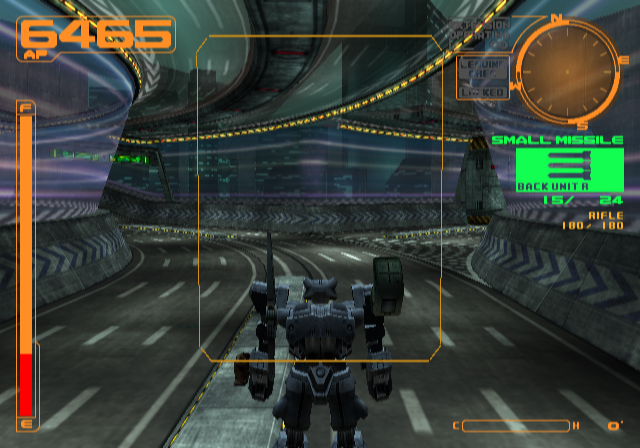
 Helium-4
on 21 Apr 2018
Helium-4
on 21 Apr 2018
Enabling Trillinear or Trilinear (Ultra/Slow) - (the 2nd option is usually more accurate if the game takes advantage of it) will make mipmap behavior more accurate to nearly mirror that of SW mode.
MrCK1
on 21 Apr 2018
Failed to mention it but yeah Trilinear/Ultra has that same issue and pretty much the same output

Helium-4
on 21 Apr 2018
Oh sorry, I misread your issue. Does the texture alignment fix itself when you move closer/further from the texture? It sounds similar to this issue: https://github.com/PCSX2/pcsx2/issues/2124
MrCK1
on 21 Apr 2018
The texture s do shift to their correct look when I move around yeah, but unlike #2124 it's when I get farther that the look matches SW not when I get closer.
Sorry about that other message, it's from an account I kinda lost access to but is still logged in in one of my browser, it's a long story.
Helium-4
on 21 Apr 2018
Discovered another game that may be affected by hardware mipmap issues: BMX XXX.
I've only tested the PAL version, but some textures corrupt at certain distances, even with mipmap emulation set to full. Full or basic makes no difference, but turning mipmap emulation off causes corruption to happen more frequently and at greater distances from the player's camera position (the same result occurs in software mode by turning mipmaps off, hence why I believe it to be a mipmap related issue).
Software mode works perfectly.
I can provide screenshots and/or gs dump if required.
 Silanda
on 9 Sep 2018
Silanda
on 9 Sep 2018
I don't know if you've already dealt with this and I'm just using an obsolete build, but Spiderman 2 flat out doesn't work on HW mode. The textures look good and all, but the life bar appears behind buildings, and when textures don't work(ergo most of the time) they look all pixelated and change with the actual textures. Then it just crashes.
 Temflakes403
on 16 Sep 2018
Temflakes403
on 16 Sep 2018
I will try to run it on the latest development version as of now(v1.5.0-dev-2561-g8acc319a4) and see if it works.
Temflakes403
on 16 Sep 2018
775
And if it crashes, it really has nothing to do with this issue.
mirh
on 16 Sep 2018
OK, after some testing I have reached the conclusions:
Won't work on 3x*
*Leaves a black sreen, only audio and will slow down too.
Will slow down and stop running on 2x.
Will work on 4x but will eventually do the same as 2x.
Mipmapping won't do shit to solve it.
I know that if mipmapping doesn't do shit to solve this post is not the place, but might as well post it here to see if it even has something to do with mipmapping.
I believe the issue shouldn't be with my GPU, as it is a GeFORCE GTX 1050ti, but it works properly on SW mode, so I'M REALLY JUST FUCKING CONFUSED.
It is not really a problem to play, as I can and have just played on SW, but after seeing how smooth it looked on 4x, I really wanted to try and fix it.
All the testing was done with PCSX2 1.5.0 (v1.5.0-dev-2561-g8acc319a4) and the plugin used was Direct3D 11. Thank you for reading this.
Temflakes403
on 16 Sep 2018
Also, mirh, that post is what directed me here, but then you can add that to the pile of problems that isn't near solving yet.
Temflakes403
on 16 Sep 2018
Well, I think I'm just gonna post it there, but if anyone knows what is happening, please just say it.
Temflakes403
on 16 Sep 2018
This isn't a support thread.
lightningterror
on 16 Sep 2018
Just a note for myself, need to put Ape Escape 2 and Hulk to Full for auto mipmap.
lightningterror
on 5 May 2020
Related issues
 mcabel
·
4Comments
mcabel
·
4Comments
 alucryd
·
6Comments
mirh
·
6Comments
alucryd
·
6Comments
mirh
·
6Comments
 vgturtle127
·
4Comments
vgturtle127
·
4Comments
 Clarke2131
·
3Comments
Clarke2131
·
3Comments
Most helpful comment
Really.. Give that man some space. First priority is his family. After that he has to work for a living. After that he has to fulfill all desires and wishes he has. And exactly at the end after he took care about everything in his life he could take care of those who want to play R&C in higher than native or with weak hardware.